
How big is Fortnite? Before installing this game, you might need to know this information to check if your device has enough space to run it. Additionally, you'll need to know whether your device can run the game and how to free up space. This article will provide you with relevant information.
How big is Fortnite in 2026?
Quick answer:
- Fortnite download size PC: about 71.24 GB.
- Fortnite full installation size: up to 106.22 GB.
If you want to know how big Fortnite is across all platforms, you can take a look at the table below.
| Platform | Fortnite Size |
| PC (Core Components) | 71.24 GB |
| PC (Full Installation + High-Resolution Textures) | 106.22 GB |
| Xbox | 99 GB |
| Playstation | 72 GB |
| Nintendo Switch | 18.7 GB |
| Mobile Device | 3.3GB for iPhone / 7.5GB for Android |
How Many GB Is Fortnite?
Based on a real installation test conducted on April 17, 2026, the actual Fortnite size is as follows:
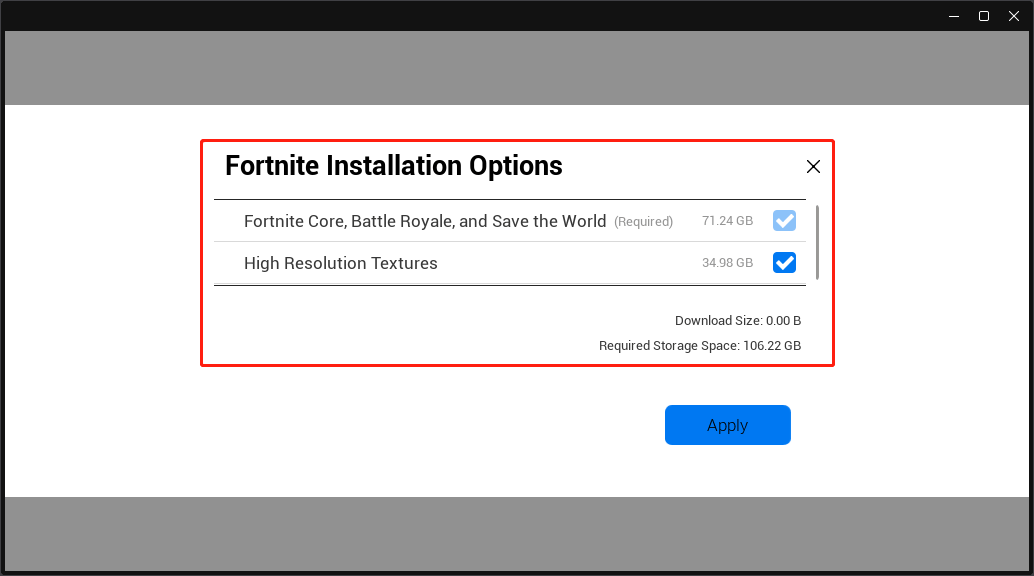
Fortnite installation used to allow you to remove Save The World around 10GB, DX12 Shaders 5GB, and disable cosmetic streaming around 30GB.
However, these options are all removed. These files are force required now. Therefore, the Fortnite installation becomes bigger and bigger.
In addition, Fortnite is constantly being updated. Each season may introduce new maps, new weapons and items, limited-time events, new character skins, etc. These updates add new files, causing the storage space occupied by Fortnite to gradually increase.
Undoubtedly, Fortnite will continue to grow. The answers regarding “how much space does Fortnite take up” naturally change over time as well.
Can My Computer Run Fortnite?
If your PC meets Fortnite system requirements, it can run the game. The minimum and recommended requirements are as follows.
| Hardware | Minimum System Requirements | Recommended System Requirements |
| GPU | Intel HD 4000 on PC; AMD Radeon Vega 8 | Nvidia GTX 960, AMD R9 280, or equivalent DX11 GPU |
| VRAM | N/A | 2GB |
| CPU | Core i3-3225 3.3 GHz | Core i5-7300U 3.5 GHz, AMD Ryzen 3 3300U, or equivalent |
| RAM | 8GB | 16GB or higher |
| Hard Drive | N/A | NVMe Solid State Drive |
| OS | Windows 10, Version 22H2 (64-bit) or Windows 10 Enterprise, Version 21H2 (64-bit) | Windows 10/11 64-bit |
How to Free up Space if Fortnite Takes up Too Much Storage Space
Here are some methods to help you free up storage if the full game size is too large:
- For a quick disk cleanup: clear cache and remove components
- For a long-term solution: move the game to another drive or upgrade storage
Method 1: Remove Unnecessary Game Components
Fortnite includes multiple game modes and optional content. Removing unused components can reduce its size.
1. Open the Epic Games Launcher.
2. Go to Library and find Fortnite.
3. Right-click the game and select Options.
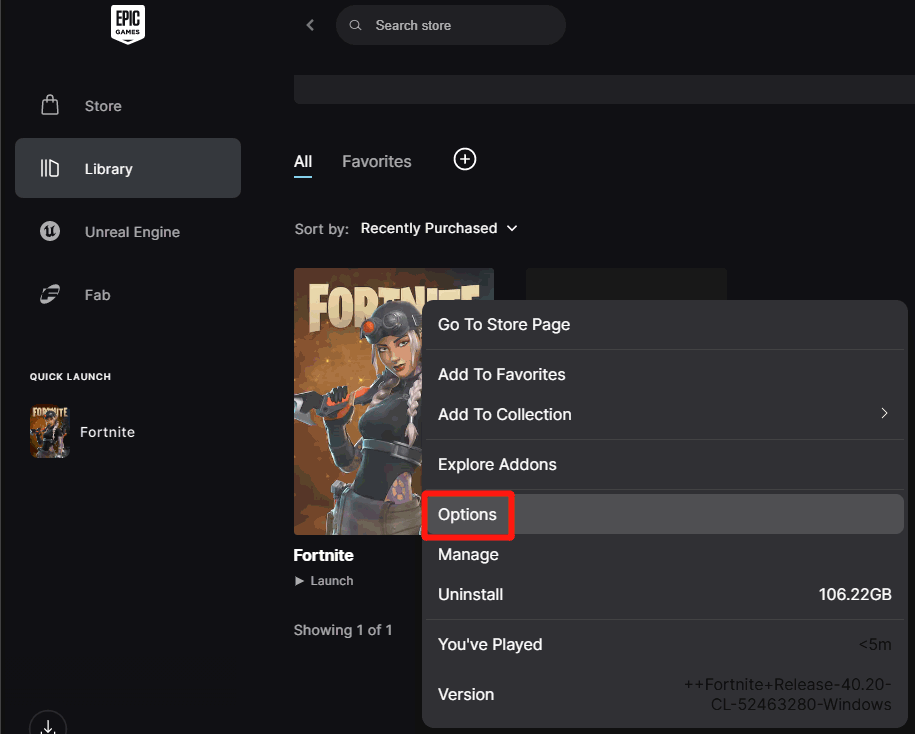
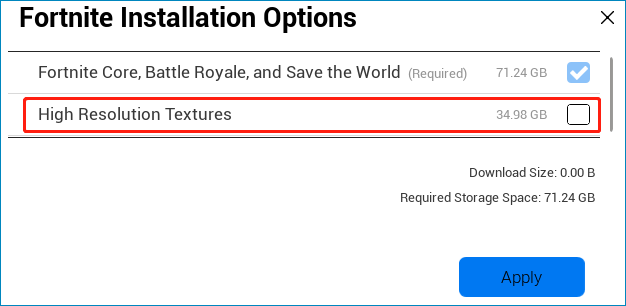
4. Uncheck the options you don’t need and click Apply. In my case, I want to remove High Resolution Textures. So I untick it. Removing it can save about 34.98 GB. Currently, Fortnite Core, Battle Royale, and Save the World are required for the game. Many players want to delete Save the World. Unfortunately, this is not allowed now.
Method 2: Clear Cache and Temporary Files
Cache files can accumulate over time and take up unnecessary space. Follow these steps to clear Fortnite cache on a PC:
1. Close the Epic Games Launcher.
2. Press Windows + R to open Run, then type %localappdata% and press Enter.
3. Find the FortniteGame folder and delete it.

This will remove the temporary assets and potential bloat.
Method 3: Delete Unused Files and Applications
Freeing up space on your system drive can also help:
- Remove unused programs from your PC.
- Delete large files you no longer need.
- Delete duplicate files you no longer need.
- Use disk cleanup tools to free up disk space on Windows.
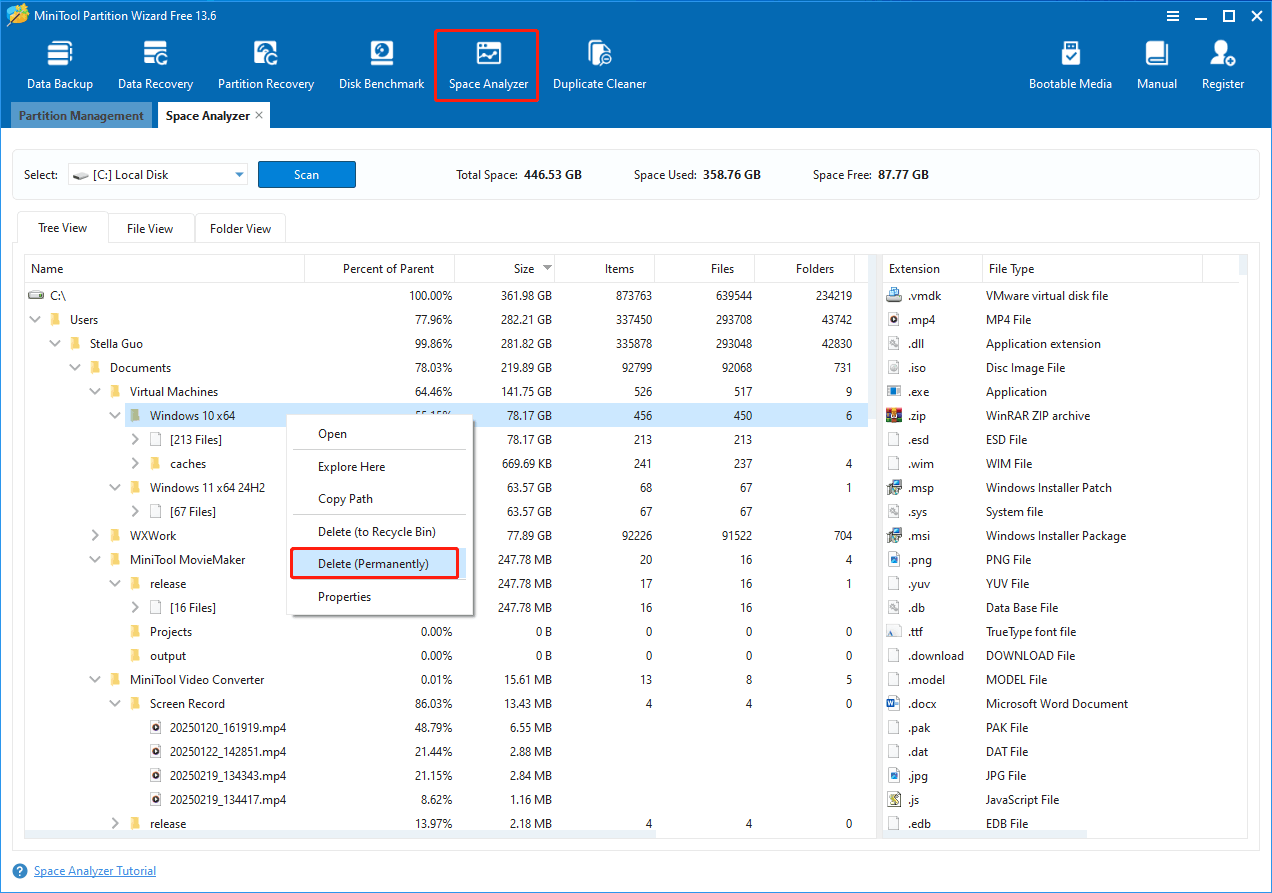
MiniTool Partition Wizard: a tool can remove large and duplicate files on Windows to release disk space.
If you are struggling with low disk space, using a professional tool like MiniTool Partition Wizard can help you quickly identify large files and remove duplicates.
MiniTool Partition Wizard FreeClick to Download100%Clean & Safe
With the Space Analyzer feature, find the large files and then delete them if you don’t need them.
With the Duplicate Cleaner feature, find and delete unnecessary duplicate files, thereby freeing up more disk space.
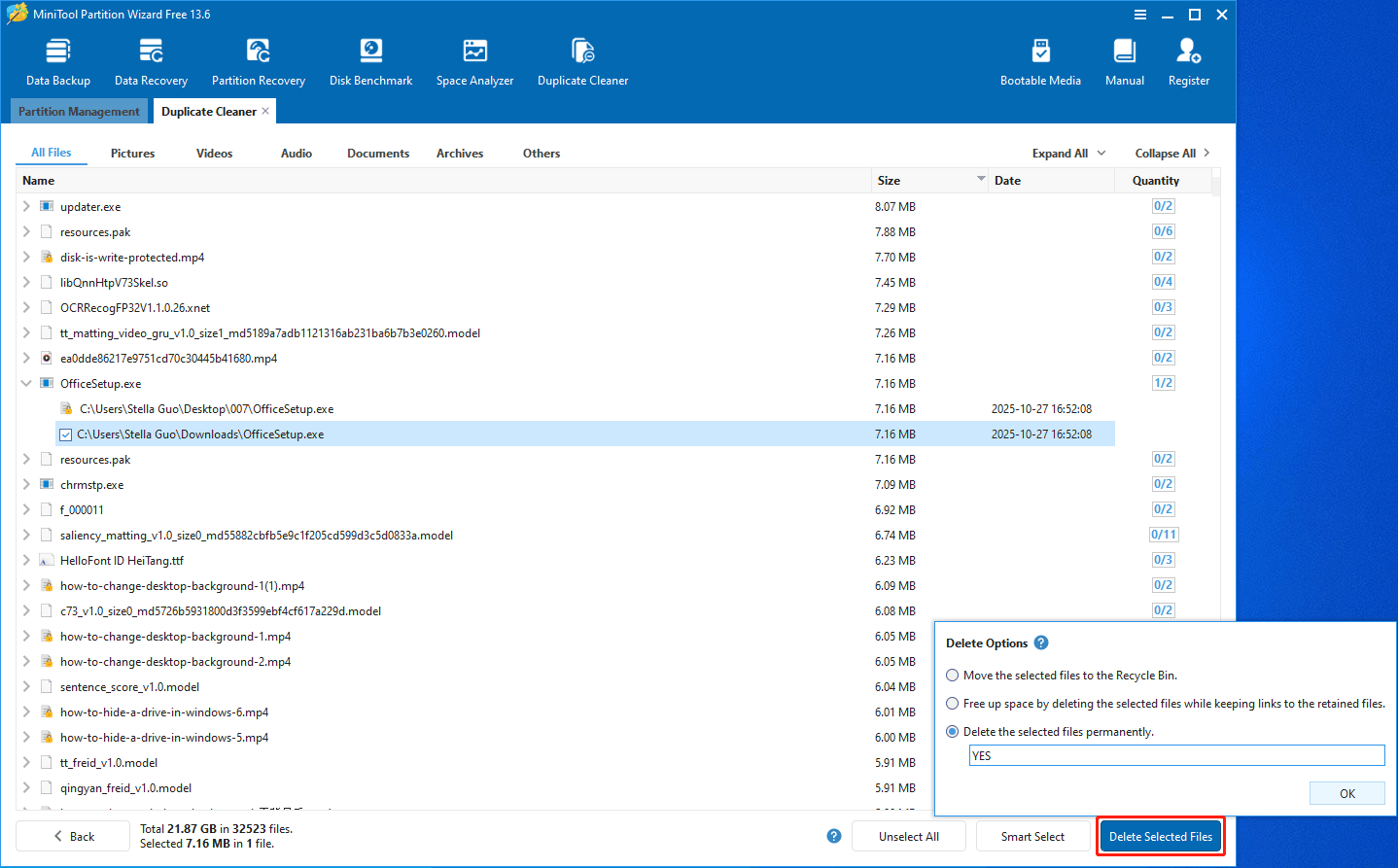
Method 4: Move Fortnite to Another Drive (Most Effective)
If your C drive is running out of space, simply deleting files may not be enough. Reinstalling Fortnite on another drive is also time-consuming and inconvenient. A more efficient solution is to move the game to another drive or extend the current partition without affecting existing data.
In this case, a professional disk management tool such as MiniTool Partition Wizard can help you handle the process smoothly and without data loss. It allows you to:
- Move installed games to another drive without reinstalling.
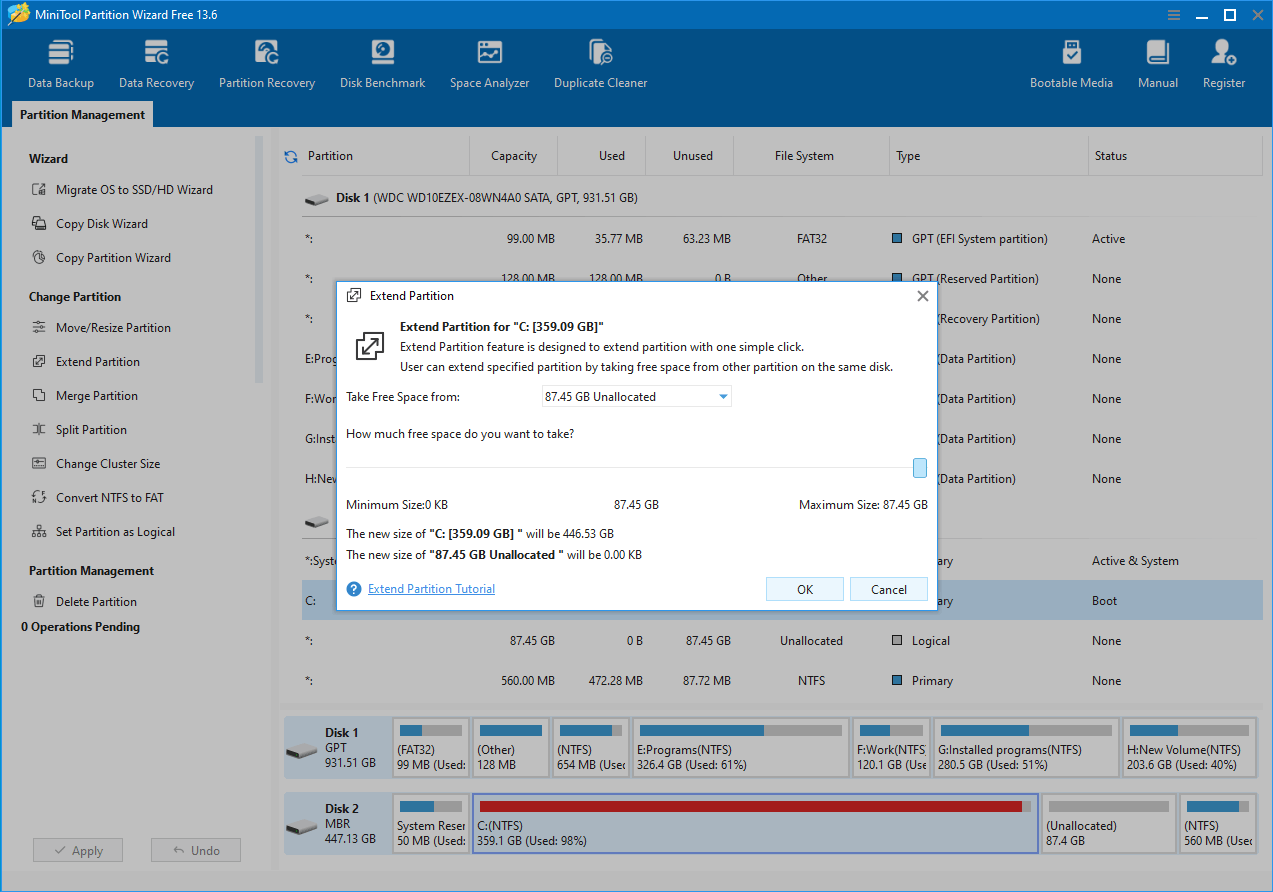
- Extend partitions even when free space is limited.
- Manage disk space safely and efficiently without risking your data.
MiniTool Partition Wizard FreeClick to Download100%Clean & Safe
The Copy Disk feature allows you to move the entire disk data from the current disk to another larger one.
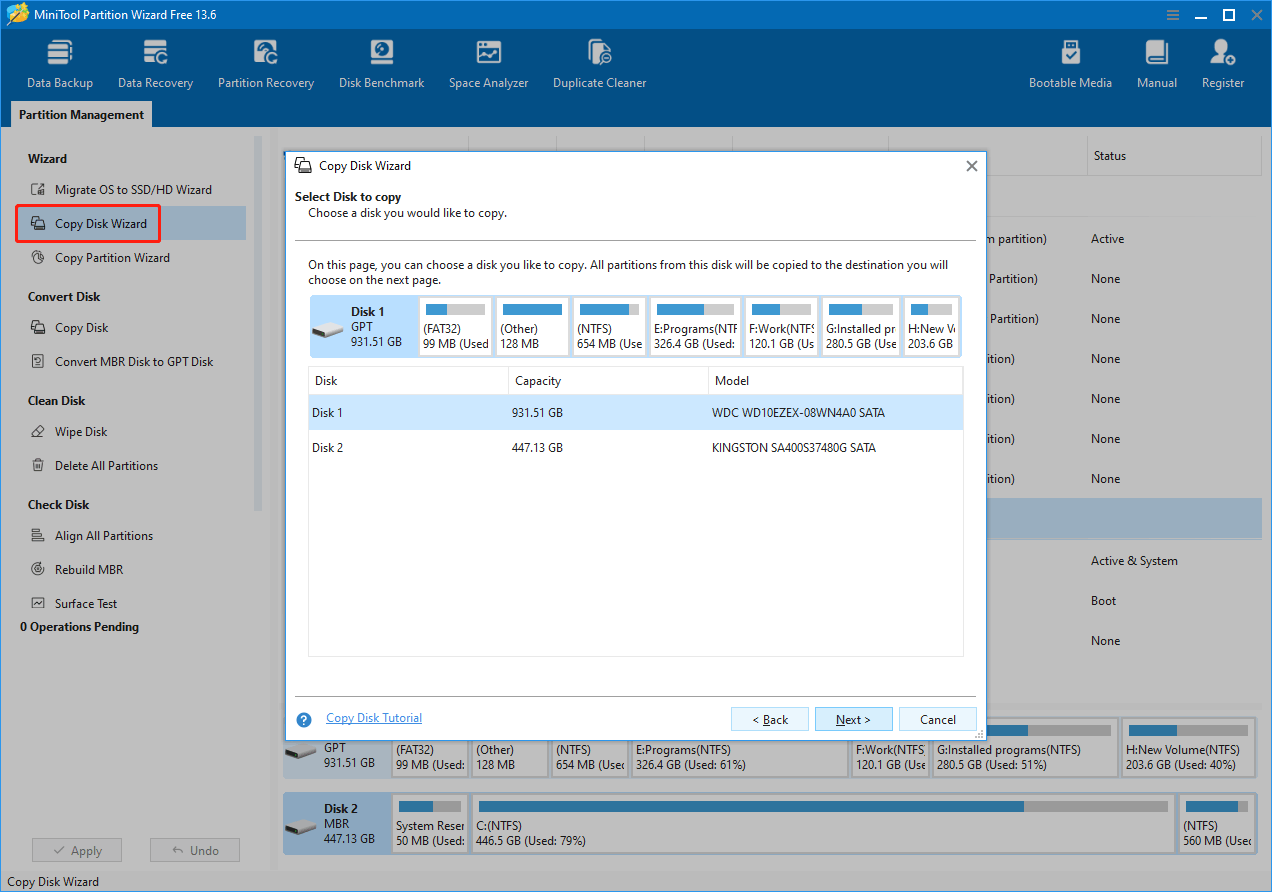
The Extend Partition feature helps extend the C drive partition by adding available or unallocated space from the same disk.
How Big Is Fortnite FAQ
Bottom Line
How many gigabytes is Fortnite? Now, you should know the answer.
Fortnite is about 72 GB to download on PC, but the full installation size can reach 107 GB or more, depending on the selected components and updates.
In 2026, most players will find that Fortnite takes up significantly more space than the official download size due to high-resolution textures, additional game modes, and continuous seasonal updates. To run the game smoothly, it is recommended to keep at least 150 GB of free disk space available.
If storage space is limited, consider removing optional components, clearing cache files, or moving Fortnite to another larger drive to free up space without affecting your existing data.
By understanding how big Fortnite is and why its size keeps increasing, you can better manage your storage and avoid unexpected disk space issues.
About The Author

Position: Columnist
Linda has been an editor at MiniTool for seven years. She continuously learns about computers and puts her knowledge into practice. Moreover, she is particularly knowledgeable in disk management, data recovery, system installation, and PDF editing. Her articles typically reference multiple examples or are based on her own experience, providing users with the most suitable solutions.
User Comments :