
How do you usually extend Windows 7 system partition? To ensure that the system partition extending is flexible and safe, it is better for our users to get help from professional disk partition manager. And, this post of MiniTool tells you what to do.
Most computer users, I believe, are not likely to perform operations on system partition, because system partition stores boot files of the operating system. Once these important files are damaged by inappropriate operations, the OS may get corrupt and even leading to serious data loss, which I believe is a situation that nobody wants to encounter.
However, we have to resize system partition sometimes, such as to cope with low disk space issue, or to shrink system partition size as it is taking too much disk space. Today what I am going to talk about is how to extend Windows 7 system partition, to help users who are unable to increase C drive in Windows 7 using Disk Management.
Extend C Drive Windows 7 Greyed out
Users who are familiar with Windows built-in Disk Management tool know that Disk Management enables them to resize partition since Windows 7, and the corresponding features are Extend Volume and Shrink Volume.
To access Disk Management, we should follow these steps:
- Right-click My Computer -> press Management -> press Disk Management.
- OR press Win + R keys -> input diskmgmt.msc -> click OK or hit Enter key.
Then we can right-click on a partition and the new features will appear. (image attached)
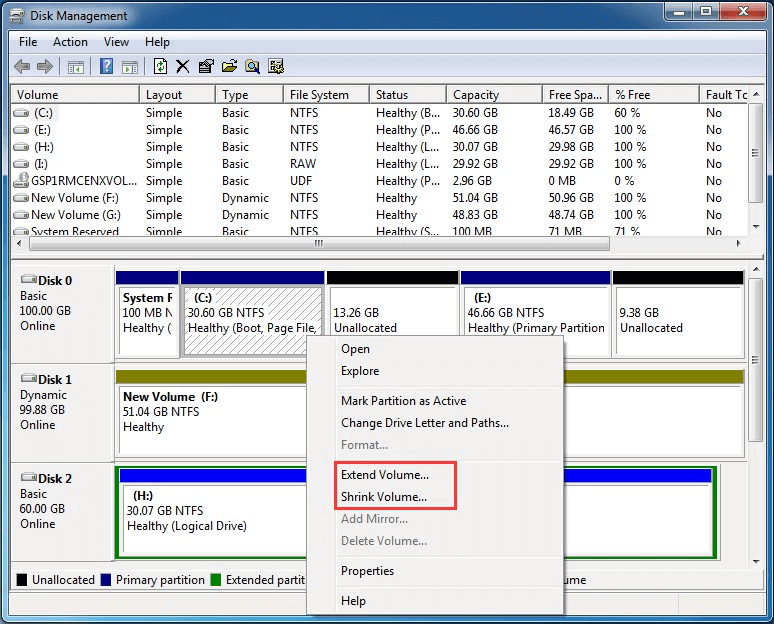
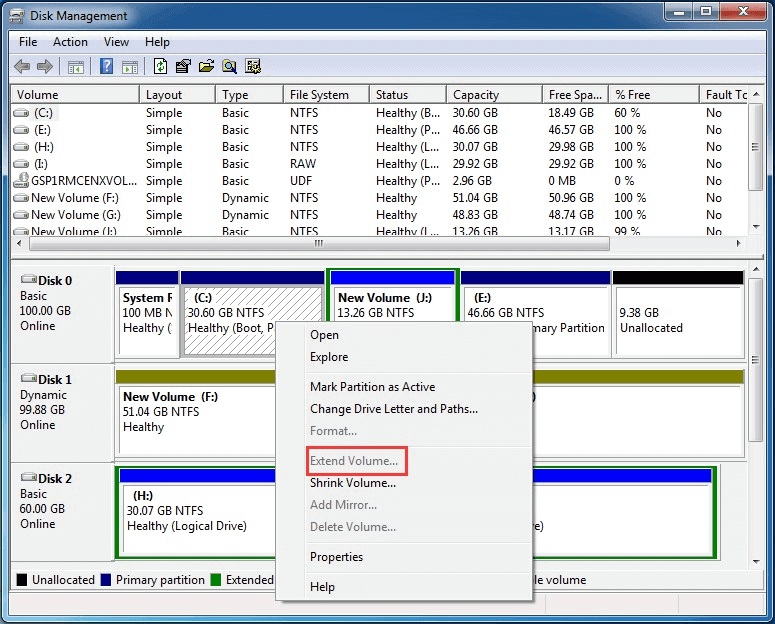
The above picture shows that extend Windows 7 system partition is possible by using this Disk Management tool. In this case, we just follow the prompt and extend C drive in Windows 7. But most of the time we may find Extend Volume is greyed out as showing below.
The reason?
Well, in one of the following situations, Extend Volume will grey out:
- There is no unallocated space following the target primary partition.
- There is no free space following the target logical partition.
- The target partition is not in RAW or NTFS file system.
If no unallocated space are available to use, I think users will have to delete a primary partition that immediately follows the system partition to increase C drive in Windows 7. And data backup should be given priority.
Well then, is there a way to extend system partition in Windows 7 without affecting data? Actually, we can seek for better solutions. For example, the third party partition magic is a good choice. As system partition requires extremely high demands for security, I recommend MiniTool Partition Wizard – professional partition magic with excellent data protection.
Partition Wizard Is the Best Choice to Extend Windows 7 System Partition
MiniTool Partition Wizard can deal with all situations to extend Windows 7 system partition, no matter there is unallocated space following the system partition or not. Besides, any changes on system partition require reboot to ensure the data security. Next, I will show you how this free partition magic helps to increase C drive in Windows 7.
Before you do: It is also recommended to use the bootable media of MiniTool Partition Wizard to perform any system-related operations in case of any accident that may lead to boot failure. To create a bootable media, get Partition Wizard Pro first.
Situation 1: there is unallocated space following Windows 7 system partition
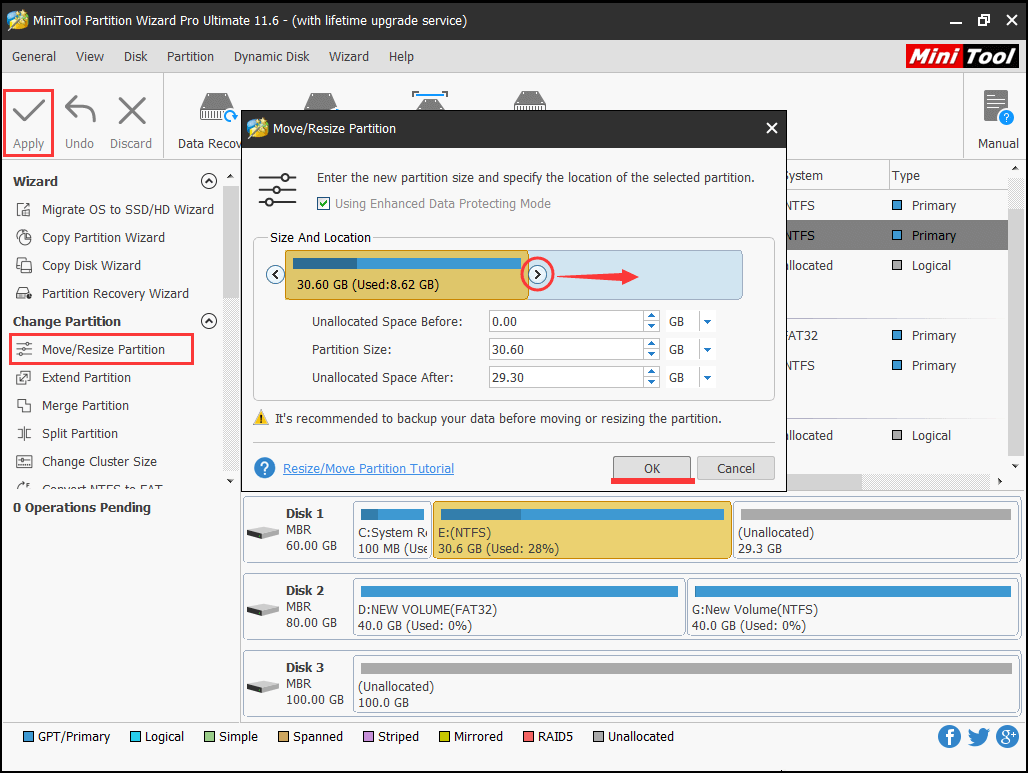
Step 1: Click on the C drive and select “Move/Resize Partition” from the operations menu.
Step 2: Drag the triangle rightwards to occupy the unallocated space (13.3 GB in my case) in the new window. Then click “OK” button to go back to the main interface.
Step 3: You can preview the change on C drive. Then press “Apply” to extend Windows 7 system partition.
Hot Article: read and learn how to resize Windows 8 boot partition.
Situation 2: there is no unallocated space or the unallocated space is not following the C drive
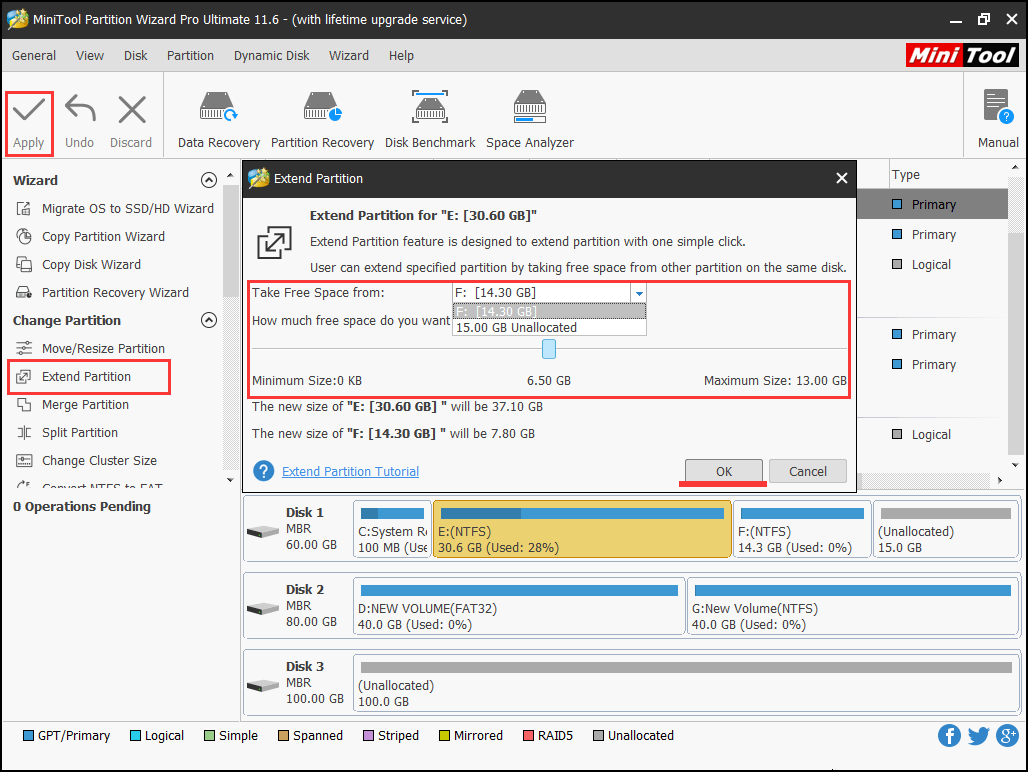
Step 1: Click on the C drive and select “Extend Partition” from the operations menu.
Step 2: Drop down the box to select which partition or unallocated space to take some free space from. Then drag the slider leftwards or rightwards to determine how much free space you want. After these operations, click “OK” to return to the main interface.
Step 3: Press “Apply” to extend C drive Windows 7.
What’s Your Opinion?
From the above demonstration, we can see MiniTool Partition Wizard Free Edition, the powerful and professional partition magic, can help us create conditions to extend Windows 7 system partition and then finish C drive extending flexibly and safely. If you want to extend Windows 7 system partition and find Extend Volume in Disk Management is greyed out, you can download this partition magic and try it.
Extend Windows 7 System Partition FAQ
- Create a bootable media using MiniTool Partition Wizard Pro.
- Boot your computer using the bootable media.
- When get the main interface, follow this guide to extend C drive Windows 7.
- Remove the bootable media and boot Windows 7.
About The Author

Position: Columnist
Rodin is an enthusiastic IT writer focusing on Windows trends, disk partition management and data recovery. She loves to write and share her idea about the useful tips and tricks on personal computers' maintenance. If you are looking for methods to improve your computer performance, manage hard drives and recover data from different devices, Rodin can provide reliable solutions for data management.
User Comments :