
How Do I increase Windows Server 2003 partition size easily? If you are troubled by this issue, read this short article and you will certainly find the best way to extend partition server 2003.
Any Ideas on How to Extend Volume Server 2003?
If I say: “Although Windows Server 2003 has being a popular operating system for many years, many users still get stuck when encountering the situation of low disk space warning, which brings a lot of inconvenience, such as low running speed, data storage failure, etc…”
I think you will agree with me.
But do you know how to extend partition in Windows Server 2003?
Well, it turns out that some users may delete part of original data to release some space; some even transfer their data to another location by using copy & paste. However, these methods are unadvisable if you have to deal with large amount of important data in Windows server 2003.
Actually, the most effective way is to extend partition server 2003 by using professional partition manager. But do you have a good idea which server partition manager is better? Today I’m going to introduce two ways for Windows Server 2003 to extend partition size easily.
Way 1: Diskpart Helps to Extend Volume Server 2003 Free
Diskpart in Windows is a command line tool used to replace FDISK, helping users deal with many partition management issues. Using Diskpart to extend partition in Windows Server 2003 is an easily obtained method for server users who are familiar with computer commands.
Step-by-step guide on resizing partition server 2003 is shown below.
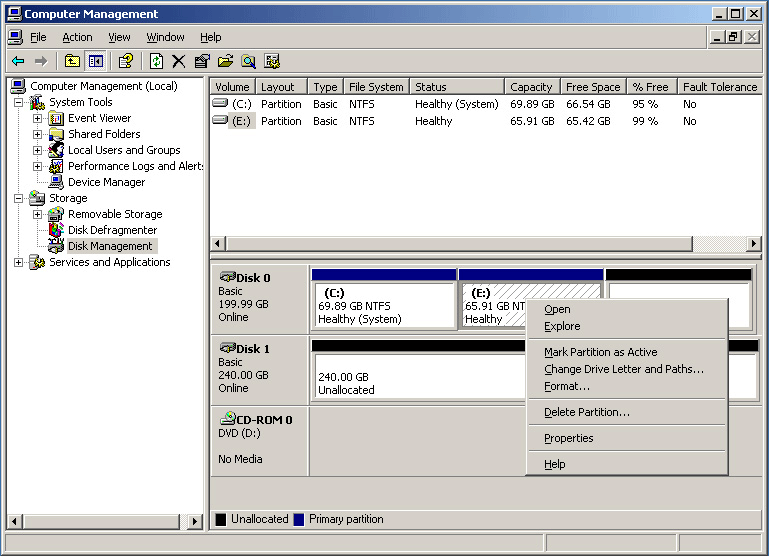
Step 1: Use Windows Disk Management tool to check whether there is an unallocated space next to the partition that is to be extended (take partition E: for example), as the following picture shows.
If there is, you can continue with Step 2. If there isn’t, you will have to delete the volume that is following the server partition to be extended, to make that area unallocated.
Step 2: Then you can extend partition server 2003 by using “diskpart” command, because Disk Management does not offer the feature Extend Volume in Windows Server 2003.
Here is the deal:
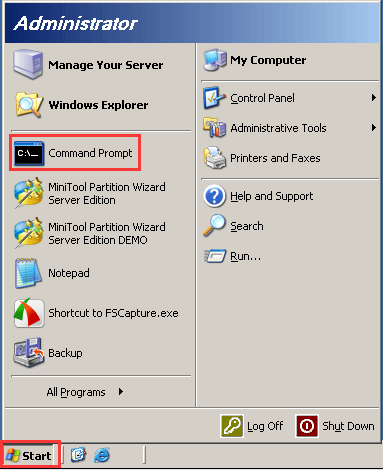
Step 1: Click “Start” > “Command Prompt” to get the command prompt window.
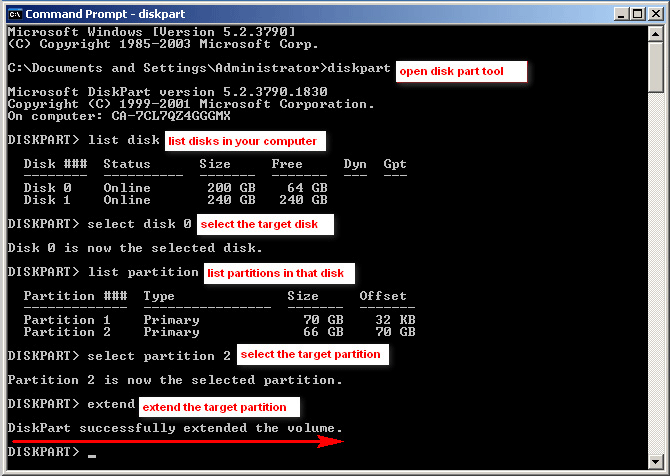
Step 2: Type: “diskpart” > “list disk”> “select disk n (n refers to the disk number)” > “list partition” > “select partition n”> “extend”.
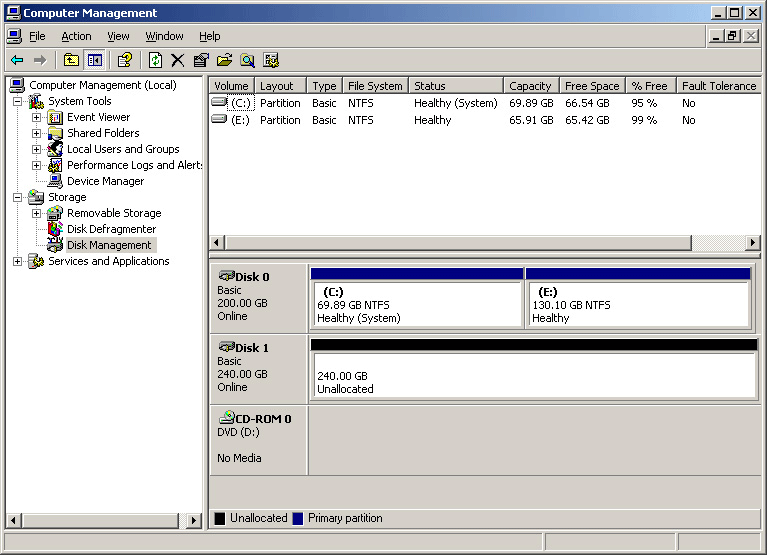
Step 3: After all operations, refresh the Disk Management to check the new disk layout. Look! The target partition has been extended successfully, just as shown below (partition E:).
But there is a catch, using “diskpart” command to extend partition in Server 2003 is not an ideal method due to the following disadvantages:
- This method has a high demand for computer command knowledge, and is rather multifarious for fresh computer users.
- When a command code is entered, the operation is executed without any warning message, which means any carelessness may result in serious consequences.
- This way can only be achieved on the premise that there is an unallocated space on the neighboring right side of the target partition, bringing great limitation to Windows Server 2003 users.
Therefore, if users who are unfamiliar with computer command line want to extend volume Windows Server 2003, it is suggested to use the professional server partition manager – MiniTool Partition Wizard Server, which is more flexible in extending volume server 2003.
Way 2: Extend Partition Server 2003 with 5 Star Partition Manager
Compared with Diskpart, MiniTool Partition Wizard’s graphic operating interface simplifies the operations, and makes it possible for users who have no idea of computer commands to increase partition in Windows Server 2003/2008/2012 all editions.
You can go to the download center to download and install the Demo Version of MiniTool Partition Wizard Server to your computer for a free trail. Please note that the Demo Version differs from the official version only in executing all your operations finally.
MiniTool Partition Wizard DemoClick to Download100%Clean & Safe
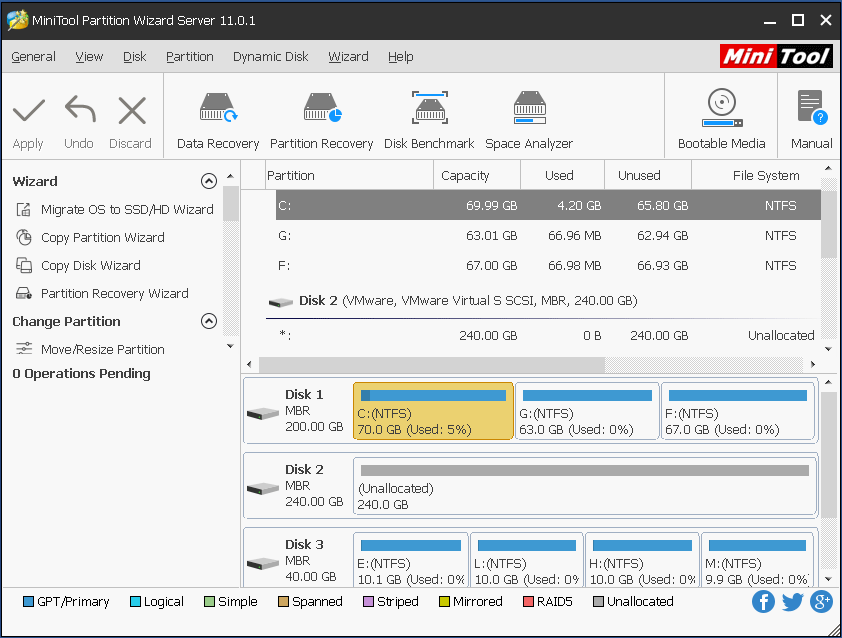
Launch the partition manager server and then you can see the main interface. In the middle panel, all your disks and partitions are listed there along with their specific information. By observation you see there is no unallocated space in the whole disk 1. In this case, if you want to extend C drive in Windows 2003, Diskpart helps nothing unless you delete partition E:.
However, you can totally rely on MiniTool Partition Wizard Server to extend volume on Windows Server 2003. Aiming at this situation, MiniTool Partition Wizard offers a useful feature called Extend Partition, which requires no unallocated space.
How can you actually use this?
Now read the tutorial below and learn to extend system partition in Windows 2003.
Step 1: Click partition C: and select “Extend”.
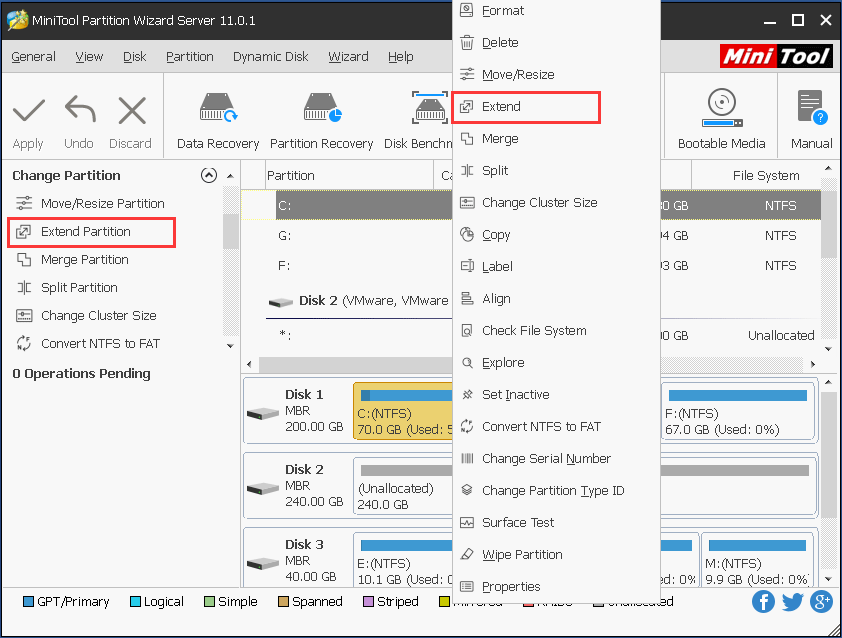
Step 2: In this interface, drop down the box to select a partition that you want to split some free space from. Still, you can drag the rectangle to decide how much free space you would like to take away so as to expand c drive of Windows 2003. Then click “OK” to return to the main interface.
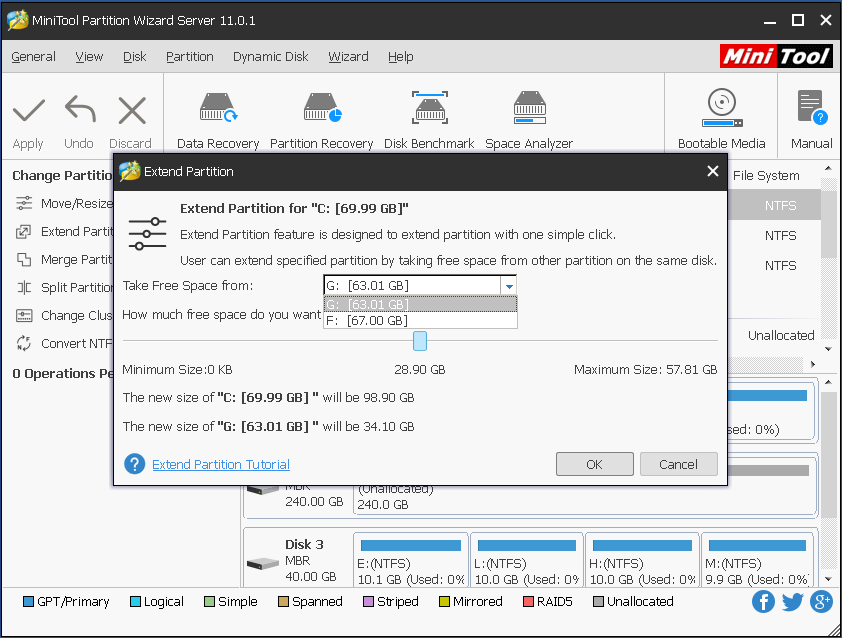
Step 3: In the main interface, you see partition C: has been extended from 69.9 GB to 99.7 GB. However, this is only a preview before your final decision. If you decide to do so, you need to click “Apply” to perform all previous operations and then increasing partition size for Windows Server 2003 is done. If not, you can click “Undo” to back to the last step or click “Discard” to back to the initial state.
Apart from Extend Partition feature, Move/Resize Partition function is another way that cab achieve Windows server 2003 extend partition. Please watch this video to get more information.
Nevertheless, if none of the partitions on the same drive has free space to offer, you may consider hard drive upgrading to complete Windows 2003 extend system partition.
Try the Ways out
If insufficient disk space occurs in your Windows Server 2003, both the above two methods can be used to extend Windows Server 2003 partition size.
But if you are unfamiliar with computer command, for the sake of data security, MiniTool Partition Wizard, which has higher security, is strongly recommended for Windows 2003 extend partition. Press the button below to try it out by yourself, it’s never too late to discover a surprising server partition manager.
MiniTool Partition Wizard DemoClick to Download100%Clean & Safe
About The Author

Position: Columnist
Rodin is an enthusiastic IT writer focusing on Windows trends, disk partition management and data recovery. She loves to write and share her idea about the useful tips and tricks on personal computers' maintenance. If you are looking for methods to improve your computer performance, manage hard drives and recover data from different devices, Rodin can provide reliable solutions for data management.
User Comments :