
Do you have a free software to resize partition so as to make the computer functions smoothly and enhance partition performance? This article provided by MiniTool Partition Wizard will show you how to resize partition Windows 10 with three best partition management freeware.
Resize Partition with Windows PowerShell Utility
Windows PowerShell, consisting of a command-line shell and associated scripting language, is a task automation and configuration management framework. It’s a free tool you that can be used to resize partition. You can shrink a partition to get unallocated space and extend small partitions with the space with it.
Here are the detailed steps to shrink a volume.
Step 1. Press Win + S to run Search utility. Then type power in the search box, right-click Windows PowerShell from the search results and select Run as administrator.
Step 2: In Windows PowerShell, input the following commands one by one and press Enter after each to execute them:
- Diskpart
- List volume
- Select volume * (replace * with the volume number of which you want to shrink)
- Shrink desired=# (# is the size you want to shrink in MB)
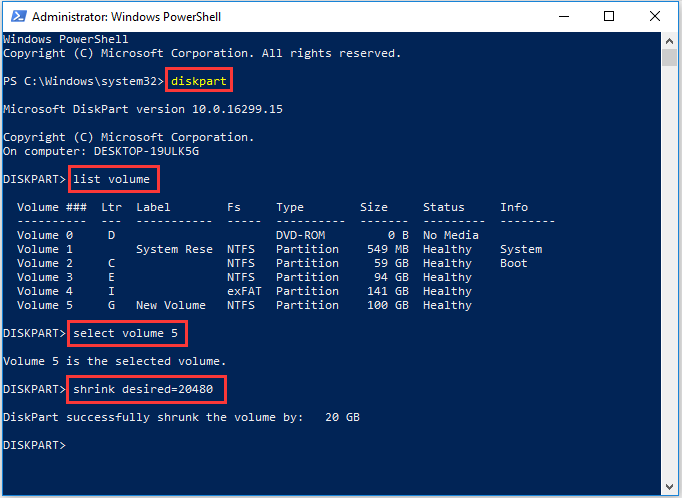
Once the partition is successfully shrunk, you can exit Windows PowerShell. If you’re not familiar with this tool or you don’t want to remember the command lines, you can try the next free utility.
Resize Partition with Disk Management Utility
Disk Management is a built-in tool in Windows 10 which can help make some simple partition managements like create, delete, and format partitions. It is able to help you resize partition Windows 10 though it still has some limitations.
To resize partition Windows 10 with Disk Management, you can follow the steps as below.
Step 1. Right-click the Windows Start menu and choose Disk Management.
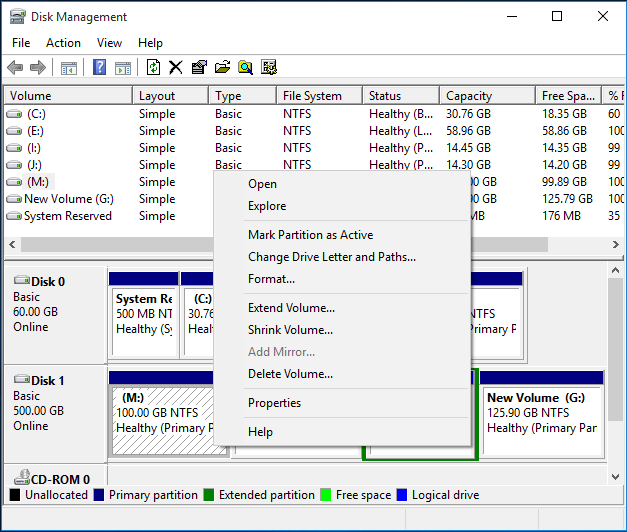
Step 2. Select the partition you want to resize and right-click, choose Extend Volume feature or Shrink Volume feature to resize the partition. For example, if you want to shrink volume Windows 10, you may choose Shrink Volume.
Step 3. Enter the amount of space that you want to shrink in MB. Then click Shrink.
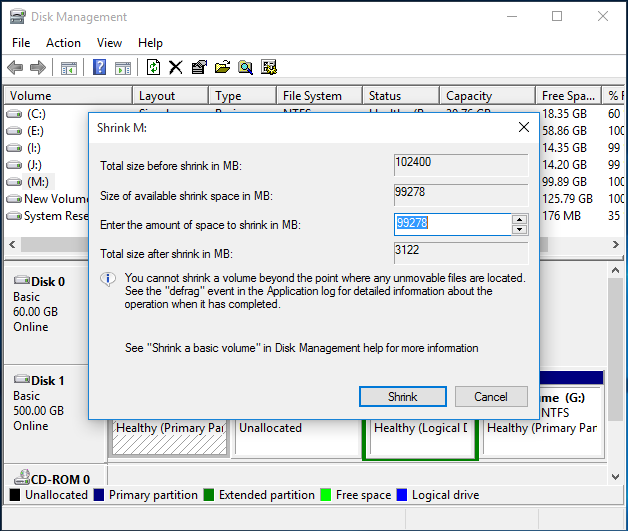
Note: To extend a partition, there must be contiguous unallocated space behind the partition that you want to extend. Besides, Disk Management is unable to resize a FAT 32 partition as the Extend Volume or Shrink Volume function only works to a RAW or NTFS partition, which could cause inconvenience.
So, Disk Management is not our best choice anyway, as it is not comprehensive enough for user to perform various disk management operations. Therefore, I would like to recommend a free partition manager – MiniTool Partition Wizard Free Edition – a powerful and absolutely free software to resize partition for home and individual users.
Resize Partition with a Free Partition Manager
Currently, there are various partition managers on market with distinctive functions, while among which, only a few are really useful.
MiniTool Partition Wizard Free Edition, developed by MiniTool Software Ltd., is a reputable and reliable partition manager trusted by tens of millions of people. With this powerful partition manager, many complicated operations can be completed, such as extend partition, convert NTFS to FAT, migrate OS to HD/SSD, convert MBR to GPT without data loss, copy disk and so on.
As it is such an excellent partition manager, many users use it to resize partitions and perform advanced operations to enhance partition performance. MiniTool Partition Wizard Free Edition is totally free, and it supports for Windows 10/8.1/8/7/Vista and Windows XP.
Now let’s see how to resize partition with the excellent partition manager.
Step 1. Download MiniTool Partition Wizard Free Edition by clicking the following button. Install it on your computer and launch it to get the main interface.
MiniTool Partition Wizard FreeClick to Download100%Clean & Safe
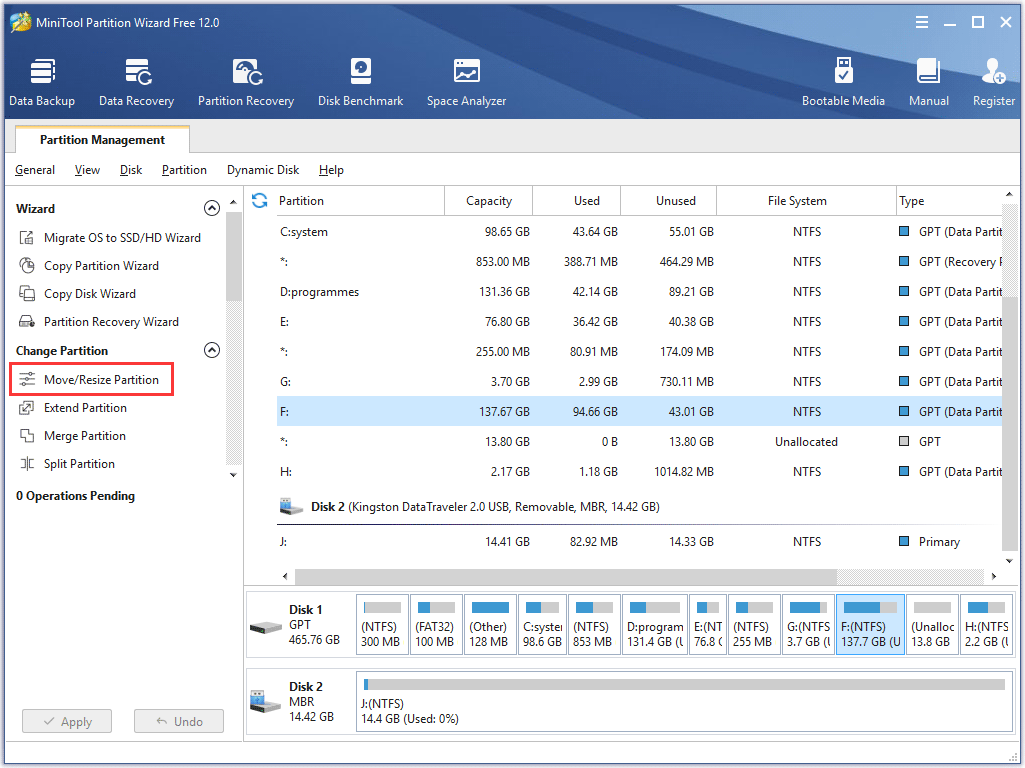
Step 2. Select the partition that you want to resize and click Move/Resize Partition from the left action panel.
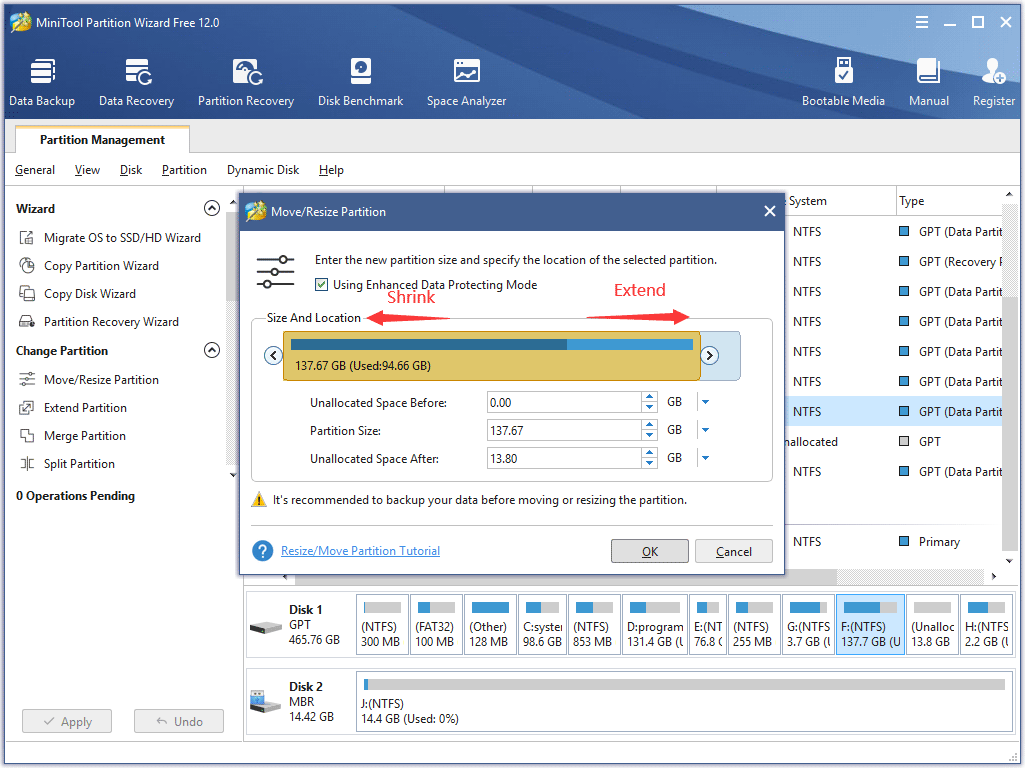
Step 3. The blue handle represents partition while the blank area means unallocated space. Do the followings and click OK to go back to the main interface. Alternatively, you can manually type specified partition size in MB, GB, or TB.
To extend a partition, lengthen the handle to occupy more unallocated space. To shrink a partition, shorten the handle by dragging the triangles.
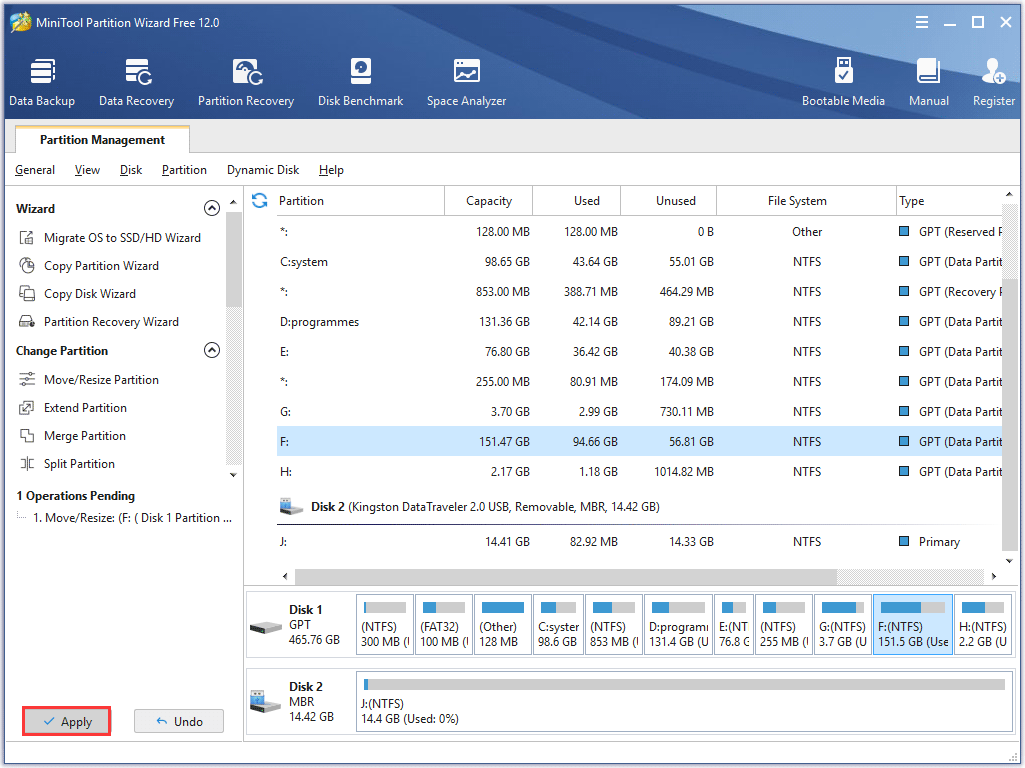
Step 4. Click Apply to allow the pending operation.
Further Reading: Resize Partition on MacOS and Ubuntu
Now you have known three ways to resize partition free on Windows. But what should you do if you’re using macOS or Ubuntu? They are different operating system platforms and the steps to resize partition are different. Let’s get more details in the following contents.
Resize Partition Mac
Similar to Windows, Mac also has a built-in tool for disk management. It is Disk Utility which can be used to resize volume/partition size.
Before you use this utility to make any changes, here are some rules you need to follow:
- If you want to extend a volume on Mac, you have to delete the volume that is directly after the target volume to get necessary space. Besides, the last volume on a disk is unable to be extended.
- Only disks with GUID Partition Map can be resized without data loss.
Without further ado, let’s see how to extend a volume with Disk Utility.
Step 1. In macOS, press Command + Space to open Spotlight search. Then type Disk Utility and press Enter to open Disk Utility.
Step 2. Select the hard drive which contains the volume you want to extend and click the Partition button on the toolbar. Then a pie chart will appear to display all the volumes on the hard drive.
Step 3: Select the volume after the target volume that you want to resize and click the Minus button (-) to delete it. Click Apply to execute the operating if you’re sure to do it.
Step 4: Select the target volume and drag the resize control or type the new size in the Size field to extend the target volume. Then click Apply.
Resize Partition Ubuntu
Whether you want to shrink or extend your Ubuntu partition, you can’t do it while it’s in use. You need an Ubuntu live CD or USB drive which contains GParted partition editor if you want to make any changes to your partitions.
But things could go easier if you’re using both Windows and Ubuntu on your computer. In this case, you can complete Ubuntu extend partition task under Windows operating system. For detailed steps, you can refer to our previous post: The Simplest Way to Resize Ubuntu Partition Under Windows.
Bottom Line
With MiniTool Partition Wizard Free Edition, you may extend or shrink a partition at ease. So, if you want to find an easy and convenient way to resize partition Windows 10, MiniTool Partition Wizard must be your best choice. In addition, you can also find some suggestions here if you want to resize partition on macOS or Ubuntu.
If you have any question about how to resize partition Windows 10, you can leave a message in the following comment zone and we will reply as soon as possible. If you need any help while using MiniTool software, you can contact us via [email protected].