
Do you know how to delete all partitions with ease? Is there any easy way to delete all partitions with ease in Windows 10/8/7? In fact, to delete all partitions, the professional partition magic – MiniTool Partition Wizard would be a great tool. And we will show you how to delete all partitions in the following paragraphs.
How to Delete All Partitions with Ease in Windows 10/8/7?
As is well known, the Disk Management of Windows is a tool to manage the disk and partitions. However, if you want to delete all partitions, the Disk Management is unable to complete that. Thus, is there any other way to delete all partitions?
Of course, the answer is positive. You can delete all partitions diskpart. And we will show you how to delete partition in this post with two ways.
Delete All Partitions by MiniTool Partition Wizard
As for partition delete, you can take advantage of a piece of the professional partition manager. Thus, MiniTool Partition Wizard is strongly recommended.
It is designed to optimize partition and disk use with its powerful features, such as extending partition, resizing partition without data loss, analyzing disk space, checking partition error, and so on.
So to delete all partitions, MiniTool Partition Wizard is also competent. And we will show you how to remove partition Windows 10 with MiniTool Partition Wizard.
MiniTool Partition Wizard FreeClick to Download100%Clean & Safe
After installing MiniTool Partition Wizard, it is time to delete all partitions.
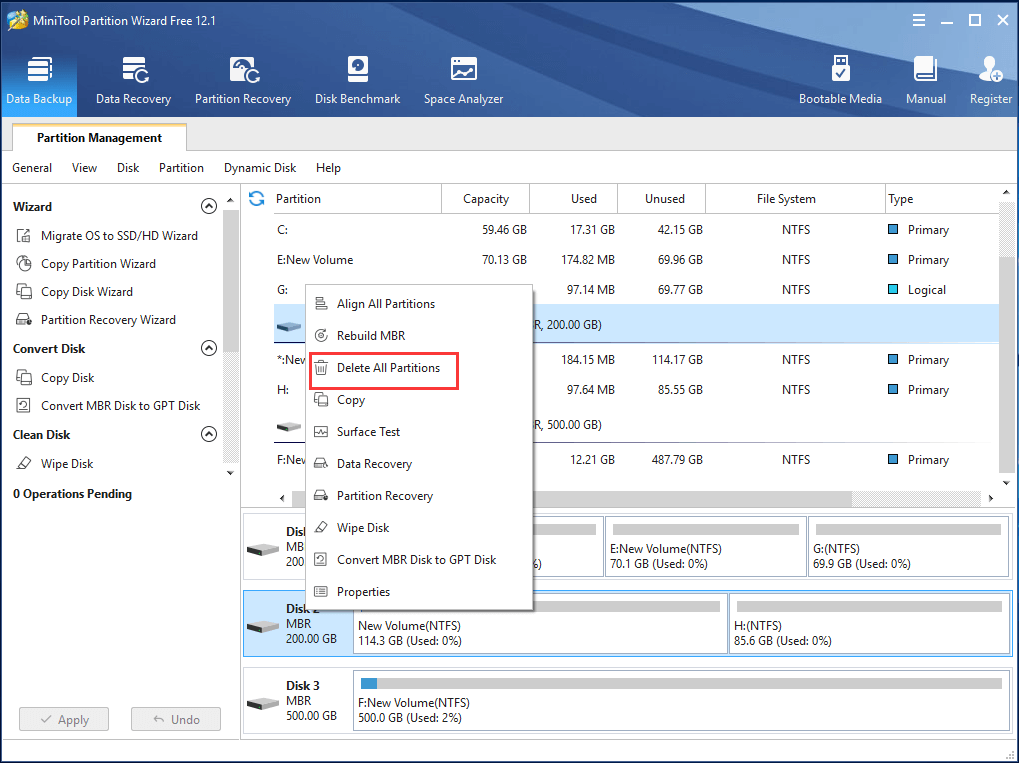
Step 1: Launch MiniTool Partition Wizard to enter its main interface. Select the disk which you want to delete all partitions and choose Delete All Partitions from the context menu to continue.
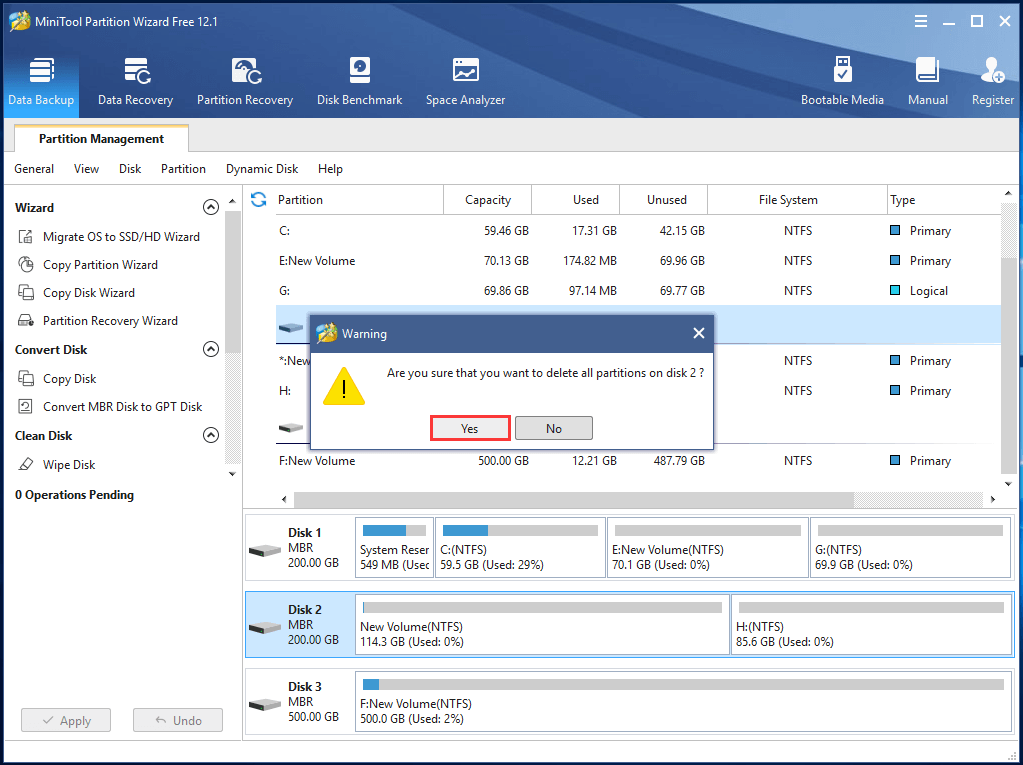
Step 2: Then you will receive a warning message which tells you all data on this disk will be destroyed and click Yes to continue.
Step 3: Then you can preview the changes and click Apply to confirm the change.
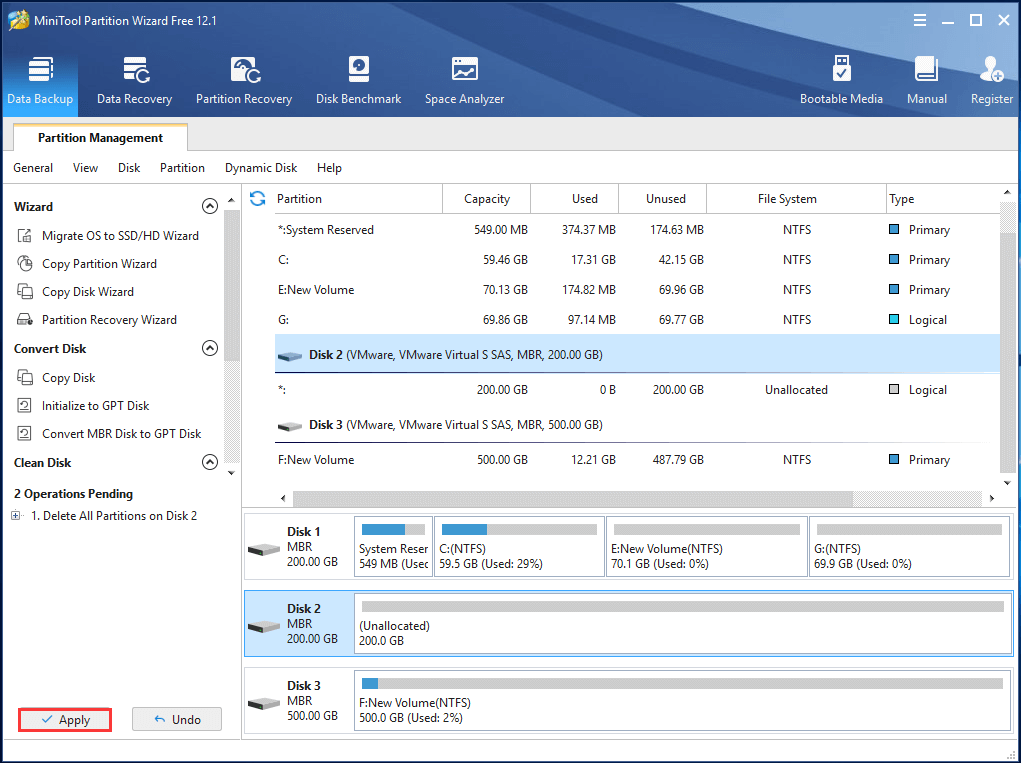
When all steps are finished, you can successfully delete all partitions. And you can see that it is very easy to delete all partition with MiniTool Partition Wizard since just three steps are required. So if you want to delete all partitions, try MiniTool Partition Wizard.
MiniTool Partition Wizard FreeClick to Download100%Clean & Safe
Besides deleting all partition, MiniTool Partition Wizard also has many other features, such as wiping a hard drive, resizing RAID partition without data loss, merging partition, etc.
Delete All Partitions by Diskpart
To delete all partitions, you can also use the diskpart tool and type the command to go on. And here, we will show you how to delete all partitions by diskpart step by step.
Step 1: Type command prompt in the search box of Windows and right-click the best-matched one to choose Run as administrator to continue.
Step 2: Input diskpart and hit Enter to continue.
Step 3: Type list disk and hit Enter to continue.
Step 4: Then, you can see all disks on your computer are listed here and you can choose the disk that you want to delete all partitions by inputting the command select disk 1. Here, the disk 1 is just an example.
Step 5: Then type the command clean and hit Enter to delete all partitions.
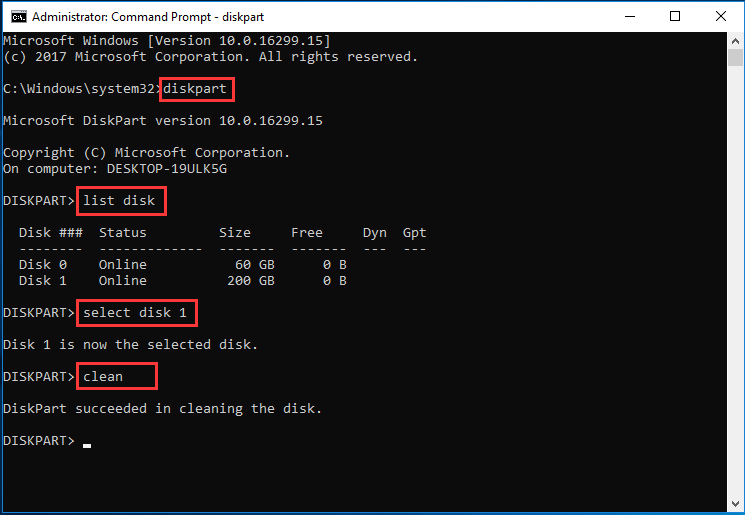
Now, you can see you have deleted all partitions through diskpart.
Related article: Clean on Wrong Disk? Undo Diskpart Clean Command Now!
Bottom Line
In conclusion, we have introduced how to delete all partitions with two ways in this post. In my opinion, MiniTool Partition Wizard is easier and more effective to delete all partitions.
And if you have any problem about MiniTool Partition Wizard, please contact us via the email [email protected].
Delete All Partitions Windows 10 FAQ
There are 3 different ways to delete partitions in Windows 10.
- Delete partitions via MiniTool Partition Wizard.
- Delete partitions via Disk Management.
- Delete partitions via Diskpart.
- Open Disk Management.
- Right-click the drive you want to unpartition.
- Select the Delete Volume… from the context menu.
- Then click Yes to execute the changes.
User Comments :