
Many users are familiar with FAT32 partition as both NTFS and FAT32 file systems are frequently used in Windows system. Along with the wide spread of FAT32, most computer users may encounter FAT32 partition loss or data loss, but how to recover FAT32 partition? In this article, I will offer you a perfect way to help you restore FAT32 partition.
Before NTFS file system, FAT32 file system was one of the most frequently-used file systems. Since its publishing in August, 1996, FAT32 has gradually replaced the earlier file systems of Windows. And many people create FAT32 partition to store files and data on their on their disk.
However, when FAT32 partition gets lost, people don’t know how to recover FAT32 partition, which is very annoying. But you don’t need to worry now, as this article will show you how to recover FAT32 partition with a professional partition recovery software.
Some people have zero knowledge of FAT file system and FAT32 file system, so before I show you how to undelete FAT32 partition, I will give you a brief introduction of FAT file systems as well as the pros and cons of FAT32 partition.
What Is FAT File System
FAT, released by Microsoft, is the abbreviation of File Allocation Table. It is also a file system adopted by all non-NT core Windows systems. Along with the development of computer, in order to satisfy different demands of users, FAT generates various editions such as FAT12, FAT16, FAT32, etc. FAT12 and FAT16 are earlier than FAT32 but later on, FAT32 replaced them for it has more advantages.
Advantages and Disadvantages of FAT32 Partition
Nowadays, NTFS is used by more and more people as it is a relatively better file system, but there are some users who are still using FAT32 due to its advantages.
Compared with NTFS file system, FAT32 is more compatible in operating system than NTFS file system. FAT32 is an older file system, and it is the most popular version of the FAT file system. Almost all operating systems support FAT32. And it is also compatible with some games consoles and bootable disk.
Besides, FAT32 is universally supported. For example, if you’d like to use the USB on older computers, or non-PC systems like TV sets, printers or projectors, you may choose FAT32.
However, FAT32 has disadvantages too. For example, FAT32 file system doesn’t provide the file security, compression, fault tolerance but NTFS does. And for FAT32 partition, the size of a single file can be no more than 4GB. The maximum partition size of FAT32 is 32GB in Windows. You cannot create a 2 TB FAT32 partition unless you use a third-party software.
See: What Is FAT32 Partition Size Limit and How to Break It?
Recover FAT32 Partition by Using MiniTool Partition Wizard
MiniTool Partition Wizard is a professional partition recovery software. With its intuitive interface, it is easy to operate and has comprehensive functions such as create partition, merge partition, resize partition, format partition, change cluster size, etc. MiniTool Partition Wizard almost supports all Windows operating systems, file systems and storage devices.
Besides, it is very simple to recover FAT32 partition by using MiniTool Partition Wizard. With just a few clicks, you can restore FAT32 partition very quickly.
Step 1. To restore FAT32 partition with MiniTool Partition Wizard Pro Edition, you may click the following button to download one at first. Then install it on your computer and launch it.
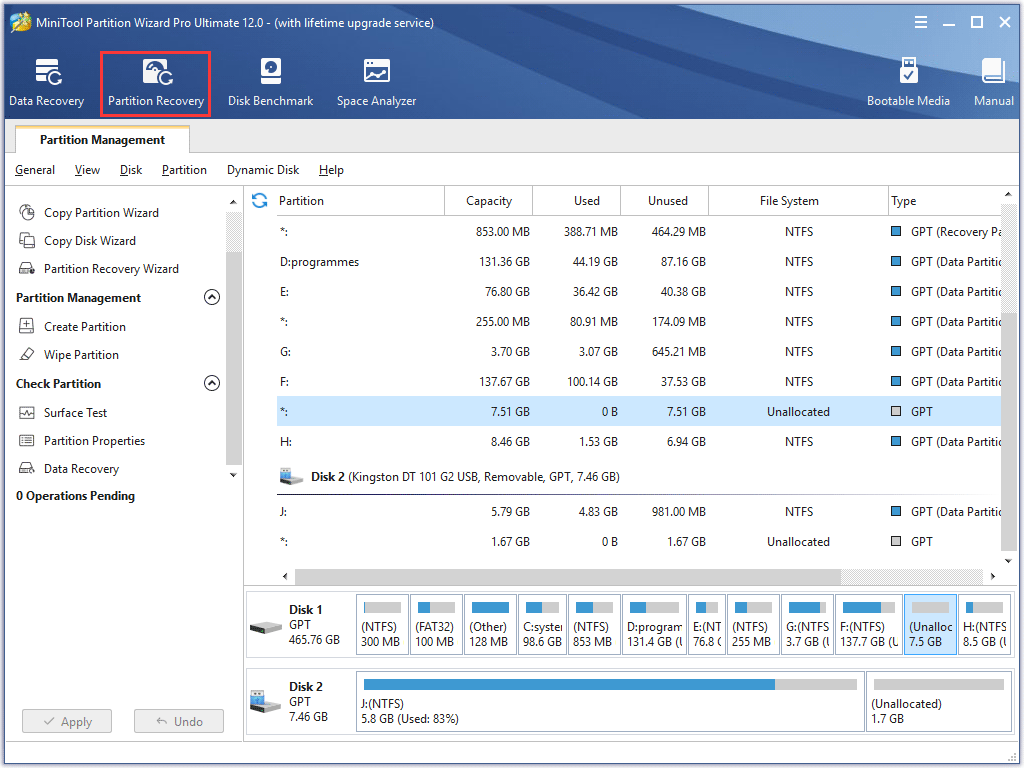
Step 2. When you get the main interface of MiniTool Partition Wizard, click the function Partition Recovery to undelete FAT32 partition.
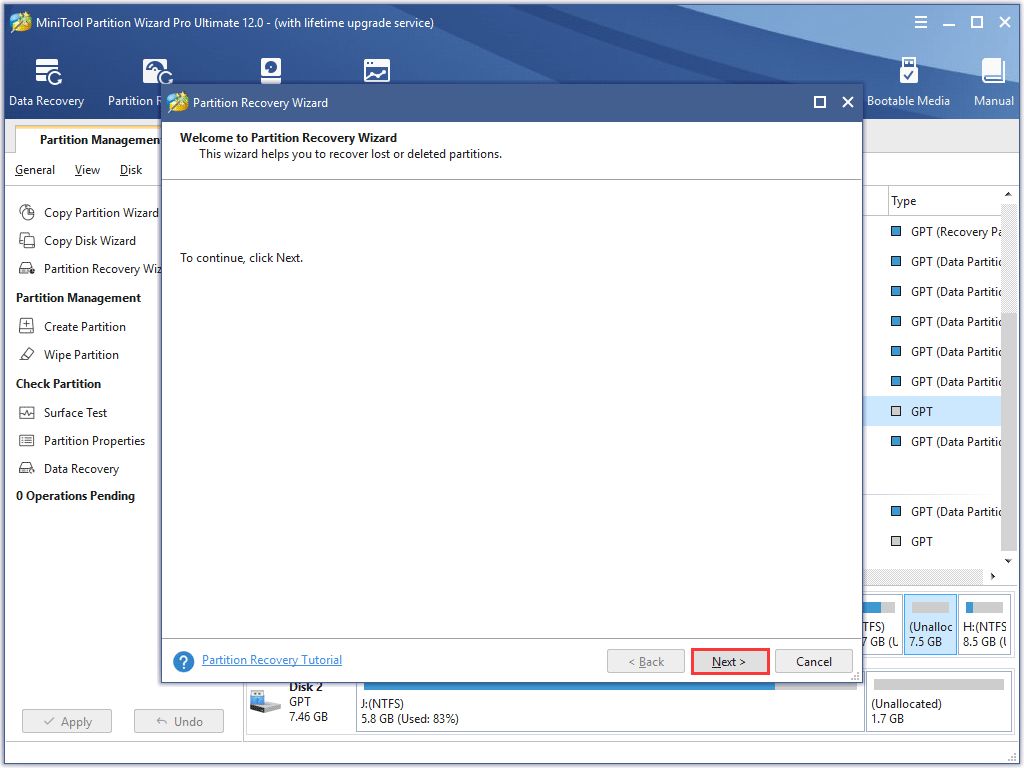
Step 3. This is the first interface of the function module Partition Recovery Wizard. Click Next to go on.
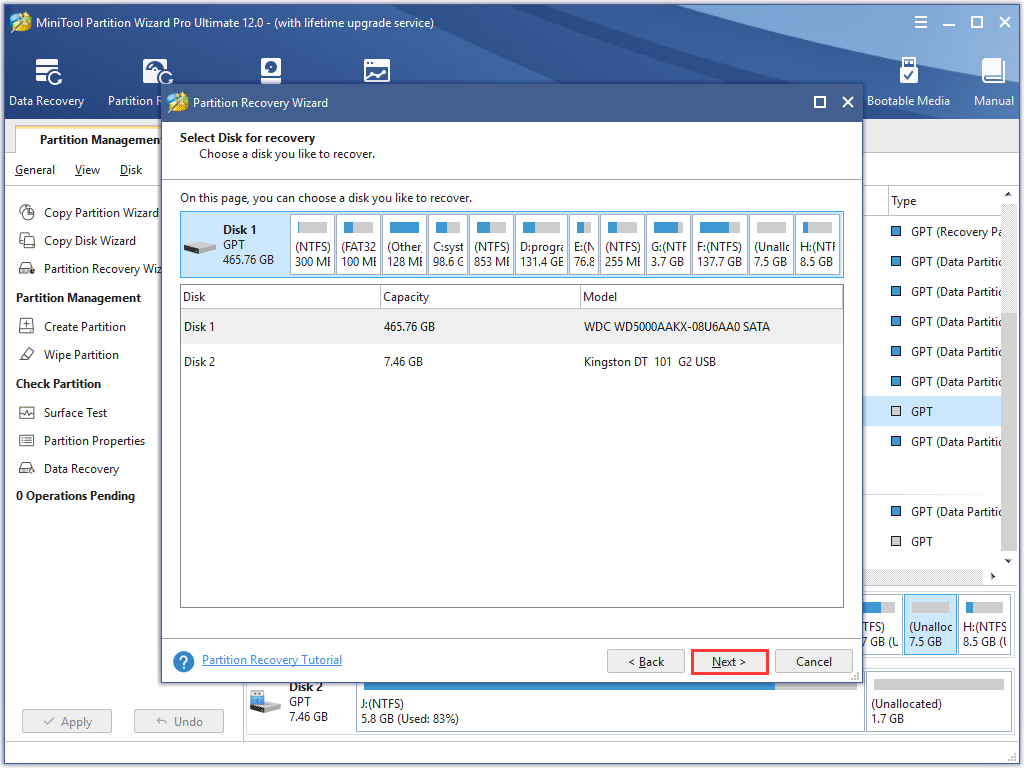
Step 4. Select the disk that contains the lost FAT32 partition and click Next.
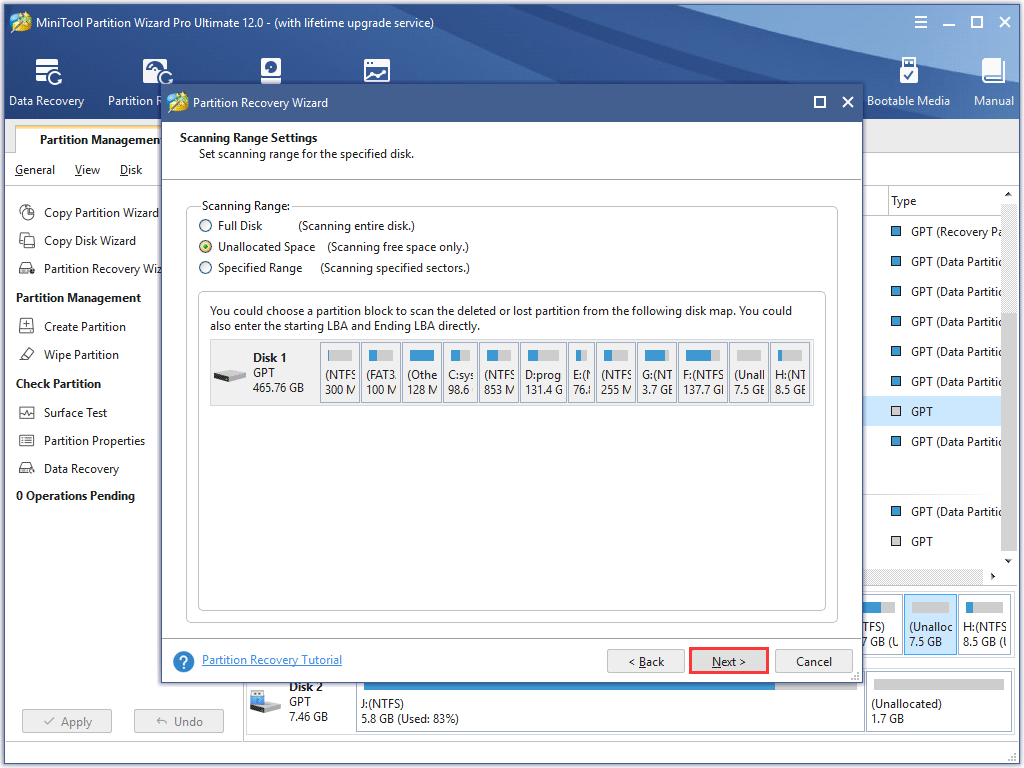
Step 5. In this interface, you can set the scanning range by choosing Full Disk, Unallocated Space or Specified Range. It must be noticed that if you choose Specified Range, we need to input specific value in the textboxes to define the location scanned. If the FAT32 partition that needs to be recovered is in the unallocated space, you can choose Unallocated space directly.
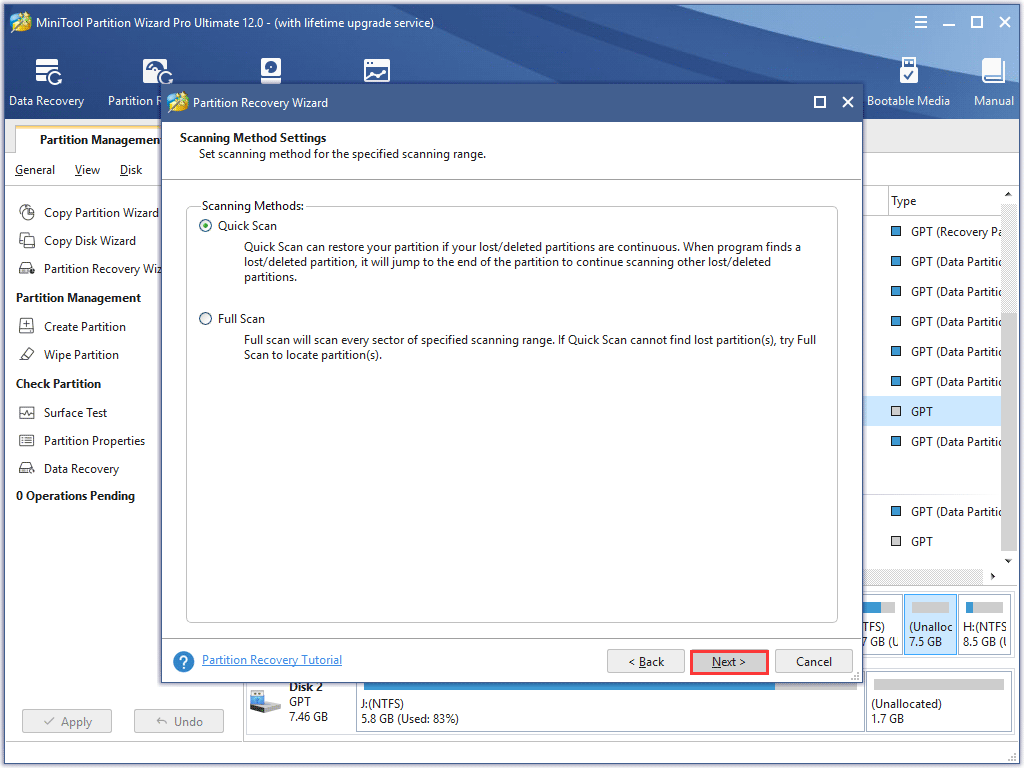
Step 6. In this interface, you can choose a scanning method by selecting Quick Scan or Full Scan. You can first select Quick Scan. Then Select Full Scan if Quick Scan gets nothing.
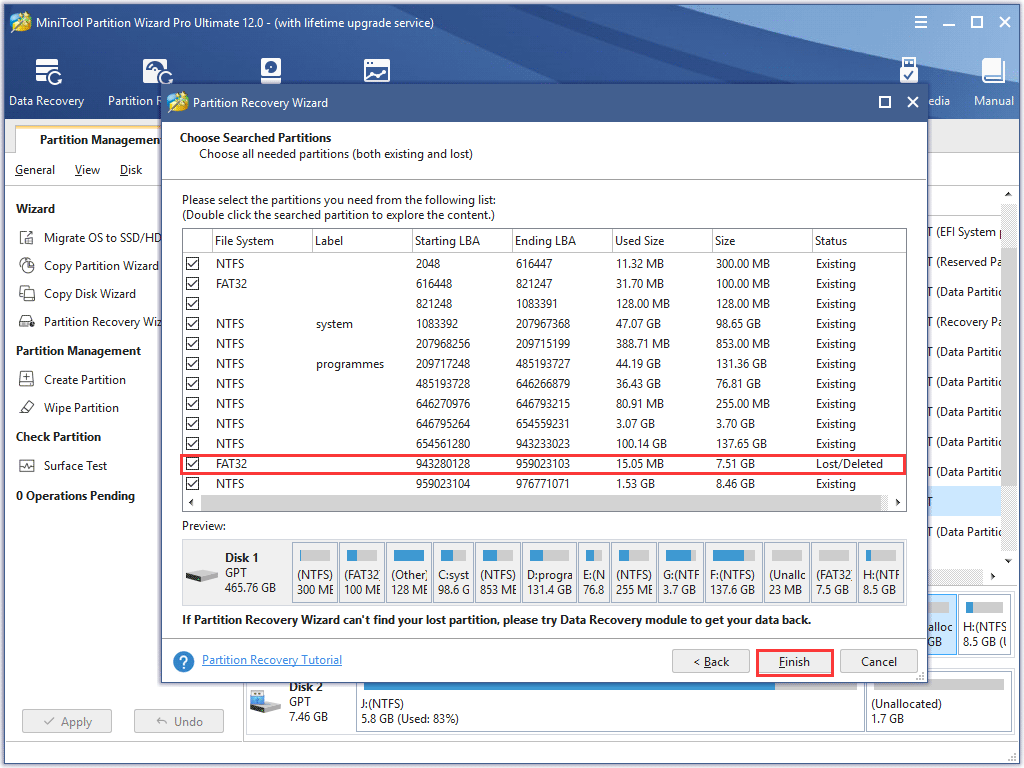
Step 7. In this interface, partition list displays information of all partitions. If the Status reveals Lost/Deleted, this partition is the lost partition scanned out. Select the partitions that you want to reserve and click Finish to restore FAT32 partition.
NOTE: When selecting needed partition, be sure you have selected all partitions you need; otherwise, the partition not selected will be lost.
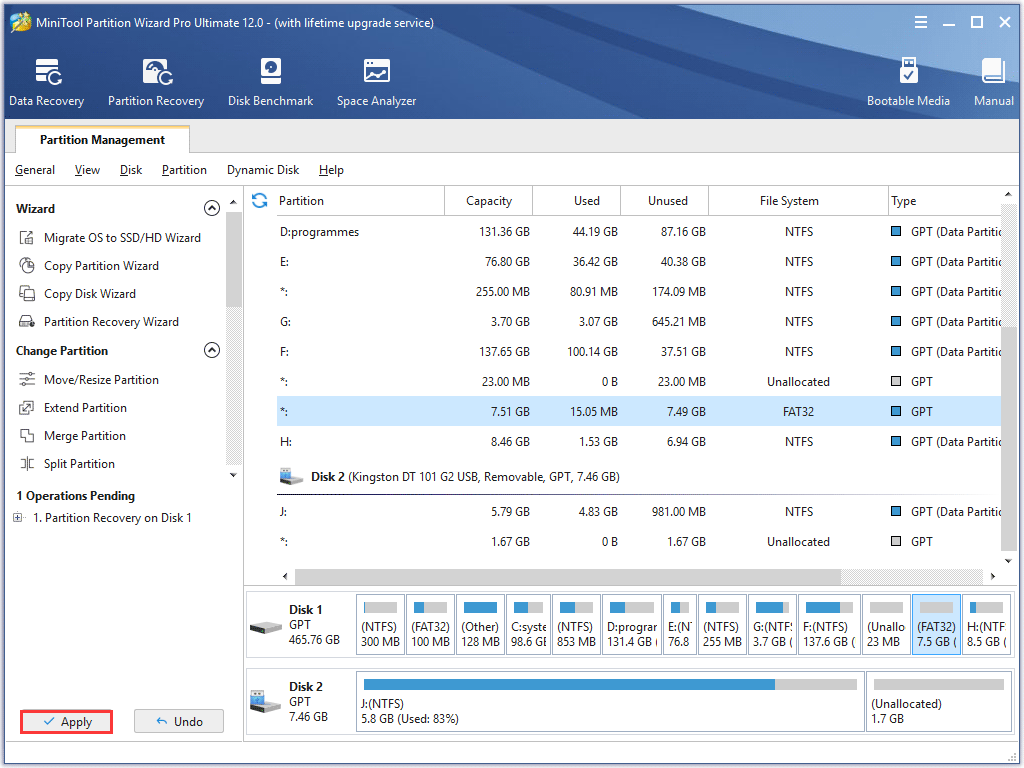
Step 7. When you turn to the main interface, you can see the FAT32 partition. Don’t forget to click Apply as this is the last step to restore FAT32 partition.
MiniTool Partition Wizard is such a powerful partition recovery software that can recover FAT32 partition in just a few clicks. And there are many other features on MiniTool Partition Wizard that you can use to manage FAT32 partition as well. Get one now!
Bottom Line
After reading this post, you may find how simple it is to recover FAT32 partition with MiniTool Partition Wizard. If you are looking for a professional partition recovery software, you may try this one.
If you have any question about how to restore FAT32 partition or undelete FAT32 partition, you can leave a message on the following comment zone and we will reply as soon as possible. If you need any help when using MiniTool software, you may contact us via [email protected].