Home -> Products -> Partition Wizard -> Merge Partitions -> Merging Partitions in XP

Merge Partitions

Merging Partitions in XP

  • Disk partition is usually executed for the new computer before the system is installed. However, as time goes by, users may be dissatisfied with their partition module of the computer and the seemingly unreasonable distribution of the partition. This time, many users consider disk repartitioning for more convenient disk management. During the operation, different measures are taken in view of individual conditions, such as: merge the partitions to reset the partition status on the disk when there are too many partitions on the disk; Resize the partitions to change the partition status of the disk. So how can we successfully realize the operations to merge the partitions and resize the partitions?
    As long as users own MiniTool Partition Wizard Partition Magic, they can easily solve various kinds of disk management problems. No matter which advanced disk management operation you need to execute, such as:merge partition, copy partition, recover partition, and resize partition, MiniTool Partition Wizard could provide perfect solutions to you. MiniTool Partition Wizard was elaborately developed by MiniTool Solution Ltd., which is a professional software development company. The partition magic can be perfectly compatible with almost all the operating systems, various file systems, and is free for individual and home user. What a valuable disk management software it is!

    Maybe some people will say that I just need to do only one operation such as merge partition, so it's totally unnecessary to execute the operation with MiniTool Partition Wizard. What's more, Merge Partition can be realized with the disk management tool of Windows. The free software makes me doubt whether there are quality issues in it, and I feel more relieved to use the disk management tool of Windows.
    Here I can certainly to say, there are none quality issues of MiniTool Partition Wizard. And it is more excellent than similar software. Above doubt clearly reflects users' concern on the data security of the disk. So which is safer to merge the partition? To use disk management tool of Windows operating system, or MiniTool Partition Wizard? I'll explain these two operations below so that you can distinguish them:

    Merge two partitions into new one with the disk management tool of Windows XP

    Now we use disk management tool of Windows XP to merge the adjacent I: partition and J: partition. Detailed steps are shown below:
    1. Firstly, we need to back up the data in I: and J: partition to other partition. A long time is spent in this step.
    2. After backup is complete, we delete I: and J: partition with disk management tool of Windows XP.
    3. After that, the space occupied by I: and J: partition becomes unallocated space, then create a new partition from it.
    4. Finally, copy the backup of original data of I: and J: partition into the new partition.

    The operation to merge partitions with disk management tool of Windows XP is complete. There are cautions about merging partition by this method:
    1. When users back up data, the operation may fail to copy some data;
    2. Enough disk space is needed to store the backup data;
    3. More time is spent to copy data twice.

    Merging partitions in XP with MiniTool Partition Wizard
    Firstly, we should download MiniTool Partition Wizard by visiting the official website http://www.partitionwizard.com/download.html, and install it on the computer. After that, run the software to enter main interface:


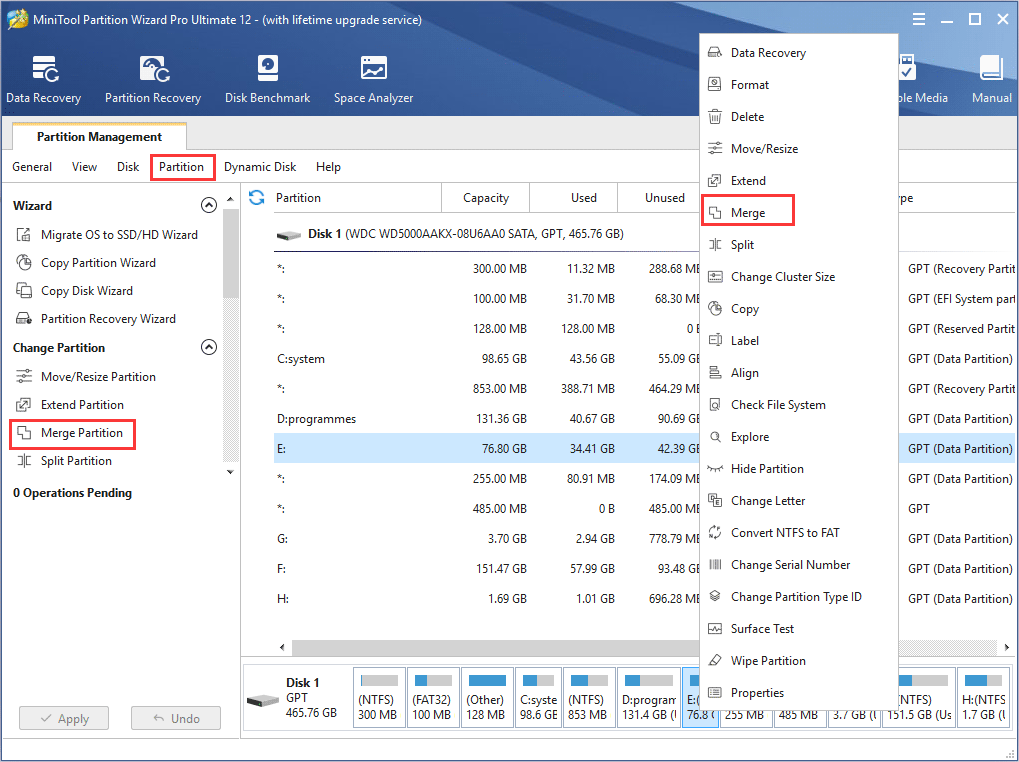
    On the main interface of MiniTool Partition Wizard, we are to merge I: and J: partition. Firstly, right click I: partition, then select "Merge" in the right shortcut menu to enter "Merge Partition" interface.
    Caution: On this interface, users can also click I: partition, then click "Merge Partition" on the left action panel or click the "Merge" button on the toolbar to enter "Merge Partition" interface.
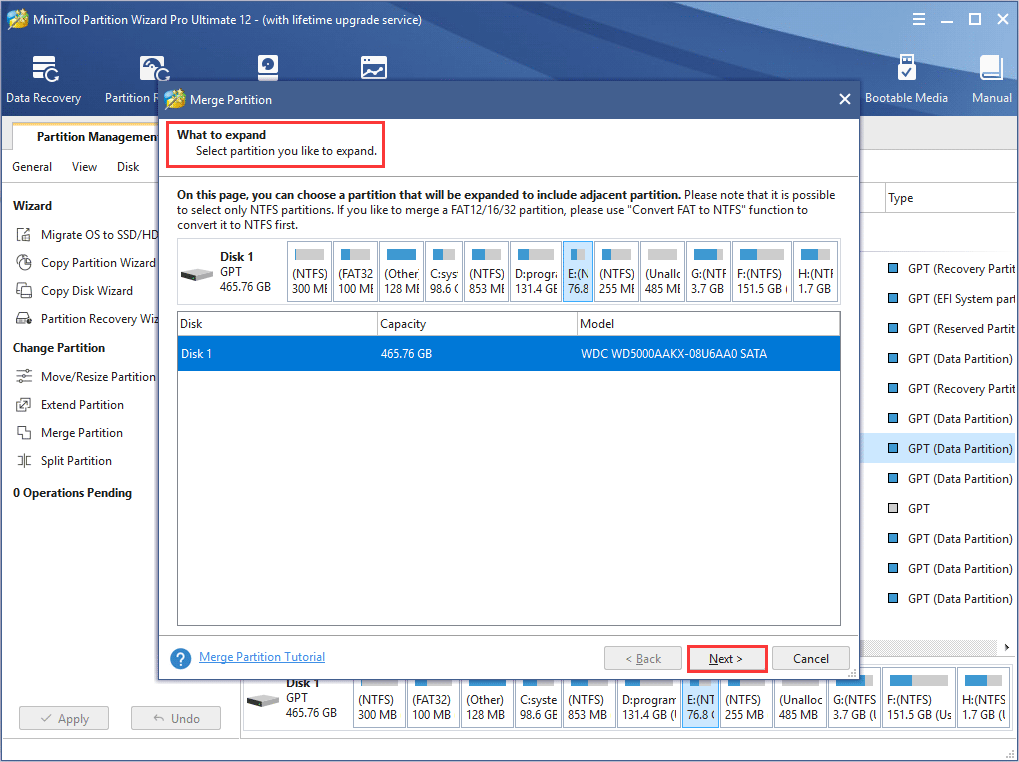
    On "Merge Partition" interface, select I: partition which is the target one used to hold the data in merged partition, then click "Next" to enter the below interface:


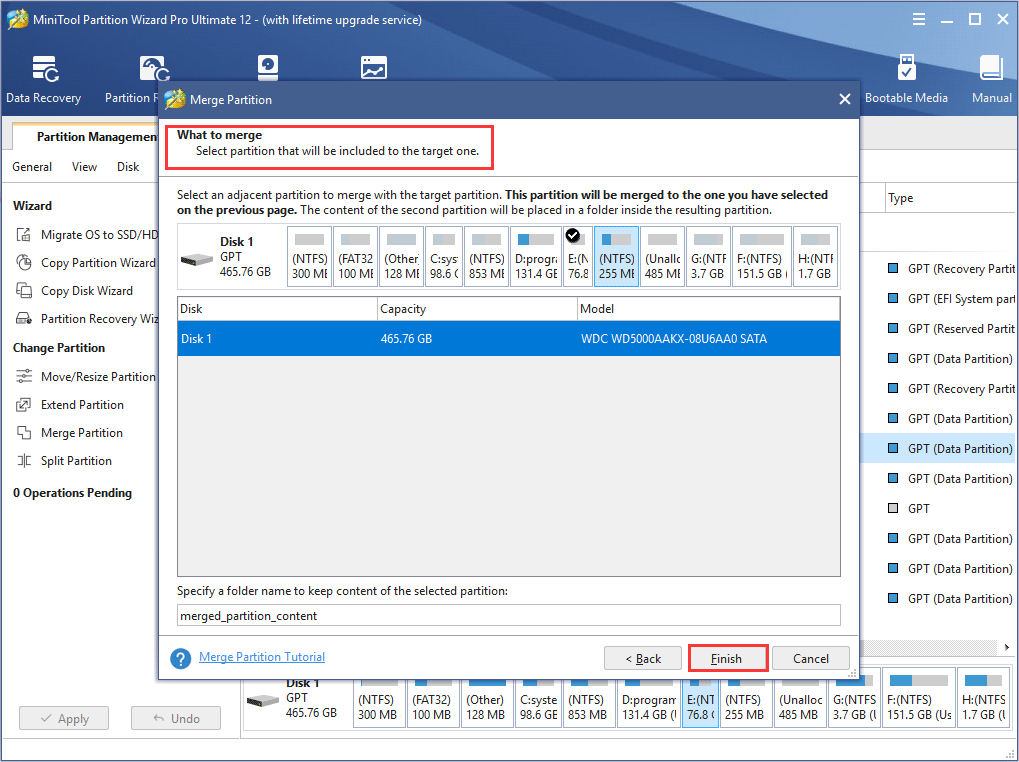
    Select J: partition which will be included to the target one, and specify a folder name for this partition. Then click on "Finish" button to return the main interface.


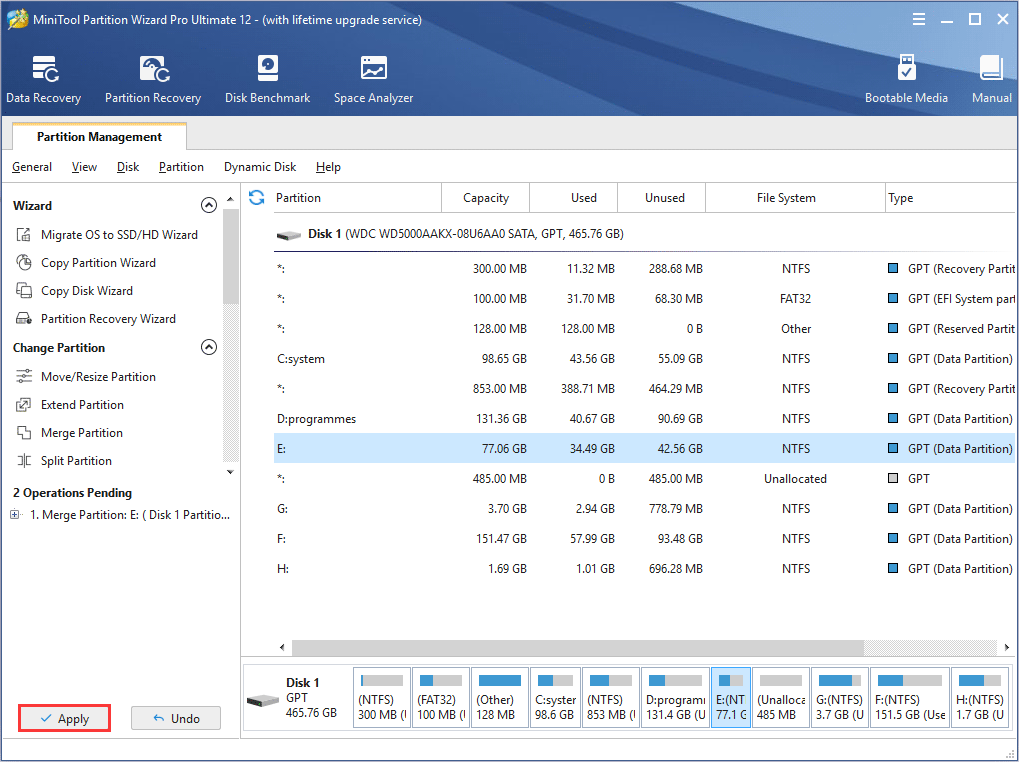
    Last, click "Apply" button to execute pending operation. After the operation is finished, the merging partition operation of I: and J: partition will be complete.
    According to the contrast, I believe that users have known which method should be used for merging partitions! MiniTool Partition Wizard is our best choice! Whether merging partitions, resizing partition or other disk management operations, MiniTool Partition Wizard makes it simple!