Resize Partition
- Resize a partition in Windows 8
- Windows 8 boot disk
- Resize partitions in Windows 8
- Shrink partition Windows 8
- Windows 8 expand partition
- Resize partition Windows 8
- Resize Windows 8 partition
- Resizing partitions in Windows 8
- Expand partition Windows 8
- Resize partition for Windows 8
- Expand system partition
- Free extend boot partition
- Extend partition windows 8
- Windows server 2003 increase partition size
- How to increase partition size
- Increase windows partition
- Increase partition xp
- Free increase windows partition
- XP increase partition size
- Increase disk partition
- Increase partition size vista
- Increase partition size
- Windows XP increase partition size
- Increase partition size XP
- Free shrink windows partition
- Windows 7 increase partition size
- Windows 2003 extend partition free
- Partition in windows 7
- Extend partition vista
- Extend primary partition Windows 7
- Extend Windows partition
- Extend system partition safely
- Shrink partition Windows 7
- Shrink partition XP
- Windows 7 extend partition free
- Windows 7 shrink partition
- Windows server 2003 extend partition
- Extend boot partition free
- Windows 7 extend system partition
- Extend OS partition Server 2003
- Resize partition server 2008
- Extended partition
- Free resize partition
- Resize partition for windows
- Resize partitions
- How to resize a partition
- Expand partition
- Windows resize partition
- Resize partition in windows 2003 safely
- Resize OS partition efficiently
- Resize a partition
- NTFS resize partition
- Resize windows 2003 partition
- How to resize partition windows server 2003
- Resize partition ubuntu
- Resize extended partition
- Vista resize partition
- Server 2003 resize partition
- Resize partition in windows 2003
- How to resize Windows partition
- How to resize ntfs partition
- Partition ntfs resize
- Win7 resize partition
- Resize win7 partition
- Windows 2003 extend partition
- Extended partitions
- Extend boot partition
- Resize server 2003 partition
- Resize disk partition
- Server 2003 partition resize
- Resize partitions server 2003
- Resize Windows server partition
- Resize partition server 2003
- Low disk space
- Manage partition C drive run out of space
- Resize Windows 7 partition
- How to repartition a hard drive
- Extend Windows 7 system partition
- Resize partition server
- Primary extended partition
- Windows 7 system partition increase
- Windows 7 partition resize
- Extend NTFS system partition without reboot
- Extend Partition Server 2008
- XP partition resize
- Windows 7 extend partition
- Resize Partition with partition magic
- Repartition Hard Drive
- Windows 7 resize partition
- Resizing partition
- Windows partition resize
- Resize windows partition
- Resize partition windows
- Window 7 partition resize
- Adjust Partition Size
- Add Space to System C Drive Partition
- Redistribute free disk space
- Reduce Drive Partition Size
- Moving Partition
- Shrink partition wizard
- Shrink Partition Under Windows
- How to show extend partition
- Shrink Windows Server 2003 Partition
- Shrink windows partition
- Windows server 2003 resize partition
- Split partition
- System disk full
- Free up disk space
- Resize GPT disk partitions
- How to resize external hard drive
- Increase disk space
- Increase c drive partition
- Expand partitions under windows
- Resize system partition
- Partition 64
- About Windows Server 2003
- Convert fat32 to NTFS
- Create a Partition in Windows Server 2003
- Disk copy
- Disk manager
- Drive copy
- Free download Partition Wizard
- Magic software for partition management
- 64bit Partition Manager
- Clone disk
- Copy partitions
- Disk copy manager
- Partition manager
- Format partition
- Free partition manager to resize partitions
- How to resize partitions
- Free partition software
- Magic software for hard disk repartition
- Resize system primary partition
- Resize partition on windows server
- Resize partition freeware
- How to resize Windows Server 2000 partitions?
- Resize partition server 2008 64bit
- Resize Server 2008 partition
- Resize system boot partition
- Resize os partition
- Resize sbs 2008 system partition
- Windows server 2003 resize partition
- Resize partition windows 2003 server
- How to resize raid 1 without data loss?
- Resize Windows server 2003 partition
- Resize RAID partition
- Resize NTFS partition
- Resizing and moving partition
- Resize partition Windows 7
- Resize partition under Window operating system.
- Resize partition Windows server 2003?
- Resize and move partition
- Resize Vista partition
- Resize partition on Vista.
- Server 2008 Resize partition
- Resize external hard drive
- Server partition resize
- Resize GPT disk partition
- Resize dynamic disk
- Resize boot partition 2
- Resize RAID 5
- Resize RAID
- Resize FAT32
- Resize FAT32 partition
- Resize partition for FAT32
- FAT32 partition resizing
- Free partition resizing software
- Free software to resize partition
- Free resizing partitions
- Resize partition on windows server operating system
- Resize partition of Windows server
- Resize server partition on Windows
- Partition resize windows 2003
- Resize partition
- Windows partition
- Extend windows 7 partition free
- Increase raid 5 size
- Extend system partition server 2003
- Extend system partition
- Increase partition size windows 7
- Extend simple volume
- Extend server 2008 boot partition
- Extend SBS 2003 server
- Increase partition size server 2008
- Increase hard disk space
- Increase free disk space on the system partition
- Increase partition capacity
Windows 7 resize partition
-
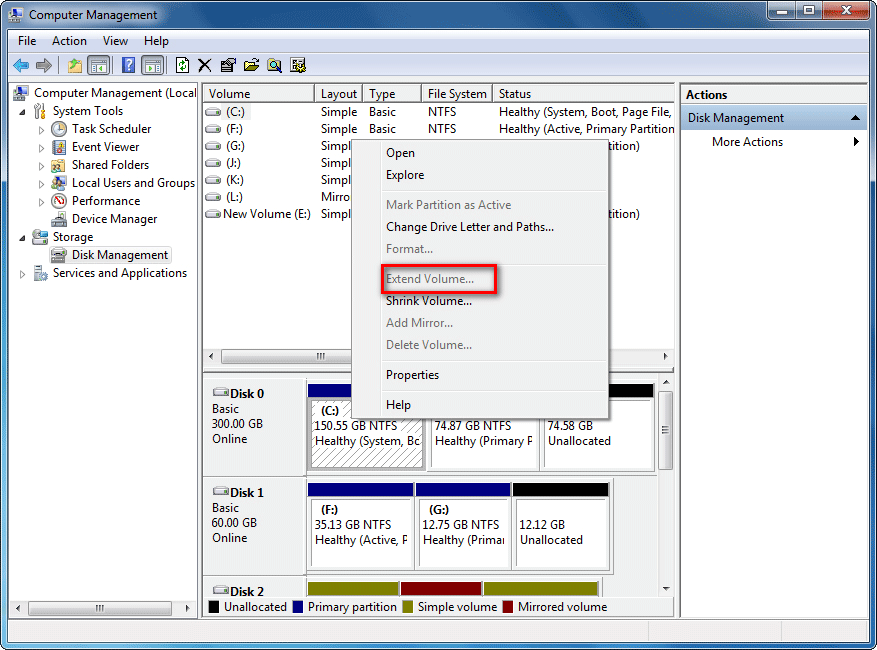
Windows 7 is the most popular Windows operating system at present which has inherited all advantages from Windows XP and Windows Vista and been improved and innovated a lot as well. When we are enjoying the great experience of Windows 7, we will still encounter the problem of low disk space as a result of more and more applications occupancy of disk space, and low speed of operating, etc. These problems are mostly caused by unreasonable allocation of disk partitions. And most operating systems may have such problem. To fix these problems, we can resize Windows 7 partition. Repartitioning causes big effect on system partition data and costs much time. The best way is to resize Windows 7 partition. Different form previous Windows operating systems, Windows 7 built-in disk management tool has been improved a lot. Theoretically, the newly-added "Extend/Compress volume" function of Windows 7 can help users resize partition. However, it still has many limitations. It is strongly suggested to use third-party professional partition magic, MiniTool Partition Wizard.
Disk Management Expert - MiniTool Partition Wizard
MiniTool Partition Wizard is a multi-functional partition magic developed by MiniTool Solution Ltd.. It can not only help users resize partition in Windows 7, but also has other functions such as create partition, delete partition, merge partition, format partition, and wipe partition, etc. All these operations are rather simple. MiniTool Partition Wizard is compatible with various storage devices and operating systems, and is able to manage partition in all kinds of storage devices (such as U disk, mobile HD, memory card, etc) and almost all Windows operating systems including Windows 2000, Windows 7. The most important thing is that MiniTool Partition Wizard is free to individual and family users. Please visit official website for more information about MiniTool Partition Wizard: http://www.partitionwizard.com/.
Use MiniTool Partition Wizard to resize partition in Windows 7
At first, download MiniTool Partition Wizard at official website and install it to the partition that is not going to be operated. After installation, run MiniTool Partition Wizard. The following picture is the main interface of MiniTool Partition Wizard.
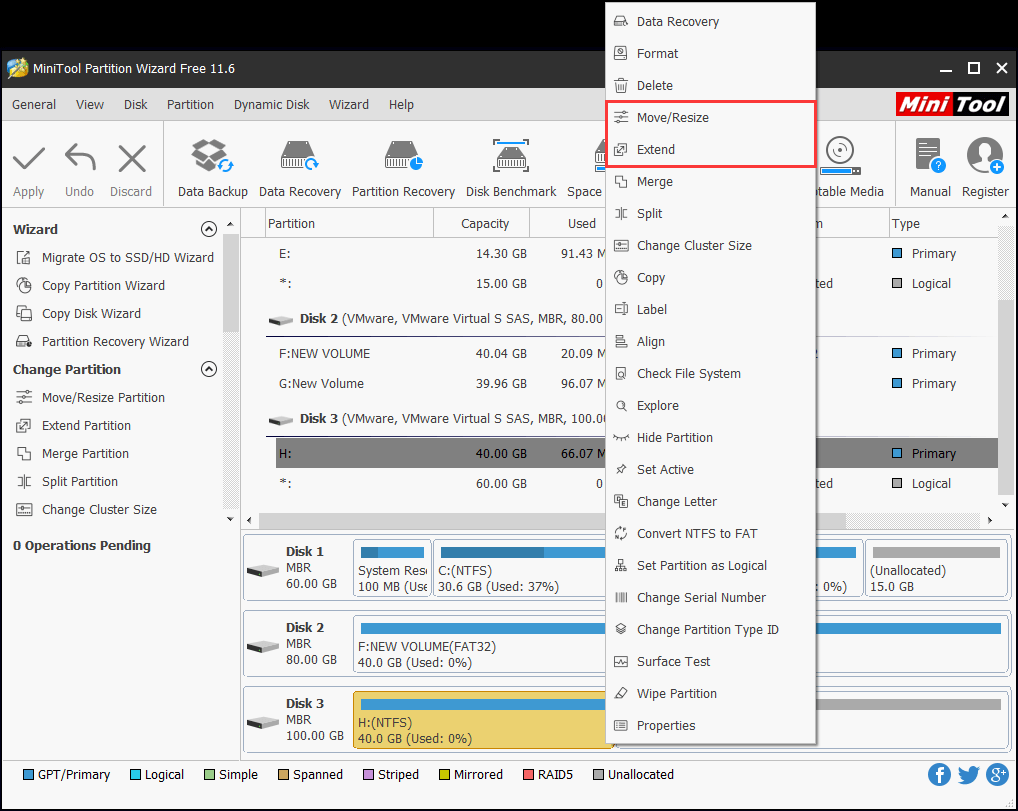
The partition list of main interface shows all partitions in computer. If we need to extend Windows 7 system partition (Partition C:), we have to make some unallocated space. Here we take shrinking Partition D: for example. Select Partition D: to resize. MiniTool Partition Wizard has four ways to enter into resize interface:
1. Click "Move/Resize Partition" function button at the "Operations" area of main interface.
2. Click "Move/Resize" button at toolbar.
3. Click "Partition" at the menu bar, and select "Move/Resize" in pull down menu.
4. Right click target partition and select "Move/Resize" option in shortcut menu.
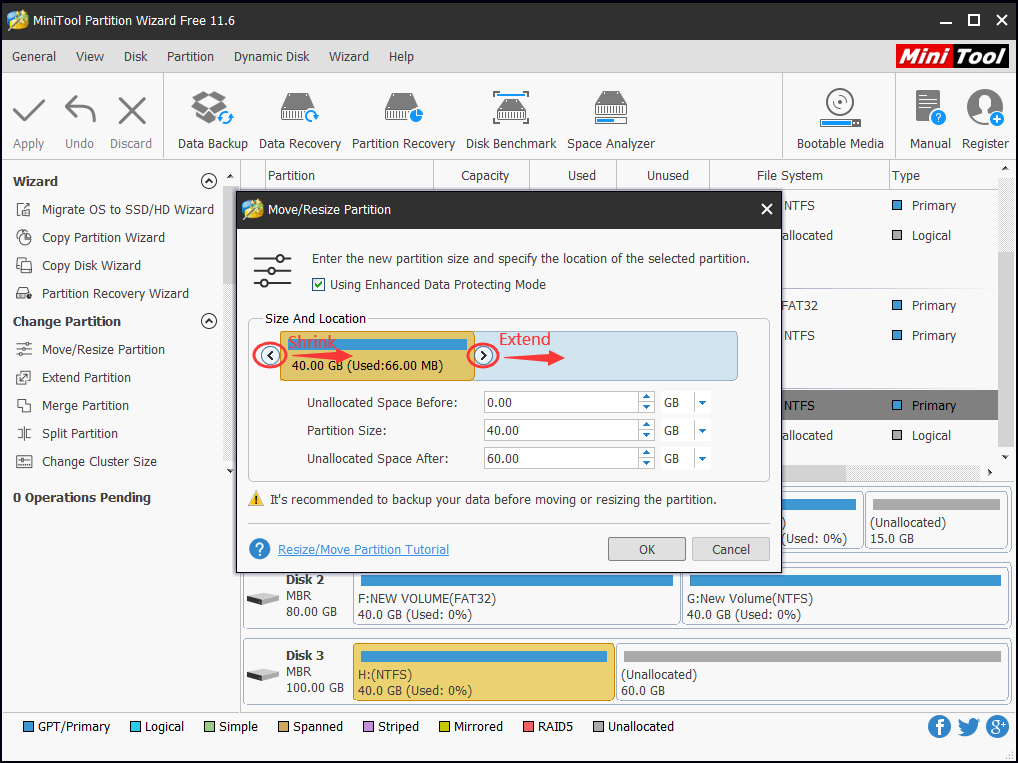
Choose any of these four ways to enter into resize interface:
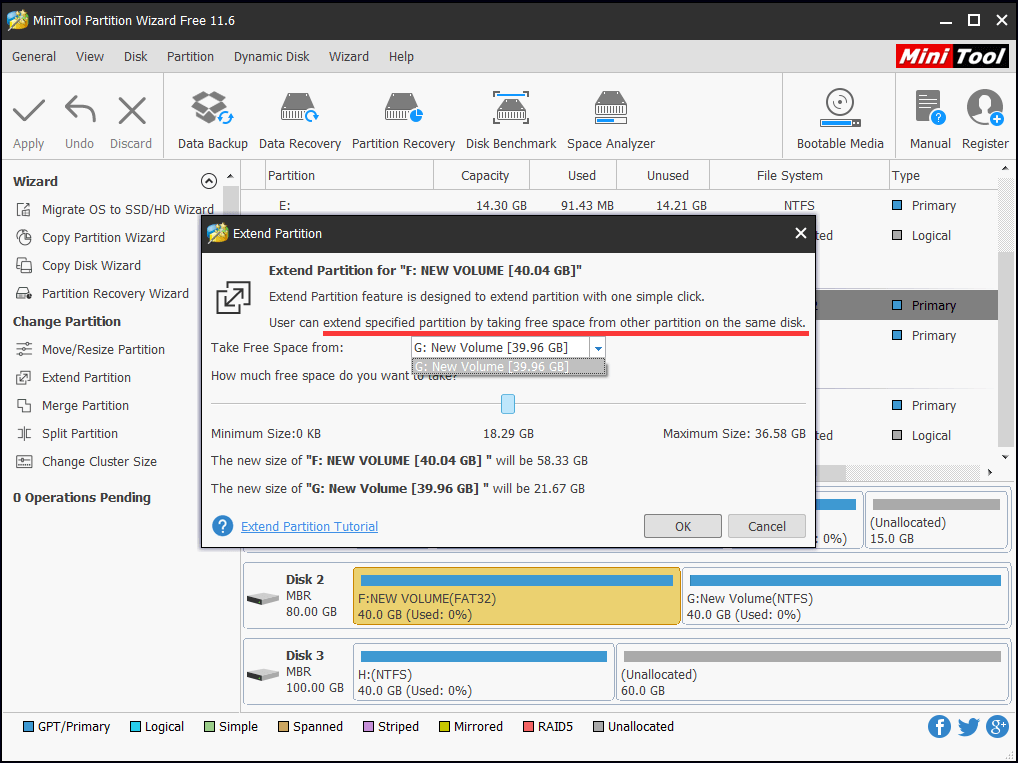
In this interface, we can set partition size and initial position of partition. MiniTool Partition Wizard provides two ways to set: one is to input values directly in textboxes, and the other one is to drag the partition handle border as the red zone showed in this picture. This interface also provides partition data protection function. Check "Using Enhanced Data Protecting Mode" if there is no special requirement. It will protect data security and avoid data loss probably triggered by abrupt emergency. After all settings, click "OK" button to finish shrinking work. The shrunk space will turn to be unallocated space. With this unallocated space, we can extend Partition C:. The operation of extending Partition C: is almost the same with shrinking Partition D:. We only need to extend Partition C: when setting size. After operation, we can see preview effect of all these operations in main interface. To complete extending system partition of Windows 7, click "Apply" button at top left corner.
This is the presentation of resizing Windows 7 system partition. The operation is so simple that almost every user can do it. MiniTool Partition Wizard has instruction in every step during the whole process to reduce chance of accidental operation. To improve your OS efficiency and stability, try this partition magic - MiniTool Partition Wizard.
Free Partition Manager Free Partition Magic Partition Manager Server Partition Magic Server
Common problems related to partition management and our solutions:
- Resize Windows 7 partition with MiniTool Partition Wizard.
- Resize Windows 7 partition with MiniTool Partition Wizard without data loss.
- Extend Windows 7 partition free with MiniTool Partition Wizard.
- Increase partition size for Windows 7 with MiniTool Partition Wizard.
- Compared with Windows 7 Disk Management, MiniTool Partition Wizard is a Windows partition magic to expand partition.