Resize Partition
- Resize a partition in Windows 8
- Windows 8 boot disk
- Resize partitions in Windows 8
- Shrink partition Windows 8
- Windows 8 expand partition
- Resize partition Windows 8
- Resize Windows 8 partition
- Resizing partitions in Windows 8
- Expand partition Windows 8
- Resize partition for Windows 8
- Expand system partition
- Free extend boot partition
- Extend partition windows 8
- Windows server 2003 increase partition size
- How to increase partition size
- Increase windows partition
- Increase partition xp
- Free increase windows partition
- XP increase partition size
- Increase disk partition
- Increase partition size vista
- Increase partition size
- Windows XP increase partition size
- Increase partition size XP
- Free shrink windows partition
- Windows 7 increase partition size
- Windows 2003 extend partition free
- Partition in windows 7
- Extend partition vista
- Extend primary partition Windows 7
- Extend Windows partition
- Extend system partition safely
- Shrink partition Windows 7
- Shrink partition XP
- Windows 7 extend partition free
- Windows 7 shrink partition
- Windows server 2003 extend partition
- Extend boot partition free
- Windows 7 extend system partition
- Extend OS partition Server 2003
- Resize partition server 2008
- Extended partition
- Free resize partition
- Resize partition for windows
- Resize partitions
- How to resize a partition
- Expand partition
- Windows resize partition
- Resize partition in windows 2003 safely
- Resize OS partition efficiently
- Resize a partition
- NTFS resize partition
- Resize windows 2003 partition
- How to resize partition windows server 2003
- Resize partition ubuntu
- Resize extended partition
- Vista resize partition
- Server 2003 resize partition
- Resize partition in windows 2003
- How to resize Windows partition
- How to resize ntfs partition
- Partition ntfs resize
- Win7 resize partition
- Resize win7 partition
- Windows 2003 extend partition
- Extended partitions
- Extend boot partition
- Resize server 2003 partition
- Resize disk partition
- Server 2003 partition resize
- Resize partitions server 2003
- Resize Windows server partition
- Resize partition server 2003
- Low disk space
- Manage partition C drive run out of space
- Resize Windows 7 partition
- How to repartition a hard drive
- Extend Windows 7 system partition
- Resize partition server
- Primary extended partition
- Windows 7 system partition increase
- Windows 7 partition resize
- Extend NTFS system partition without reboot
- Extend Partition Server 2008
- XP partition resize
- Windows 7 extend partition
- Resize Partition with partition magic
- Repartition Hard Drive
- Windows 7 resize partition
- Resizing partition
- Windows partition resize
- Resize windows partition
- Resize partition windows
- Window 7 partition resize
- Adjust Partition Size
- Add Space to System C Drive Partition
- Redistribute free disk space
- Reduce Drive Partition Size
- Moving Partition
- Shrink partition wizard
- Shrink Partition Under Windows
- How to show extend partition
- Shrink Windows Server 2003 Partition
- Shrink windows partition
- Windows server 2003 resize partition
- Split partition
- System disk full
- Free up disk space
- Resize GPT disk partitions
- How to resize external hard drive
- Increase disk space
- Increase c drive partition
- Expand partitions under windows
- Resize system partition
- Partition 64
- About Windows Server 2003
- Convert fat32 to NTFS
- Create a Partition in Windows Server 2003
- Disk copy
- Disk manager
- Drive copy
- Free download Partition Wizard
- Magic software for partition management
- 64bit Partition Manager
- Clone disk
- Copy partitions
- Disk copy manager
- Partition manager
- Format partition
- Free partition manager to resize partitions
- How to resize partitions
- Free partition software
- Magic software for hard disk repartition
- Resize system primary partition
- Resize partition on windows server
- Resize partition freeware
- How to resize Windows Server 2000 partitions?
- Resize partition server 2008 64bit
- Resize Server 2008 partition
- Resize system boot partition
- Resize os partition
- Resize sbs 2008 system partition
- Windows server 2003 resize partition
- Resize partition windows 2003 server
- How to resize raid 1 without data loss?
- Resize Windows server 2003 partition
- Resize RAID partition
- Resize NTFS partition
- Resizing and moving partition
- Resize partition Windows 7
- Resize partition under Window operating system.
- Resize partition Windows server 2003?
- Resize and move partition
- Resize Vista partition
- Resize partition on Vista.
- Server 2008 Resize partition
- Resize external hard drive
- Server partition resize
- Resize GPT disk partition
- Resize dynamic disk
- Resize boot partition 2
- Resize RAID 5
- Resize RAID
- Resize FAT32
- Resize FAT32 partition
- Resize partition for FAT32
- FAT32 partition resizing
- Free partition resizing software
- Free software to resize partition
- Free resizing partitions
- Resize partition on windows server operating system
- Resize partition of Windows server
- Resize server partition on Windows
- Partition resize windows 2003
- Resize partition
- Windows partition
- Extend windows 7 partition free
- Increase raid 5 size
- Extend system partition server 2003
- Extend system partition
- Increase partition size windows 7
- Extend simple volume
- Extend server 2008 boot partition
- Extend SBS 2003 server
- Increase partition size server 2008
- Increase hard disk space
- Increase free disk space on the system partition
- Increase partition capacity
Resizing and moving partition
- Resizing and moving partition will be conducive to enhancing partition performance and saving plenty of internal memory. Moreover, it will equally better utilize partition resources to optimize computer maximally. Here I would like to recommend MiniTool Partition Wizard Server Edition for user to resize and move partition.
Differences of FAT and NTFS:
Before the emergence of FAT 32, most PC adopted common FAT 16 file system, for instance, Windows 95. As the development of computer hardware and popularization of computer, FAT 16 don't match the system requirement any longer. In this regard, a improved file system FAT 32 emerged to bear following features in comparison with FAT 16:
1. Support disk with maximum volume of 2TB and minimum capacity of 512. Based on FAT 32, Windows 2000 allows a maximum partition volume of 32GB.
2. Adopt smaller cluster to more efficiently store information.
3. Relocate root directory and utilize FAT backup copy. Additionally, the boot record of FAT 32 is contained in an structure that includes core data to reduce the possibility of system failure.
Focusing on safety performance, NTFS file system employs unique file system structure Windows NT on the basis of protecting file and directory data resulting in saving storage resources and disk space. The widely-used Windows NT 4.0 has just employed NTFS 4.0 file system which has impressed customers for its powerful and high safety performance.
As the most popular file systems, both FAT and NTFS have properly managed partition, improved partition performance and averted a lot of losses. MiniTool Partition Wizard Server Edition - a professional partition manager will be a perfect complement for user to perform all kinds of operations on disk. Developed by MiniTool Solution Ltd., MiniTool Partition Wizard Server Edition is able to create partition, delete partition, format partition, wipe partition, merge partition, resize partition, copy partition, convert file system, etc.
User could download MiniTool Partition Wizard Server Edition at MiniTool Partition Wizard Download Center:

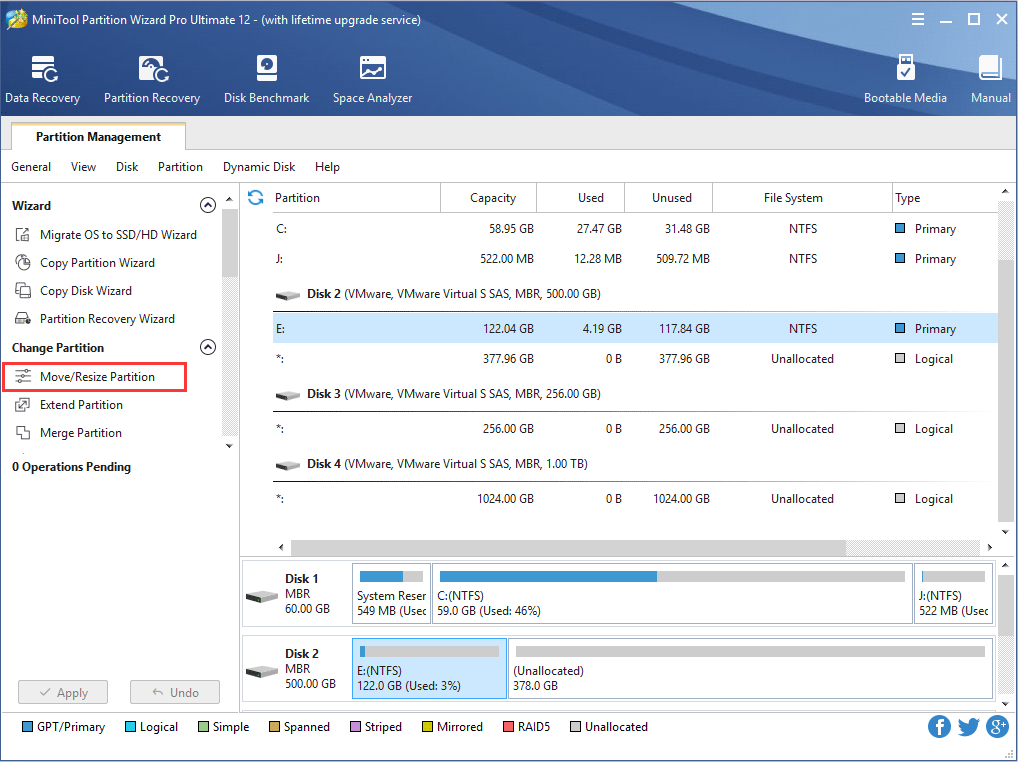
After entering the main interface, user could see all partitions on disk. To resize partition, user should first select and right click desired partition, then click "Move/Resize" in the red box at the top of the interface.

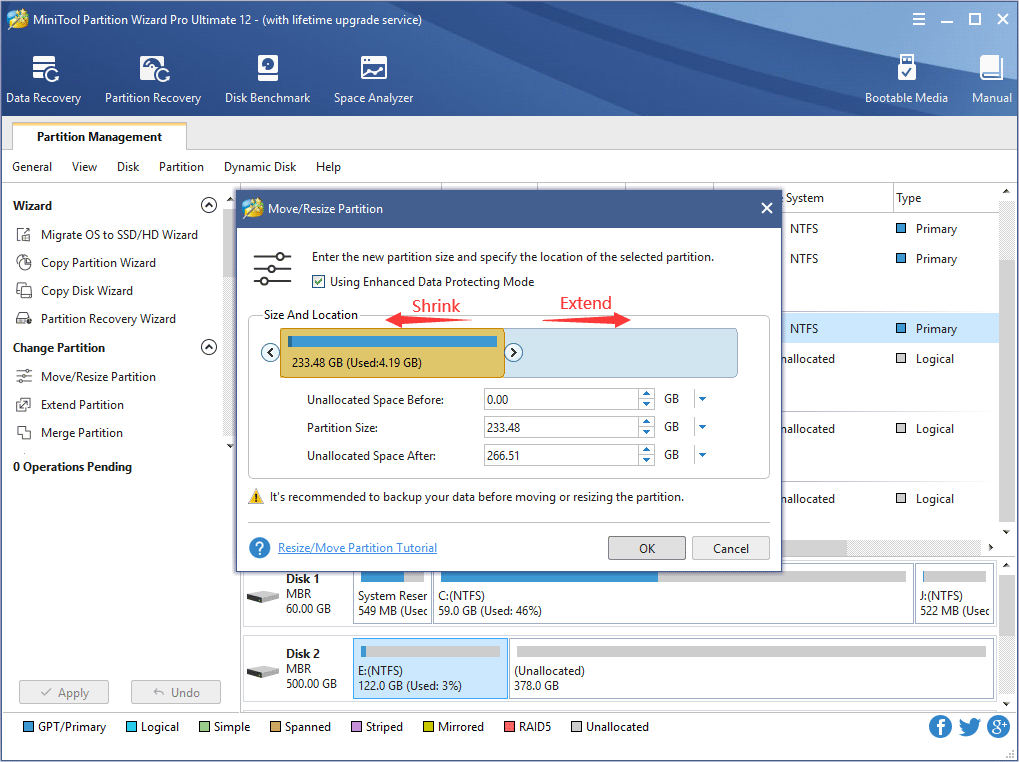
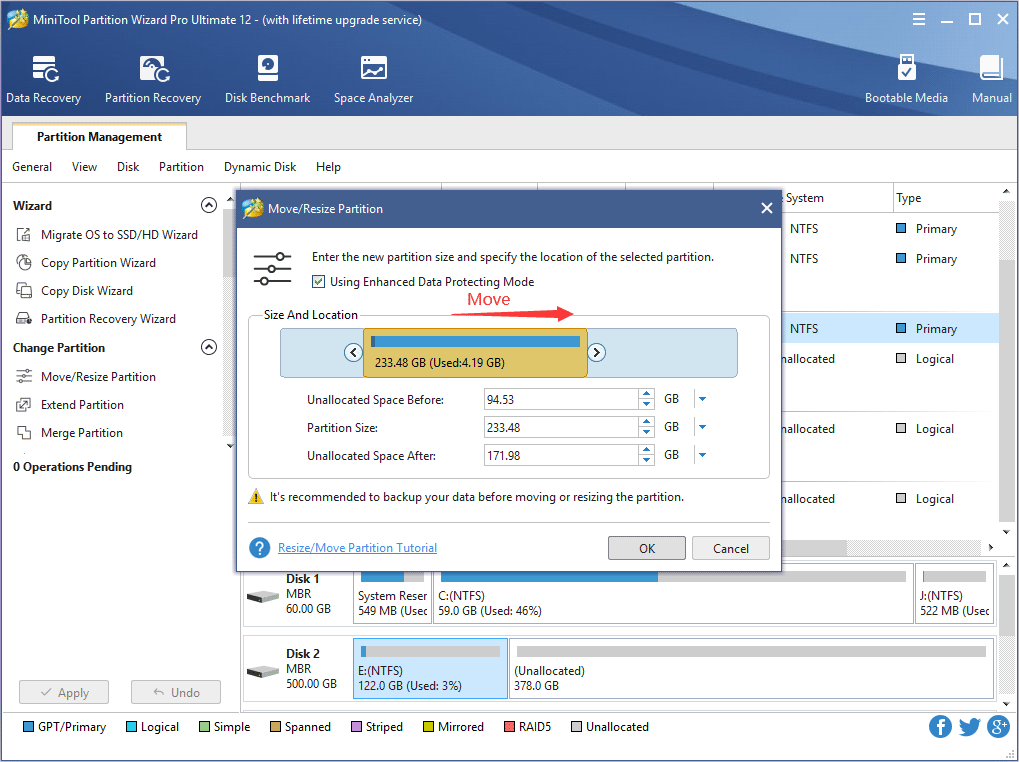
Now user should set the size of partition by dragging the left or right arrow. After that, please click "OK".
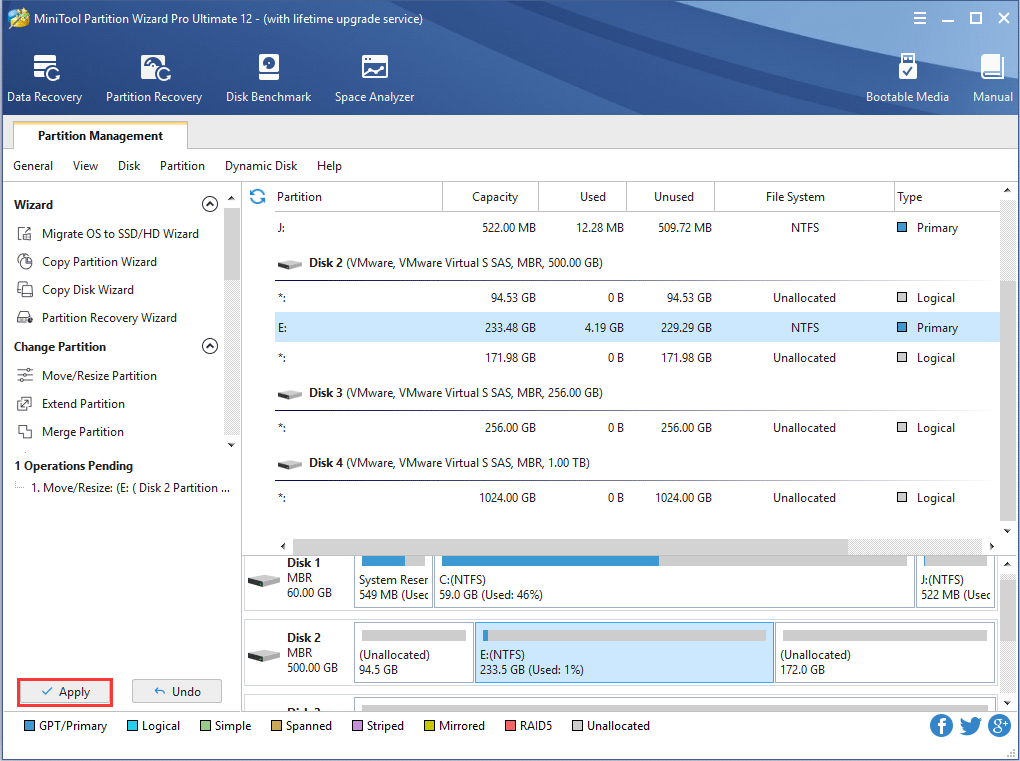
Now MiniTool Partition Wizard Server Edition is resizing partition. This process will merely take a little time. For more information on MiniTool Partition Wizard Server Edition, please go to http://www.partitionwizard.com.
Free Partition Manager Free Partition Magic Partition Manager Server Partition Magic Server
Common problems related to partition management and our solutions:
- Resize system primary partition with MiniTool Partition Wizard.
- Resize partition on Windows server with MiniTool Partition Wizard.
- Resize system or boot partition with MiniTool Partition Wizard Server Edition.
- Resize operating system partition with MiniTool Partition Wizard Server Edition.
- Resize Windows SBS system partition with MiniTool Partition Wizard Server Edition.
- How to resize raid 1 without data loss?
- Resize RAID partition with MiniTool Partition Wizard Server Edition.
- Resize NTFS partition with MiniTool Partition Wizard Server Edition.
- Resize partition under Window operating system.
- Resize partition for Server 2008.
- Resize external hard drive with MiniTool Partition Wizard.
- Resize server partition with MiniTool Partition Wizard Server Edition.
- Resize GPT disk partition with MiniTool Partition Wizard Server Edition.
- Resize dynamic disk with MiniTool Partition Wizard Server Edition.
- Resize boot partition with MiniTool Partition Wizard Server Edition.