Partition Manager
- Partition manager server
- The best server partition manager
- Upgrade to larger disk
- Windows 7 partition software
- Free Hard Disk Drive Space Manager
- Partition software windows server 2008
- Free fat ntfs partition recovery
- Merge partitions
- Free partition manager
- Windows server 2008 partition manager software
- Windows web server partition software
- Windows Server 2003 partition software
- Partition manager for Windows server 2008
- Windows Vista Partition Manager
- Partition software for server
- Windows server partition manager
- Windows Server 2003 Partition Manager
- Windows server 2008 partition manager
- GPT Disk Partition Manager
- Free windows 7 partition manager
- Convert fat to ntfs xp
- Convert fat32 to ntfs in windows xp
- Windows convert fat32 to ntfs
- Free disk manage
- Divide disk free
- Repartition windows 7 drive
- Windows 7 disk manager
- Recover lost partition
- Explore partition
- Extend boot partition Windows 7
- Windows 7 partition manager
- Hard disk copy
- Copy disk partition
- Dynamic disk recovery
- Extend OS partition
- Disk partition software for 64-bit Vista.
- Disk partition windows server 2003
- Extend/enlarge gpt partition
- Extend/expand logical partition
- Free partition manager software
- Extend/expand logical partition
- Extend/enlarge gpt partition
- Delete all partitions
- Copy wizard
- Copy gpt disk
- Free repartition external hard drive
- Free partition recovery software
- Discard all changes
- Boot partition is the partition where...
- Copy partitions is a function where a...
- How to create partitions?
- How to format partitions?
- Partition wizard can perform Linux...
- Partition wizard can tell you how to fix...
- Norton Partition Magic is one good...
- What is partition?
- Partitioning is the process of writing the...
- If user needs one professional partition...
- What is partition drive?
- How to fix partition?
- Partition Magic is an excellent partition...
- Partition Magic 8.0 is an excellent...
- Choosing partition software, user can...
- Partition wizard is an alternative to...
- Partition wizard can support many OS...
- Managing partition, Partition wizard is...
- How to perform partition recovery?
- How to repair partition?
- How to resize partition?
- Partition wizard can resize partition well.
- Partition wizard is one professional...
- What is partition table?
- What is Partition table doctor?
- What is partition utility?
- How to partition windows?
- Partitions are divided into primary...
- How to restore partition?
- How to swap partition?
- What is system partition?
- How to boot windows 7?
- How to resize windows partitions?
- How to partition Vista?
- How to partition windows 7?
- Partition wizard supports many 32...
- Partition Wizard is a professional...
- Partition wizard can partition FAT32 well.
- Partition wizard can tell user how to...
- How to merge partition under windows...
- How to resize NTFS partitions?
- What is NTFS and how to resize partitions?
- Partition wizard supports 64 bit systems.
- How to resize server partition?
- What is disk partitioning software?
- What is drive partition AFS?
- How to resize hard disk partition?
- Partition Wizard is the industry leading...
- How to resize 64 bit partition?
- How to resize partitions?
- What is 64 bit system?
- How to partition 64 bit windows XP?
- How to active partition?
- How to partition disk?
- Partition wizard can partition windows...
- How to partition windows 2000 server?
- How to partition windows vista 32 bit?
- How to partition windows vista 64 bit?
- How to partition 64 bit windows 2008...
- How to partition 32 bit windows 2008...
- How to partition windows 2003?
- How to partition windows 2008?
- How to partition 32 bit windows XP?
- What is partition magic64?
- How to partition 64 bit windows XP?
- Partition Wizard is professional...
- How to perform windows 7 64 bit...
- How to partition for windows XP?
- What is Partition magic 8 for vista?
- Compared with partition wizard in light...
- What is Partition magic 8.05?
- What is partition magic Dos?
- What is Partition Magic 9.0?
- How to partition for windows vista with...
- How to partition under windows 7?
- Partition wizard is an alternative to...
- Partition wizard can perform partitioning...
- Partition wizard is an alternative to...
- Partition Wizard is alternative partition...
- What is partition magic X64?
- What is partition management?
- Partition Wizard is the best partition...
- What is partition manager 64 bit?
- How to partition for Windows 2003...
- How to partition for windows 7?
- How to partition for Windows 2003...
- How to do partition 32 bit winddows7?
- What is partition manager for vista 64 bit?
- What is partition manager for vista 64...
- What is partition manager 9.0 64X?
- What is partition manager for XP64?
- What is partition manager X64?
- How to do resize partition for vista?
- What is partition manager for windows...
- Partition wizard is one free partition...
- How to resize partitions 64 bit vista?
- What is sd partitions?
- What is partition?
- What is XP partition?
- Partition manager is a professional...
- Partition wizard home edition is one free...
- How to clone disk?
- How to convert FAT32 to NTFS?
- How to copy disk?
- What is disk manager?
- What is drive copy?
- What is partition backup copy?
- How to resize partition for windows 2003?
- What is server partition manager?
- What is system copy?
- What is volume manager?
- How to boot windows?
- What is windows MBR?
- How to fix windows MBR?
- What is windows partition?
- How to build windows 7?
- Partition wizard can partition windows 7...
- Partition wizard can partition XP and...
- Partition Wizard Home Edition for...
- What is Microsoft windows 7?
- How to resize windows 7 partition?
- How to get windows 7 key?
- How to install windows 7?
- How to use windows 7 tools?
- How to resize windows 7 partitions?
- How to remove windows 7?
- What is windows 7 2009?
- Partition wizard supports windows 7...
- What is windows 7 test?
- What is server magic partition?
- What is server partition software?
- What is partition software for server?
- How to resize server 2003 partition?
- How to resize window server 2003...
- Partition Wizard Server Edition is an...
- How to partition windows server 2003...
- What is windows server partition?
- How to do windows server 2003 partition?
- What is partition server 2000?
- What is windows server 2000 partition?
- What is server 2000 partition?
- What is partition magic for windows...
- What is server partitioning tool?
- How to partition windows server 2003?
- What is windows server 2003 partition...
- What is partition manager server edition?
- What is windows 2003 partition manager?
- What is partition manager for server?
- What is partition manager for windows...
- Partition wizard is the best server...
- Partition wizard home edition is best...
- What is partition manager 2003?
- What is partition magic 2003?
- Partition 64 bit with 64 bit partition manager
- Partition copy
- Partition for Windows 2000 professional
- Partition for Windows 2003 server 32bit
- Windows 7 Partitions
- Partition for Windows XP 32bit
- Partition backup and copy
- Create NTFS Partitions
- Partition manager of windows vista
- Windows partition manager9.0 64x
- Change Letter with Partition Manager Freeware
- Partition for 64bit Windows Server 2003
- Partition for Windows Vista 32 bit
- Partition for Windows Vista 64bit
- Partition for 32bit Windows Server 2008
- Partition for 32bit windows 7
- Partition 64bit Windows 7
- Partition for Windows 2003
- Partition for Windows XP 64bit
- Partition for 64bit Windows Server 2008
- Partition Wizard for drive partitioning.
- Partition Wizard Overview
- Partitions for Windows 2008
- Partitions for Windows XP
- Copying System
- System partitions
- Volume partition manager
- Windows backup
- Boot damaged windows
- Rebuild Windows MBR
- Damaged Windows MBR fix
- Recovery Data
- Disk Partition
- Manage partition from CD-ROM
- Manage partition when system can not be booted
- 64 bit Windows 7 partition
- Best free partition manager for Windows 7
- Change dynamic disk to basic
- Change NTFS partition size
- Change partition size Server 2003
- Change server 2008 partition size
- Changing partition label
- Check partition for error
- Copy hard drive
- Copying disk freeware
- Create bootable disks
- Deleting partitions
- Windows 7 partition
Format Partition
- How to format partitions? It is simple with MiniTool Partition Manager. Get MiniTool Partition Manager now at
http://www.partitionwizard.com/download.html
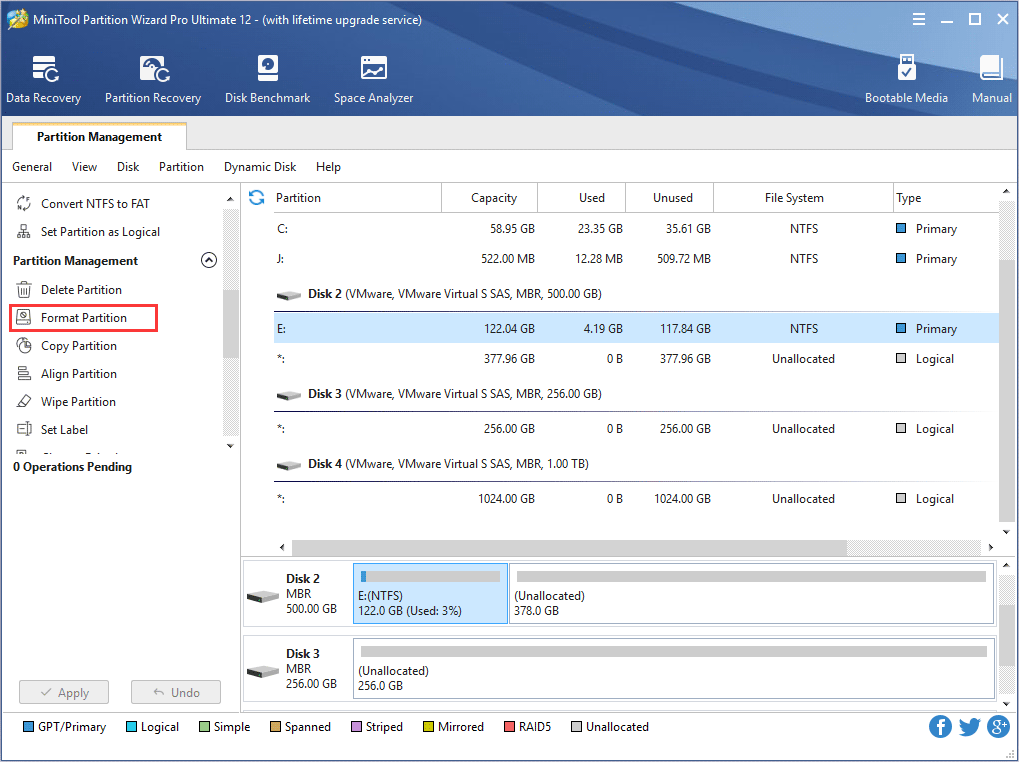
Select the partition you want to format.

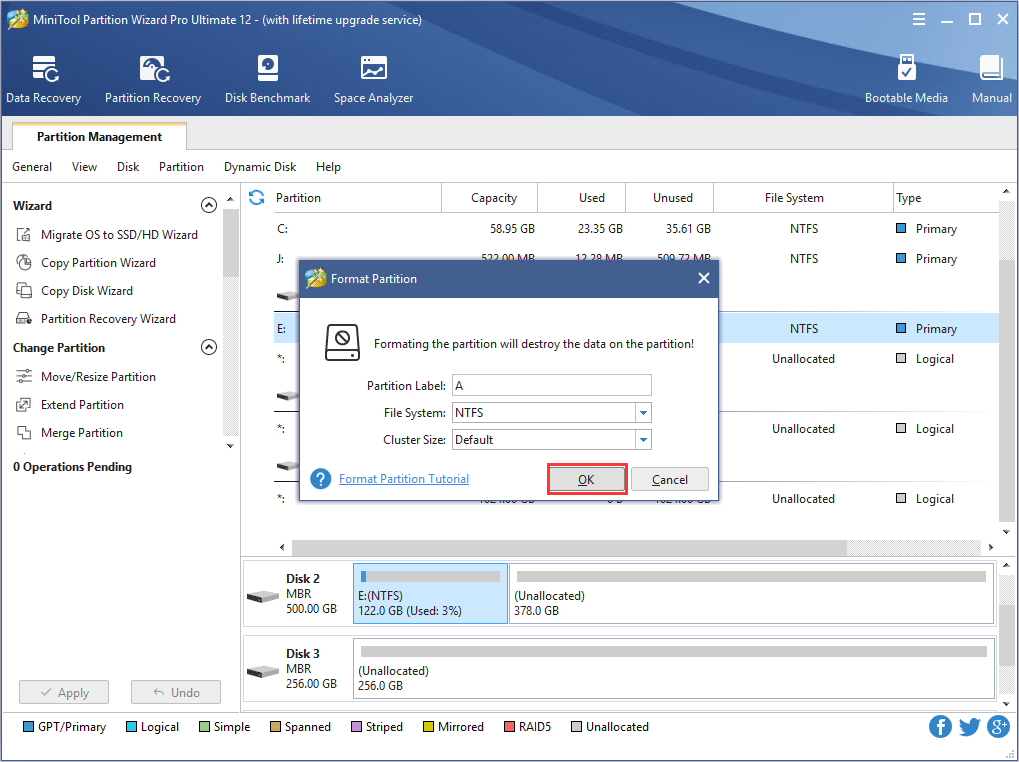
Here we will choose disk H to format. Then click the button Format and a pop up dialogue box appears.

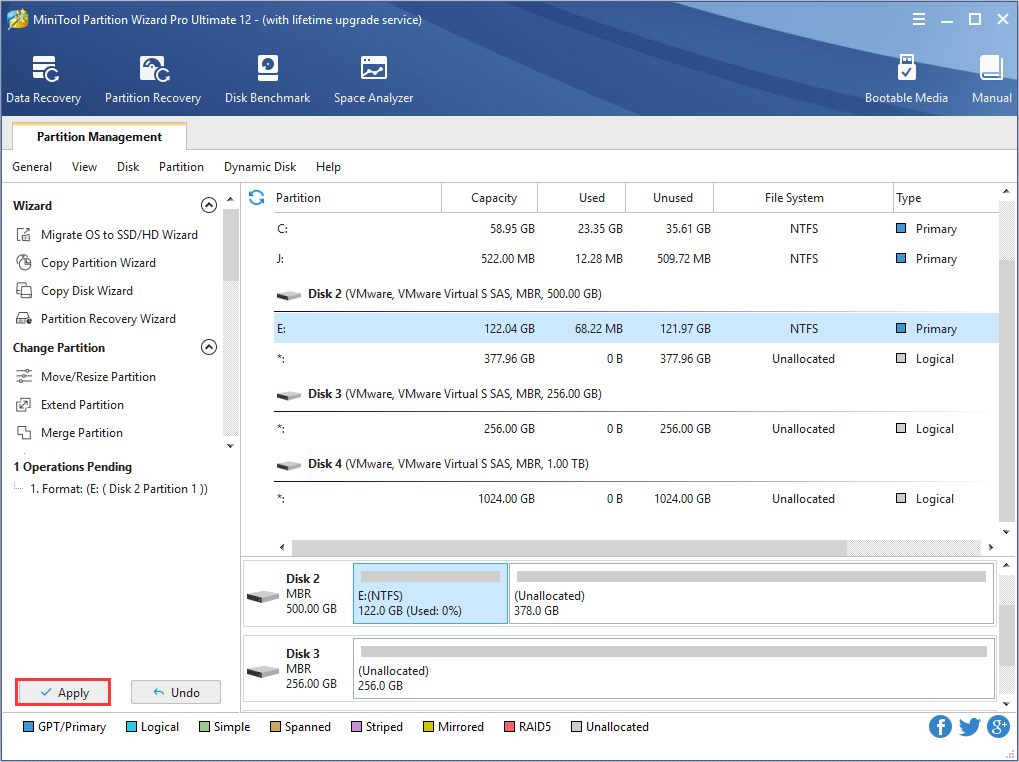
Here you are allowed to select the type of format: either to format the partition with NTFS file system or FAT32 file system. At the same time, you can set the size of cluster, we recommend setting it as Default. Apply change and your partition would be formatted.
If you want to format the disk permanently, you can reinstall the Operating System. In this process, XP has the partition and format program built in.
First, enter BIOS setting and set CD-ROM priority.
1) press Del and enter BIOS.
2) Select Advanced BIOS Features.
3) Press enter and go to the setting interface of the BIOS setting.
4) Select First Boot Device.
5) Using the up arrow or down arrow to select CDROM.
6) Press ESC to go back to the BIOS setting.
7) Save changes.
8) Press Y and restart computer.
Different BIOS has different hot keys. If you have a desktop computer, you can follow the above steps. If you have laptop computer, press F2 to enter BIOS setting.
1) Restart computer and select CD ROM, and insert in the CD of Windows XP.
2) When it shows press any key to boot from CD, press enter.
3) Soon the welcome interface of Windows appears, select install now, and press enter.
4) Computer shows permission protocol and press F8 to load information.
5) Select complete installation.
Now, you can delete all partitions and create partition. Partition is measured by MB. While 1 G equals to 1024 G, disk C usually set 8 G is enough. Set the partition size for other partitions as you like.
After partitioning, set disk C as system partition. Format it with NTFS file system and install the OS.
6) Start copying files, this is a long process. After this, restart your computer.
7) After restart, computer is loading application information.
8) The following step can be carried out according to tips. After the end of this process, restart the computer and finish the installation.
Next is to install drivers
What should be installed? Right click my computer and open the device management function in the property menu. Just click the options with a yellow question mark. All these devices need drivers. After installation, put in the CD.
1) Right click my computer and select property.
2) Select hardware and click device manager.
3) Double click the yellow?
4) Install new drivers.
5) Select yes only this time, and click next to continue. Then, select auto search and click next.
6) The installation process will be carried out automatically.
After everything is ready enter device management and you will see no yellow? This shows the drive is installed.
Then reboot the system and format the partition with FAT32 file systems. The last step is to install common applications.
As the leading partition manager, Partition Wizard has many functions in partition management. With MiniTool Partition Manager, you can Move/Resize Partition, Merge Partition, Change Cluster Size, Copy Partition, Create Partition, Delete Partition, Format Partition, Convert File System, Hide/Unhide Partition, Explore Partition, Partition Recovery, Convert Dynamic Disk to Basic Disk and much more. All these operation would be carried out under a protection mode, so you never need to worry about data loss.
Some more advanced functions: rebuild MBR, convert DPT (disk partition table) format from MBR to GTP, and recover data, move/resize system partitions, convert file systems and much more.
MiniTool Partition Manager can support both MBR and GUID partition table format running on 32/64 bits Operating System including Windows XP, Vista, Windows Server 2000/2003/2008 and the latest Windows 7.
As a partition manager with such powerful functions and performances, Partition Wizard is available for you on the website: http://www.partitionwizard.com/ Free Partition Manager Free Partition Magic Partition Manager Server Partition Magic Server
Common problems related to partition management and our solutions:
- How to boot partition?
- How to create partition?
- How to copy partitions?
- How to download partition?
- How to fix partition?
- How to perform partition recovery?
- How to repair partition?
- How to resize partitions?
- How to swap partition?
- How to restore partition?
- How to resize partition for vista 64 bit?
- Resizing partitions
- What is sd partitions?
- How to resize server partition?
- How to resize partition for vista?
- How to resize windows partition?
- How to merge partition XP?
- How to drive partition AFS?
- What is xp partition?
- What is the partition?