Partition Magic
- Windows 8 disk management
- Windows 8 partition management
- Partition in windows 7
- Active partition
- Disk partition software
- Hidden partition
- Disk partitioning software
- Hard drive partitions
- Partition server magic
- Portable partition magic
- How to remove partition
- Partition magic 6.0 download
- Formatting partitions
- Disk copy software
- Disk Partition In DOS Windows linux unix2
- Delete files permanently
- Delete Partition Windows 7
- Delete Hard Drive
- Dual boot Windows XP Windows 7
- Initialize to GPT disk
- Wipe partition in windows
- Partition recovery wizard
- Partition hard disk
- Perform windows xp hard drive partitioning
- Partition external hard drive
- Recover deleted NTFS partition
- Windows server partition magic
- Recover lost partitions
- Harddisk partition recovery
- Rebuild MBR
- FDISK format tools
- Initialize to MBR disk
- Partitioning basics
- Partition copy software
- Windows 2003 server partition magic
- NTFS hard disk recovery
- Recover fat32 partition
- Windows server 2003 partition magic
- Recover Hard Disk Partition
- Windows 2000 Server Partition Magic
- Server Partition Magic
- Partition Magic Server Torrent
- Partition Magic Server Rapid share
- Partition Magic Server 2000
- Partition Magic for Server 2008
- Server 2008 partition magic
- Partition magic server free
- Partition magic server edition
- Partition magic for Windows 2003 Server
- Partition magic for server 2003
- Symantec partition magic server
- Partition magic Windows Server 2008
- Partition magic server
- Partition magic server version
- Partition magic for Windows 2000 server
- Remove partition
- Undo Format
- Partition Magic 8 Windows Server 2003
- 2003 Server Partition Magic
- Undo last operation
- Partition magic 8 server 2003
- Vista 64 bit partition
- View partition properties
- Partition magic for server
- Partition magic for 2003
- Free partition magic for server
- Support hardware raid
- Partition magic for server 2000
- Wipe partition
- Wipe disk
- Windows xp hard drive partitioning
- Windows 7 partition software
- Reload disk information
- Clone Dynamic Disk
- SBS 2008 server partition
- Repartition server
- Bootable CD
- C drive is out of space
- C drive full
- SBS server low disk space
- Selecting Harddisk Partition
- Recover Files by Partition Recovery
- Safely upgrade disk by cloning disk
- Repartition raid
- Free Partition Recovery from Unallocated Space
- Partition Magic for Windows Server 2003
- Partition Windows 2008 64Bit
- Hiding Partitions
- Partition 2003 server
- Partition servers
- Windows Server 2003 Partitions Software
- Windows Server 2008 partition
- Windows 2008 disk management
- Windows 2003 server partition manager
- Small business server 2003 partition
- Partitioning
- Partition server 2008
- Switch from FAT32 to NTFS
- Partition Server 2003
- Supported hard disk type
- Supported file system
- Windows XP FAT to NTFS
- Windows 32 Or 64 Bit
- Server partition
- Server magic alternative
- Server disk partition software
- Server 2003 repartition dynamic disk
- Partition Windows 7 system
- Partition Windows 7 64 bit
- Partition Wizard Server
- Free upgrade
- Set driver letter
- Partition Windows 7
- Partition Windows 7 32bit for free
- Magic partition download
Set driver letter
-
After hard disk formatting, every partition would have a driver code, namely, driver letter. Driver letter is like the serial number of boxes, which enable user to know what a certain box contains on seeing the serial number. Similarly, driver letter is the serial number of partitions, helping manage hard disk file management. When calling a program, user will have a clear mind where this program exists, which is really convenient for the management of diverse files. However, it is noteworthy that drivers letter is still likely to get lost, for instance, user suddenly find that they can not see some partitions which previously exist on the disk. When facing this circumstance, user should better employ third-party partition magic software to set driver letters. Moreover, the partition magic software, MiniTool Partition Wizard for example, can still help perform other advanced disk management operations and manage disk partitions properly.
What is driver letter?
Driver letter is identifier of disk storage devices on DOS and Windows operating system and identified with 26 English letters plus a :. On earlier PC, there were generally two floppy disk drivers: "A:" and "B:". Then with the popularization of large volume disks, floppy disk gradually quits the stage of history and the current driver letter starts with "C:". Driver letter is specified when a partition is created and user can change driver letters depending on personal needs. But note that the driver letters must by the 26 English letters from "A" to "Z". The purpose of setting driver letter is to let user better manage partition data and make the data access more convenient and ordered.
Set driver letter with MiniTool Partition Wizard
User could free download MiniTool Partition Wizard at the official website http://www.partitionwizard.com and not installing this partition magic software to partition which is to be operated is strongly recommended.
Launch MiniTool Partition Wizard to set driver letter:

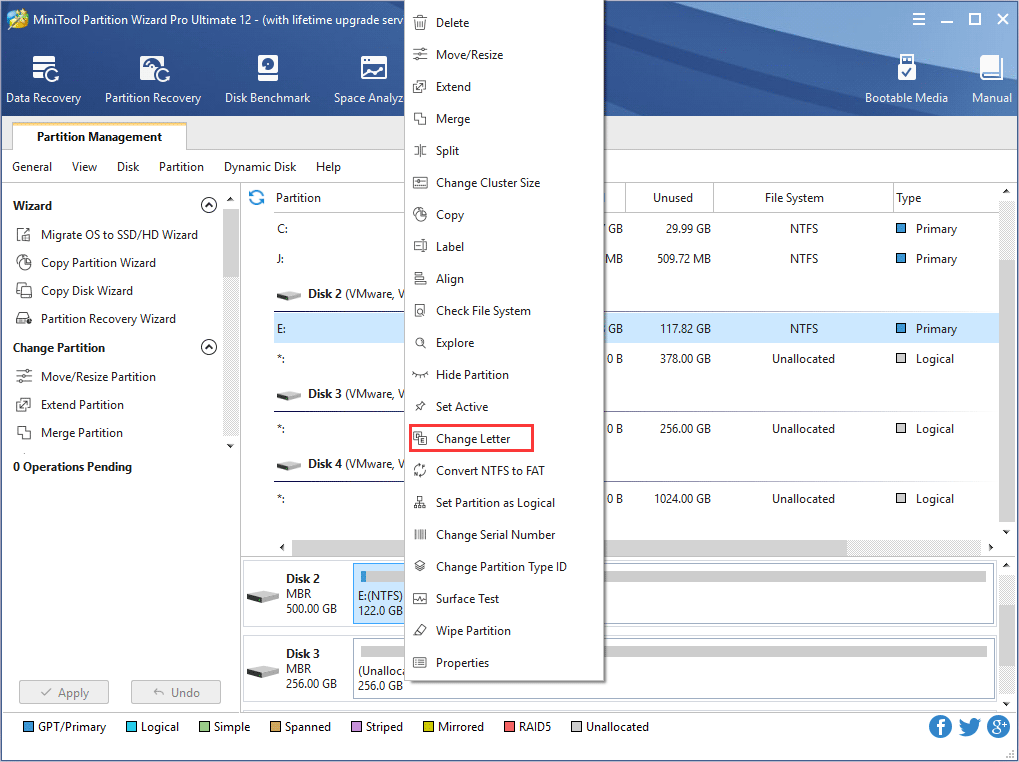
Select and right click the partition missing driver letter and then click "Change Letter".

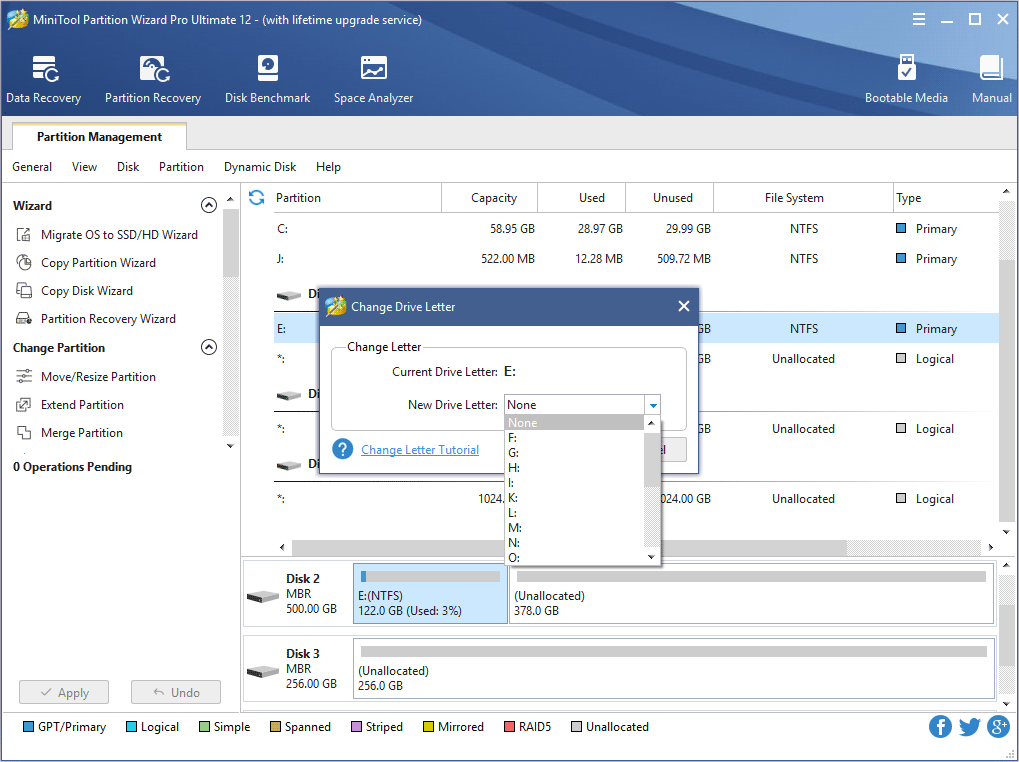
In this window user could see the partition has none driver letter currently, click the down-pointed menu at "New Drive Letter" column and select a desired letter for this driver, then click "OK".

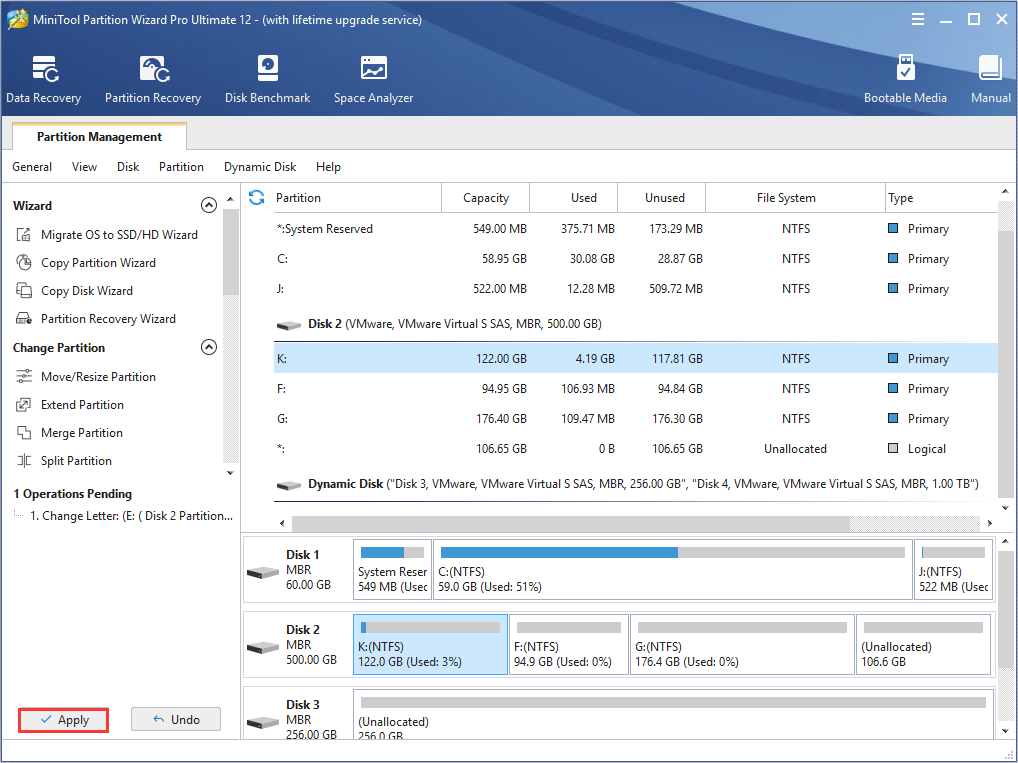
Last, click "Apply" to execute pending operation and then the driver would have a letter.