
When using a computer to cope with some things in work and life, partition loss is a common situation and all partition data is also deleted. But don’t worry. Today in this post, we will show you how to easily recover deleted NTFS partition, as well as the partition data with the best NTFS partition recovery software, MiniTool Partition Wizard.
NTFS Partition Is Lost
NTFS (New Technology File System), a proprietary file system developed by Microsoft, is widely used due to its better overall performance, improved support for metadata, reliability, etc. Thus, you create an NTFS partition for data storage.
While using a computer, it is possible that some accidents happen to you, which will lead to partition loss. The main factors are corrupted partition table, mistaken deletion (e.g. clean a wrong disk with diskpart), bad sectors, virus attack, power failure, and more.
When opening Windows Disk Management in Windows 10/8/7, you cannot see the NTFS partition but find it displays an unallocated mark in the location where the NTFS partition is originally in. All partition data is also deleted.
If you are bothered by partition loss issue now, you will be wondering about: is it possible to get partition data back? How can I recover my deleted data? Here we will show you the answers in detail as follows.
How to Recover Delete NTFS Partition in Windows 10/8/7
Is Partition Recovery Possible
Once the NTFS partition gets missing, all the partition data are lost, which probably brings immeasurable loss to you. So, is it possible to get back lost or deleted NTFS partition, as well as the data saved on the partition?
After partition deletion, the location of the partition shows unallocated. Actually, partition data still exist and can be recovered with the help of a professional data recovery program as long as no new data overwrite this location.
Use MiniTool Partition Wizard to Recover Deleted NTFS Partition
As a matter of fact, partition loss issue is asked by many users. You must ask: how can I recover deleted files from hard disk? The answer is to use a piece of professional partition recovery software.
Well then, which one is the best partition recovery software? MiniTool Partition Wizard is a good choice for NTFS partition recovery. And it can be used to deal with many issues, for example, extend partition, rebuild MBR, migrate OS, copy disk, convert disk between MBR and GPT, manage dynamic disk and more.
Importantly, as a piece of professional data recovery software, it offers you two powerful features to recover data from deleted NTFS partition in Windows 10/8/7, such as Partition Recovery and Data Recovery.
The first feature enables you to recover deleted NTFS partition, as well as the files saved on the target drive. And the second option allows you to recover files from deleted NTFS partition instead of recovering the entire partition.
For NTFS partition recovery, you can get MiniTool Partition Wizard Ultimate Edition from the following button. Then, follow the step-by-step guide to start recovery.
Undelete Partition via Partition Recovery Windows 10/8/7
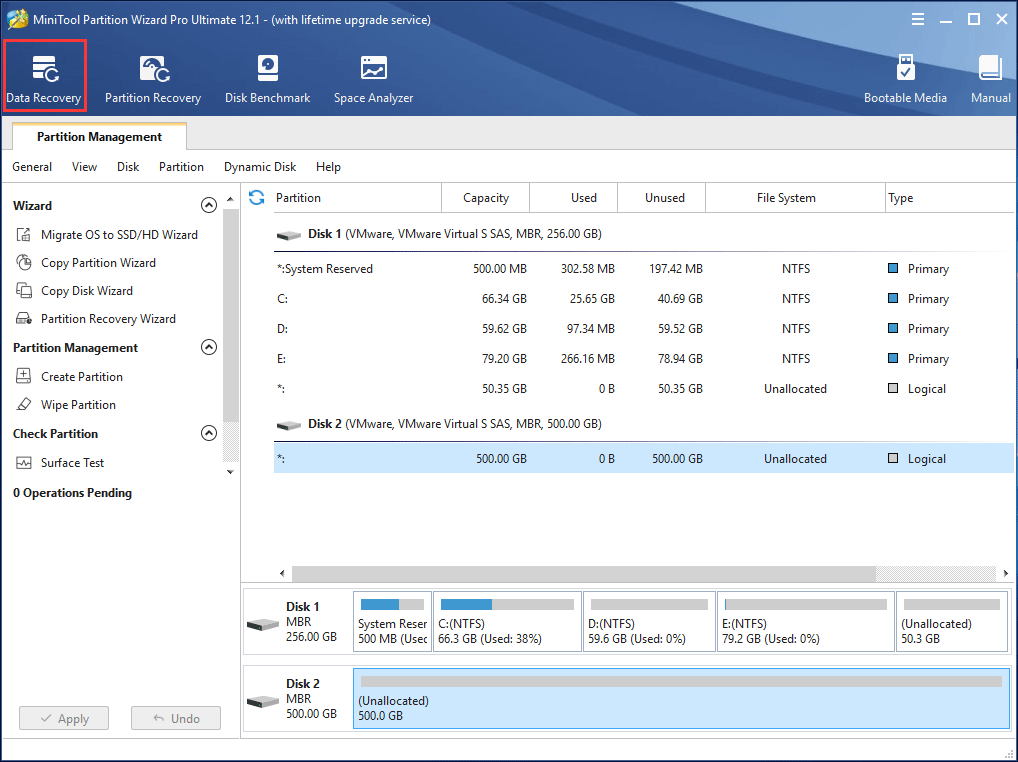
Step 1: After installing MiniTool Partition Wizard, please launch this partition software to its main interface. Here you can see your disk partition becomes “unallocated”. Here, you can click Partition Recovery in the toolbar to recover files from unallocated space. Or, you can right-click on the target hard drive to select this feature or select it from the Check Disk menu to undelete partition.
Take the first way as an example.
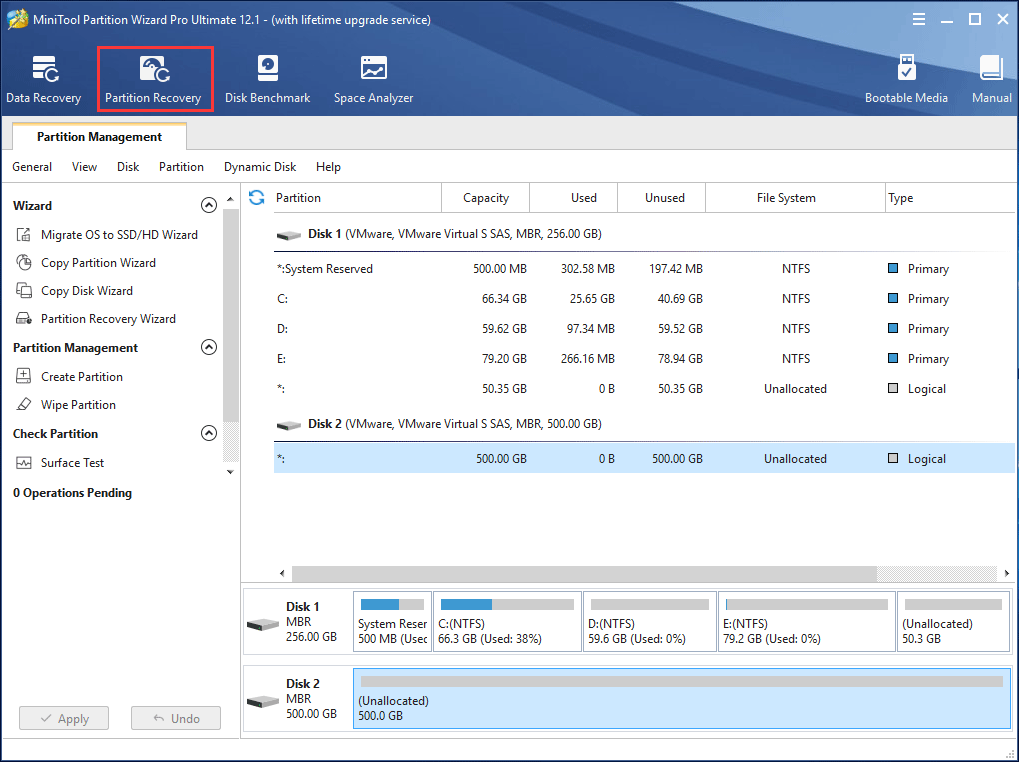
Step 2: In the pop-up window, click the Next button to continue.
Step 3: On the page below, choose a disk you want to recover.
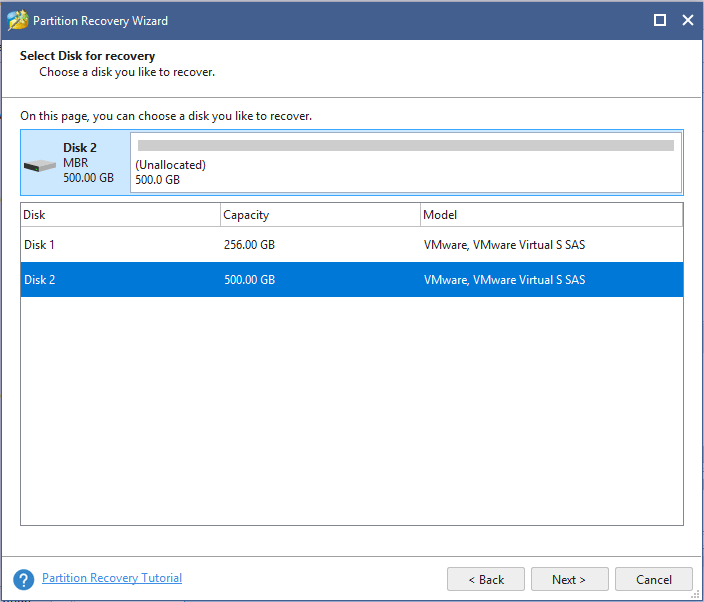
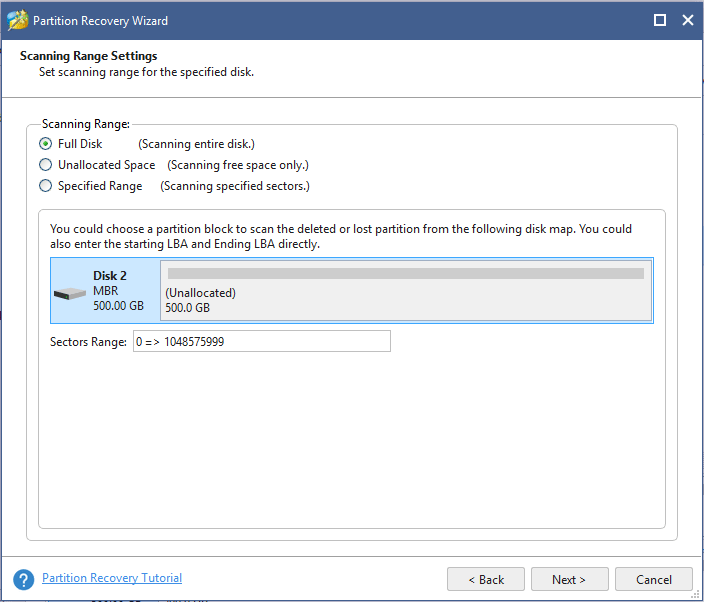
Step 4: In this interface, three scanning ranges are listed:
- Full Disk: it enables you to scan the entire disk to find deleted or lost partitions.
- Unallocated Space: this option only helps to scan free space to quickly find needed partitions.
- Specified Range: this mode allows you to enter the starting LBA and Ending LBA directly to perform this scan.
Please select a scanning range for the specified disk and click Next to continue.
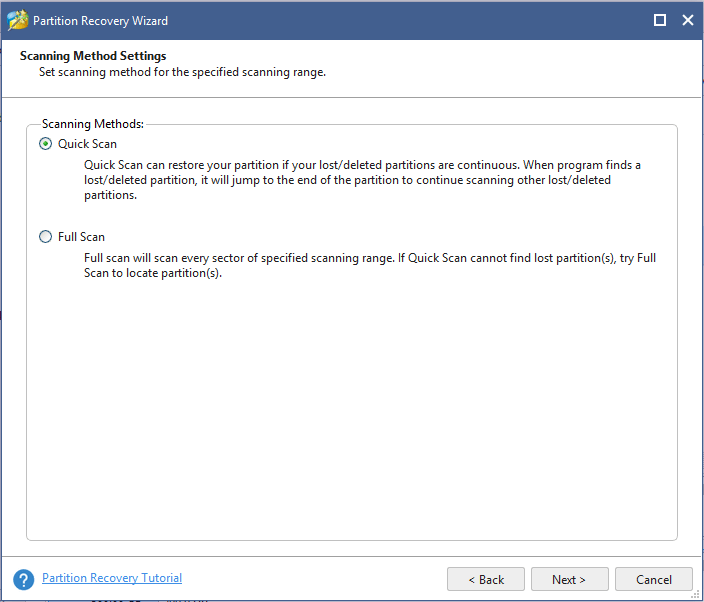
Step 5: Now you need to choose a scanning method for the scanning range you have set in the above step to recover deleted NTFS partition. Two scanning methods are here:
- Quick Scan: this scanning method is suitable to restore your partitions if your partitions are continuous. That is to say, when finding a lost/deleted partition, this software will jump to the end of this partition to scan other partitions.
- Full Scan: this mode is designed to scan every sector of the scanning range you have chosen when Quick Scan fails to work.
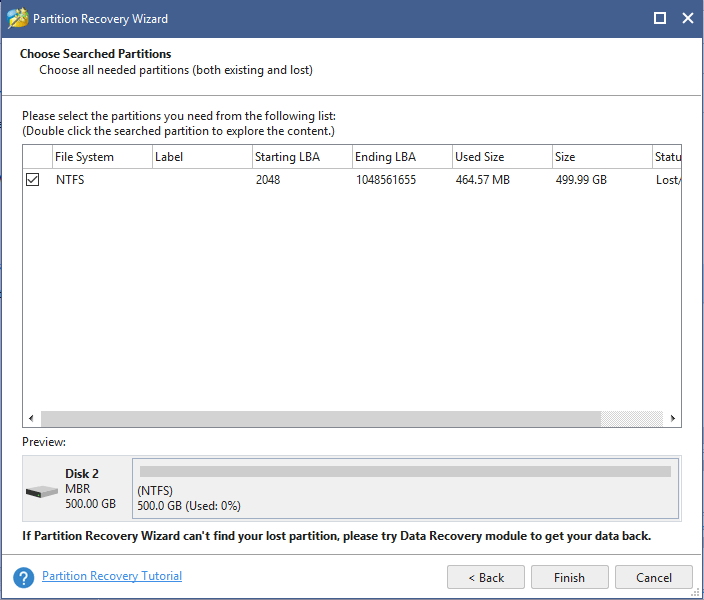
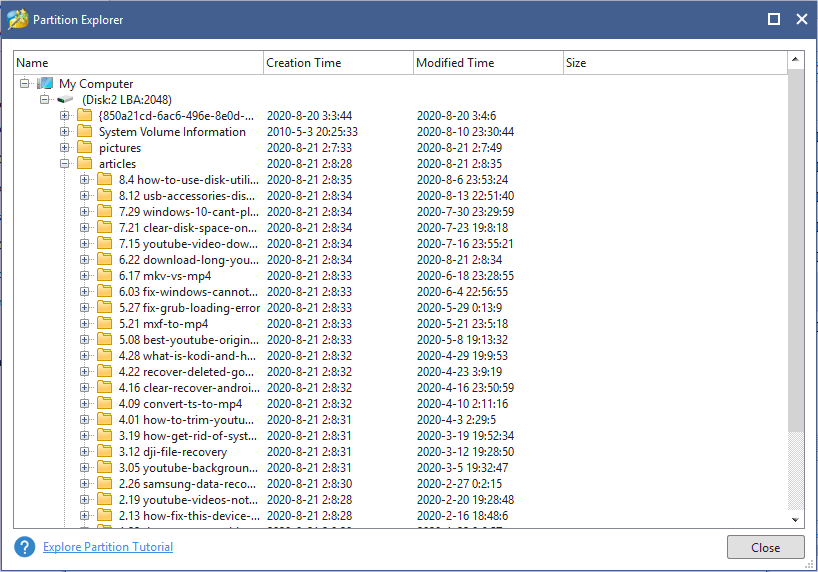
Step 6: After finishing the scan, you can see all deleted NTFS partitions and existing partitions are listed in the pop-up interface. Please check all needed partitions (both existing and lost) and then click Finish to go back to MiniTool Partition Wizard main interface.
Step 7: Then in the main interface, you can preview your deleted NTFS partitions are displayed. You may find the recovered partitions don’t have a drive letter and you should assign a letter for them. Just select a recovered partition, and then click Change Drive Letter in the left pane. Then in the pop-up window, select a new letter from the drive letter list.
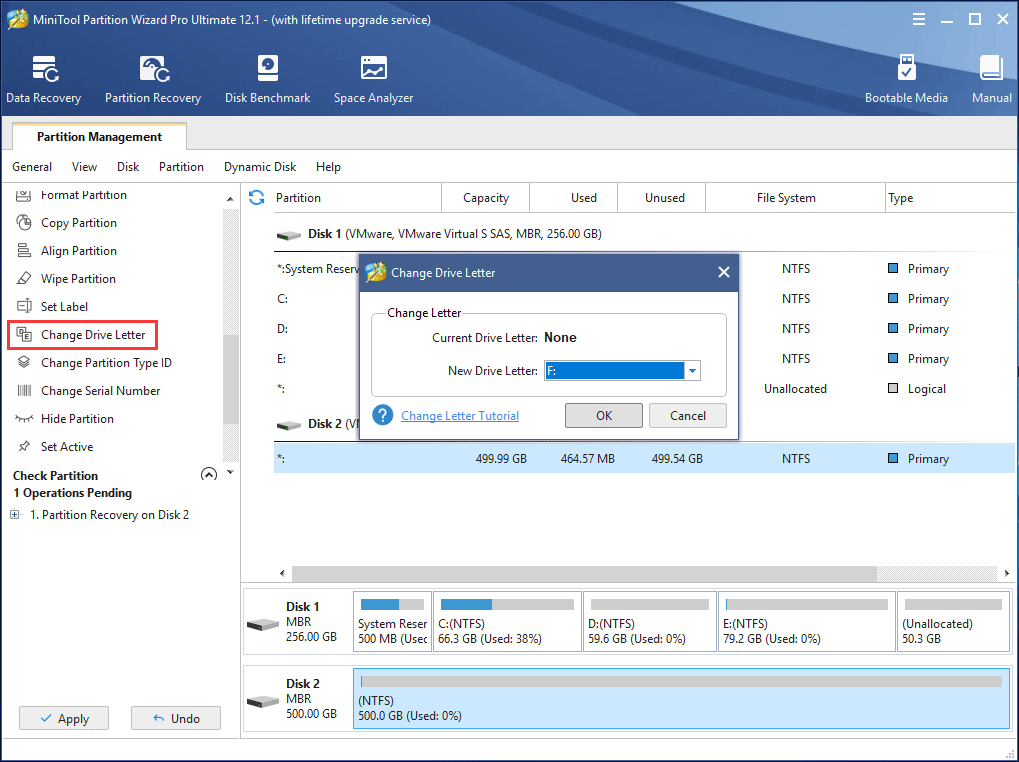
Step 8: Finally, click Apply to execute this operation.
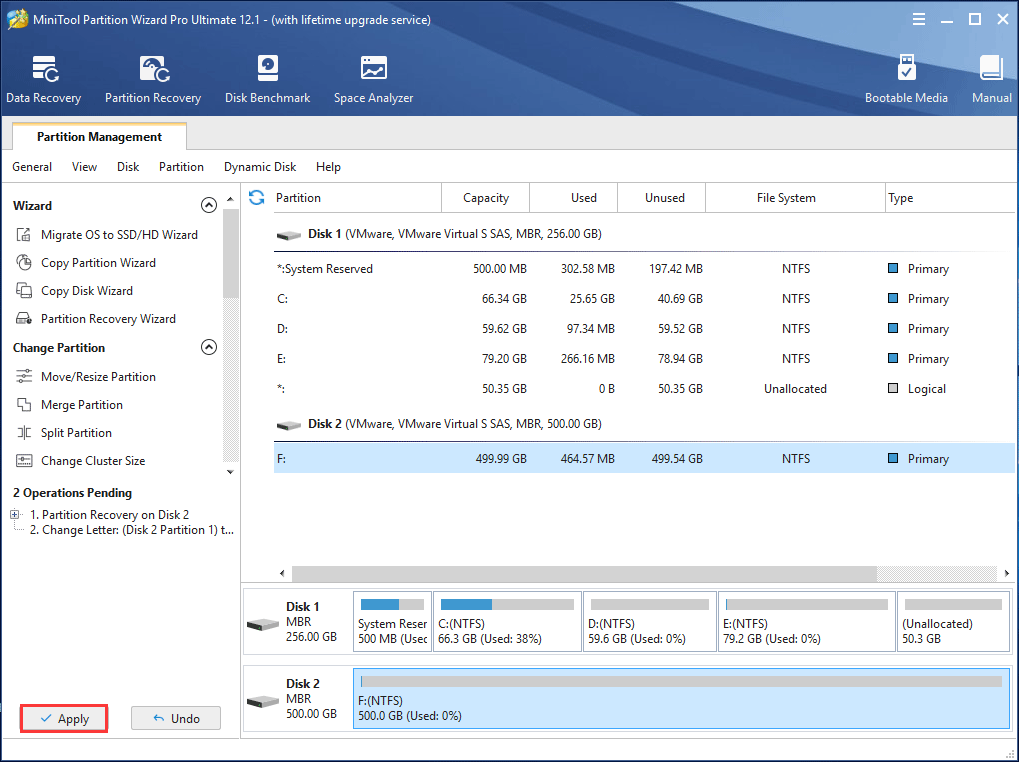
Now with the help of MiniTool Partition Wizard, you can easily recover NTFS partition as well as partition data. After finishing all these steps, you can access your partition data. If you are interested in MiniTool Partition Wizard and think it is useful to undelete partition, please share it and let other persons deal with their issues effectively.
Recover Data from Deleted NTFS Partition via Data Recovery
In addition, MiniTool Partition Wizard has another feature called Data Recovery. If you fail to recover deleted NTFS partition with Partition Recovery feature, please try this one.
This function is suitable to only recover data from deleted NTFS partition, not to retrieve the deleted partition. With it, you are able to handle different data loss issues in Windows 10/8/7, for example, recover deleted files from a local disk or an external hard drive, removable disks like USB drive, SD card, etc.
Above all, you can use it to restore data from lost partitions because of accidental deletion or OS reinstallation, RAW partition, formatted partition, and damaged drives.
Before NTFS partition recovery, you still need to get MiniTool Partition Wizard Pro Ultimate Edition. Then, install it on your Windows 10/8/7 computer for a try.
How do you recover deleted files? Follow the guidance now.
Step 1: Run MiniTool Partition Wizard to its main interface where you can click Data Recovery from the toolbar.
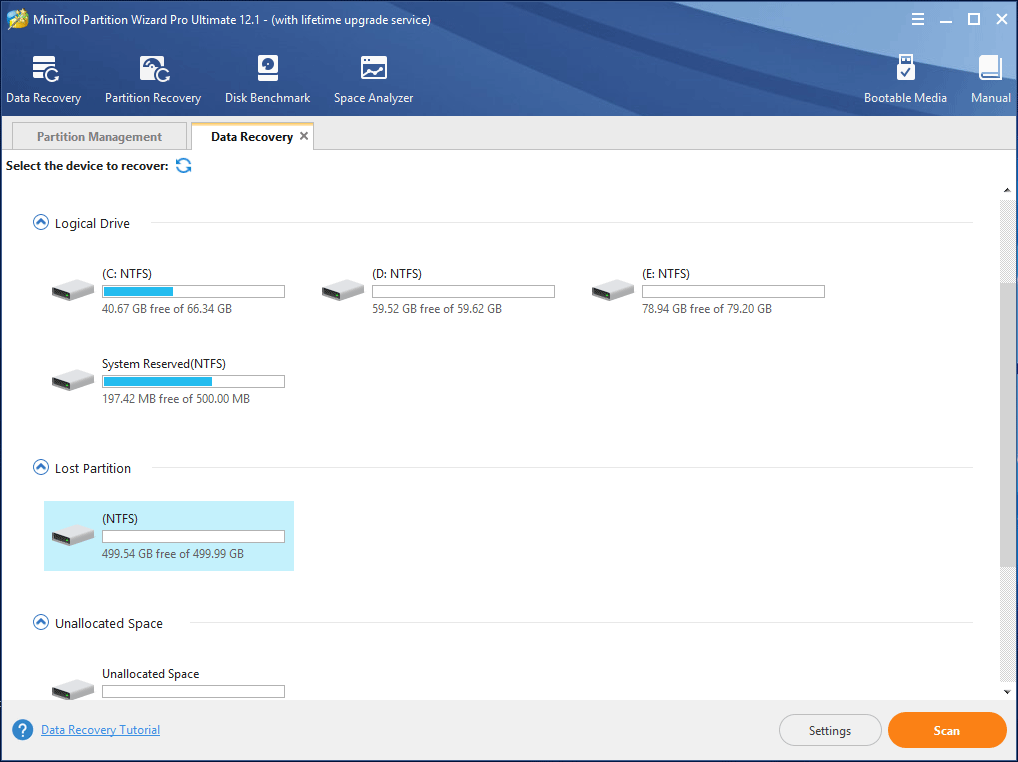
Step 2: In the pop-up window, you see all the partitions, as well as hard disks, are listed. Here, you can choose the lost partition to scan or unfold Hard Disk to choose the target disk which contains deleted partition(s). Here, take the first option as an example.
Then, click the Scan button in the lower right side to start a full scan.
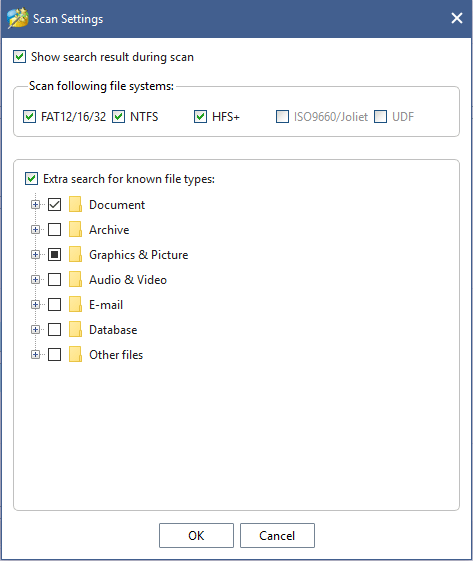
Step 3: Now MiniTool Partition Wizard is scanning your selected partition. The scanning time is different based on disk capacity and data amount, please wait patiently until the scan completes for the best recovery result.
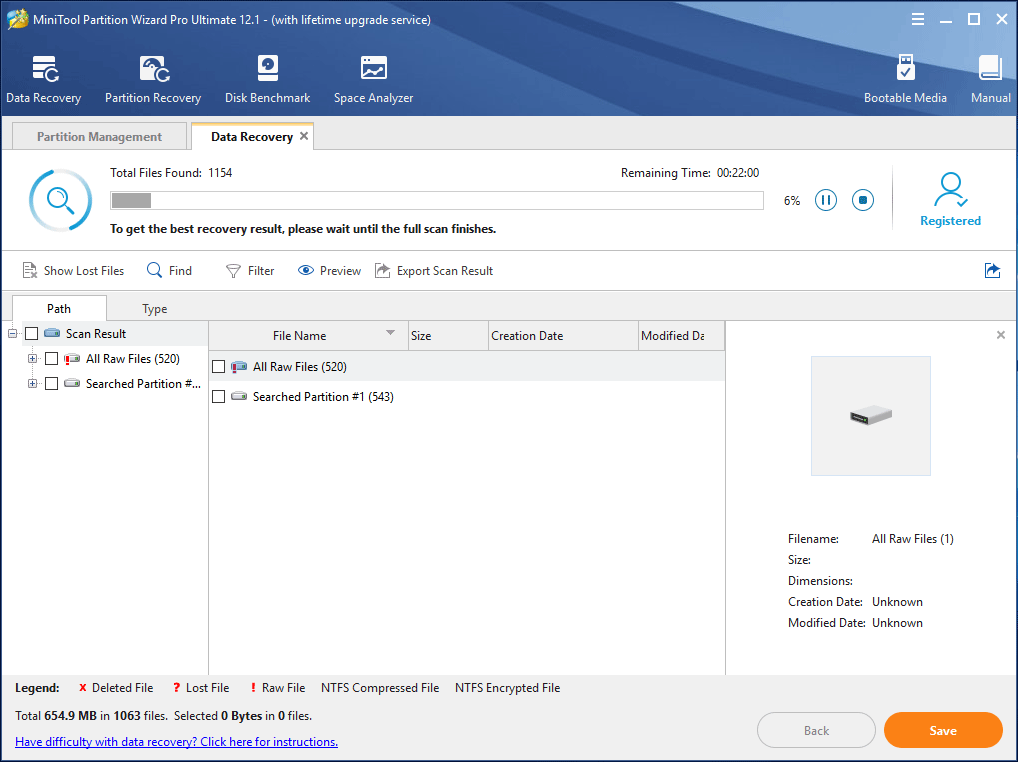
Step 4: After finishing a scan, the lost NTFS partition will be found. Please unfold each folder in the partition, check all needed files and click the Save button to store these files to a safe location. Here Find, Filter and Type are three options which are useful to quickly find needed files.
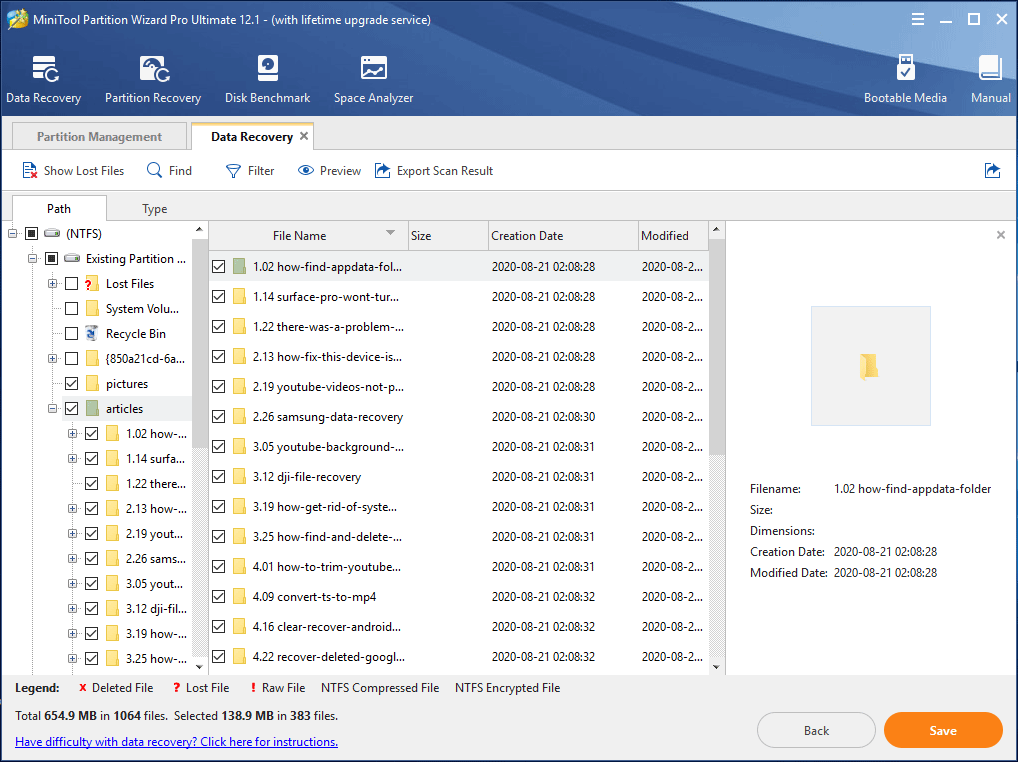
After recovering files from the deleted NTFS partition, you can create a new partition on the unallocated partition with the Create Partition feature of MiniTool Partition Wizard.

MiniTool Partition Wizard, a piece of powerful NTFS partition recovery software, is really helpful to recover deleted NTFS partition and data or retrieve files from deleted NTFS partition. If you like this software, please get it to have a try or share it with your friends.
Suggestion: Make a Backup to Avoid Data Loss
Partition loss is very common since nobody can ensure no mistake happens during managing your disk. Besides, it is troublesome and time-consuming to do data recovery although the professional software can get lost partition and data back to a certain degree.
So, in order to avoid data loss, it is necessary to do something. In our opinion, the best choice is to make a backup. Here we recommend you to use the professional Windows backup software, MiniTool ShadowMaker.
It is compatible with Windows 10/8/7, enabling you to back up files, operating system, partitions, and disk. This software can help you to only back up changed or newly added data with its Incremental or Differential options. Besides, it can support automatic backup. Above all, it also offers another two backup methods for you, such as file sync and disk clone.
To avoid data loss, you can get MiniTool ShadowMaker Trial Edition to back up files. Just click the following button to download it.
MiniTool ShadowMaker TrialClick to Download100%Clean & Safe
How to back up files after you recover deleted NTFS partition and partition data? Here are the steps.
Step 1: Run MiniTool ShadowMaker to its main interface.
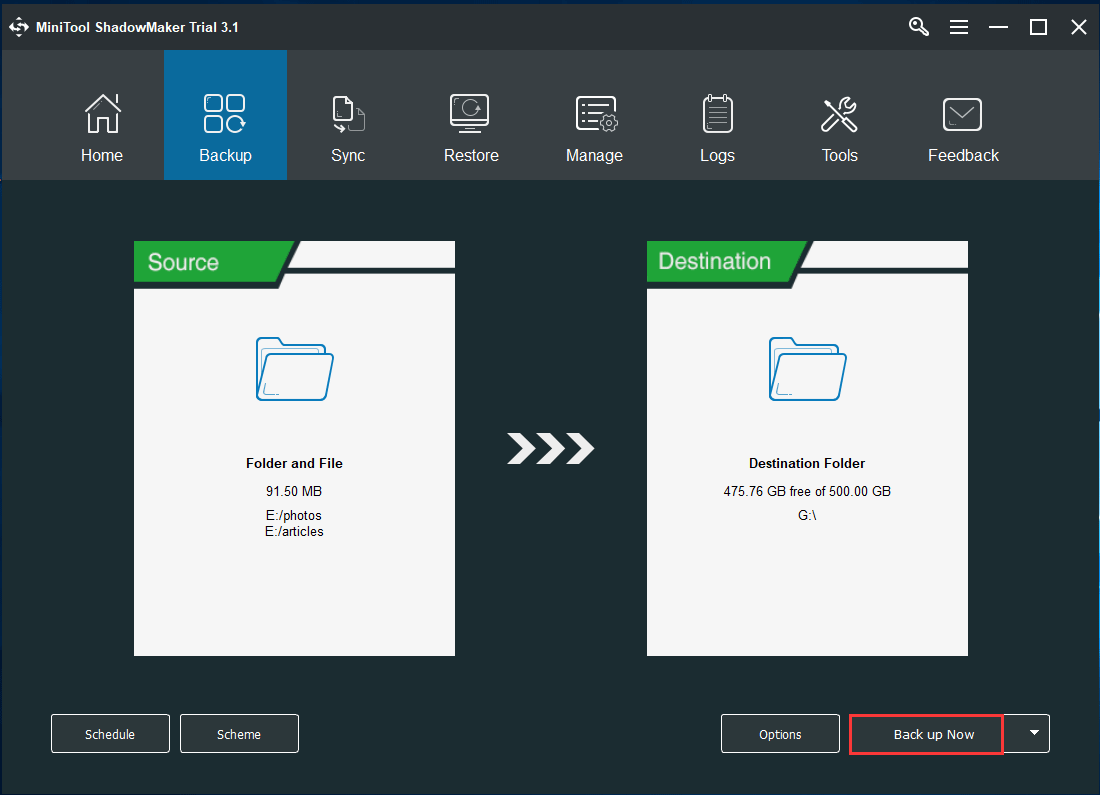
Step 2: Go to the Backup page, click the Source and Destination sections respectively to choose files you want to back up and target path to save the backed up files.
Step 3: Finally, hit Back up Now to start file backup.
Related article: 3 Ways to Create Automatic File Backup in Windows 10 Easily
Bottom Line
Your NTFS partition is deleted in Windows 10/8/7? Many files are saved on the lost drive? MiniTool Partition Wizard is a good choice to recover delete NTFS partition or get deleted files back from NTFS partition.
To avoid data loss again, you had better have a habit of backing up your computer files with MiniTool ShadowMaker.
If you have any question during using our software, you can leave us comments in the text below or email via [email protected]. Some suggestions are also appreciated.
About The Author

Position: Columnist
Vera is an editor of the MiniTool Team since 2016 who has more than 5 years’ writing experiences in the field of technical articles. Her articles mainly focus on disk & partition management, PC data recovery, video conversion, as well as PC backup & restore, helping users to solve some errors and issues when using their computers. In her spare times, she likes shopping, playing games and reading some articles.