
When there are some problems with your partition, you may not access the partition or even not boot your computer. Thus, this post will introduce 3 different cases of partition repair and show you how to make partition repair in Windows 10/8/7.
When Need to Make Partition Repair
A partition is a logical separation of a whole hard disk and a partition can be used to store system files and data. However, if a partition is corrupted, what may happen?
A corrupted partition may be caused by a lot of reasons, such as virus attack, improper operations, environmental reasons and so on.
In general, you may receive all kind of problems when a partition or the partition table is corrupted, and here are three common issues:
- The computer can’t boot.
- The partition can’t be accessed.
- The partition is lost.
However, the most important thing is to repair the partition. Thus, do you know how to make partition repair in Windows 10/8/7?
And in this post, we will show you how to repair partition with 3 different cases and they will be introduced one by one.
Case 1. How to Make Partition Repair When Computer Can’t Boot?
Now, we will introduce the first situation on how to repair partition when the computer can’t boot. Sometimes when a computer fails to boot, it may because there is a problem of the system partition. The system partition must be an existing partition of a hard disk which can be configured for a computer to operate.
If the system partition is corrupted, you may encounter the issue computer can’t boot. Thus, what you need do is to fix corrupted partition so as to make the computer return to the normal state.
However, as your computer can’t boot, the bootable media is necessary. So, MiniTool Partition Wizard, a professional partition manager, is a powerful program that is designed to deal with various partition and disk problems.
It can also help you to create the bootable media which can be used to boot the abnormal computer, thus you can check file system or rebuild MBR so as to fix the problem computer can’t boot.
In order to make partition repair Windows 10, you need to purchase MiniTool Partition Wizard and we will show you how to operate step by step.
Solution 1. Check File System
If you encounter the problem computer failed to boot, you can try to check the file system. And we will show you how to repair partition by checking the file system step by step.
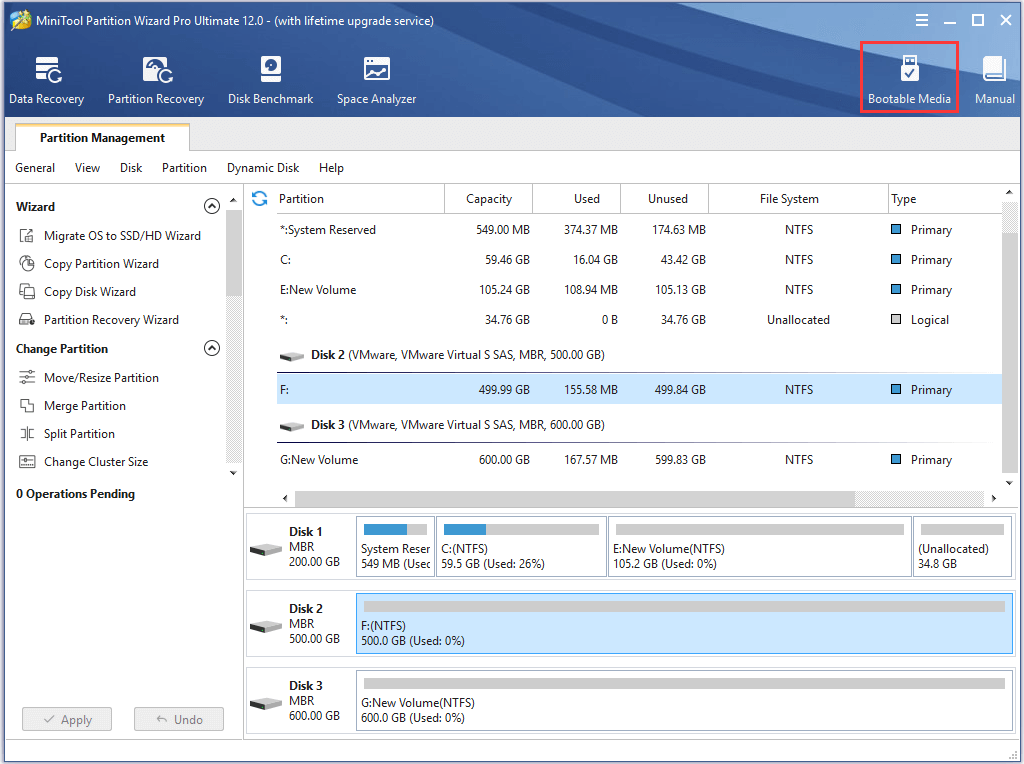
Step 1: Install MiniTool Partition Wizard to a normal computer and launch it to enter its main interface. Then click Bootable Media feature to create a bootable CD/DVD or a USB drive to continue.
Step 2: Connect the bootable media to your computer which can’t boot and change the BIOS settings so as to boot your computer from it and to enter MiniTool Recovery Environment.
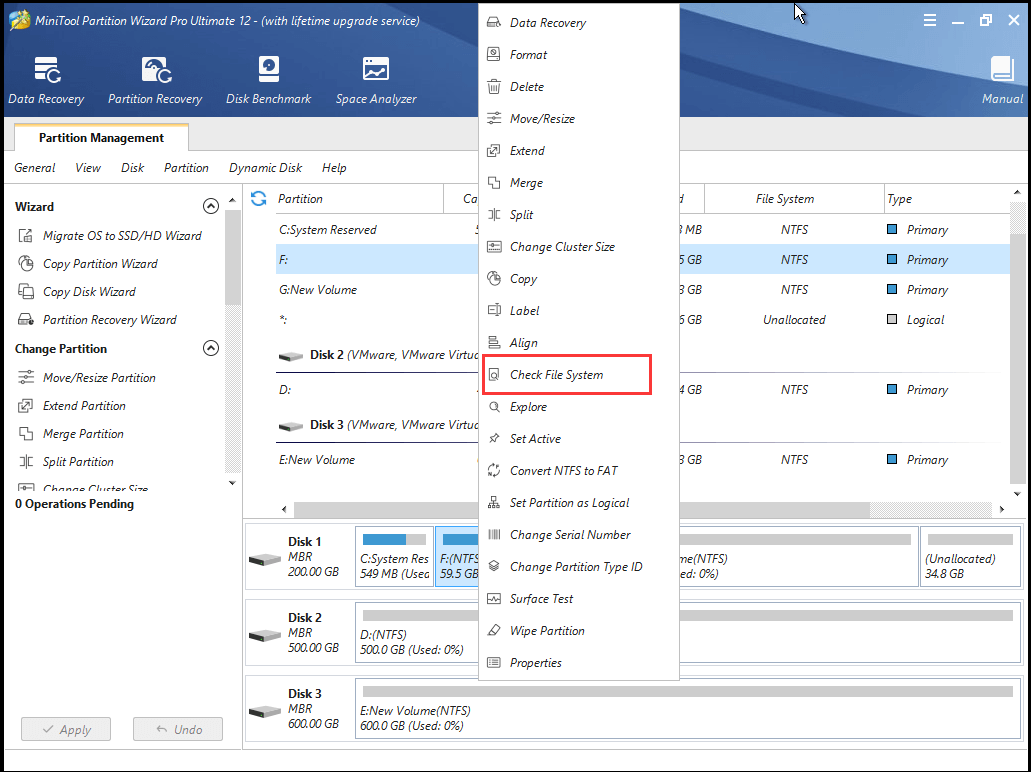
Step 3: Select the system partition and choose the Check File System feature from the context menu to continue.
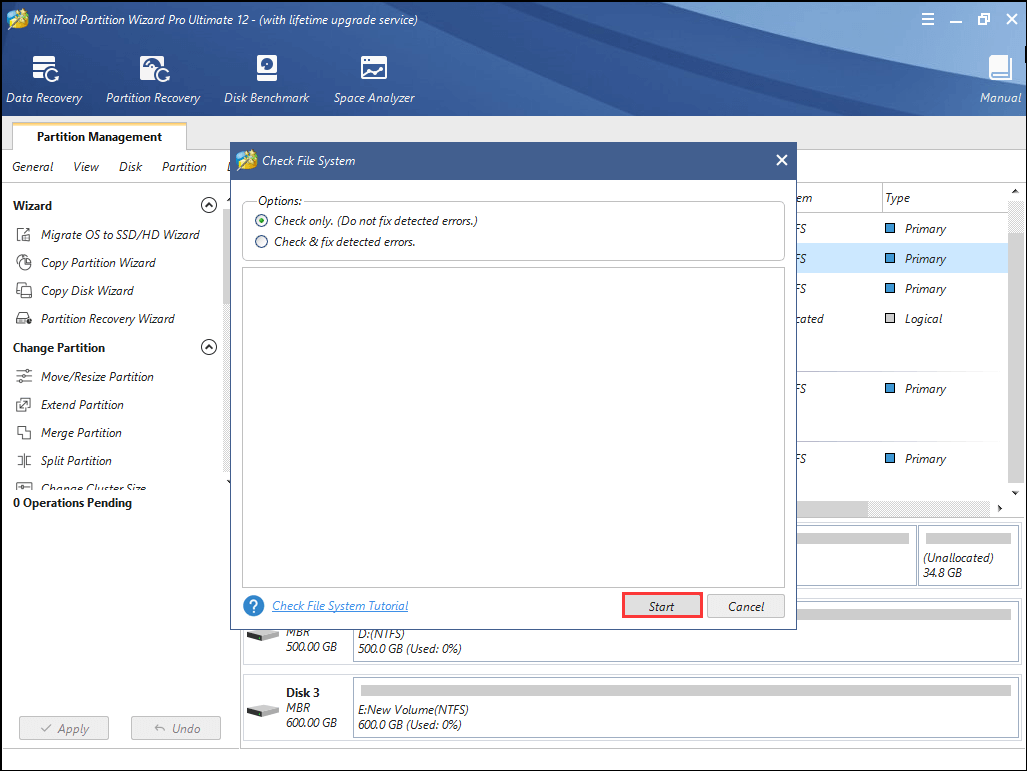
Step 3: In the popup window, you can see two options. In order to make partition repair Windows 10, you had better select the second one which can check and fix the detected errors. Then click Start to go on.
When the processes are finished, you can restart your computer to check whether you have repaired the partition successfully and fixed the issue computer can’t boot.
Solution 2. Rebuild MBR
MBR is an essential part of booting the computer. If the MBR of the partition is corrupted, you may also encounter the issue computer can’t boot. Thus, what you need do is to rebuild MBR to fix the problem.
To rebuild MBR, MiniTool Partition Wizard is also competent. Now, we will show you how to repair MBR with the repair partition tool – MiniTool Partition Wizard.
Step 1: Boot your computer from the bootable media so as to enter MiniTool Recovery Environment.
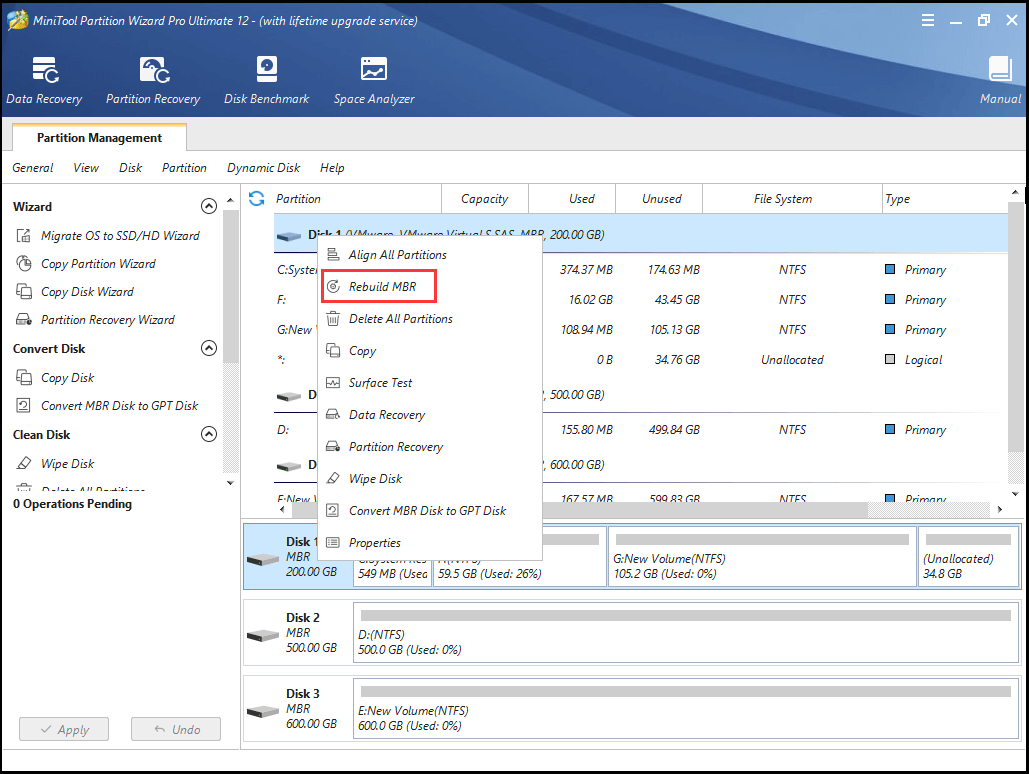
Step 2: Select the system disk and choose the Rebuild MBR feature from the context menu to go on.
Step 3: Then click Apply to confirm the change.
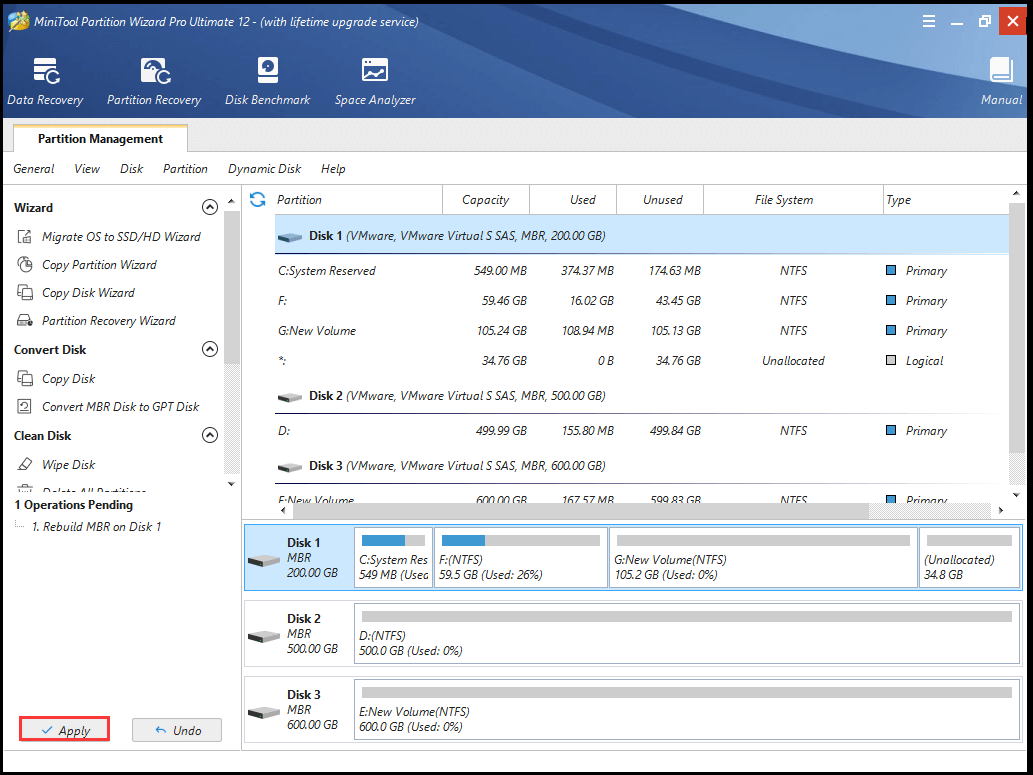
When you have finished the above steps, you can restart your computer to check whether your computer can boot successfully.
There are two ways to make partition repair when encountering the problem computer failed to boot due to the corrupted partition.
Case 2. How to Make Partition Repair When It Is Inaccessible?
In the above part, we have introduced the first situation on how to repair corrupted partition when the computer can’t boot. Now, in this part, we will introduce the second one. How to make partition repair Windows 7 when it is inaccessible?
When the partition is corrupted, you may receive an error message which tells you that the partition is inaccessible, as the following picture:
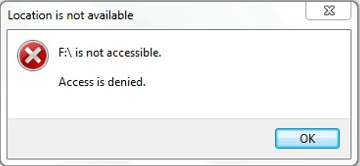
As a matter of fact, to fix this problem, what you can do is to format the partition. However, formatting a partition or a hard drive will give rise to data loss.
Thus, the first thing you need do is to recover the data and then the second step is to format the partition.
And here, MiniTool Partition Wizard is a powerful program which can help you to recover data and format the partition with ease.
So in order to fix corrupted partition, you can purchase MiniTool Partition Wizard Pro Ultimate edition.
Then we will show you how to recover data and format a partition with this repair partition tool.
Step 1: Install the software and launch it to enter its main interface.
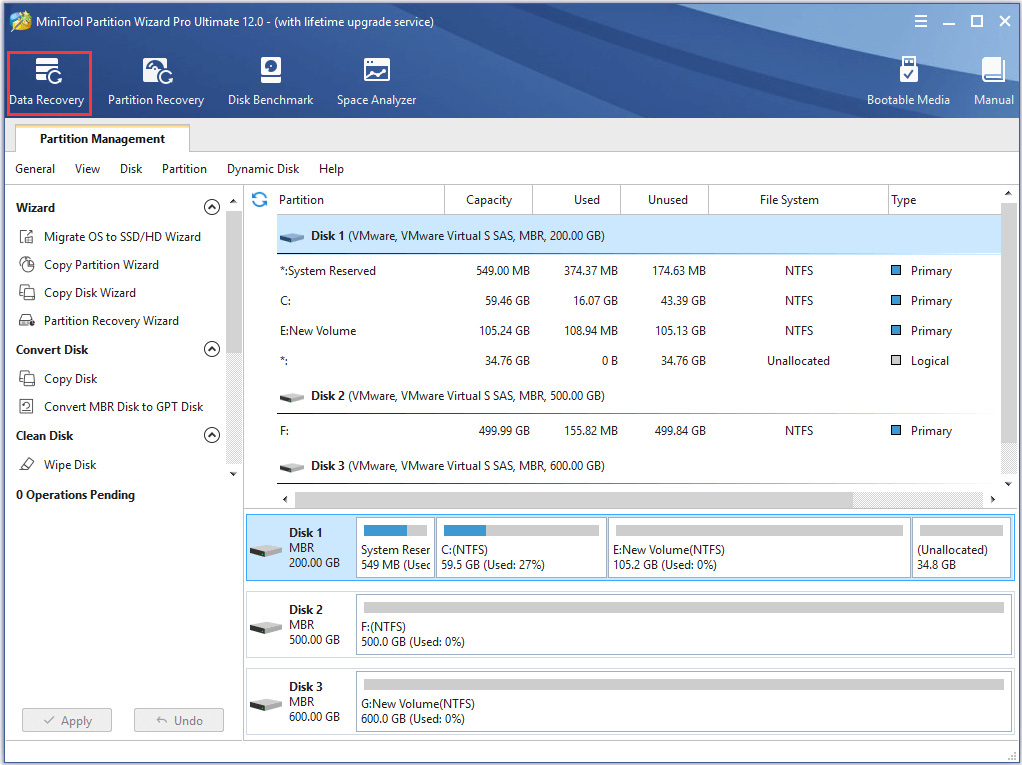
Step 2: Select the Data Recovery feature in the Tools bar to go on.
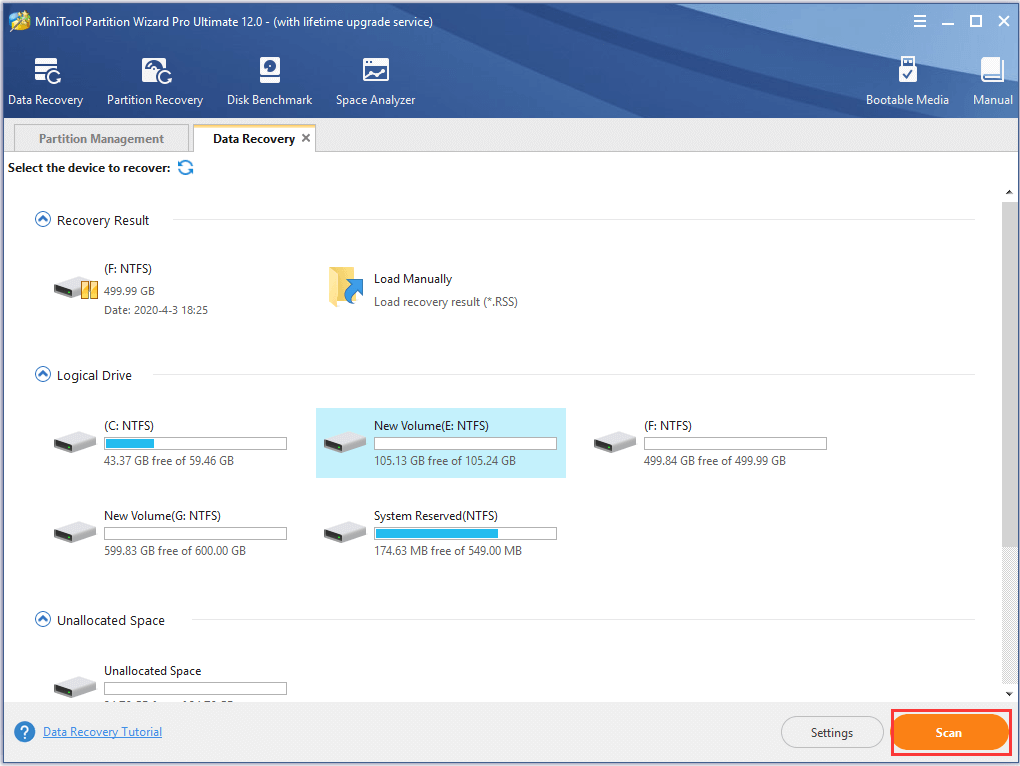
Step 3: In the popup window, please select the partition which has encountered the issue access is denied and click Scan to continue.
Step 3: When the scanning process is finished, you can find that all files in this partition are listed here. Thus, you can check the files you want to save and click Save to continue.
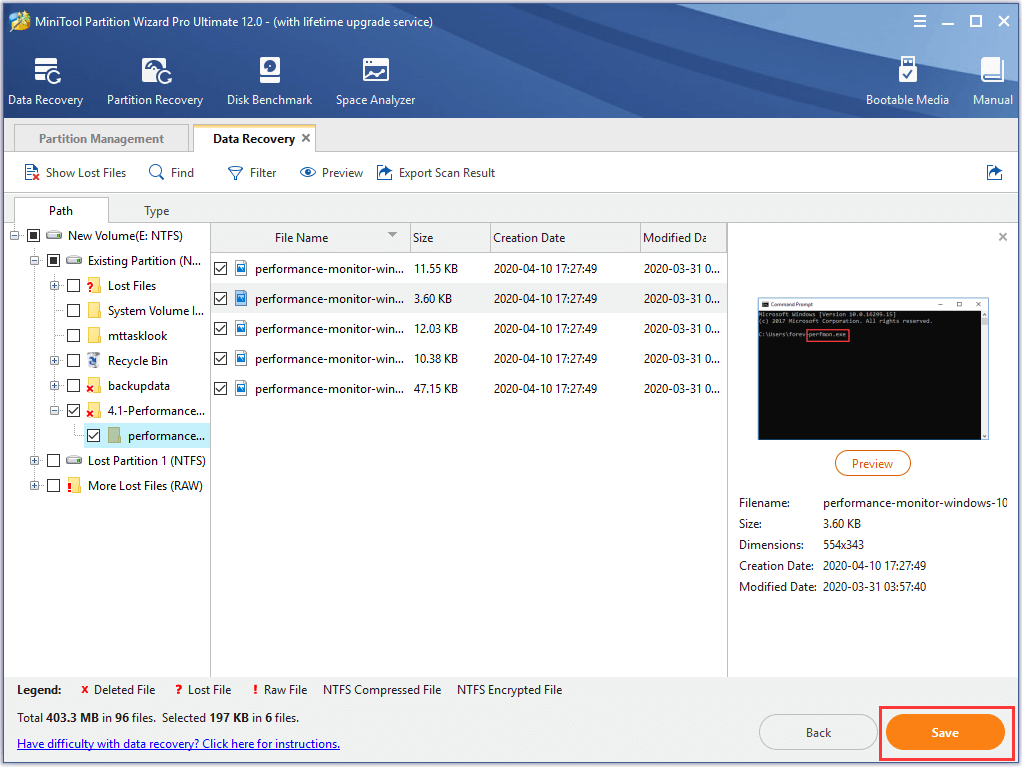
Step 4: Next, you are required to choose a destination for the files you want to save and click OK to continue. It is recommended to choose an external hard drive.
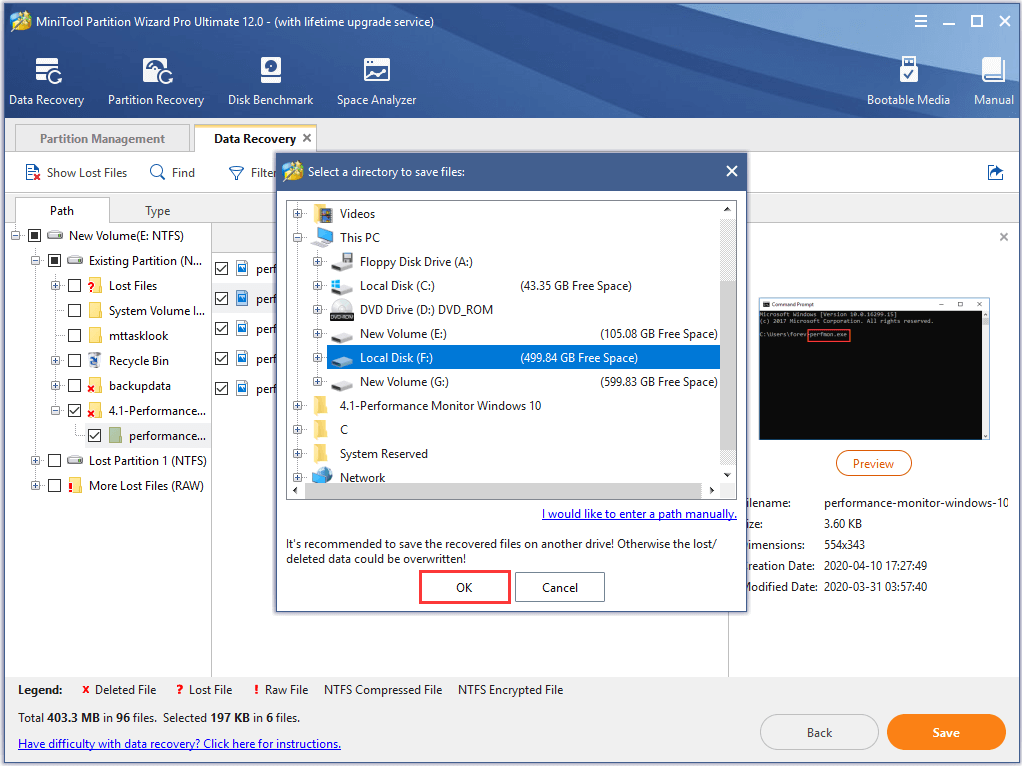
Step 5: When you have recovered the data in the corrupted partition, it is time for you to format the partition. Thus, you need to close the Data Recovery window and return to the main interface of MiniTool Partition Wizard.
Step 6: Select the corrupted partition and choose Format from the context menu to continue.
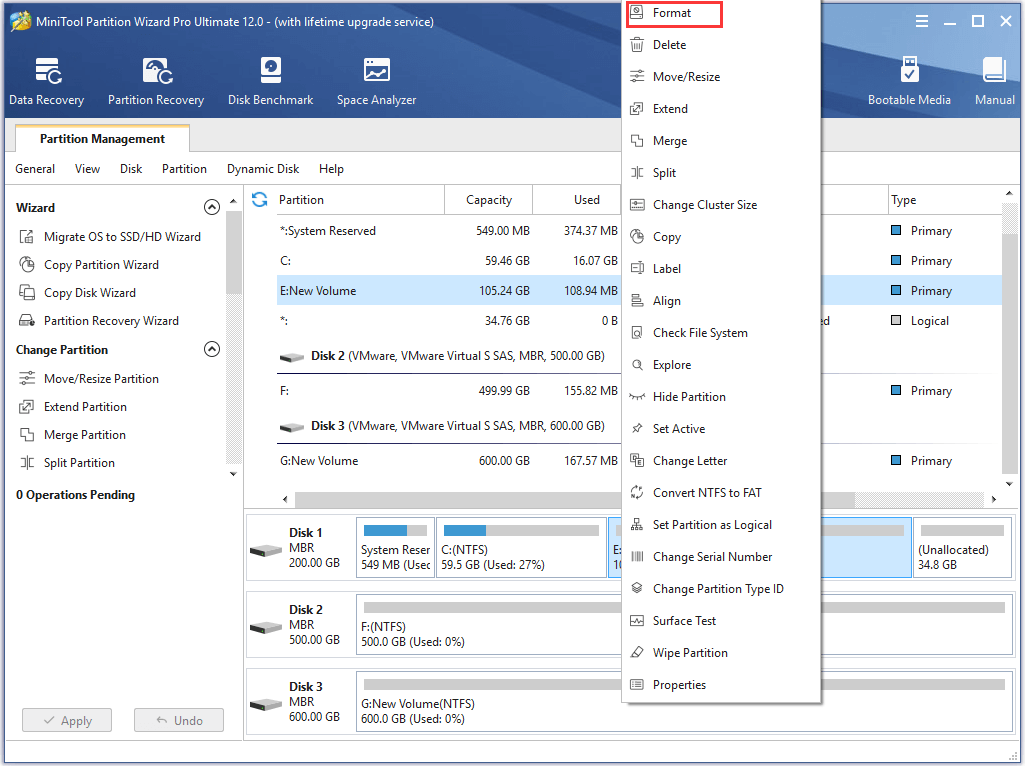
Step 7: Next, you are required to set some partition elements, such as Partition Label, File System, and Cluster size. Then click OK to continue.
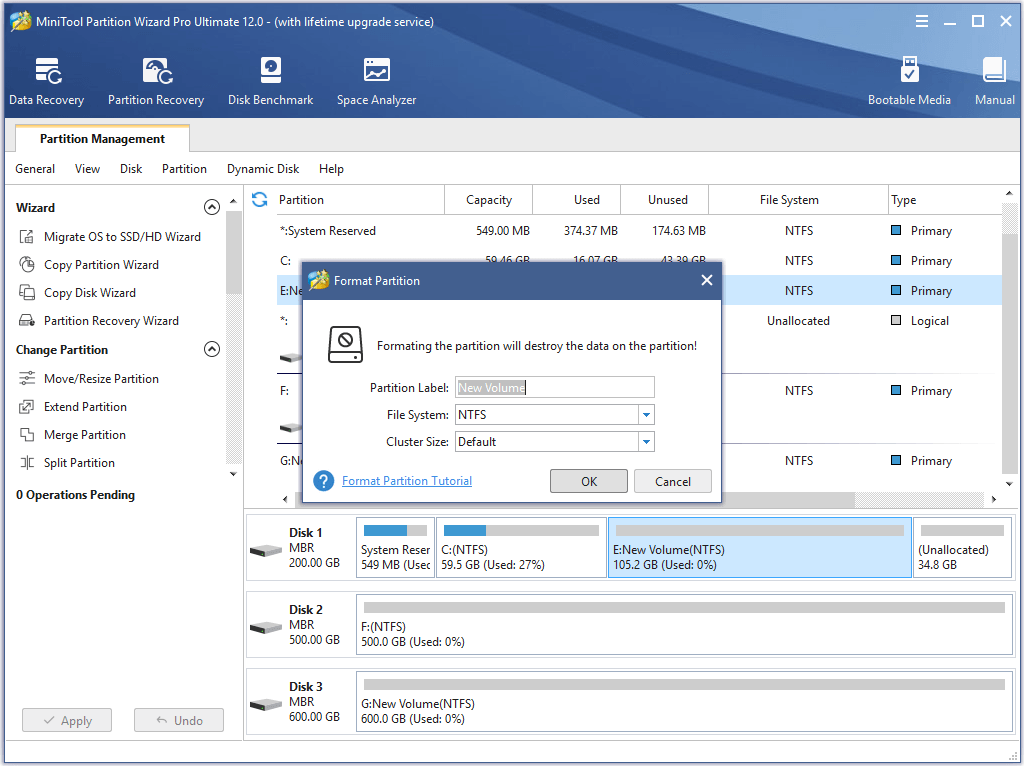
Step 8: Returning to the main interface, click Apply to confirm the pending operations.
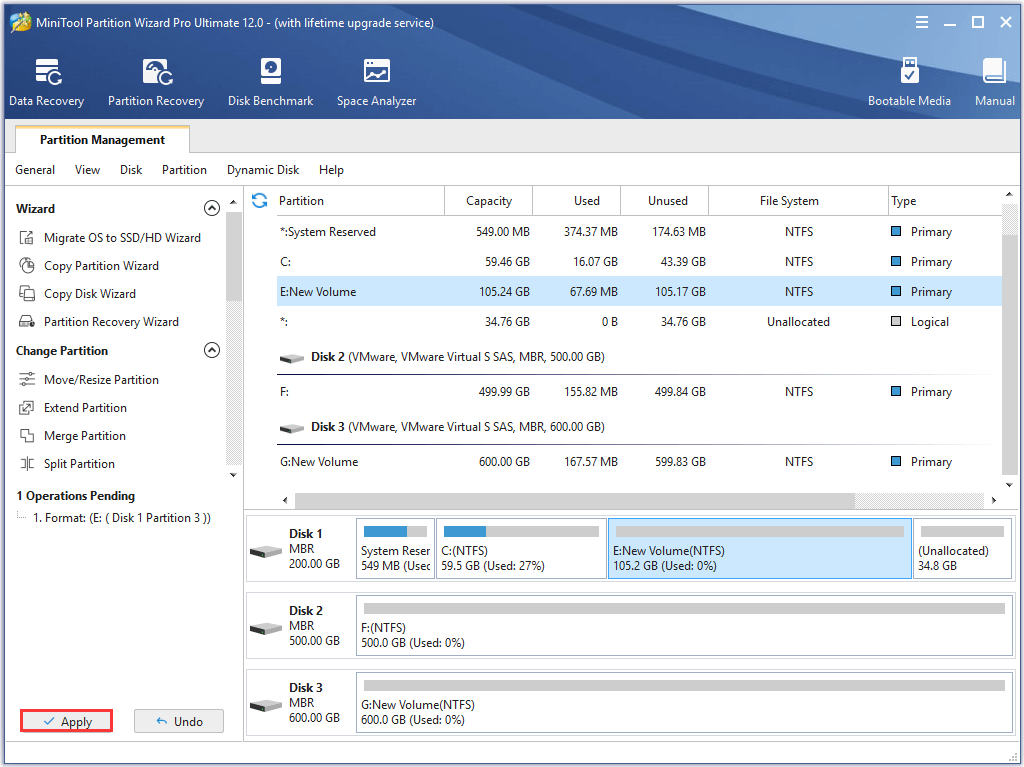
When you have completed the above steps, you can successfully solve the problem the partition is inaccessible. Before formatting the partition, it is necessary for you to recover the data with the Data Recovery feature so as to avoid data loss during the formatting process.
Case 3. How to Make Partition Repair When Partition Is Lost
Now, we will introduce the third situation of partition repair Windows 7. How to repair the partition when it is lost?
Partition loss can be caused by virus reasons. For example, it can be caused by wrong deletion, hardware issue, clean on wrong disk, corrupted partition table, bad sectors and so on.
Related article: What to Do If I Find Bad Sectors on Hard Drive in Windows 10/8/7?
In fact, when a partition is lost, what you can do is to recover the partition table so as to recover the lost partition. However, how can you make partition recovery with ease?
In order to perform partition recovery with ease, MiniTool Partition Wizard would be the best choice with its Partition Recovery feature. Thus, you can purchase MiniTool Partition Wizard from the following button.
Then, we will show you how to recover lost partition step by step with the powerful program.
Step 1: Install the software and launch it to enter its main interface.
Step 2: Select the disk which has lost partitions and choose the Partition Recovery feature from the Tools bar or the context menu to continue.
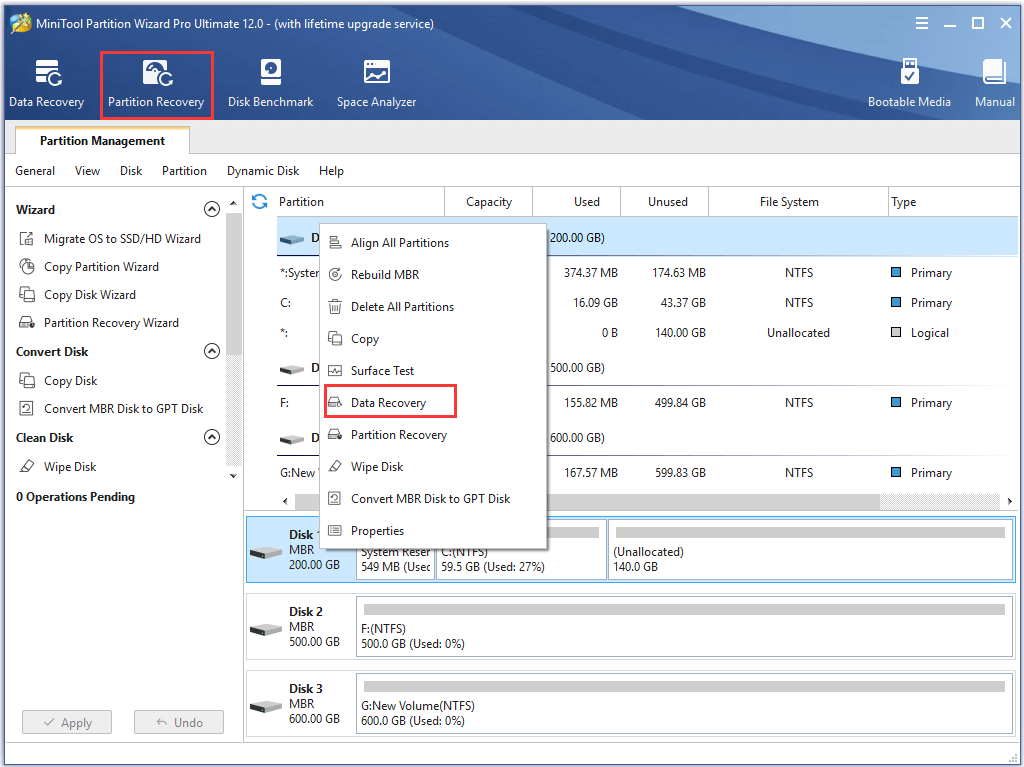
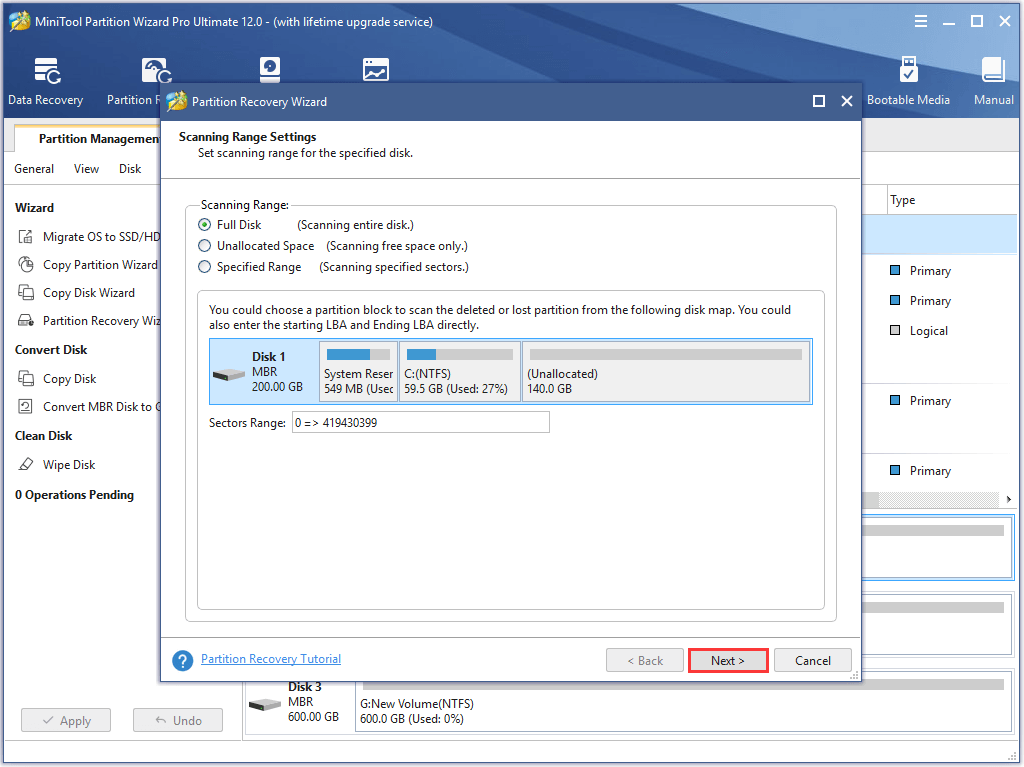
Step 3: In the popup window, you need to set the scanning range. Here are three scanning ranges which include Full Disk, Unallocated Space, and Specified Range and you can choose any one according to your needs. Then click Next to continue.
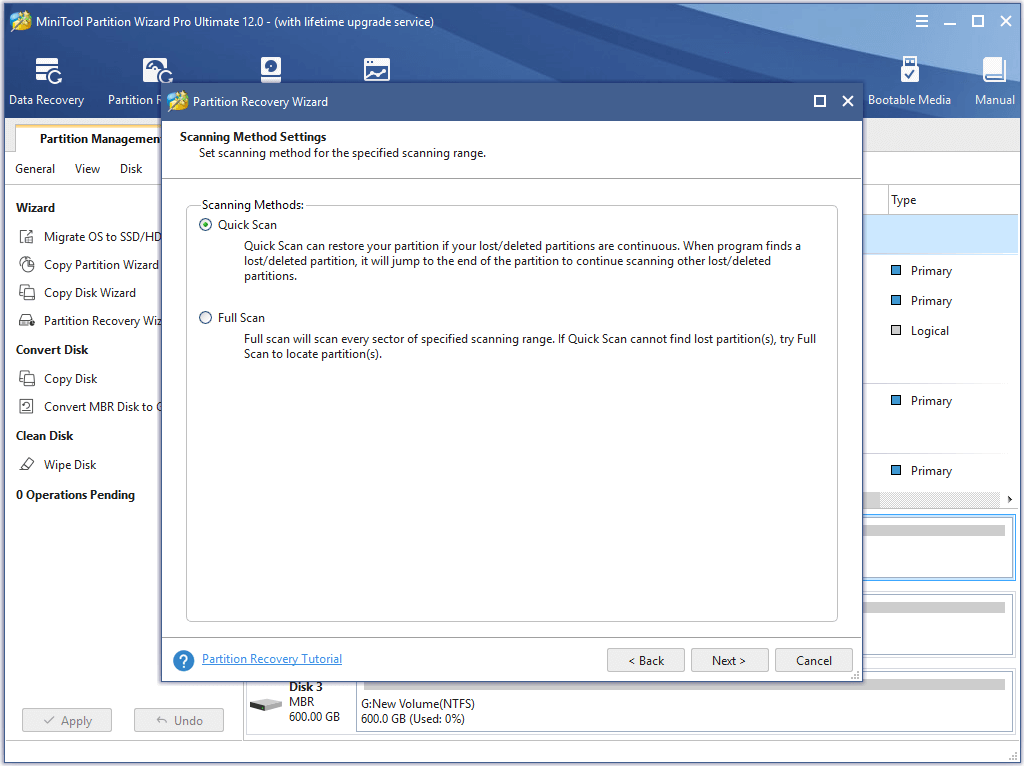
Step 4: Then you are required to choose the scanning method and click Next to go on.
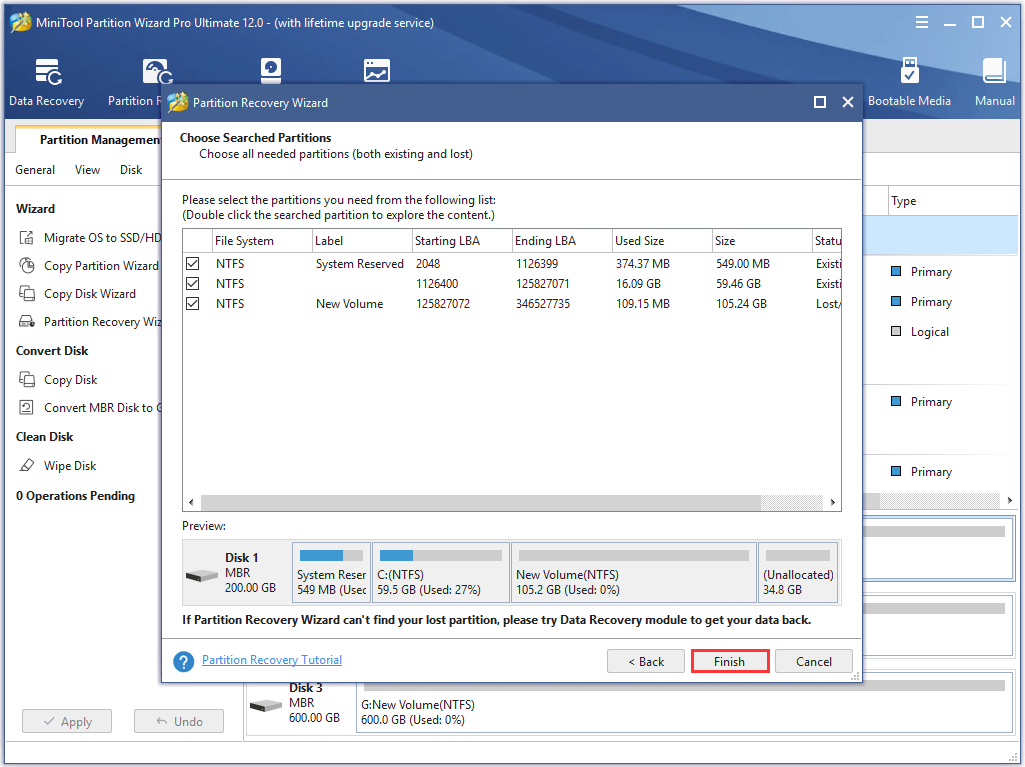
Step 5: Now, you can see that the searched partitions are listed here and then check the partitions including the existing partitions and lost ones. You can also double-click the partition to explore its content. And then click Finish to continue.
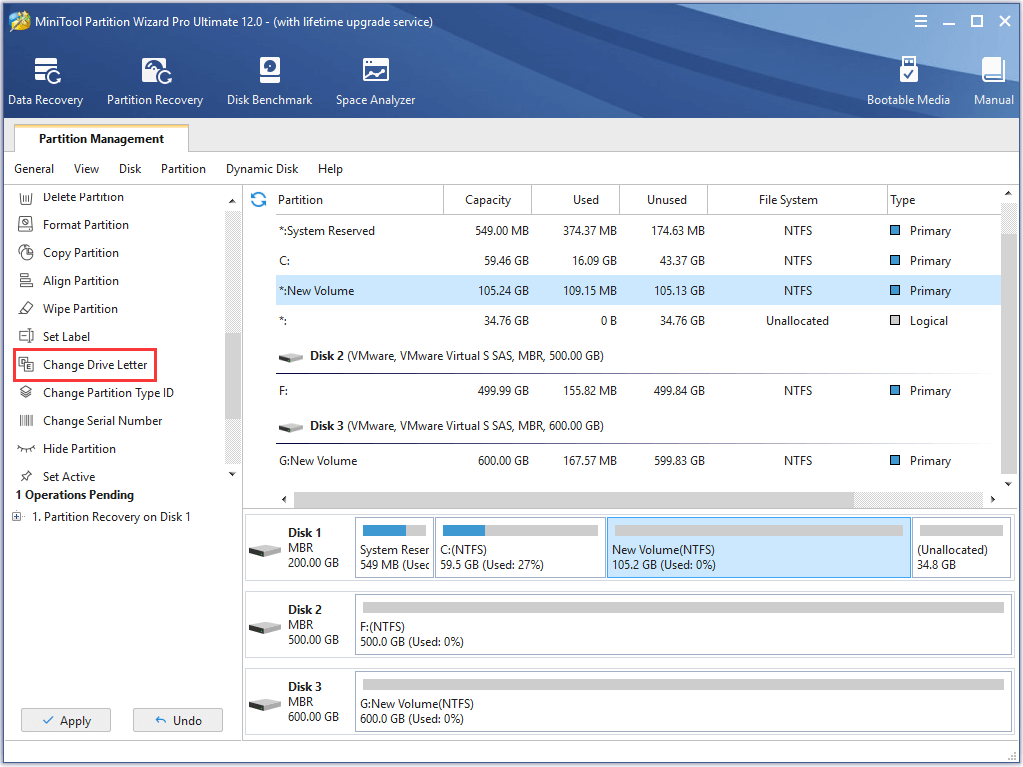
Step 6: Returning to the main interface, you can preview the change. Then choose the recovered partition and choose Change Drive Letter from the left pane to assign a drive letter for this partition.
Step 7: At last, you can click Apply to confirm these changes.
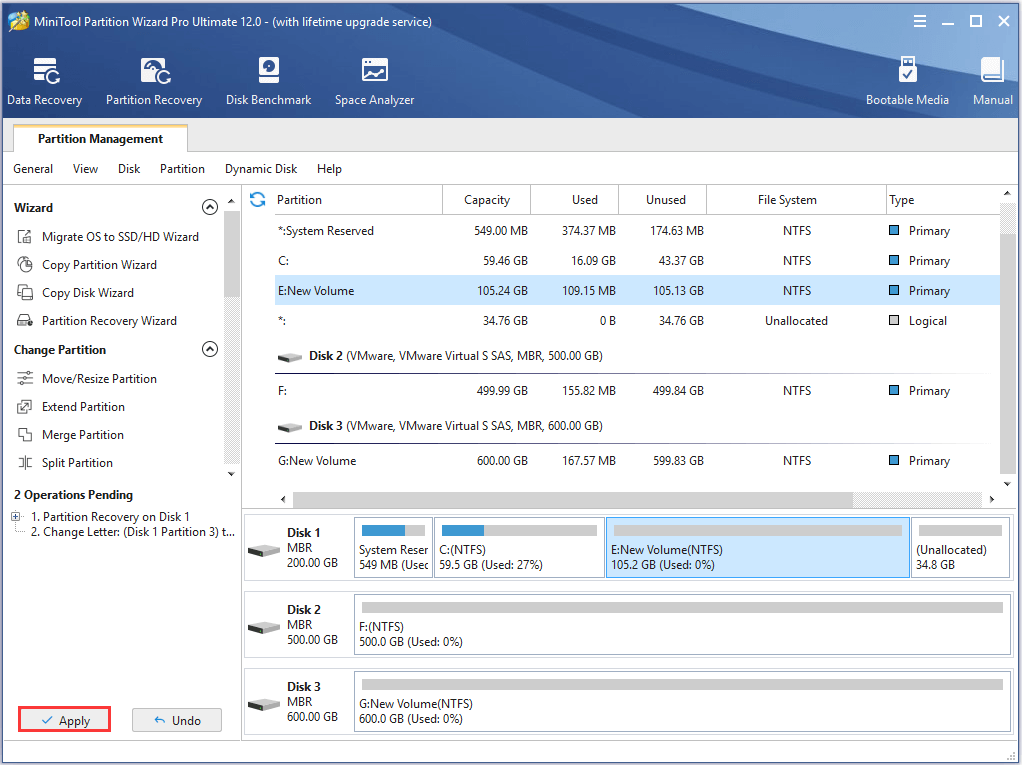
When you have finished all the steps, you can successfully find the lost partition back as well as the data in this partition. And this is an easy way to recover partition table.
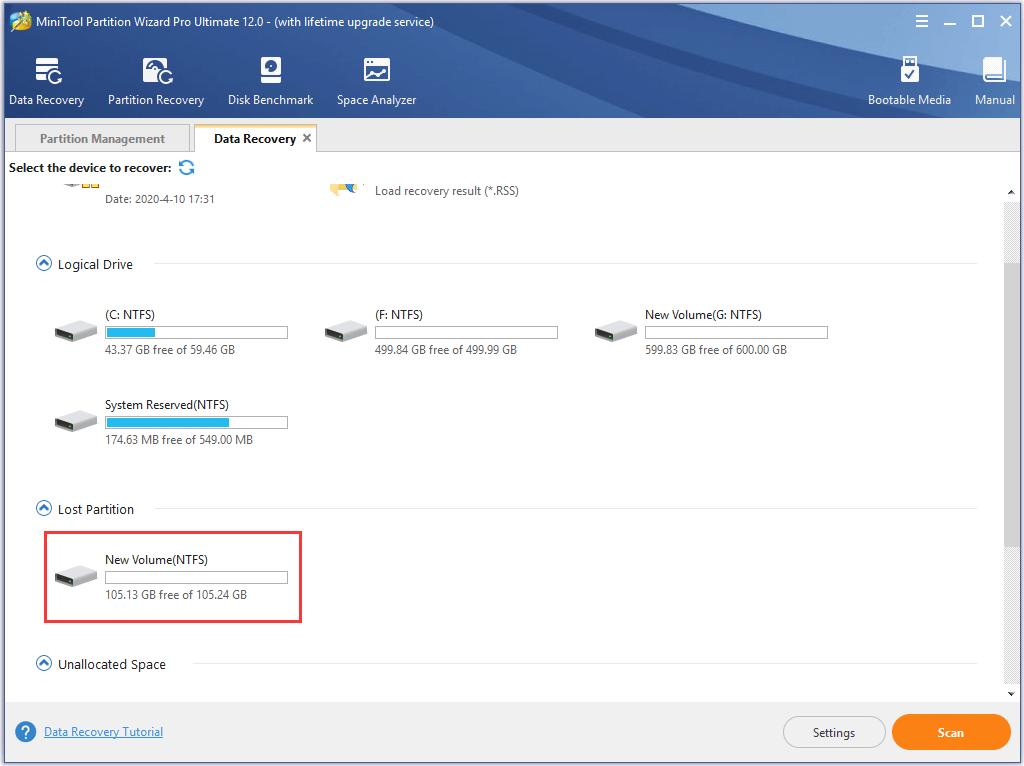
However, if you fail to recover the lost partition or fail to repair partition table or the partition is overlapped, it is recommended to find the data back. Thus, the Data Recovery feature of MiniTool Partition Wizard would play an important role.
Thus, you need to choose the lost partition in Data Recovery page to scan.
When you have recovered all files and data in the lost partition, you can choose to create a new partition on this unallocated space.
Related article: How to Recover Lost Partition after Wrong Deletion/Clean?
Now, we have introduced all three situations of partition repair in Windows 10/8/7. If you have the same issue, try to use the partition repair tool – MiniTool Partition Wizard.
Bottom Line
In conclusion, this post has introduced three different situations of partition repair. If you need to repair corrupted partition, try these methods.
In addition, the professional partition magic – MiniTool Partition Wizard plays an essential role in partition repair. Not only can it manage the partition and disk, but also it can help you to recover the lost data with its powerful features.
However, if you have any problem of MiniTool Partition Wizard, please feel free to contact us via the email [email protected].
Partition Repair FAQ
To repair a partition table, you can take the following measures.
- Create a bootable disk with MiniTool Partition Wizard.
- Connect the bootable disk to the computer which has a corrupted partition table.
- Enter BIOS to change boot order and then launch software.
- Select the target disk.
- Click on the Rebuild MBR function.
- Follow the instructions to finish this process.
- Run chkdsk to check the system partition.
- Use System File Checker.
- Mark system partition as active.
- Rebuild MBR.
- Perform a system restore.
- Reinstall Windows.
For more detailed solution, you can read the post: Fix Unable to Reset Your PC A Required Drive Partition Is Missing
User Comments :