
What Is Basic Disk
Basic disk uses partitions to manage data, and one partition cannot share and split data with other partitions (the late versions of Windows OS like Windows 7, Windows 8 and Windows 10 also call partitions volumes).
On a basic disk, we can create 2 styles of partitions, namely MBR style partition and GPT style partition. To create MBR style partitions, we need to initialize the hard disk to MBR (master boot record). To create GPT style partitions, we should initialize the disk to GPT (GUID partition table).
For more information, please see MBR VS GPT (Focus on Difference and How to Convert Safely).
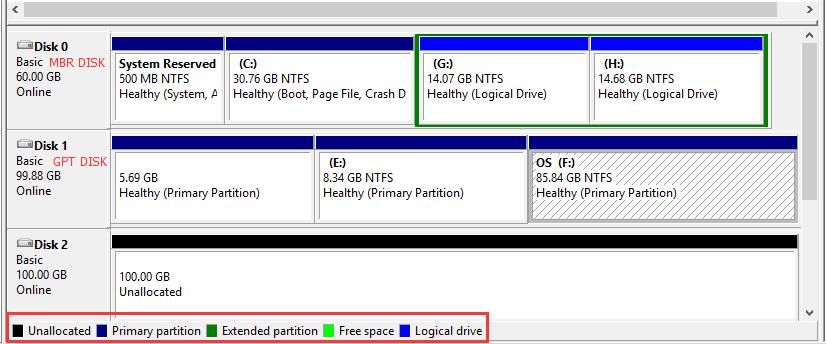
On MBR disks, partitions are called primary partition, extended partition, or logical partition while all partitions on GPT disk are called GPT partitions which function like primary partitions. An MBR based basic disk can have either four primary partitions OR three primary plus one extended partition, but the extended partition can contain an unlimited number of logical drives. And a GPT based hard disk can hold up to 128 partitions.
We can extend a primary partition by adding contiguous unallocated space on the same disk or extend a logical drive by adding free space contained in extended partition, but these partitions should be formatted with NTFS file system. Otherwise, Extend Volume feature is grayed out.
What Is Dynamic Disk
Dynamic disk uses dynamic volumes to manage data. It is a separate form of volume management that allows one volume to have noncontiguous extents on one or more physical disks. Dynamic disks use a database to track information about all volumes on the disk as well as information about other dynamic disks, and the location of the database is determined by partition style of the disk.
On MBR partitions, the database is contained in the last 1 megabyte (MB) of the disk while database on GPT partitions is located in a 1MB reserved partition. In addition, each dynamic disk in a computer saves a copy of the database, so that Windows can repair a damaged database by using the database on other dynamic disks.
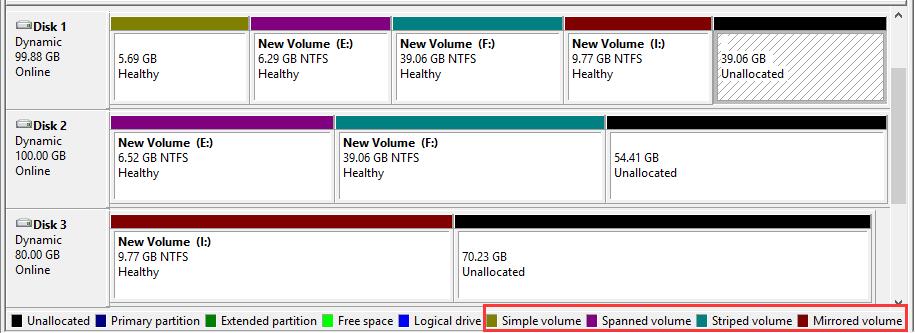
On a dynamic disk, we can create 5 types of dynamic volumes to enhance computer performance, including simple volume, mirrored volume, striped volume, spanned volume, and RAID-5 volume.
- Simple volume functions like primary partitions on basic disk;
- Mirrored volume provides fault tolerance by creating a copy of data contained in this volume;
- Striped volume improves disk input/output performance by distributing I/O requests across disks;
- Spanned volume combines spaces on 2 hard disks at least to a dynamic volume;
- RAID-5 volume stripes data and parity across three or more disks.
For more information about these volumes, please see Dynamic Disk.
In Windows snap-in Disk Management utility, we are only allowed to extend simple volumes and spanned volumes except for the system and boot one; or we can extend a mirrored volume after breaking the mirror. However, with a third party partitioning program, we can extend any types of dynamic volumes.
Relationship Between Basic Disk and Dynamic Disk
Although basic disk and dynamic disk are 2 types of hard disk configurations, they are not completely irrelevant. Actually, we can convert a basic disk to dynamic disk or turn a dynamic disk to basic disk without data loss when there is a need.
Detailed steps of converting basic disk to dynamic disk:
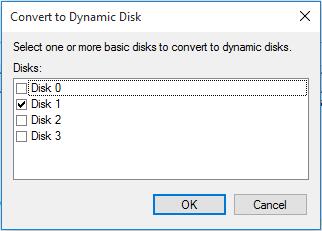
Right click the basic disk -> choose “Convert to Dynamic Disk” from the popup menu -> click “OK” -> tap “Convert” to get the window below:
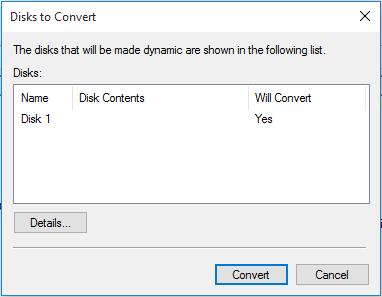
Then we will see the following message:
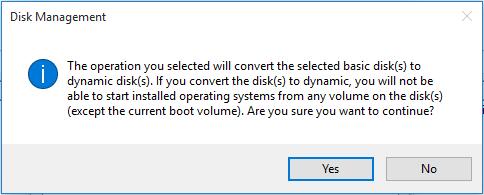
This message shows we cannot start installed operating systems from any volume on this disk except the current boot one. That is to say, all Windows OS except the current running one will be unbootable. Therefore, users who are dual or multi booting Windows on one disk had better not convert the basic disk to dynamic disk if they want to run all Windows well.
Moreover, when converting a basic disk to dynamic, users may be troubled by the error:
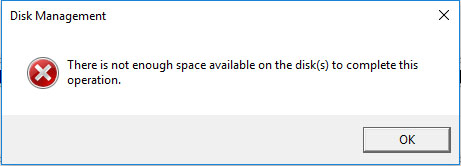
This will appear if there is not enough free space that is not partitioned at the end of the disk to create the database for the dynamic disk. To fix the error, we need to shrink the last partition to create such a space via the feature “Shrink Volume”.
However, once a disk has been converted to dynamic disk, we will be unable to convert it to basic disk in both Disk Management and Diskpart unless we delete all existing dynamic volumes. Needless to say, this operation will lead to data loss. But fortunately, there is an excellent partitioning tool which makes it possible to restore a dynamic disk to basic without deleting any information.
MiniTool Partition Wizard FreeClick to Download100%Clean & Safe
Detailed steps of converting dynamic disk to basic disk:
1. MiniTool Partition Wizard Free Edition does not support converting dynamic disk to basic. We need to purchase advanced editions to do this job.
2. MiniTool Partition Wizard requires a reboot when converting dynamic disk to basic.
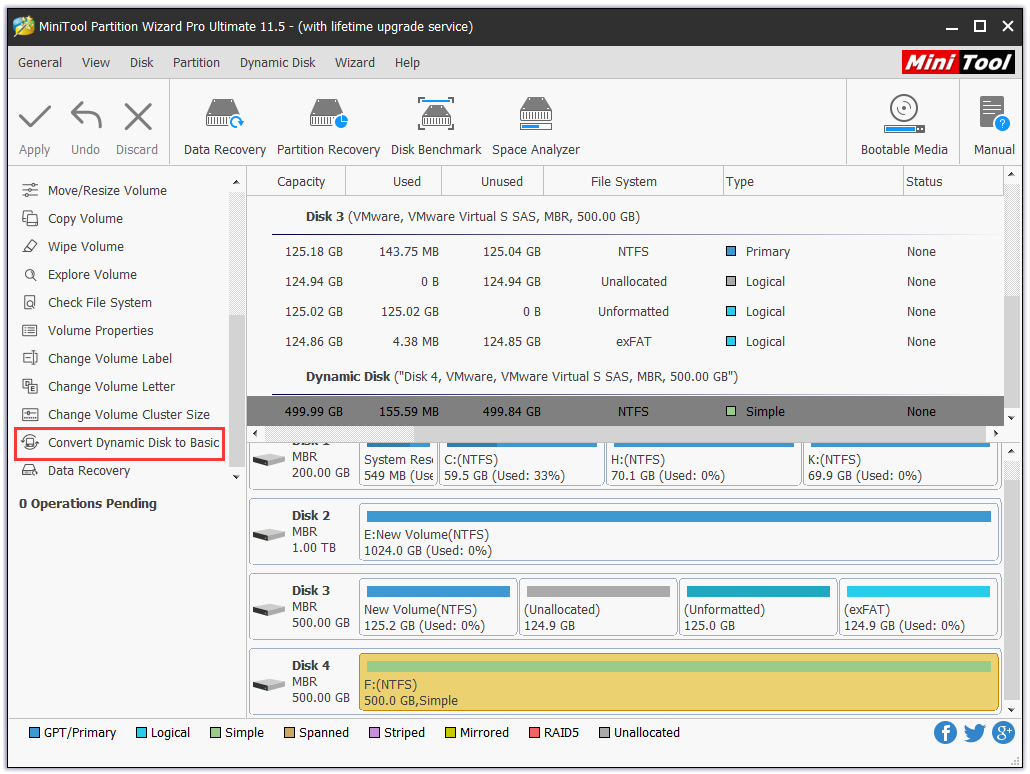
Step 1. After installing and registering MiniTool Partition Wizard, click the dynamic disk that needs converting and choose “Convert Dynamic Disk to Basic” from the action panel.
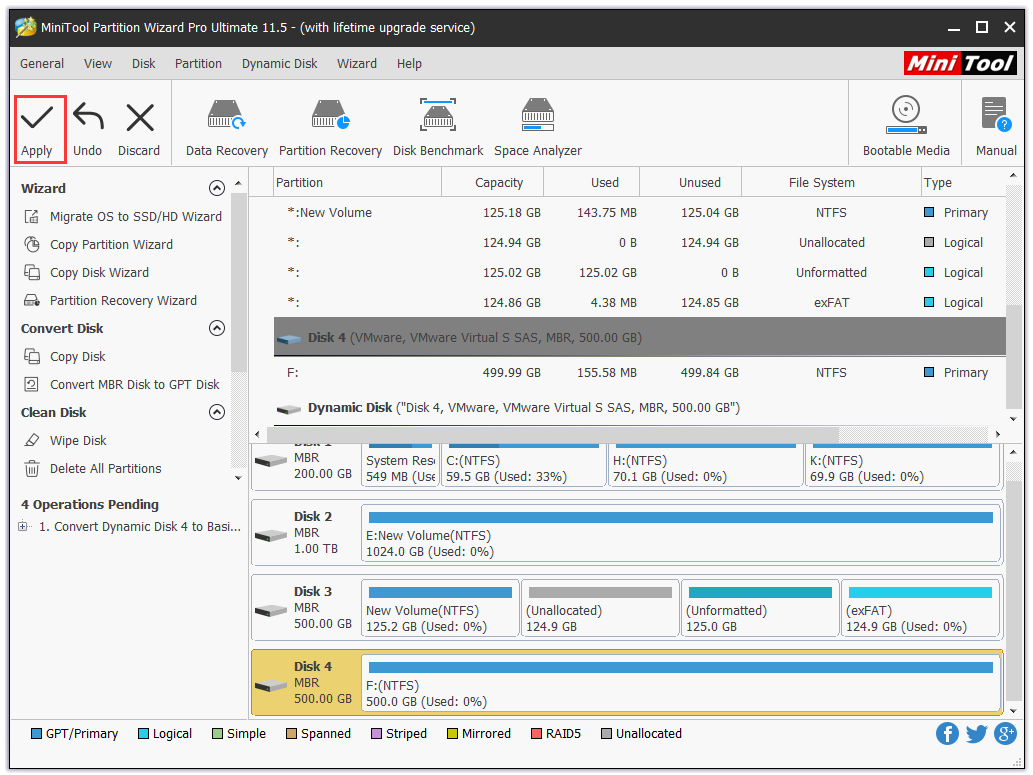
Step 2. Then we can preview that the selected disk will become a basic disk. At this moment, click “Apply” on the tool bar to confirm the conversion.
Hopefully, this article has explained the general knowledge of basic disk and dynamic disk.
About The Author

Position: Columnist
Rodin is an enthusiastic IT writer focusing on Windows trends, disk partition management and data recovery. She loves to write and share her idea about the useful tips and tricks on personal computers' maintenance. If you are looking for methods to improve your computer performance, manage hard drives and recover data from different devices, Rodin can provide reliable solutions for data management.
User Comments :