Resize Partition
- Resize a partition in Windows 8
- Windows 8 boot disk
- Resize partitions in Windows 8
- Shrink partition Windows 8
- Windows 8 expand partition
- Resize partition Windows 8
- Resize Windows 8 partition
- Resizing partitions in Windows 8
- Expand partition Windows 8
- Resize partition for Windows 8
- Expand system partition
- Free extend boot partition
- Extend partition windows 8
- Windows server 2003 increase partition size
- How to increase partition size
- Increase windows partition
- Increase partition xp
- Free increase windows partition
- XP increase partition size
- Increase disk partition
- Increase partition size vista
- Increase partition size
- Windows XP increase partition size
- Increase partition size XP
- Free shrink windows partition
- Windows 7 increase partition size
- Windows 2003 extend partition free
- Partition in windows 7
- Extend partition vista
- Extend primary partition Windows 7
- Extend Windows partition
- Extend system partition safely
- Shrink partition Windows 7
- Shrink partition XP
- Windows 7 extend partition free
- Windows 7 shrink partition
- Windows server 2003 extend partition
- Extend boot partition free
- Windows 7 extend system partition
- Extend OS partition Server 2003
- Resize partition server 2008
- Extended partition
- Free resize partition
- Resize partition for windows
- Resize partitions
- How to resize a partition
- Expand partition
- Windows resize partition
- Resize partition in windows 2003 safely
- Resize OS partition efficiently
- Resize a partition
- NTFS resize partition
- Resize windows 2003 partition
- How to resize partition windows server 2003
- Resize partition ubuntu
- Resize extended partition
- Vista resize partition
- Server 2003 resize partition
- Resize partition in windows 2003
- How to resize Windows partition
- How to resize ntfs partition
- Partition ntfs resize
- Win7 resize partition
- Resize win7 partition
- Windows 2003 extend partition
- Extended partitions
- Extend boot partition
- Resize server 2003 partition
- Resize disk partition
- Server 2003 partition resize
- Resize partitions server 2003
- Resize Windows server partition
- Resize partition server 2003
- Low disk space
- Manage partition C drive run out of space
- Resize Windows 7 partition
- How to repartition a hard drive
- Extend Windows 7 system partition
- Resize partition server
- Primary extended partition
- Windows 7 system partition increase
- Windows 7 partition resize
- Extend NTFS system partition without reboot
- Extend Partition Server 2008
- XP partition resize
- Windows 7 extend partition
- Resize Partition with partition magic
- Repartition Hard Drive
- Windows 7 resize partition
- Resizing partition
- Windows partition resize
- Resize windows partition
- Resize partition windows
- Window 7 partition resize
- Adjust Partition Size
- Add Space to System C Drive Partition
- Redistribute free disk space
- Reduce Drive Partition Size
- Moving Partition
- Shrink partition wizard
- Shrink Partition Under Windows
- How to show extend partition
- Shrink Windows Server 2003 Partition
- Shrink windows partition
- Windows server 2003 resize partition
- Split partition
- System disk full
- Free up disk space
- Resize GPT disk partitions
- How to resize external hard drive
- Increase disk space
- Increase c drive partition
- Expand partitions under windows
- Resize system partition
- Partition 64
- About Windows Server 2003
- Convert fat32 to NTFS
- Create a Partition in Windows Server 2003
- Disk copy
- Disk manager
- Drive copy
- Free download Partition Wizard
- Magic software for partition management
- 64bit Partition Manager
- Clone disk
- Copy partitions
- Disk copy manager
- Partition manager
- Format partition
- Free partition manager to resize partitions
- How to resize partitions
- Free partition software
- Magic software for hard disk repartition
- Resize system primary partition
- Resize partition on windows server
- Resize partition freeware
- How to resize Windows Server 2000 partitions?
- Resize partition server 2008 64bit
- Resize Server 2008 partition
- Resize system boot partition
- Resize os partition
- Resize sbs 2008 system partition
- Windows server 2003 resize partition
- Resize partition windows 2003 server
- How to resize raid 1 without data loss?
- Resize Windows server 2003 partition
- Resize RAID partition
- Resize NTFS partition
- Resizing and moving partition
- Resize partition Windows 7
- Resize partition under Window operating system.
- Resize partition Windows server 2003?
- Resize and move partition
- Resize Vista partition
- Resize partition on Vista.
- Server 2008 Resize partition
- Resize external hard drive
- Server partition resize
- Resize GPT disk partition
- Resize dynamic disk
- Resize boot partition 2
- Resize RAID 5
- Resize RAID
- Resize FAT32
- Resize FAT32 partition
- Resize partition for FAT32
- FAT32 partition resizing
- Free partition resizing software
- Free software to resize partition
- Free resizing partitions
- Resize partition on windows server operating system
- Resize partition of Windows server
- Resize server partition on Windows
- Partition resize windows 2003
- Resize partition
- Windows partition
- Extend windows 7 partition free
- Increase raid 5 size
- Extend system partition server 2003
- Extend system partition
- Increase partition size windows 7
- Extend simple volume
- Extend server 2008 boot partition
- Extend SBS 2003 server
- Increase partition size server 2008
- Increase hard disk space
- Increase free disk space on the system partition
- Increase partition capacity
Resize ntfs partition
- Since the release and improvement of Microsoft operating system, the file system has also developed constantly ranging from the initial FAT 12 to the latest NTFS which enjoys higher safety and has been widely used by user throughout the world. During the course, Microsoft has also issued FAT16 and FAT32. As the most popular file system, NTFS offers file encryption, file compression and partition compression functions to bear better disk management capacity and higher safety performance in comparison with FAT file system. The upgraded performance of NTFS has undisputedly brought us enormous expediencies; nevertheless, it has also invited corresponding problems such as operations on disk management. NTFS file system is susceptible to data damage while user performs operation on NTFS disk. What's more, the system built in disk management tool would fail to resize even FAT partition, let alone NTFS. Therefore, to resize NTFS partition, user should have recourse to a third-party partition manager, for example MiniTool Partition Wizard Server Edition.
NTFS:
NTFS is a standard file system for Windows NT, Windows 2000, Windows XP, Windows Server 2003, Windows Server 2008, Windows Vista and Windows 7 that has replaced FAT to provide file system for Windows operating system by improving FAT and HPFS. Its functions include supporting metadata, employing high-level data structure to improve performance, reliability, disk space utilization, and other additional functions such as accessing ACL and file system journaling. The data encryption and data compression functions have not only bettered disk utilization, but enhanced file safety.
How to resize NTFS partition?
To resize NTFS partition, user should first obtain the partition manager MiniTool Partition Wizard Server Edition by visit MiniTool Partition Wizard Download Center to download.
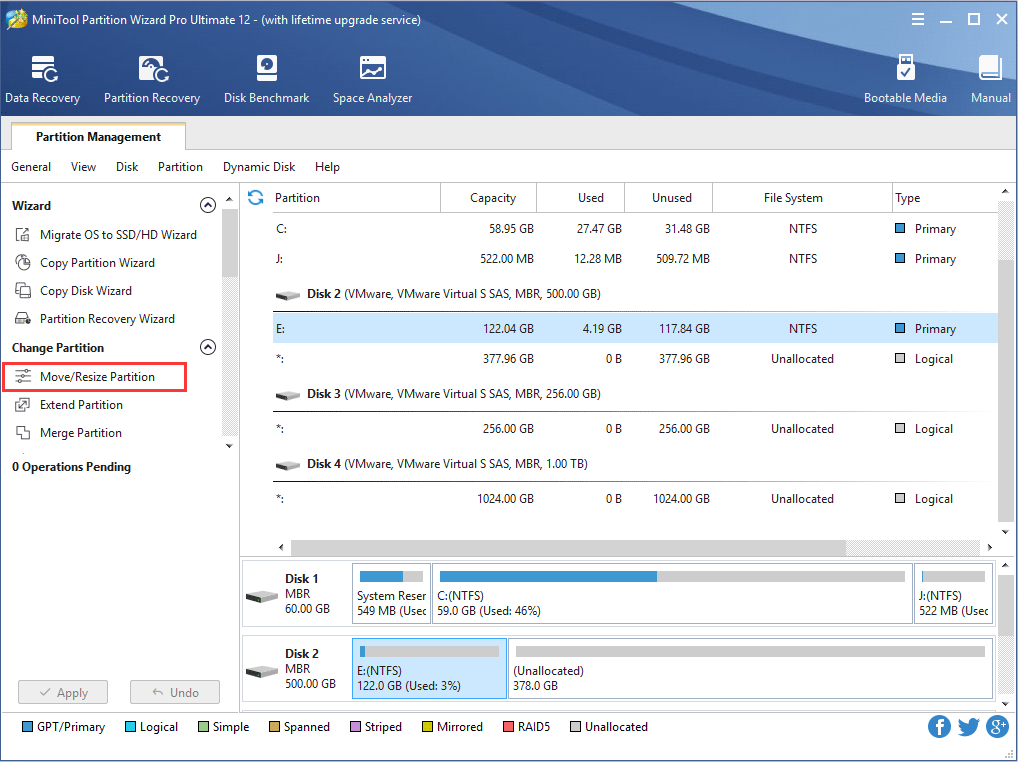
After running MiniTool Partition Wizard Server Edition, user would come to the following interface:

In this interface, user should select and right click desired NTFS partition, then click "Move/Resize".

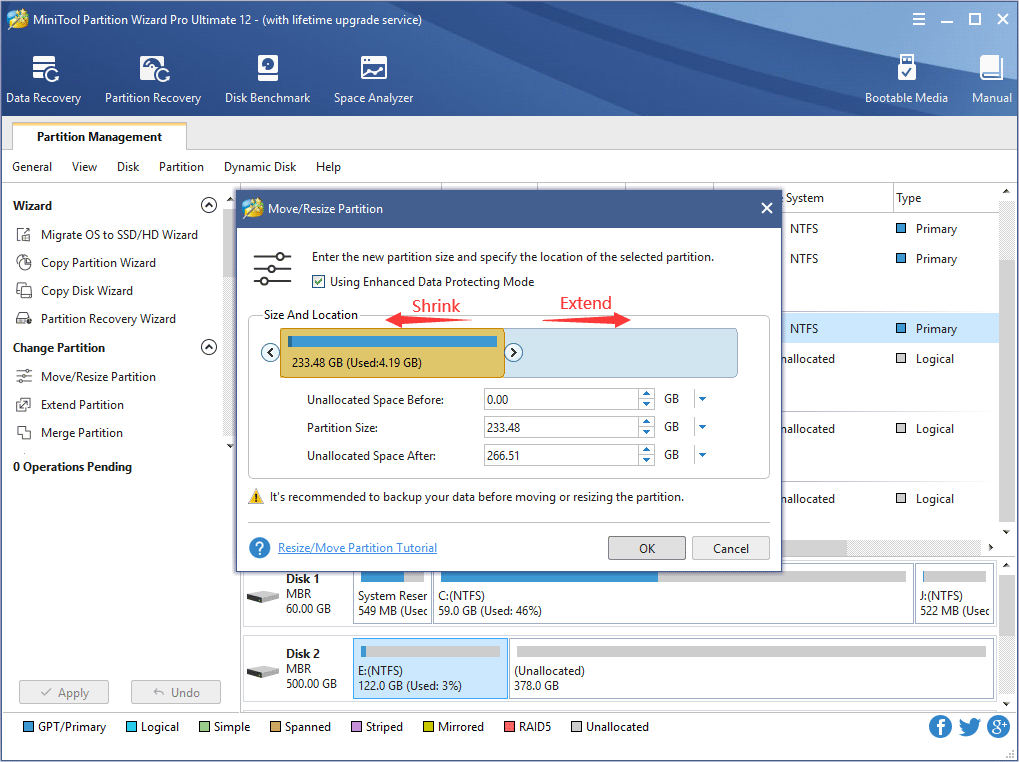
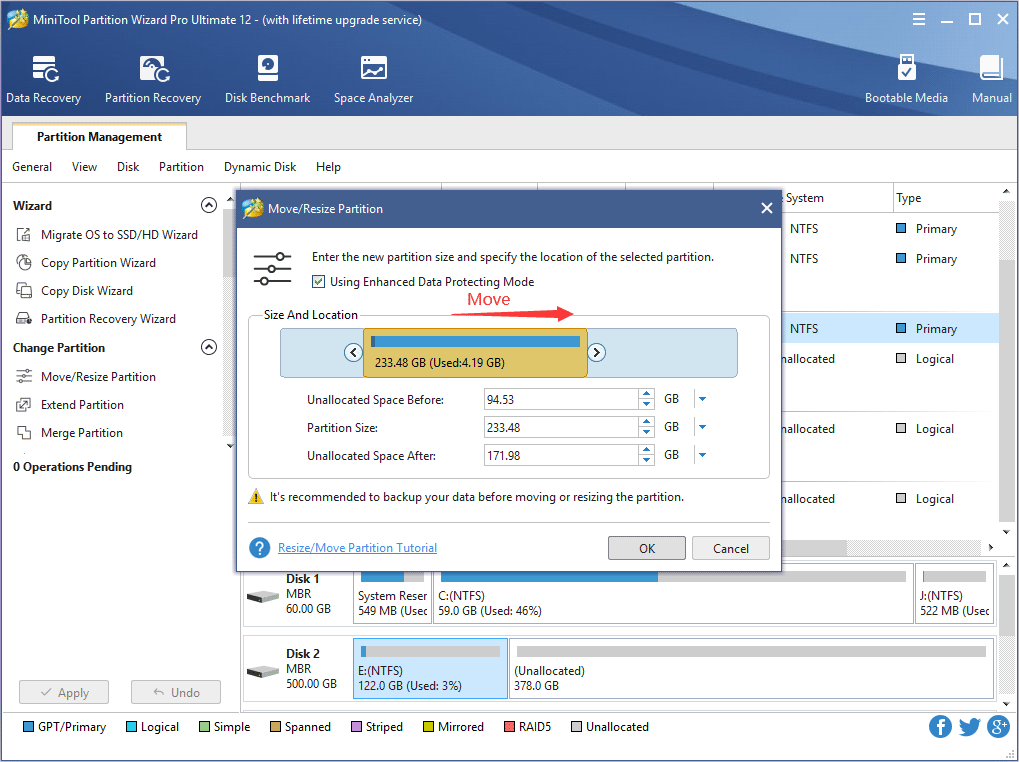
This interface is to set partition size by dragging left or right arrow or setting unallocated space, then click "OK" to enter next step:

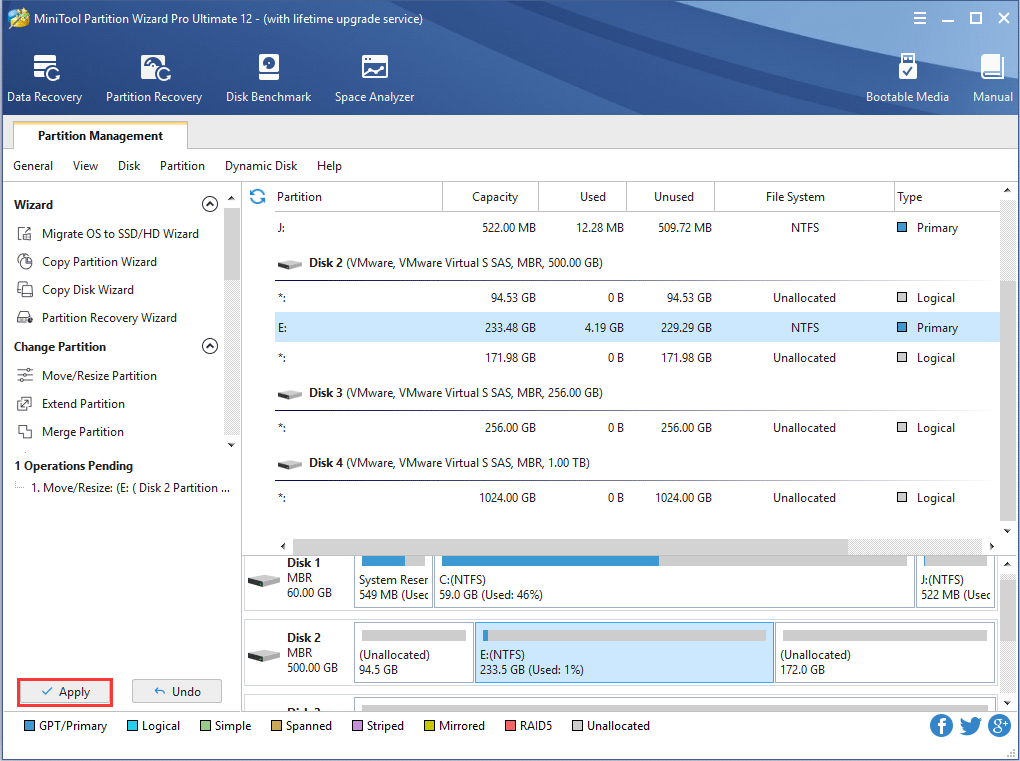
Finally, user should click "Apply" to execute all previous settings to really resize NTFS partition. During this process, partition data will be free from any damage.
Free Partition Manager Free Partition Magic Partition Manager Server Partition Magic Server
Common problems related to partition management and our solutions:
- Resize system primary partition with MiniTool Partition Wizard.
- Resize partition on Windows server with MiniTool Partition Wizard.
- Resize system or boot partition with MiniTool Partition Wizard Server Edition.
- Resize operating system partition with MiniTool Partition Wizard Server Edition.
- Resize partition under Window operating system.
- How to resize partition under Windows server 2003?
- Resize and move partition with MiniTool Partition Wizard.
- Resize external hard drive with MiniTool Partition Wizard.
- Resize GPT disk partition with MiniTool Partition Wizard Server Edition.
- Resize boot partition with MiniTool Partition Wizard Server Edition.