
When you use your computer for a long time, the data saved on your partition will increase, which may cause your C drive to be almost full. So, how to extend partition Windows 10 without losing data? Don’t worry. This article from Partition Magic will tell you how to extend C drive Windows 10 in five ways.
Why Need to Extend Partition Windows 10
Extend partition Windows 10 without formatting is often necessary for the following reasons:
- Low disk space: If a partition is running low on space due to data accumulation, extending the partition can provide more space.
- Optimizing disk usage: Extending a partition allows you to better utilize available disk space and improve system performance when the required space is less than the space originally allocated to the partition.
- Organizing data: By extending a partition, you can better organize your data without having to manage multiple partitions.
- Avoiding system errors: When the system partition (usually the C: drive) is running low on space, it can cause Windows 10 errors and instability. Extending the partition space can prevent such problems.
In conclusion, extending a partition in Windows 10 is necessary to effectively manage disk space, prevent system errors, and optimize data storage for better performance and availability.
How to Extend Partition Drive Windows 10
When you are running low on disk space, you might want to first empty the Recycle Bin. The Recycle Bin is a temporary storage place for some deleted files or folders. When you delete an unwanted file on your PC, the file is not permanently deleted but goes to the Recycle Bin.
So, you can free up some disk space by deleting folders in the Recycle Bin. However, this method will only increase disk space a little bit.
Under this circumstance, what should you do? You can use third-party software and Windows built-in tools to extend partition Windows 10.
Extend Partition Windows 10 with MiniTool Partition Wizard
To extend partition Windows 10, you need professional and secure software to help you. MiniTool Partition Wizard is a good choice. Its Extend Partition, Move/Resize Partition, and Migrate OS to SSD/HD features can extend partition.
Besides, it is free disk partition software specially designed for managing partitions and disk usage. It not only provides operations such as create/format/split/merge partition, but also provides functions such as convert MBR to GPT, hard drive recovery, and USB drive formatter.
First, click the button below to get this partition manager on your PC. You can have a try.
MiniTool Partition Wizard DemoClick to Download100%Clean & Safe
To extend C drive Windows 10 without boot problems, it is recommended to first create a MiniTool bootable media, then boot the computer with it, and finally extend the system drive in boot mode. Here are the detailed steps:
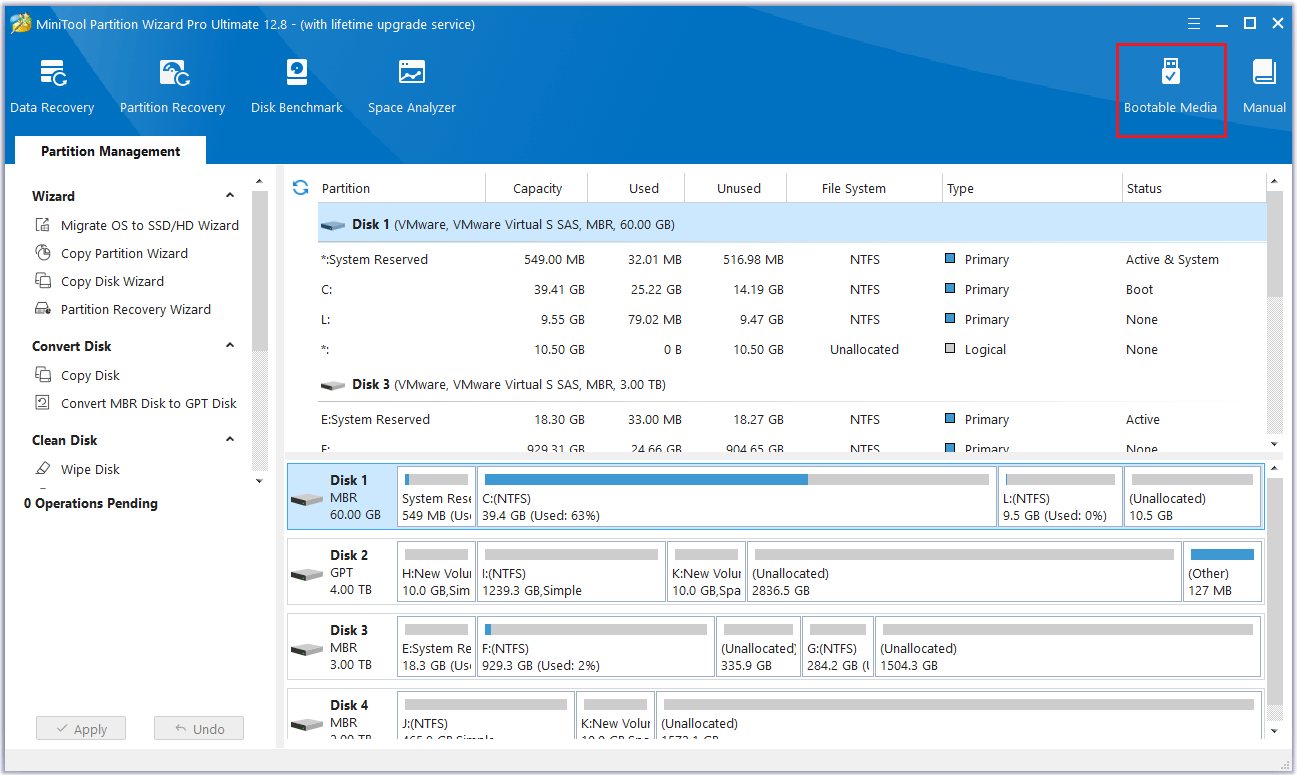
Step 1: Prepare a recordable USB flash drive, and connect it to your computer. Then launch MiniTool Partition Wizard to its main interface, and click Bootable Media.
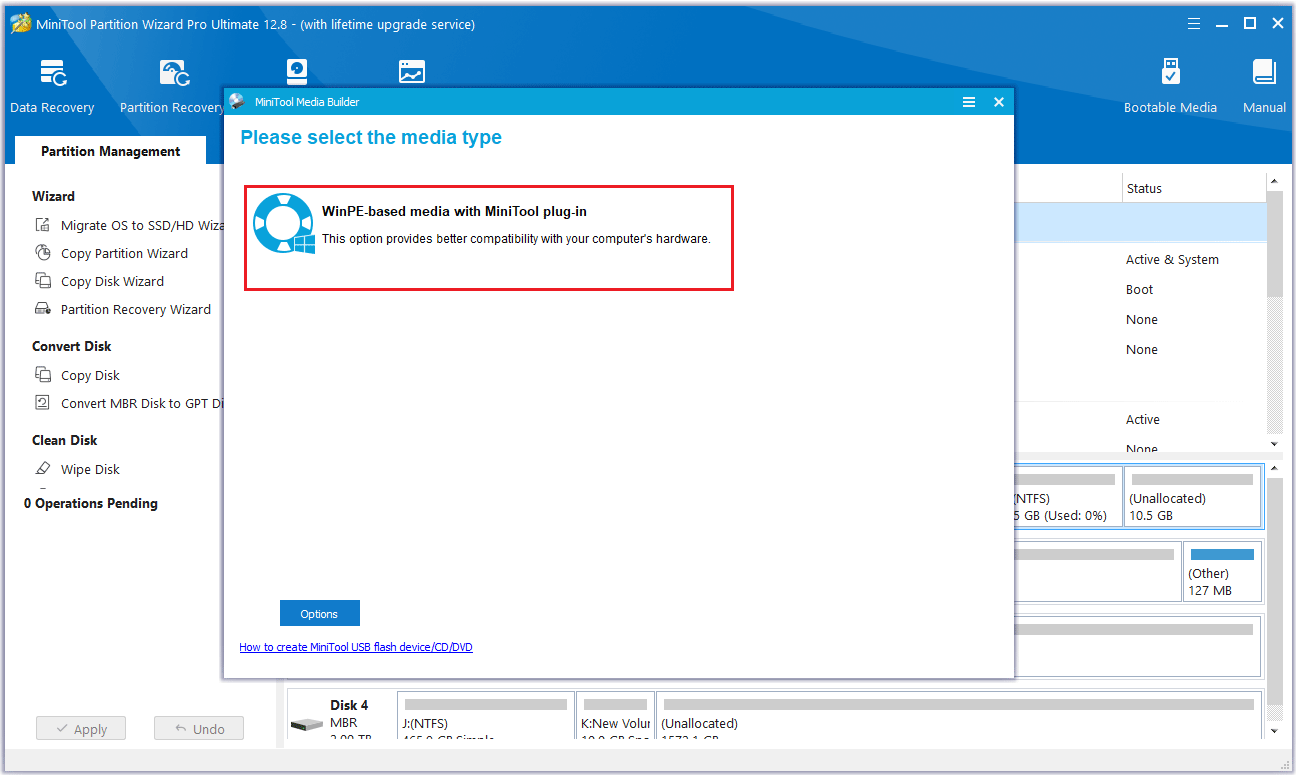
Step 2: Select WinPE-based media with MiniTool plug-in to continue.
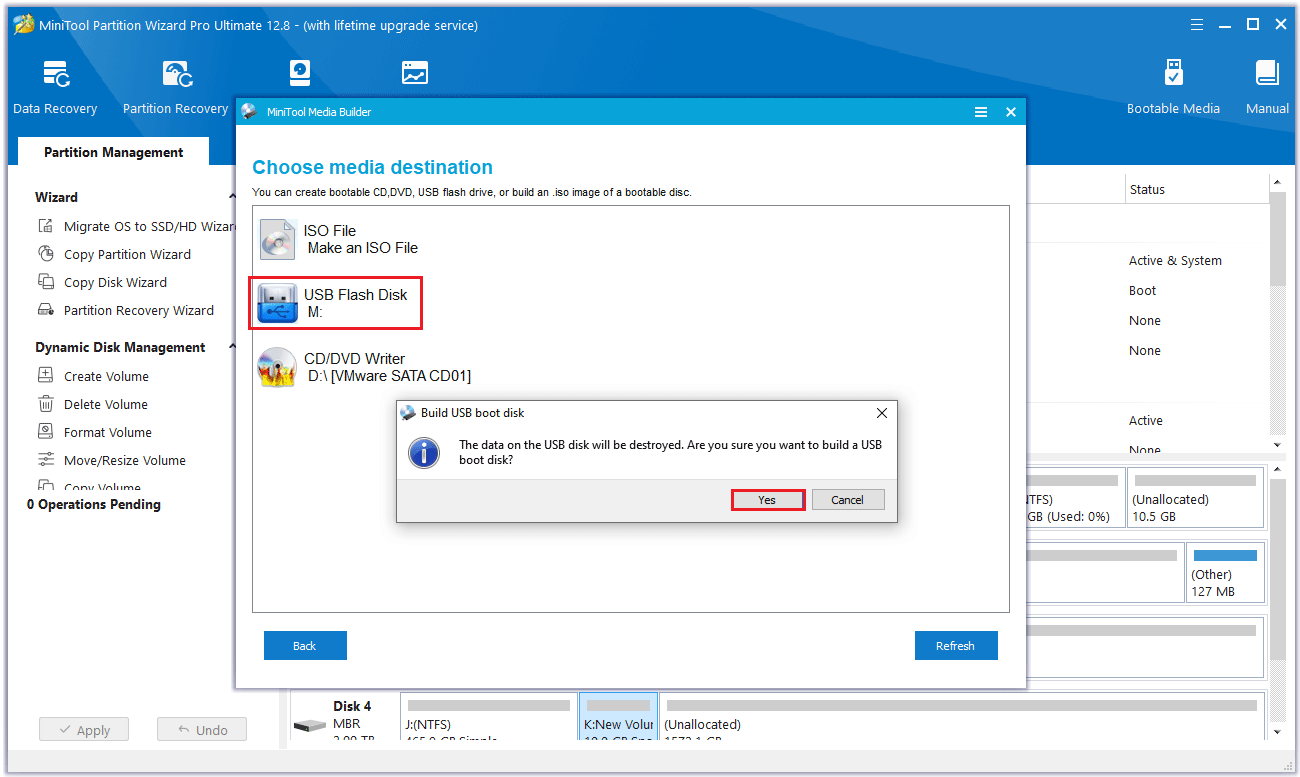
Step 3: To build a Boot Flash Drive, please click the USB Flash Drive option, and a warning message will pop up, then click Yes to confirm that you want to burn the boot flash drive.
Step 4: Please wait while MiniTool Bootable Media Builder is generating boot files on the flash drive. Finally, click Finish after successful burning.
Step 5: Restart the computer and press F2 or another key to enter BIOS menu. Change boot settings to make your computer boot from the USB.
Now, you can try the following features to extend partition Windows 10 without data loss and boot issues.
Use the Extend Partition Feature
When there is no continuous unallocated space next to the system partition in Windows 10. You can use the Extend Partition feature.
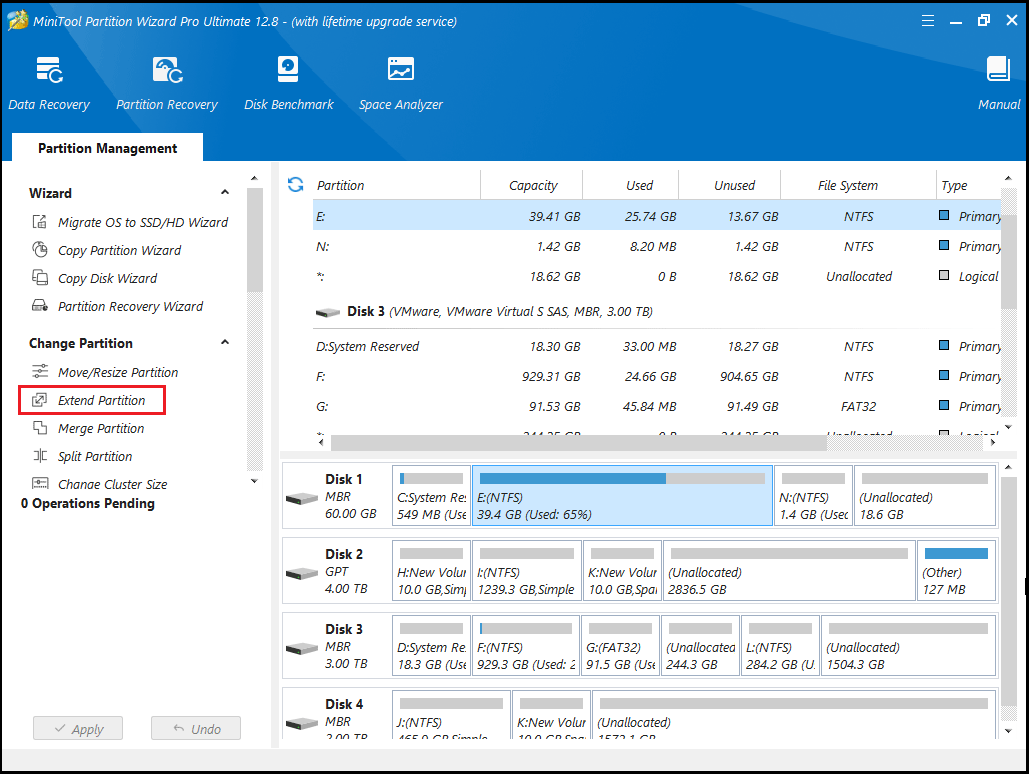
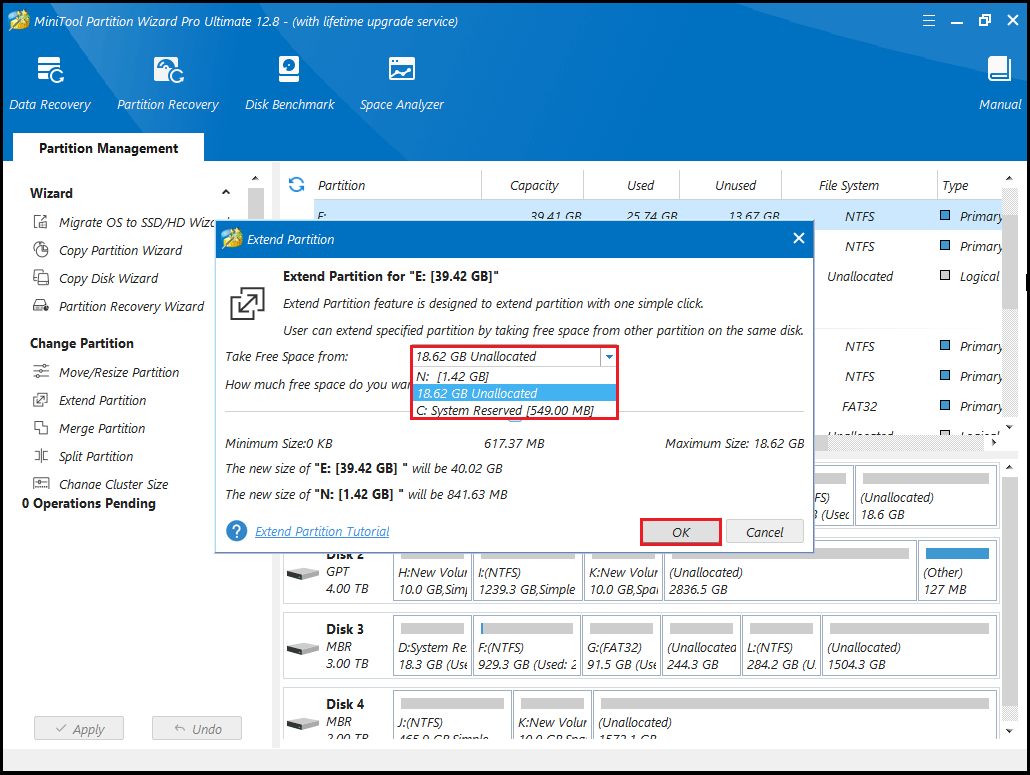
Step 1: In the main interface of MiniTool Partition Wizard, select the system partition and click Extend Partition from the left action pane.
Step 2: Click the down arrow from “Take Free Space From” and choose a partition or unallocated space. You can drag the sliding handle leftwards or rightwards to decide how much of the available space it takes up. After that, click OK to go back to the main interface.
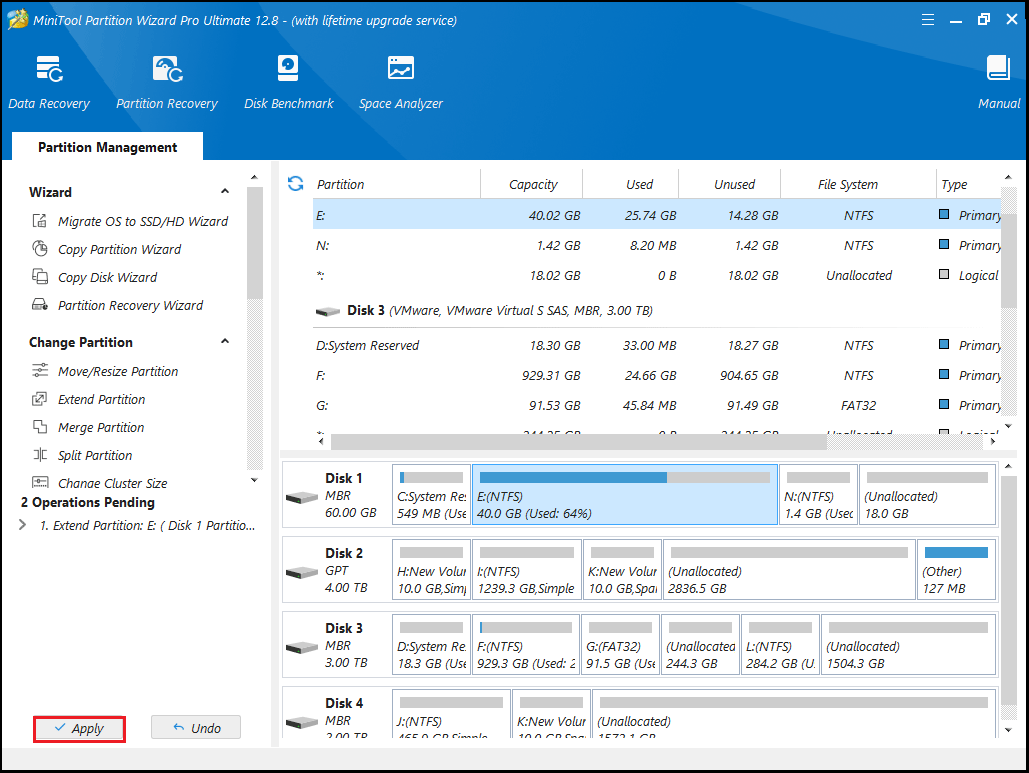
Step 3: Now you can see the system partition is extended, but this effect has not been applied to the computer. So, you need to click the Apply button to execute all changes.
Use the Move/Resize Partition Feature
When using this feature, there is an unallocated space adjacent to (it can be on the left or right) the system partition in Windows 10.
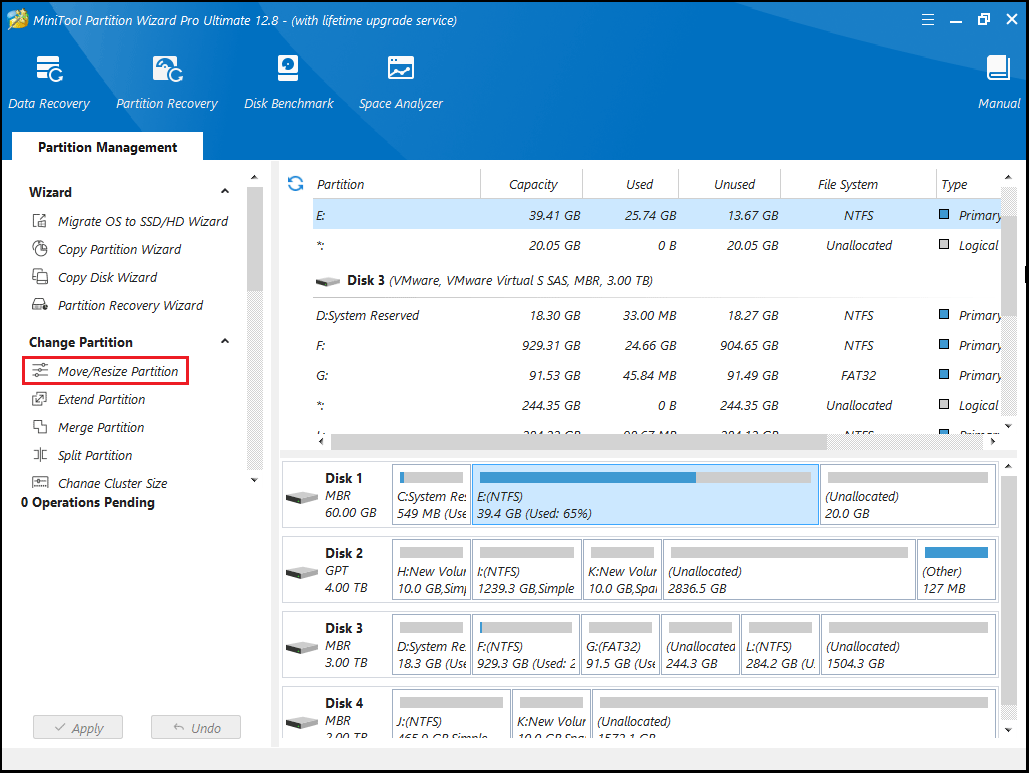
Step 1: Launch MiniTool Partition Wizard, then go to the main interface. Highlight the system partition, and then click Move/Resize Partition from the action pane to extend partition Windows 10 without losing data.
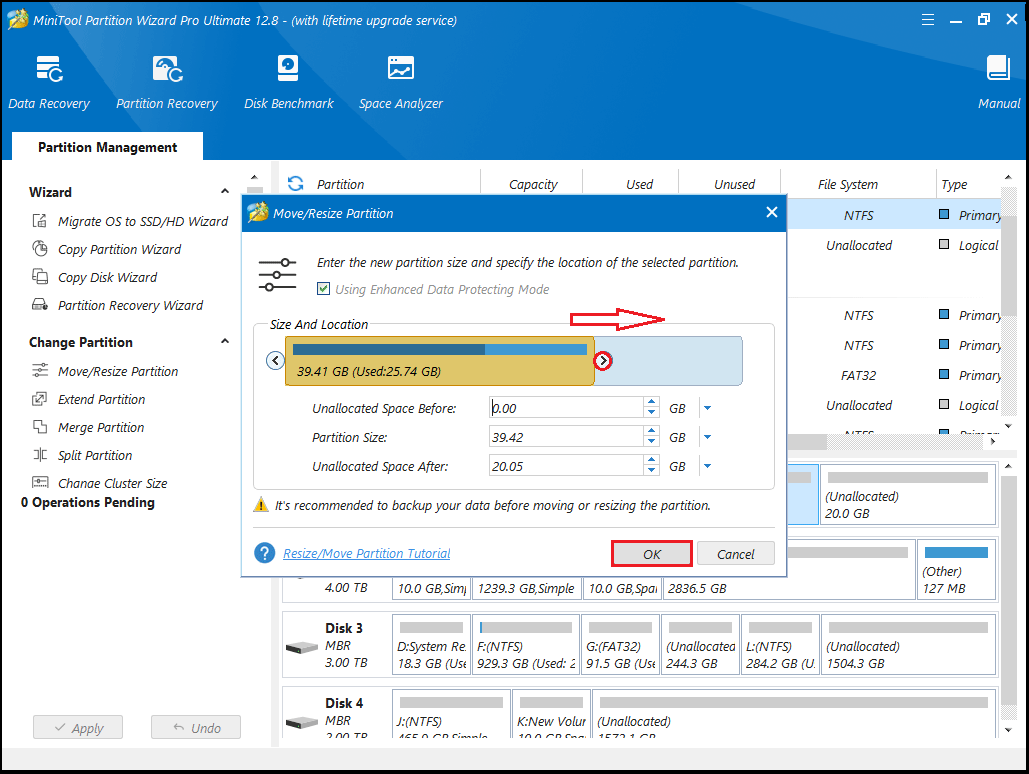
Step 2: Then in the pop-up window, drag the arrow to the right to occupy the unallocated space. Click OK. In this window, Using Enhanced Data Protecting Mode is checked by default which ensures data safety when suddenly power outage appears in Windows 10.
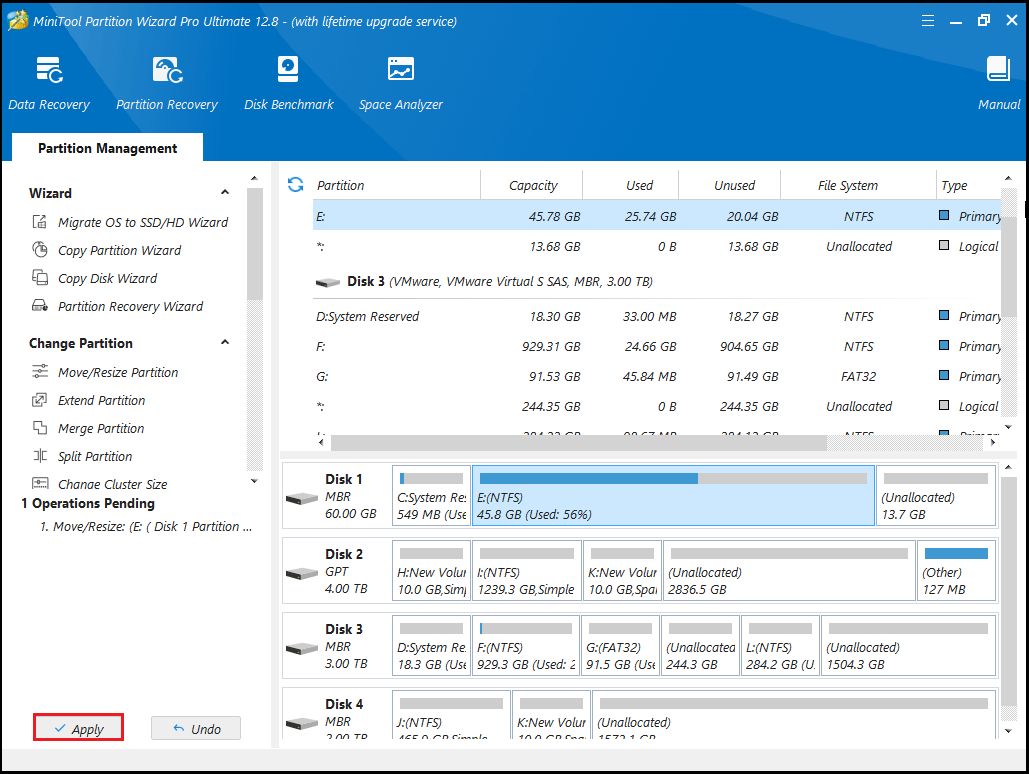
Step 3: Now in the main interface, you can see the changes in the partition. Click Apply to perform the system partition extension operation.
Use the Migrate OS to SSD/HD Wizard Feature
You can also choose to upgrade your system disk to a larger hard drive to extend the partition on Windows 10. The Copy Disk and Migrate OS to SSD/HD two features of MiniTool Partition Wizard can perform this operation.
MiniTool Partition Wizard DemoClick to Download100%Clean & Safe
- Copy Disk: This feature is designed to clone the entire disk (including system data and other partition data) to another large disk. If all partitions on the source disk are almost full, you should choose this mode.
- Migrate OS to SSD/HD: This feature enables you to move system partition files as well as system-related files to SSD/HD for backup. In addition, you can also perform such an operation to extend the system partition in Windows 10 with another large disk.
1. The target disk does not store any important data because the cloning process will destroy all data on the target disk.
2. The free space on the destination disk should be greater than or equal to the used disk space on the source disk.
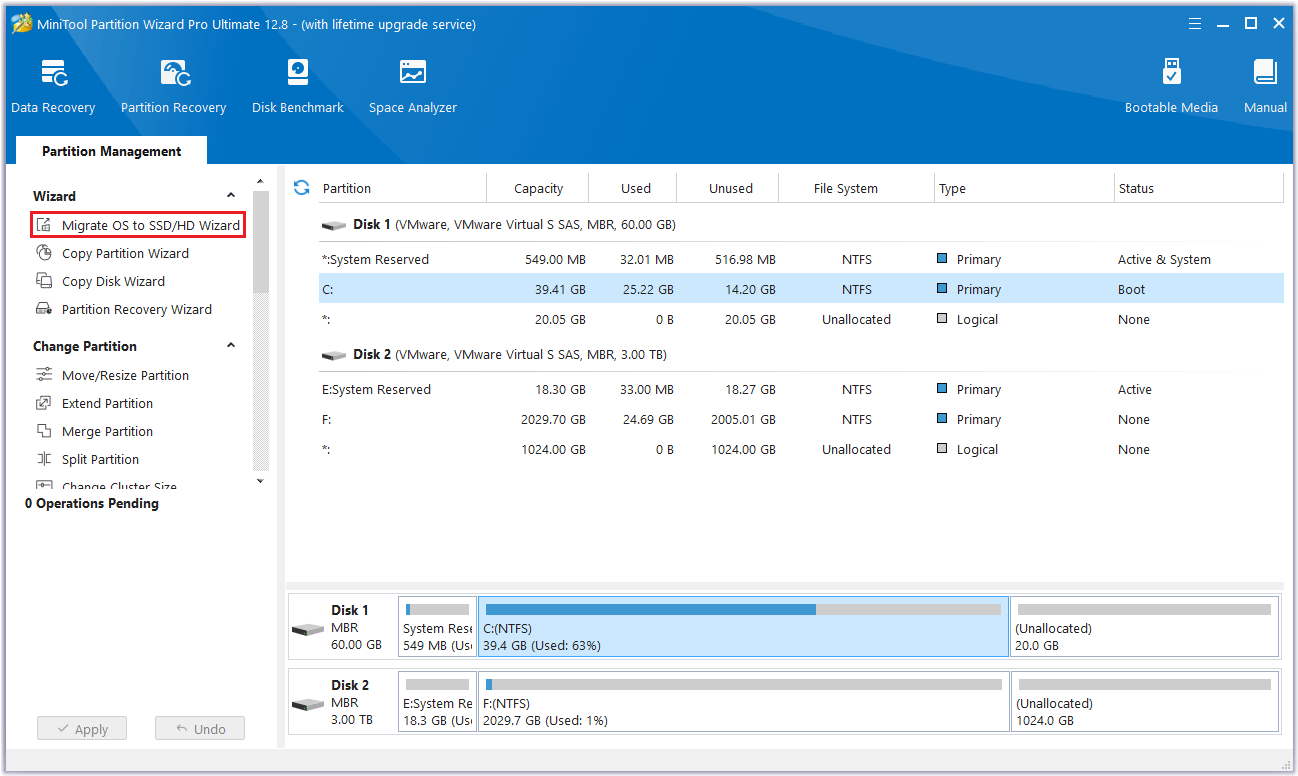
Step 1: Run MiniTool Partition Wizard to its main interface. Click on the disk that needs to be cloned and select Migrate OS to SSD/HD Wizard from the action panel.
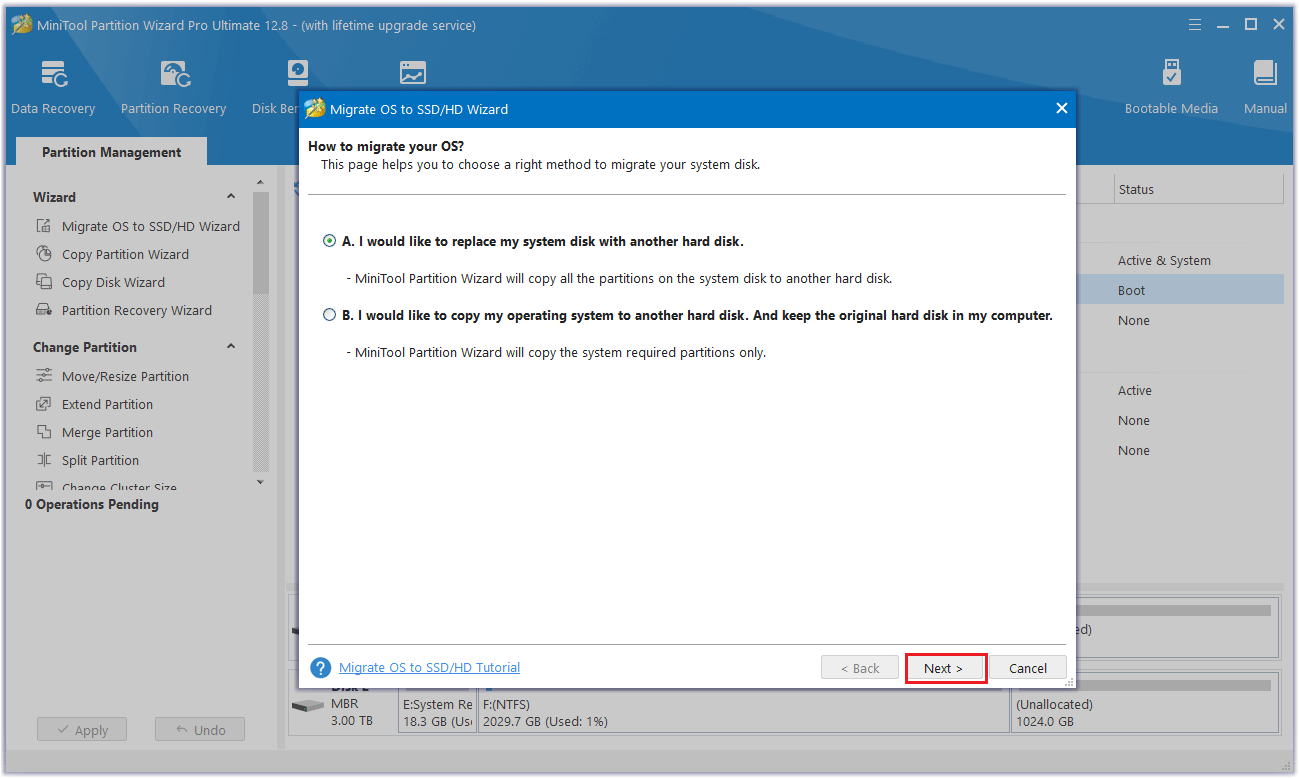
Step 2: Choose one migration way, then select Next.
- If you want to copy all partitions on the system disk, choose option A.
- If you decide to move just the operating system to another disk, choose option B.
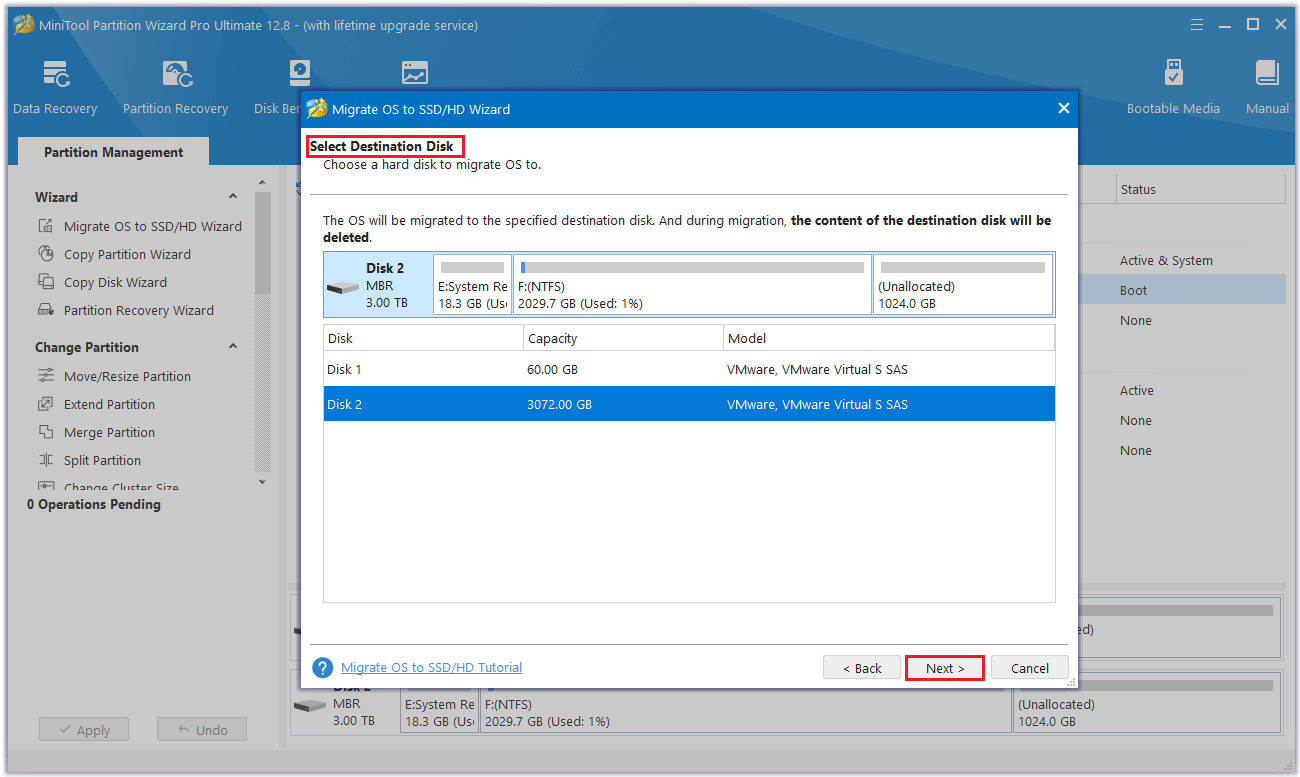
Step 3: Select the destination disk and click Next.
Step 4: In the pop-up warning box prompts that the data on the disk will be destroyed. To perform the cloning operation successfully, click the Yes button.
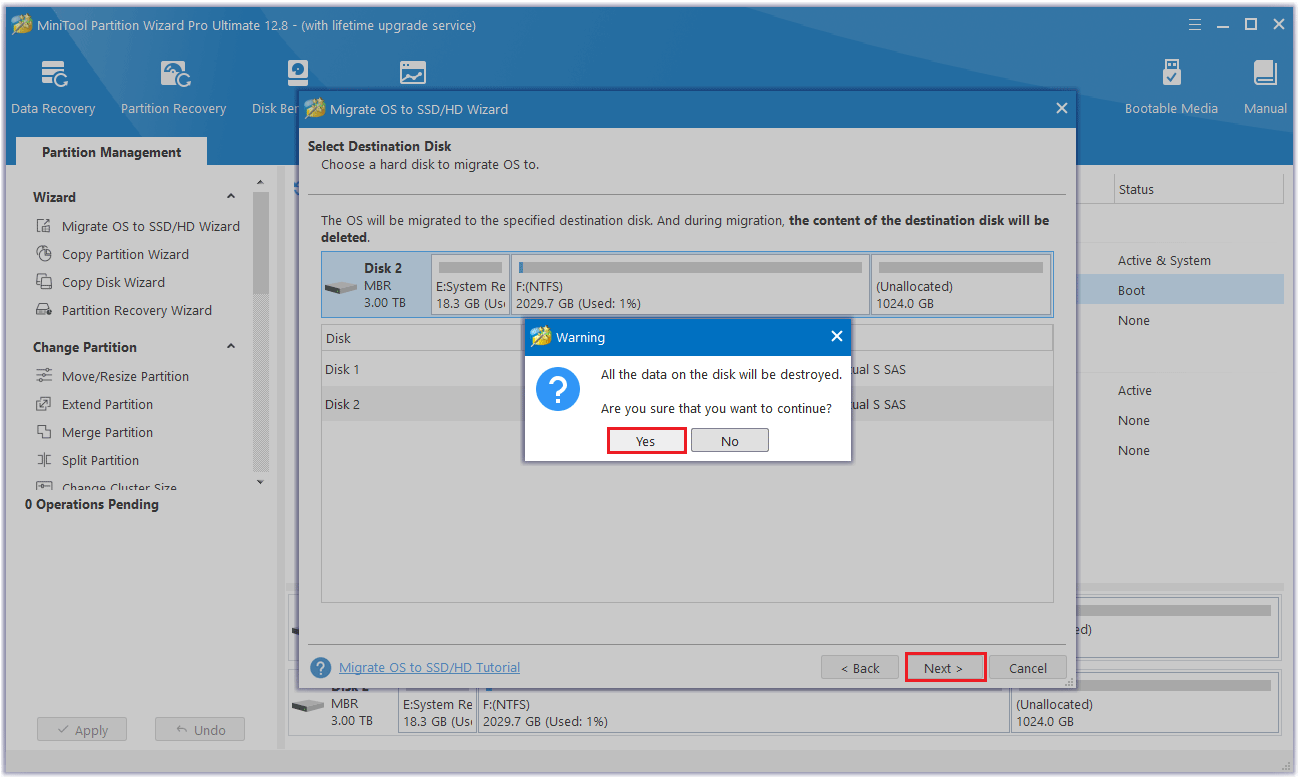
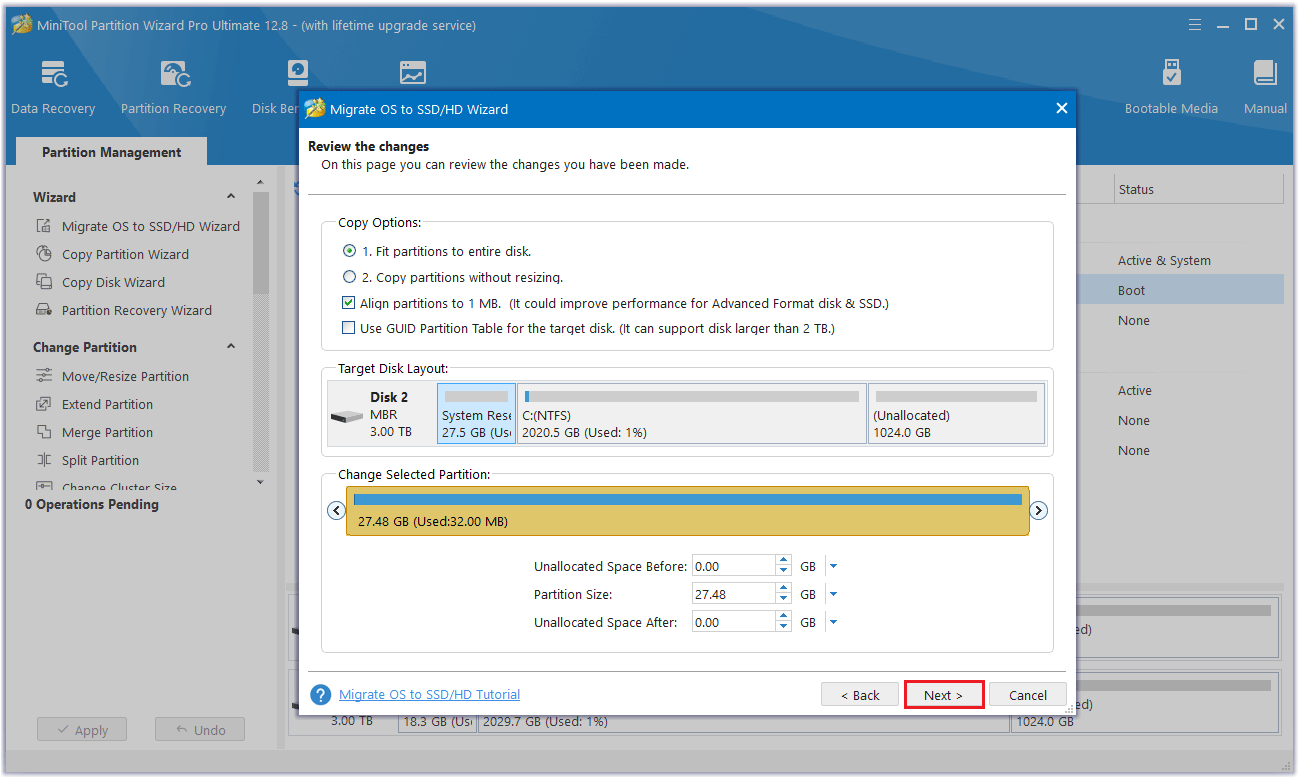
Step 5: Select a copy option and click Next.
- Fit partitions to entire disk: Fill all disk space on the target disk in proportion to the partition size.
- Copy partitions without resizing: Keep the original partition size. Available only if the destination disk is not smaller than the source disk.
- Align partitions to 1MB: This can improve the performance of the target disk if it is an SSD.
- Use GUID Partition Table: It can support disks larger than 2TB.
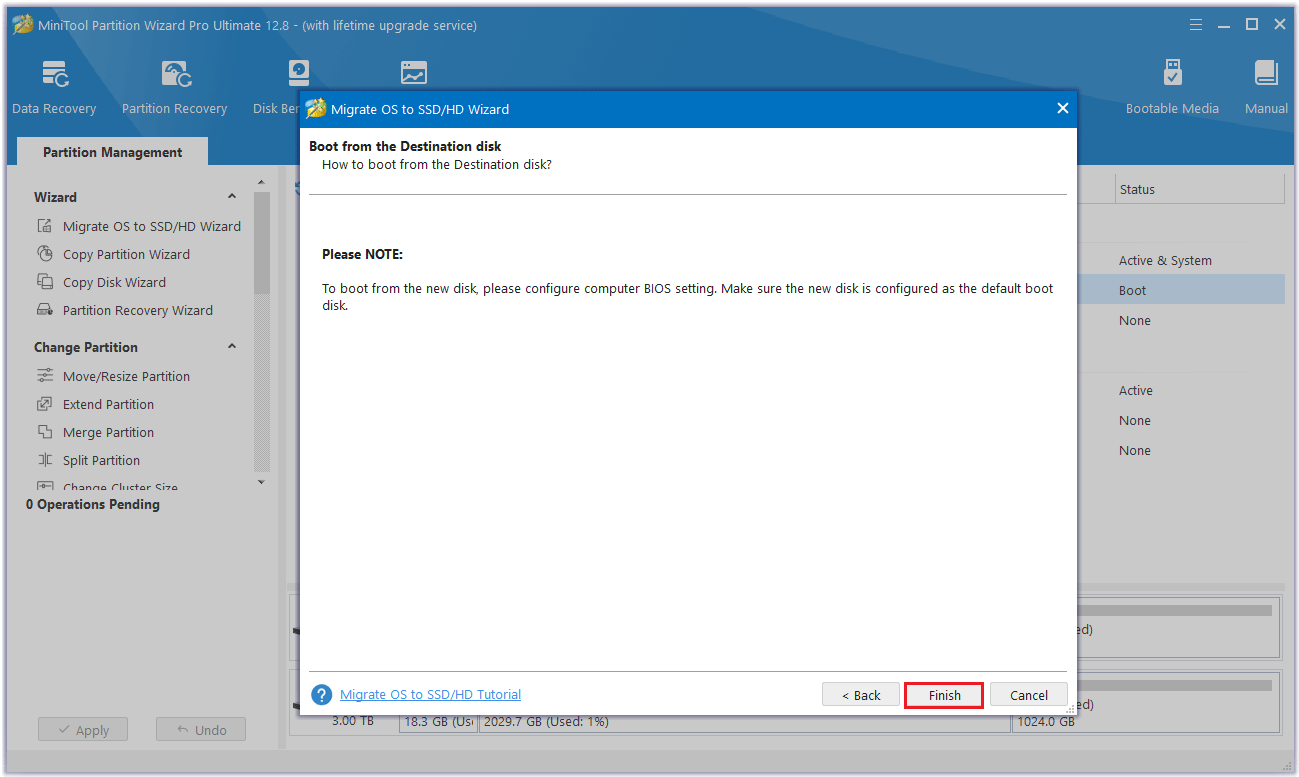
Step 6: Read the note carefully which shows how to boot from the destination disk, and click Finish to go back to the main interface.
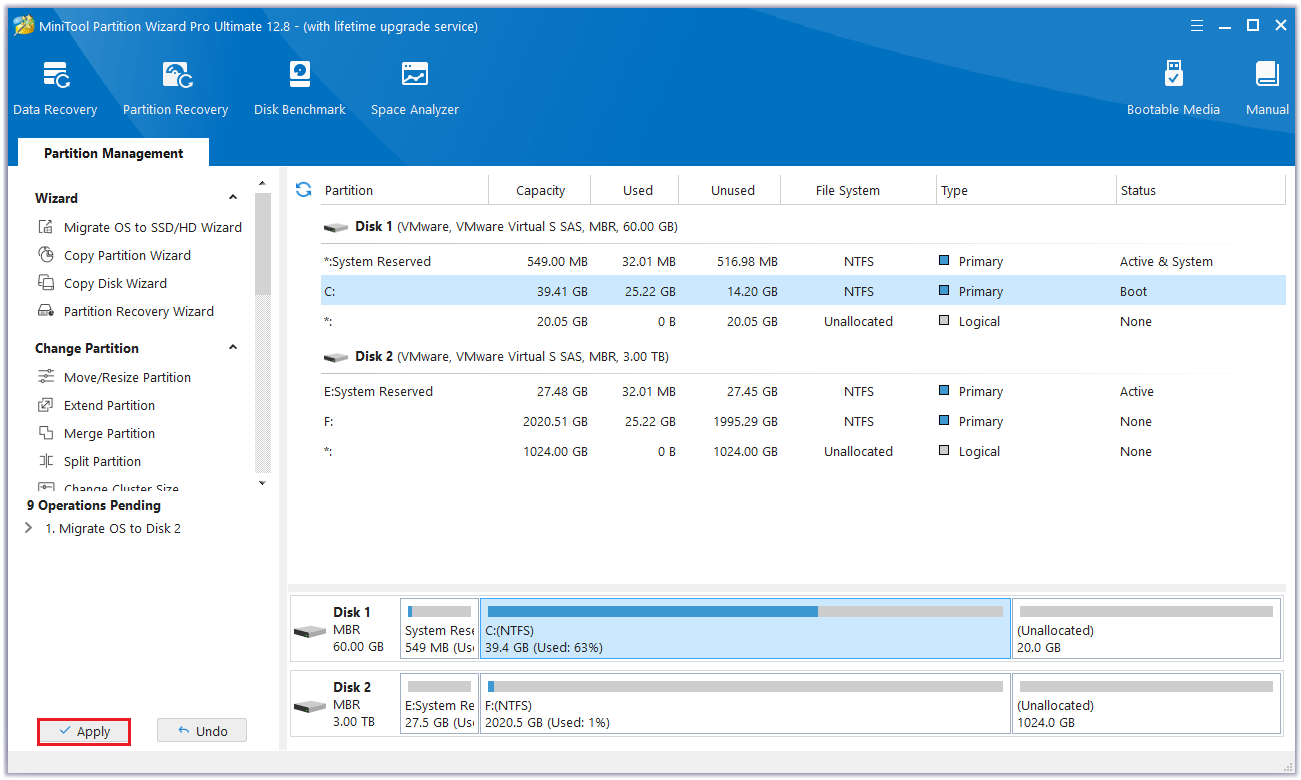
Step 7: MiniTool Partition Wizard will return to its main interface. Here you can preview all the changes you want to extend partition Windows 10 without formatting. Click Apply to make the operation effective.
When you have cloned the disk successfully, make sure you have set the target disk as the new boot disk, and then your computer should boot normally.
Extend Partition Windows 10 with Windows Built-in Tools
In addition to the third-party software introduced above that can extend partition Windows 10, Windows built-in Disk Management and Command Prompt can also extend partitions. Let’s take a look.
Use Disk Management
Disk Management has two basic functions: Extend Volume and Shrink Volume. This Extend Volume feature helps to increase the partition size by adding unallocated disk space. However, the only limitation is that not all partitions can be extended using this method. Sometimes, you will meet Windows 10 Extend Volume greyed out. Why?
Because the Extend Volume feature of Disk Management only extends volumes to the allocated/free space which is next to the right of the target partition. Besides, this feature is only available for NTFS and RAW partitions. Here are the steps:
Step 1: Press the Win + X keys to select Disk Management and the disk and partition information will be demonstrated on the main interface.
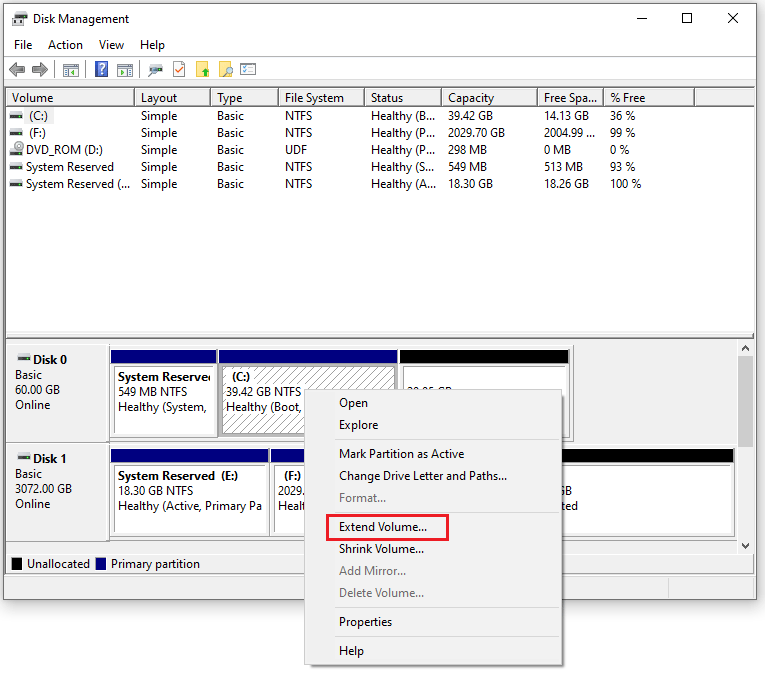
Step 2: Right-click on the C partition you want to extend and choose the option Extend Volume.
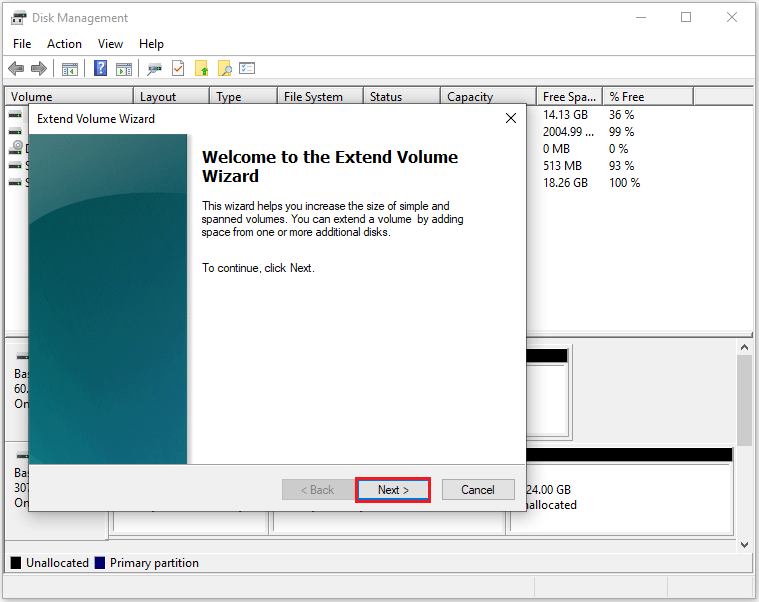
Step 3: In this pop-up window, click Next to continue.
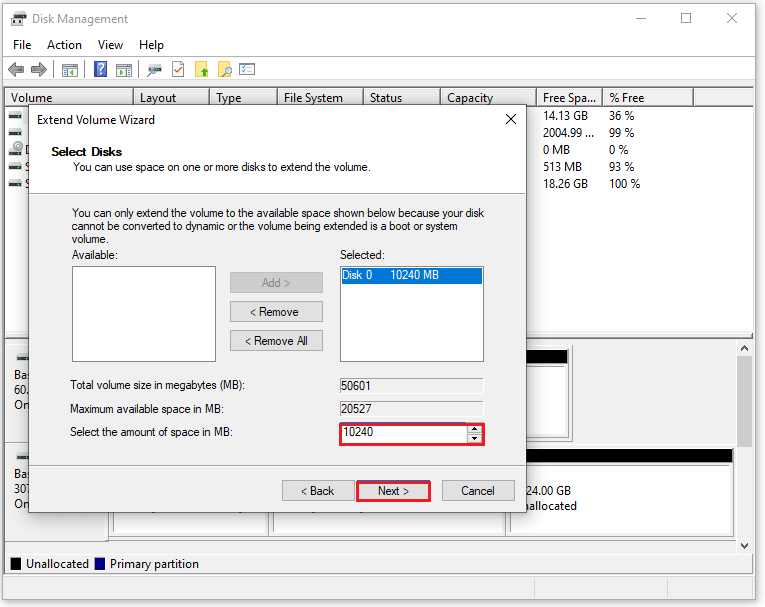
Step 4: Set the amount of disk space you would like to add to the C partition. After fulfilling the requirements, click the Next button.
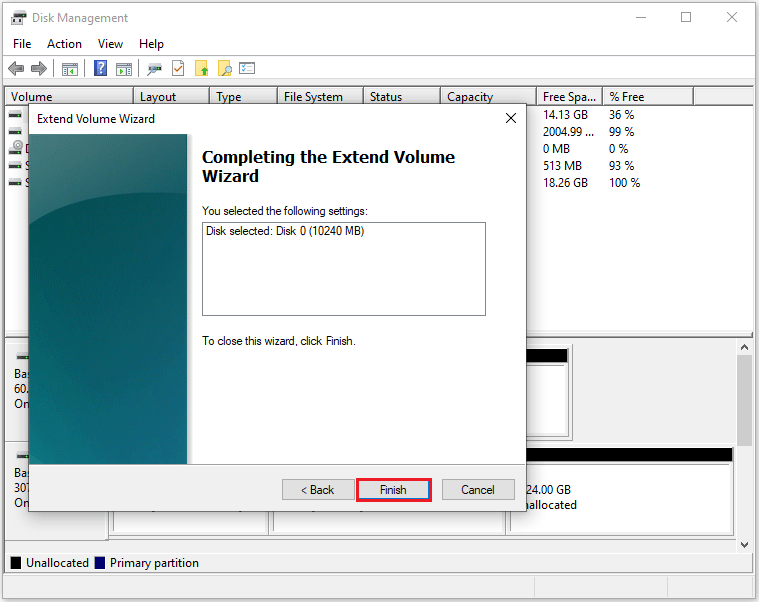
Step 5: Complete the process by clicking the Finish button and you’ll return to the Disk Management tool where you can see the partition’s changes.
Use Command Prompt
In addition to using Disk Management to expand partition Windows 10, you can also use the diskpart tool in Command Prompt.
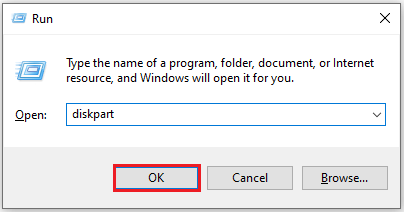
Step 1: Press the Win + R keys to open the Run box, and type diskpart to click OK.
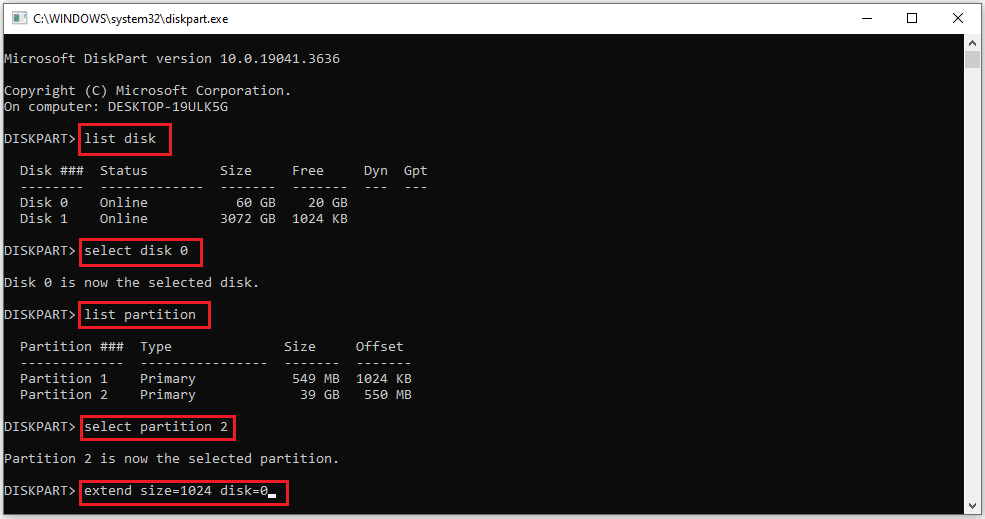
Step 2: Type the following commands and each one ends with the Enter key:
- list disk
- select disk 0 (0 is the number of the target disk)
- list partition
- select partition 2 (2 is the partition number of the target disk)
- extend size=x (x means a specific space size of the unallocated space or free space on the target disk you want to use, and x is in MB unit)
In summary, you can use third-party software and Windows built-in tools to extend a partition. But in comparison, MiniTool Partition Wizard can do this without losing any data. Windows built-in tools have certain limitations and may also cause data loss and affect the computer startup. It is not recommended to use the Windows built-in tools.
Bottom Line
This article ends here. The article describes in detail how to extend partition Windows 10 in five ways. You can choose the method you prefer to expand partition Windows 10. I hope this article is helpful to you.
If you have any questions or suggestions while using MiniTool Partition Wizard, you can contact us via [email protected] to get a quick reply.
Extend Partition Windows 10 FAQ
Right-click the Windows partition and click Extend.
Take some free space from another drive or the unallocated space.
Click Apply.
About The Author

Position: Columnist
Cecilia has been an editor at MiniTool for two years. She primarily focuses on disk and partition-related content, with particular expertise in disk cloning, partition recovery, and PDF document conversion. She is dedicated to providing users with clear and accurate solutions to help them efficiently resolve common computer problems.
User Comments :