Resize Partition
- Resize a partition in Windows 8
- Windows 8 boot disk
- Resize partitions in Windows 8
- Shrink partition Windows 8
- Windows 8 expand partition
- Resize partition Windows 8
- Resize Windows 8 partition
- Resizing partitions in Windows 8
- Expand partition Windows 8
- Resize partition for Windows 8
- Expand system partition
- Free extend boot partition
- Extend partition windows 8
- Windows server 2003 increase partition size
- How to increase partition size
- Increase windows partition
- Increase partition xp
- Free increase windows partition
- XP increase partition size
- Increase disk partition
- Increase partition size vista
- Increase partition size
- Windows XP increase partition size
- Increase partition size XP
- Free shrink windows partition
- Windows 7 increase partition size
- Windows 2003 extend partition free
- Partition in windows 7
- Extend partition vista
- Extend primary partition Windows 7
- Extend Windows partition
- Extend system partition safely
- Shrink partition Windows 7
- Shrink partition XP
- Windows 7 extend partition free
- Windows 7 shrink partition
- Windows server 2003 extend partition
- Extend boot partition free
- Windows 7 extend system partition
- Extend OS partition Server 2003
- Resize partition server 2008
- Extended partition
- Free resize partition
- Resize partition for windows
- Resize partitions
- How to resize a partition
- Expand partition
- Windows resize partition
- Resize partition in windows 2003 safely
- Resize OS partition efficiently
- Resize a partition
- NTFS resize partition
- Resize windows 2003 partition
- How to resize partition windows server 2003
- Resize partition ubuntu
- Resize extended partition
- Vista resize partition
- Server 2003 resize partition
- Resize partition in windows 2003
- How to resize Windows partition
- How to resize ntfs partition
- Partition ntfs resize
- Win7 resize partition
- Resize win7 partition
- Windows 2003 extend partition
- Extended partitions
- Extend boot partition
- Resize server 2003 partition
- Resize disk partition
- Server 2003 partition resize
- Resize partitions server 2003
- Resize Windows server partition
- Resize partition server 2003
- Low disk space
- Manage partition C drive run out of space
- Resize Windows 7 partition
- How to repartition a hard drive
- Extend Windows 7 system partition
- Resize partition server
- Primary extended partition
- Windows 7 system partition increase
- Windows 7 partition resize
- Extend NTFS system partition without reboot
- Extend Partition Server 2008
- XP partition resize
- Windows 7 extend partition
- Resize Partition with partition magic
- Repartition Hard Drive
- Windows 7 resize partition
- Resizing partition
- Windows partition resize
- Resize windows partition
- Resize partition windows
- Window 7 partition resize
- Adjust Partition Size
- Add Space to System C Drive Partition
- Redistribute free disk space
- Reduce Drive Partition Size
- Moving Partition
- Shrink partition wizard
- Shrink Partition Under Windows
- How to show extend partition
- Shrink Windows Server 2003 Partition
- Shrink windows partition
- Windows server 2003 resize partition
- Split partition
- System disk full
- Free up disk space
- Resize GPT disk partitions
- How to resize external hard drive
- Increase disk space
- Increase c drive partition
- Expand partitions under windows
- Resize system partition
- Partition 64
- About Windows Server 2003
- Convert fat32 to NTFS
- Create a Partition in Windows Server 2003
- Disk copy
- Disk manager
- Drive copy
- Free download Partition Wizard
- Magic software for partition management
- 64bit Partition Manager
- Clone disk
- Copy partitions
- Disk copy manager
- Partition manager
- Format partition
- Free partition manager to resize partitions
- How to resize partitions
- Free partition software
- Magic software for hard disk repartition
- Resize system primary partition
- Resize partition on windows server
- Resize partition freeware
- How to resize Windows Server 2000 partitions?
- Resize partition server 2008 64bit
- Resize Server 2008 partition
- Resize system boot partition
- Resize os partition
- Resize sbs 2008 system partition
- Windows server 2003 resize partition
- Resize partition windows 2003 server
- How to resize raid 1 without data loss?
- Resize Windows server 2003 partition
- Resize RAID partition
- Resize NTFS partition
- Resizing and moving partition
- Resize partition Windows 7
- Resize partition under Window operating system.
- Resize partition Windows server 2003?
- Resize and move partition
- Resize Vista partition
- Resize partition on Vista.
- Server 2008 Resize partition
- Resize external hard drive
- Server partition resize
- Resize GPT disk partition
- Resize dynamic disk
- Resize boot partition 2
- Resize RAID 5
- Resize RAID
- Resize FAT32
- Resize FAT32 partition
- Resize partition for FAT32
- FAT32 partition resizing
- Free partition resizing software
- Free software to resize partition
- Free resizing partitions
- Resize partition on windows server operating system
- Resize partition of Windows server
- Resize server partition on Windows
- Partition resize windows 2003
- Resize partition
- Windows partition
- Extend windows 7 partition free
- Increase raid 5 size
- Extend system partition server 2003
- Extend system partition
- Increase partition size windows 7
- Extend simple volume
- Extend server 2008 boot partition
- Extend SBS 2003 server
- Increase partition size server 2008
- Increase hard disk space
- Increase free disk space on the system partition
- Increase partition capacity
How to resize ntfs partition
-
As we all know, as the latest file system developed by Microsoft for Windows NT and later operating systems, NTFS has more advantages in functions and safety compared with the ever widely used FAT32. So this file system is favored by many users since it was released. Owing to the continuous promotion of Microsoft, it has become the most widely used file system all over the world. Well then, what advantages does NTFS have?
1. Has early mistake warning function.
2. More high-efficiency reading speed.
3. Detects and repairs disk error.
4. Offers many functions, such as compressing disk, data encryption, and disk quota.
5. Supports the volume within 2TB and single file within 64GB.
6. Adopts smaller cluster to store and manage file.
Although NTFS has many advantages and features compared with other file systems, we may meet many problems in the process of using NTFS partition. For example, we can not store more files because of NTFS partition space shortage. And many NTFS users have paid much attention to this problem.
Resize NTFS partition under Windows XP without damaging data
To solve the problem of NTFS partition space shortage quickly, I believe most users will think of resizing NTFS partition. However, we will find it is not easy to resize NTFS partition under Windows XP, because its system built-in disk management tool can not help us resize NTFS partition directly. If we want to use this tool to resize NTFS partition, we have to repartition the hard disk, but this method will lead to the loss of important data. I believe nobody is willing to see this result. As a matter of fact, users who are familiar with Windows disk management know there is a better method for resizing NTFS partition. With this method, we can resize NTFS partition quickly without bringing any damage to data. That is the third party professional partition magic. Here, MiniTool Partition Wizard is suggested.
MiniTool Partition Wizard, a piece of partition magic with powerful functions
MiniTool Partition Wizard is a piece of professional partition magic developed by MiniTool Solution Ltd.. This software has all-sided functions, easy operations, and pretty high security, which makes it have extremely powerful disk management competence. With this professional partition magic, we can accomplish almost all disk management, including Resize NTFS partition. Besides, its operations are very easy. First, we need to download it from its official website http://www.partitionwizard.com/. Then, install and run it to get its main interface.
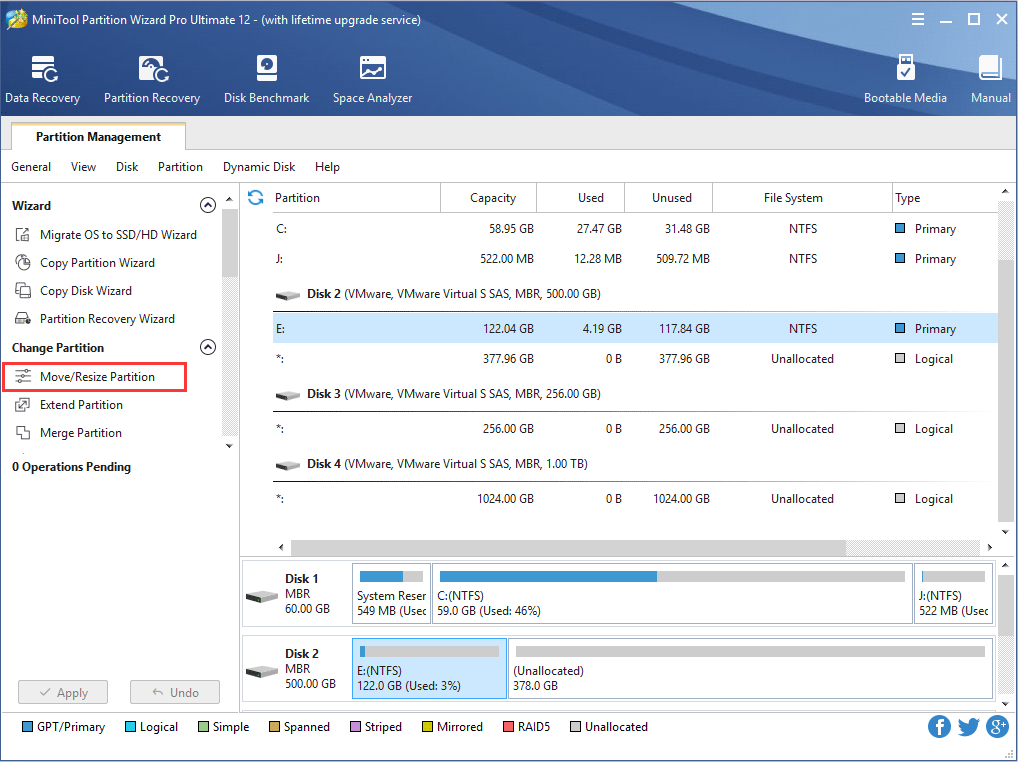
In the main interface, select the NTFS partition which needs resizing, and then click "Move/Resize" to enter the next interface.
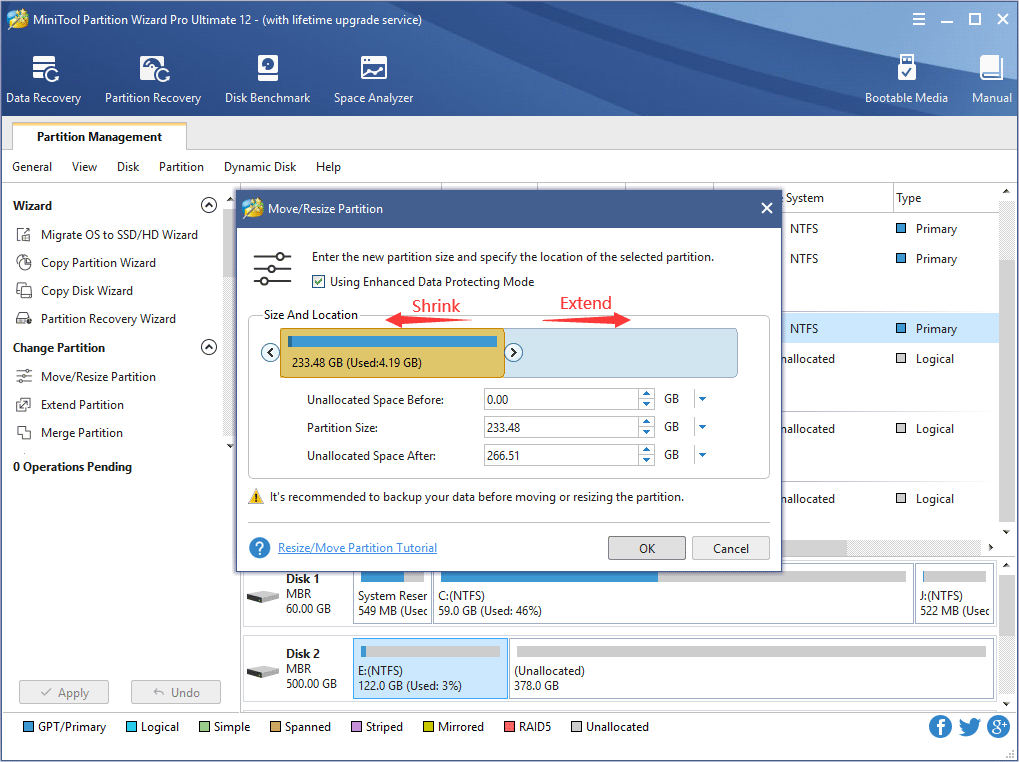
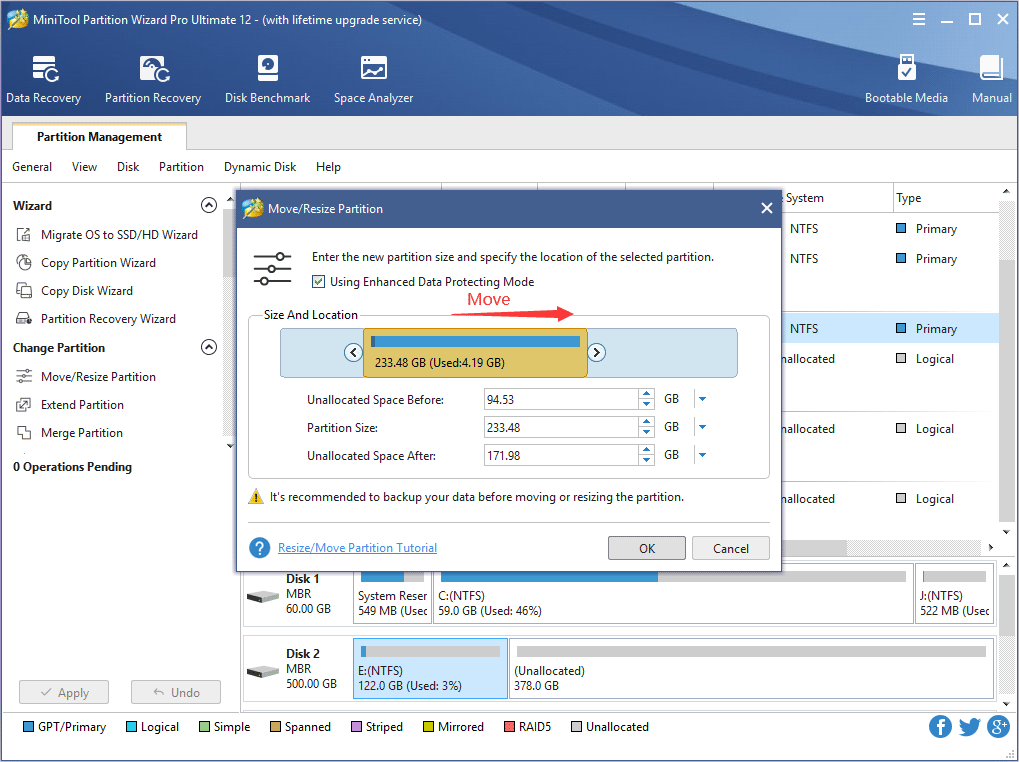
Here, drag the black triangles to change the length of the partition handle to resize NTFS partition. Then, click "OK" to go back to the main interface.
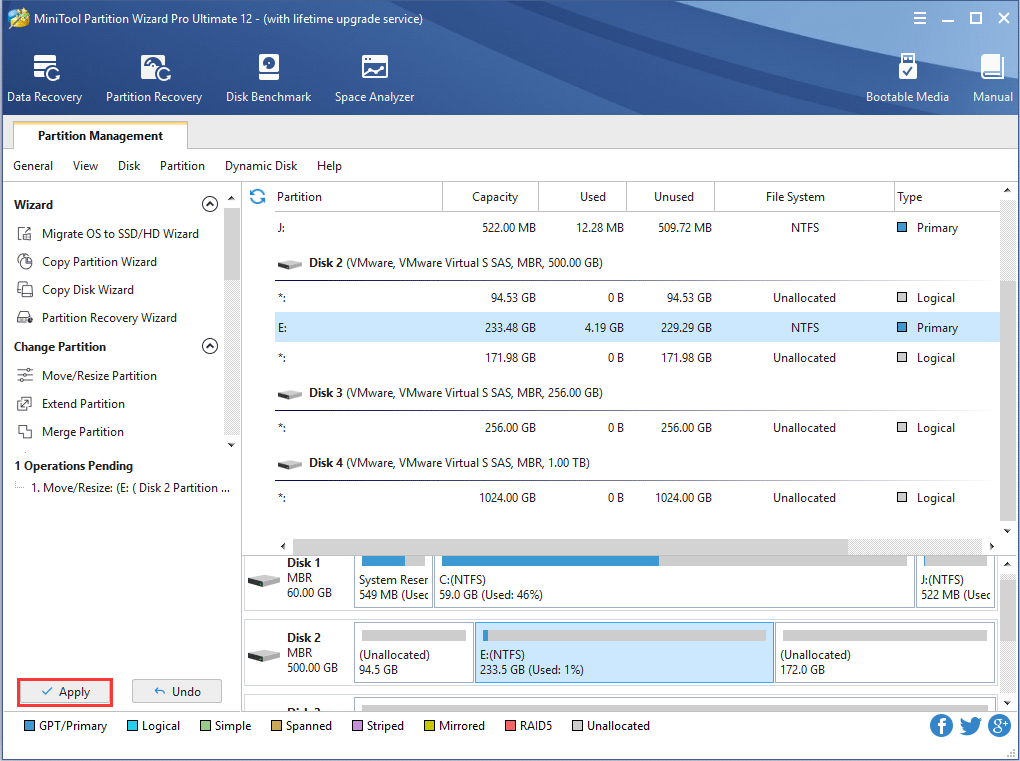
The main interface shows the NTFS partition has been resized. However, this is just a preview effect this partition magic offers. To accomplish real resizing, we need to click "Apply" to perform all operations.
If you are looking for a method for resizing NTFS partition, you can try using the powerful and professional partition magic MiniTool Partition Wizard. More importantly, this partition magic offers free edition for home and individual users. Hurry to download it from its official website to experience its powerful functions. I believe it will not disappoint you.
Free Partition Manager Free Partition Magic Partition Manager Server Partition Magic Server
Common problems related to partition management and our solutions:
- Resize NTFS partition with MiniTool Partition Wizard Server Edition.
- How to convert FAT32 to NTFS with MiniTool Partition Wizard?
- Extend NTFS/system partition without reboot.