Resize Partition
- Resize a partition in Windows 8
- Windows 8 boot disk
- Resize partitions in Windows 8
- Shrink partition Windows 8
- Windows 8 expand partition
- Resize partition Windows 8
- Resize Windows 8 partition
- Resizing partitions in Windows 8
- Expand partition Windows 8
- Resize partition for Windows 8
- Expand system partition
- Free extend boot partition
- Extend partition windows 8
- Windows server 2003 increase partition size
- How to increase partition size
- Increase windows partition
- Increase partition xp
- Free increase windows partition
- XP increase partition size
- Increase disk partition
- Increase partition size vista
- Increase partition size
- Windows XP increase partition size
- Increase partition size XP
- Free shrink windows partition
- Windows 7 increase partition size
- Windows 2003 extend partition free
- Partition in windows 7
- Extend partition vista
- Extend primary partition Windows 7
- Extend Windows partition
- Extend system partition safely
- Shrink partition Windows 7
- Shrink partition XP
- Windows 7 extend partition free
- Windows 7 shrink partition
- Windows server 2003 extend partition
- Extend boot partition free
- Windows 7 extend system partition
- Extend OS partition Server 2003
- Resize partition server 2008
- Extended partition
- Free resize partition
- Resize partition for windows
- Resize partitions
- How to resize a partition
- Expand partition
- Windows resize partition
- Resize partition in windows 2003 safely
- Resize OS partition efficiently
- Resize a partition
- NTFS resize partition
- Resize windows 2003 partition
- How to resize partition windows server 2003
- Resize partition ubuntu
- Resize extended partition
- Vista resize partition
- Server 2003 resize partition
- Resize partition in windows 2003
- How to resize Windows partition
- How to resize ntfs partition
- Partition ntfs resize
- Win7 resize partition
- Resize win7 partition
- Windows 2003 extend partition
- Extended partitions
- Extend boot partition
- Resize server 2003 partition
- Resize disk partition
- Server 2003 partition resize
- Resize partitions server 2003
- Resize Windows server partition
- Resize partition server 2003
- Low disk space
- Manage partition C drive run out of space
- Resize Windows 7 partition
- How to repartition a hard drive
- Extend Windows 7 system partition
- Resize partition server
- Primary extended partition
- Windows 7 system partition increase
- Windows 7 partition resize
- Extend NTFS system partition without reboot
- Extend Partition Server 2008
- XP partition resize
- Windows 7 extend partition
- Resize Partition with partition magic
- Repartition Hard Drive
- Windows 7 resize partition
- Resizing partition
- Windows partition resize
- Resize windows partition
- Resize partition windows
- Window 7 partition resize
- Adjust Partition Size
- Add Space to System C Drive Partition
- Redistribute free disk space
- Reduce Drive Partition Size
- Moving Partition
- Shrink partition wizard
- Shrink Partition Under Windows
- How to show extend partition
- Shrink Windows Server 2003 Partition
- Shrink windows partition
- Windows server 2003 resize partition
- Split partition
- System disk full
- Free up disk space
- Resize GPT disk partitions
- How to resize external hard drive
- Increase disk space
- Increase c drive partition
- Expand partitions under windows
- Resize system partition
- Partition 64
- About Windows Server 2003
- Convert fat32 to NTFS
- Create a Partition in Windows Server 2003
- Disk copy
- Disk manager
- Drive copy
- Free download Partition Wizard
- Magic software for partition management
- 64bit Partition Manager
- Clone disk
- Copy partitions
- Disk copy manager
- Partition manager
- Format partition
- Free partition manager to resize partitions
- How to resize partitions
- Free partition software
- Magic software for hard disk repartition
- Resize system primary partition
- Resize partition on windows server
- Resize partition freeware
- How to resize Windows Server 2000 partitions?
- Resize partition server 2008 64bit
- Resize Server 2008 partition
- Resize system boot partition
- Resize os partition
- Resize sbs 2008 system partition
- Windows server 2003 resize partition
- Resize partition windows 2003 server
- How to resize raid 1 without data loss?
- Resize Windows server 2003 partition
- Resize RAID partition
- Resize NTFS partition
- Resizing and moving partition
- Resize partition Windows 7
- Resize partition under Window operating system.
- Resize partition Windows server 2003?
- Resize and move partition
- Resize Vista partition
- Resize partition on Vista.
- Server 2008 Resize partition
- Resize external hard drive
- Server partition resize
- Resize GPT disk partition
- Resize dynamic disk
- Resize boot partition 2
- Resize RAID 5
- Resize RAID
- Resize FAT32
- Resize FAT32 partition
- Resize partition for FAT32
- FAT32 partition resizing
- Free partition resizing software
- Free software to resize partition
- Free resizing partitions
- Resize partition on windows server operating system
- Resize partition of Windows server
- Resize server partition on Windows
- Partition resize windows 2003
- Resize partition
- Windows partition
- Extend windows 7 partition free
- Increase raid 5 size
- Extend system partition server 2003
- Extend system partition
- Increase partition size windows 7
- Extend simple volume
- Extend server 2008 boot partition
- Extend SBS 2003 server
- Increase partition size server 2008
- Increase hard disk space
- Increase free disk space on the system partition
- Increase partition capacity
Format partition
- Many a user is in to habit of formatting disk partition periodically to clean junk data or some choose to format partition instead of reinstalling operating system to eliminate viruses. However, the onboard disk management function could not realize such operation. Therefore, user now requires a professional partition manager to format partition safely and efficiently, MiniTool Partition Wizard Server Edition should be the very best choice.
Introduction to formatting:
Simply speaking, formatting is the initial part of the process for preparing a hard disk or other storage medium for its first use. The disk formatting includes setting up an empty file system. A disk formatting may set up multiple file systems by formatting partitions for each file system. Disk formatting is also part of a process involving rebuilding an entire disk from scratch.
Formatting initially applies only in computer hard disk. Nevertheless, as the development of electronic products, many storage devices have adopted formatting. In a narrow sense, formatting is to zero clear data, delete all storage data and recover storage to original state.
On high-level formatting and low level formatting:
Formatting comprises high-level formatting and low-level formatting.
Formatting a disk for use by an operating system and its applications and files involves two quite different types of formatting. First, a low-level (closer to the hardware) formatting program will mark the surface of the disk with sector numbers and other information to be used later, in normal operations, by the disk controller. This is intended to be the permanent foundation of the disk, and is often completed at the factory. High-level formatting occurs during operating system installation, or when adding a new disk. This inscribes the file system format. Disk and distributed file system will specify an optional boot block, and various volume and directory information for the operating system. High-level formatting is the process of setting up an empty file system on the disk and installing a boot sector. This alone takes little time, and is sometimes referred to as a "quick format". In addition, the entire disk may optionally be scanned for defects, which takes considerably longer, up to several hours on larger hard disks. In the case of floppy disks, both high- and low-level formatting are customarily done in one pass by the software. In recent years, most floppies have shipped pre-formatted from the factory as DOS FAT12 floppies. It is possible to format them again to other formats, if necessary.
As powerful partition manager developed by MiniTool Solution Ltd., MiniTool Partition Wizard Server Edition could perform various operations on disk, such as create partition, delete partition, format partition, wipe partition, merge partition, resize partition, copy partition, partition manager or convert file system, etc.

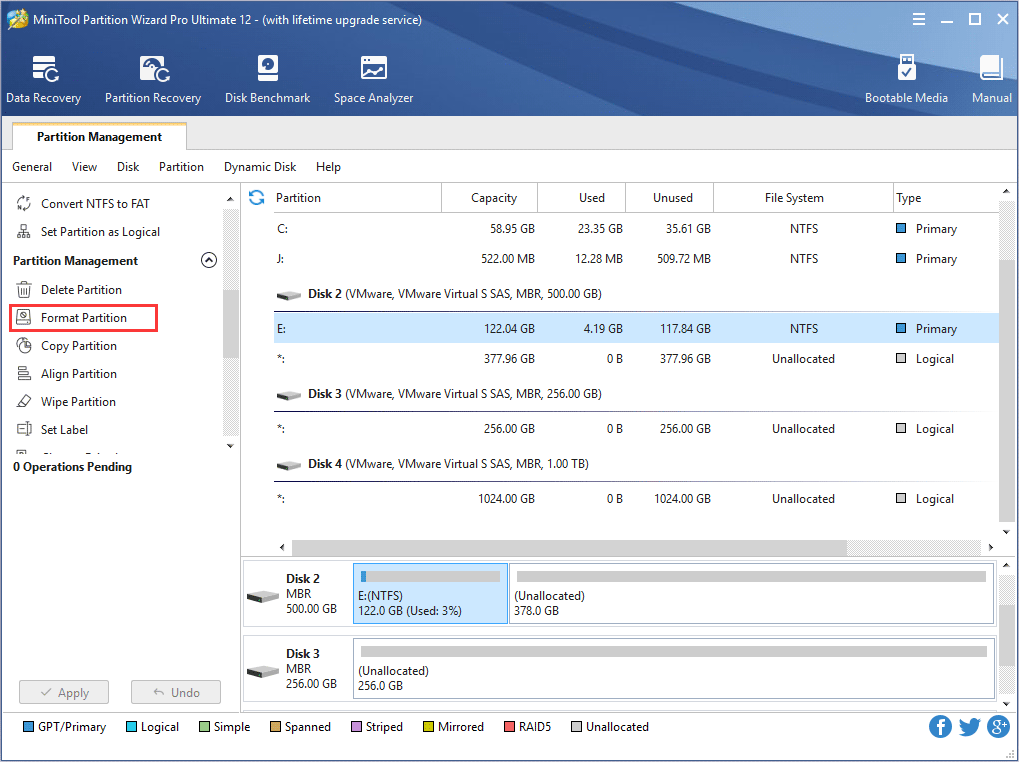
In this interface, all partitions are listed here. To format partition, user should select the desired partition and click "Format Partition".

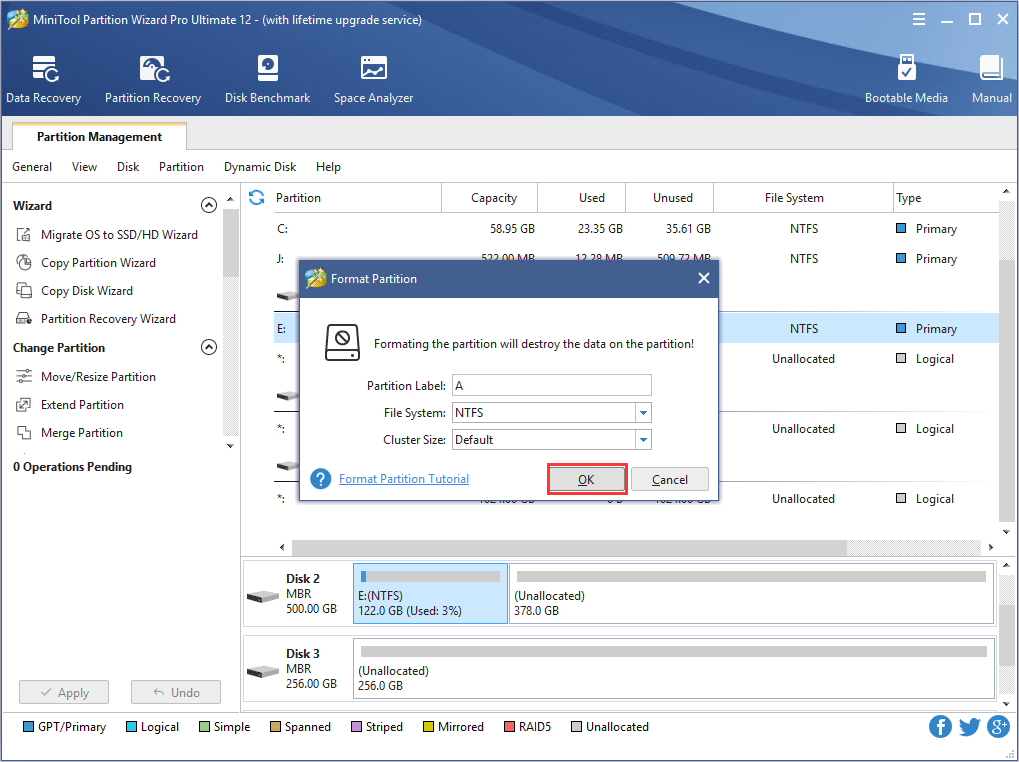
Then, a box above would emerge for formatting setting. After that, user should click "OK" to enter next step.

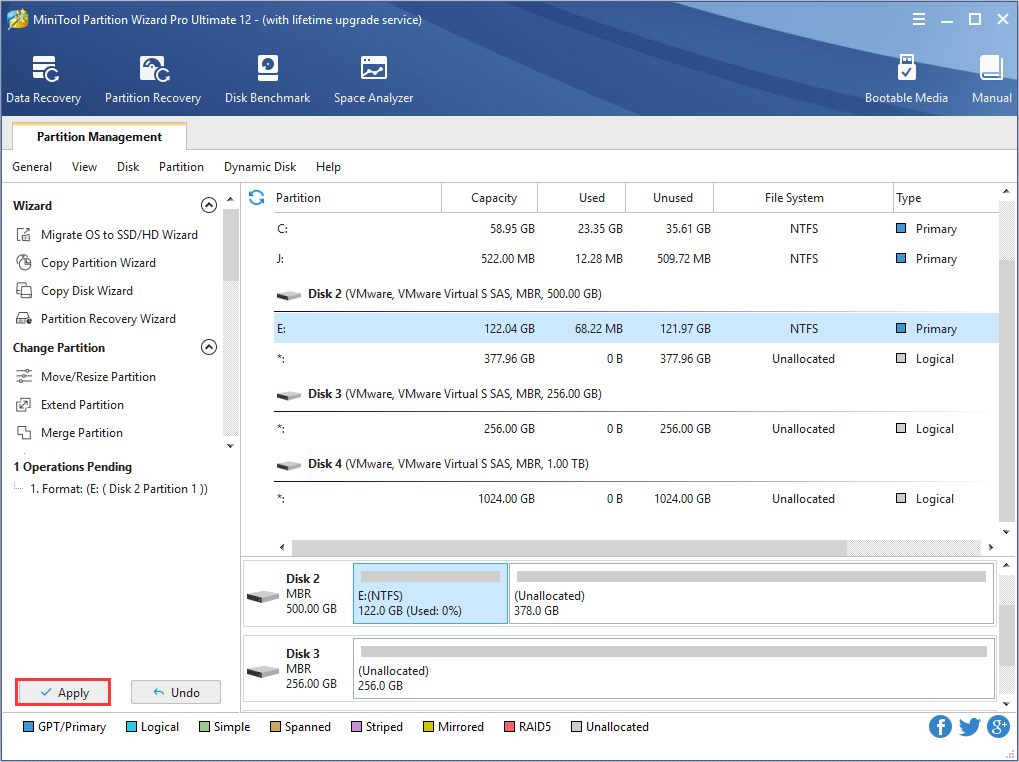
Now user should click "Apply" at the top left corner of this interface to format partition.
This is merely "Format Partition" function of MiniTool Partition Wizard Server Edition, for more detailed information on other disk operations please go to http://www.partitionwizard.com.
Free Partition Manager Free Partition Magic Partition Manager Server Partition Magic Server