
Get a low disk space warning and want to extend partition Windows 10 to solve it? Fortunately, you come to the right place. Here we will show you how to extend C drive in Windows 10 without formatting or losing data. And two ways are offered to you.
Extend Partition Windows 10 When C Drive Is Almost Full
After using a PC for a period of time, more and more data are saved on your partition, and the data occupy much disk space. Although the hard drive you use is relatively big, it is most likely that your hard drive is almost full or only C drive is running out of space.
Here let’s take system partition as an example.
When there is no disk space, you will find your partition bar gets red. Sometime Windows will prompt you a specific message “You are running very slow on disk space on local disk (C:). Click here to see if you can free space on this drive“.
When low disk space warning happens in your PC, you will most likely encounter one or more situations which are listed below:
Cases:
- Your computer runs very slowly.
- You probably fail to store large files or folders to the hard drive.
If there is not enough disk space, perhaps some of your needs can’t be met, for example, system upgrade, program or software installation.
So, what should you do if C drive is running out of disk space? How to extend system partition Windows 10 without losing data? Find answers in the following part.
Two Ways to Extend Partition Windows 10 Without Formatting
Solution 1: Extend C Drive Windows 10 on the Same Disk
In order to ensure your partition C has enough disk space, you should choose to expand it if there is some free space on other partitions but how to achieve this aim? Here we will introduce you three tools to help resize partition in Windows 10 without losing data.
① Extend System Partition Windows 10 with MiniTool Partition Wizard
In the partition management software market, there are many kinds of tools. And among them, there is an excellent program – MiniTool Partition Wizard which is developed by MiniTool Software Ltd. It is worthy of being recommended to extend Windows 10 partition.
As a professional partition manager, it can be used to deal with many operations on disk management, such as resize partition, extend partition, format/wipe/copy partition, rebuild MBR, clone disk, migrate OS to SSD/HDD, etc.
Now, to extend C drive in Windows 10 to solve low disk space warning, you can download this free Windows 10 partition manager and install it on the PC to have a try. To ensure a successful extension, we strongly recommend using MiniTool Partition Wizard Pro Edition, create a bootable disc or drive and start the extension task.
MiniTool Partition Wizard FreeClick to Download100%Clean & Safe
Then let’s look at how to extend partition Windows 10 in two cases:
Case 1: When there is unallocated space adjacent (it can be at the left side or right side) to your system partition in Windows 10.
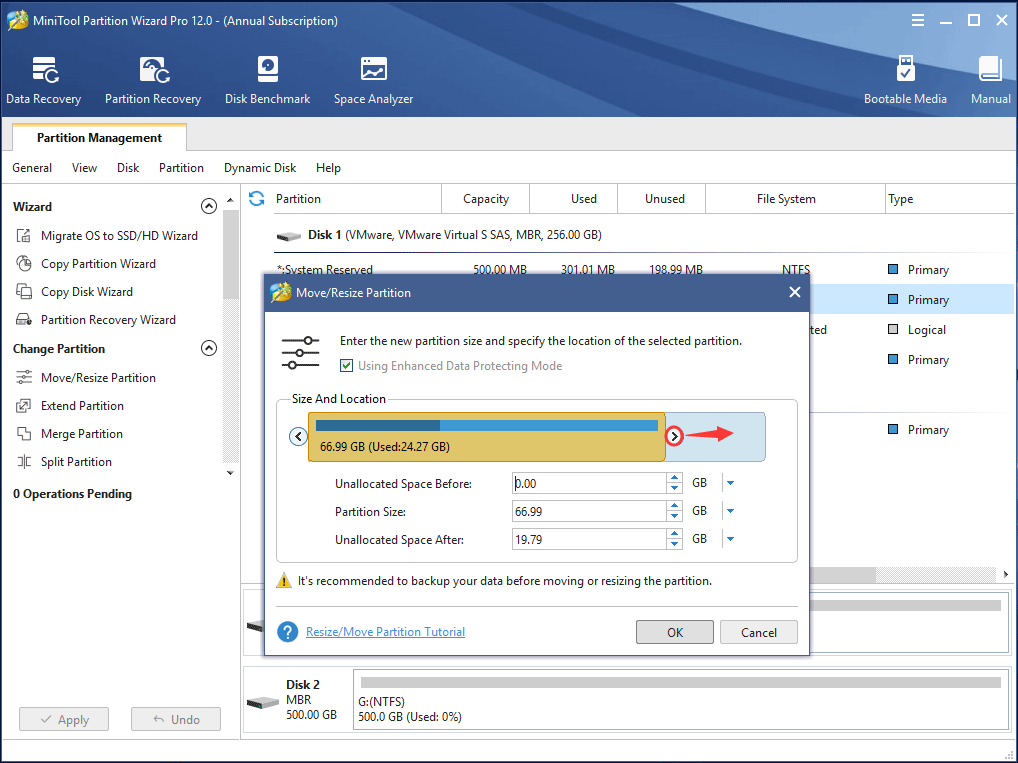
Step 1: Launch MiniTool Partition Wizard, then go to the main interface. Select system partition C, then select Move/Resize Partition from the action pane to resize partition Windows 10 without losing data.
Step 2: Then in the pop-up window, drag the black arrow to occupy the unallocated space. Here Using Enhanced Data Protecting Mode is checked by default and it can protect your data when a sudden power outage happens.
Step 3: Finally click Apply to perform system partition extension operation.
Case 2: When there is no unallocated space next to system partition in Windows 10.
If you experience this case, how to extend C drive in Windows 10 without formatting? Now, keep your reading.
Here, Its Extend feature enables you to expand partition by taking free space from any other existing partitions or unallocated spaces on the same disk.
Let’s see detailed steps to finish extending C drive successfully:
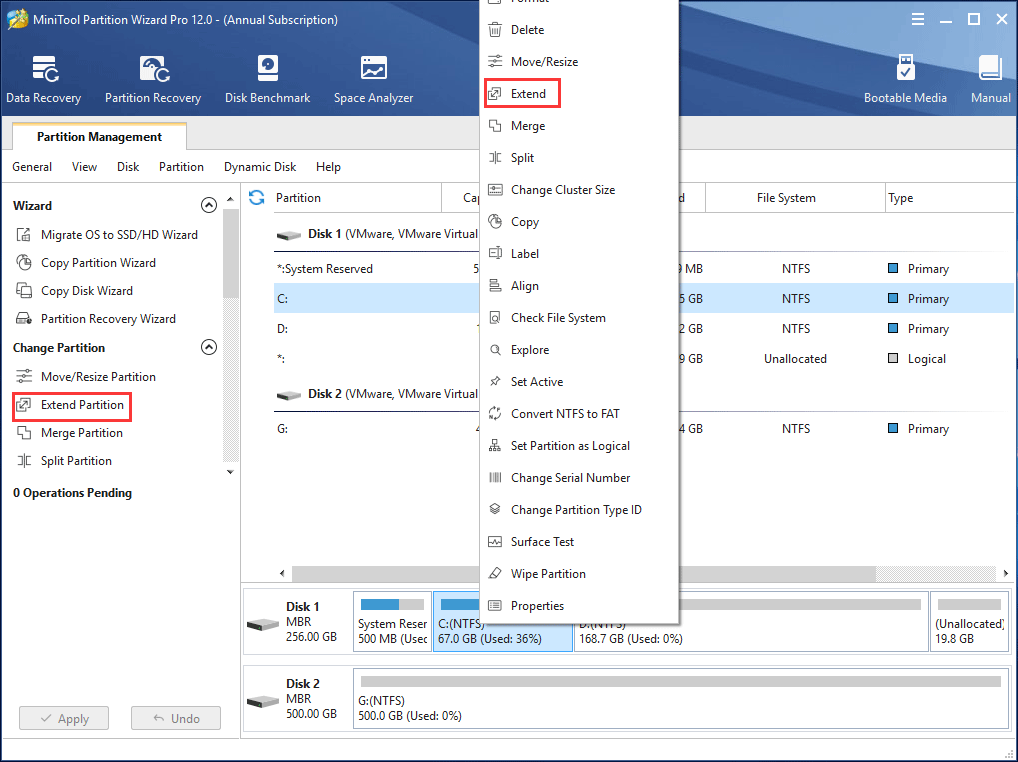
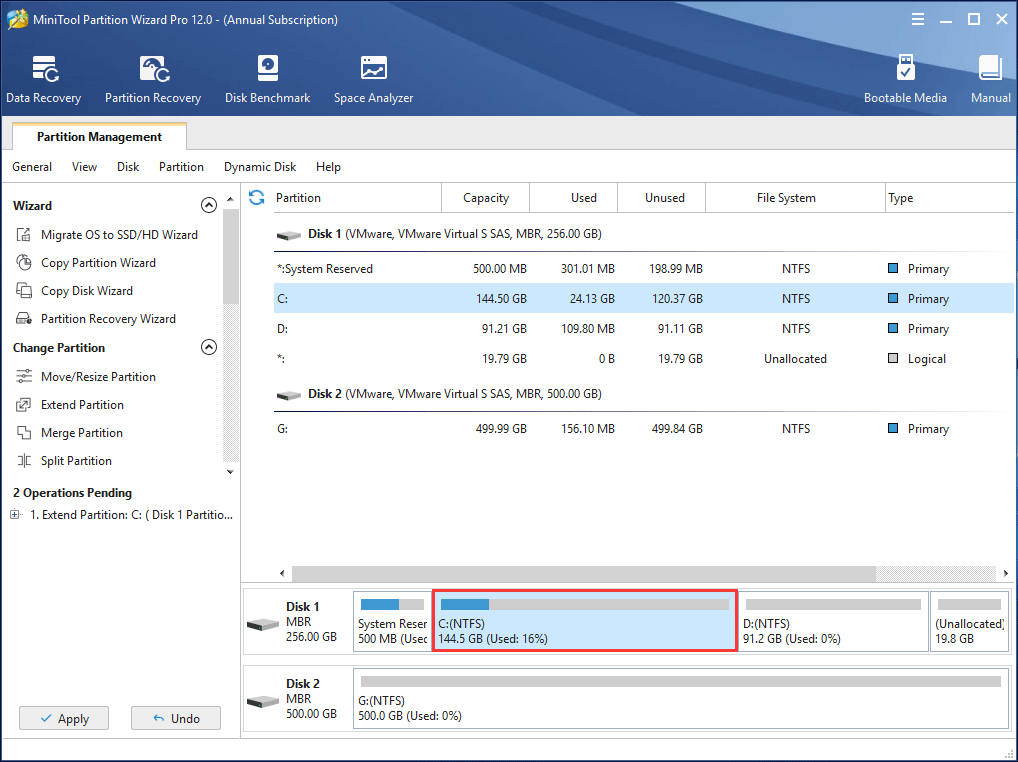
Step 1: Please select the Windows 10 system partition and click Extend Partition from the left pane. Also, it is OK to right-click on C partition and select Extend.
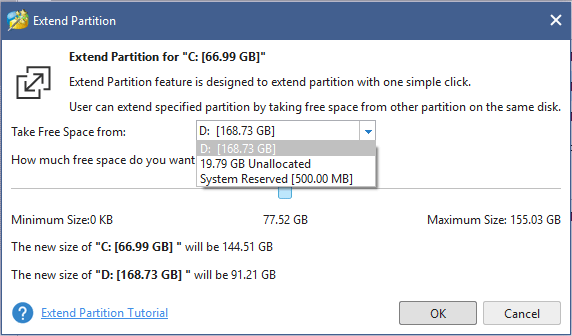
Step 2: How to allocate more space to C drive in Windows 10? Just choose to take free space from a partition or unallocated space and drag the sliding handle to decide how much free space to take. After that, click OK to go back to the main interface.
Step 3: Now you can view the partition is enlarged, but this effect has not been applied to the computer, so you need to click on the Apply button to execute all changes.
② Extend C Drive Windows 10 via Disk Management
Some of you may be wondering: how to extend C drive in Windows 10 without software. Actually, you can choose to use Windows Disk Management which has two basic features Extend Volume and Shrink Volume. They are useful to increase or reduce partition size.
Nevertheless, when trying to extend volume, sometimes you may fail to do a job with the features, but sometimes you can extend or shrink partition successfully, not knowing the reason.
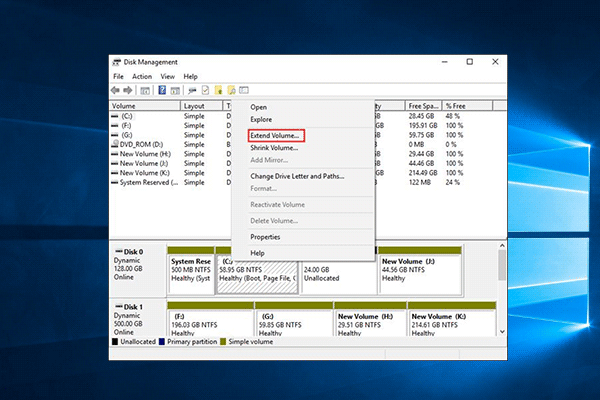
When you open this free tool and right-click C drive, you will view Windows 10 Extend Volume greyed out so you can’t extend volume in Windows 10, just like the picture shows below.
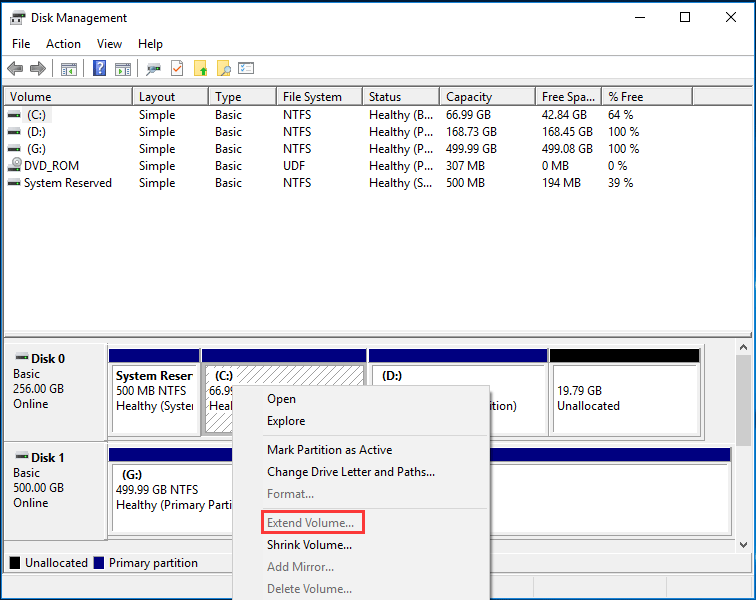
Do you know why Extend Volume is disabled in Windows 10 for C drive? In fact, it is due to the limitation of Disk Management. Here are two points you should pay attention to:
- The unallocated space must be on the same disk, and it must follow the system partition. That is to say, Disk Management only can extend a primary partition with contiguous unallocated space on the right side (logical partition with free space).
- The partition you want to extend should be in the NTFS or RAW file system, otherwise, extend volume greyed out issue in Windows 10 will appear.
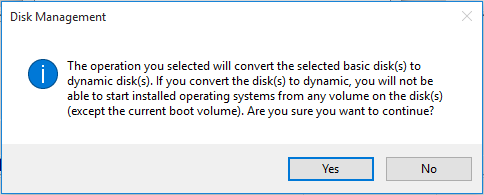
Furthering tip: If you want to extend a partition on the data disk and there is an empty disk on your computer, Extend Volume is available. During the process, you will receive a message telling you to convert the selected basic disk to dynamic disk to expand partition in Windows 10.
③ Extend Partition Windows 10 with Diskpart
In addition to extending C drive Windows 10 with Disk Management, there is another tool named diskpart which also enables you to manage your disk and partition in some aspects, such as extend volume, format volume, convert to NTFS, clean disk and more.
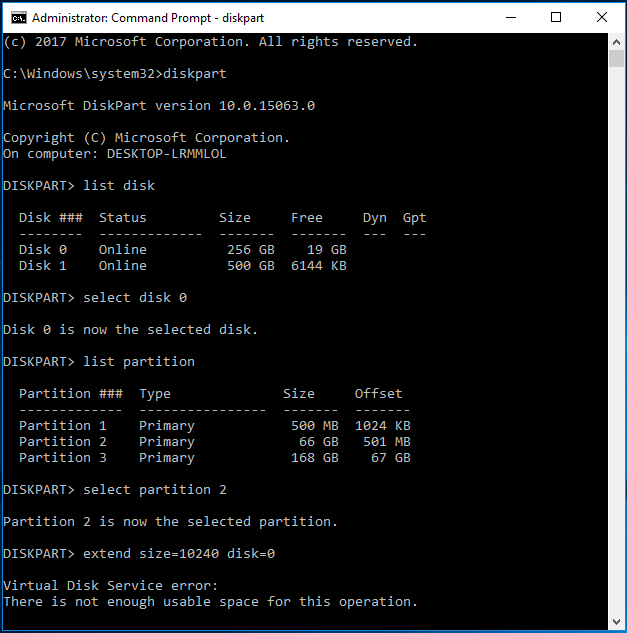
In order to extend Windows 10 partition with losing data, please run CMD as administrator, type “diskpart” to launch this tool. And then type the following commands and each one ends with “Enter” key:
- list disk
- select disk n: n is the number of the target disk.
- list partition
- select partition n: n refers to the partition number on the target disk.
- extend size=x disk=n: x means a specific space size of the unallocated space or free space on the target disk you want to use, and x is in MB unit.
However, if there is no unallocated space followed by system partition C, you can’t extend volume in Windows 10. A virtual disk service error “there is not enough usable space for this operation” probably happens.
In this part, we introduce three partition managers to extend partition in Windows 10 without formatting. By using them, you will find MiniTool Partition Wizard can help to increase partition size well without any limitation and it can solve Windows 10 can’t extend partition issue.
Compared to Disk Management and Diskpart, it has more powerful functions in partition or disk management, so it should be strongly recommended. Just get it to have a try.
MiniTool Partition Wizard FreeClick to Download100%Clean & Safe
Solution 2: Extend Partition Windows 10 with Another Hard Drive
In addition to the above solution, you can also choose to upgrade your system disk to a bigger hard drive to extend partition on Windows 10. MiniTool Partition Wizard, Windows 10 partition manager, provides you two features:
Copy Disk: This mode is designed to clone the entire disk including system data and other partition data to another big disk. If all partitions on the source disk are almost full, you should choose this mode and then increase all partition size by using the free disk space on the destination disk after finishing disk copy.

• Disk copy adopts sector-by-sector mode.
• The target disk must be larger than the used disk space on the original disk.
• Ensure that no data is saved on the target hard drive, otherwise, all data on this disk will be destroyed.
Migrate OS to SSD/HD: This feature enables you to move your system partition files as well as system-related files to SSD/HD to make a backup. Besides, you can also perform such an operation to extend system partition in Windows 10 with another big disk.
This feature is suitable if you only want to extend C drive but there is not enough disk space on the rest partitions of the same disk. How to do this work?
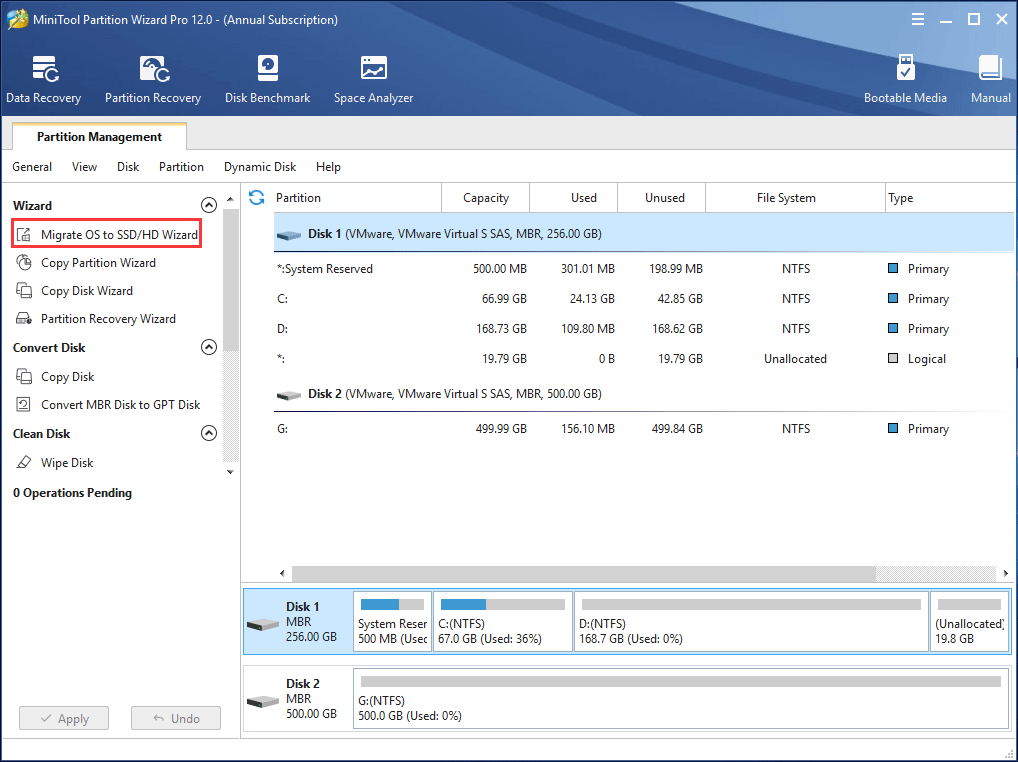
Step 1: Launch MiniTool Partition Wizard and then click Migrate OS to SSD/HD Wizard from the Wizard menu.
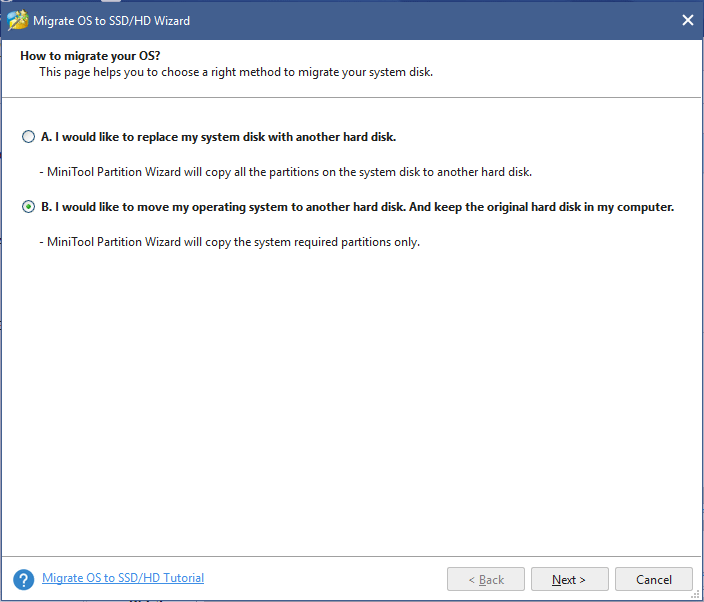
Step 2: Two options are offered to you. Here your purpose is to only extend C drive, so choose method B to continue.
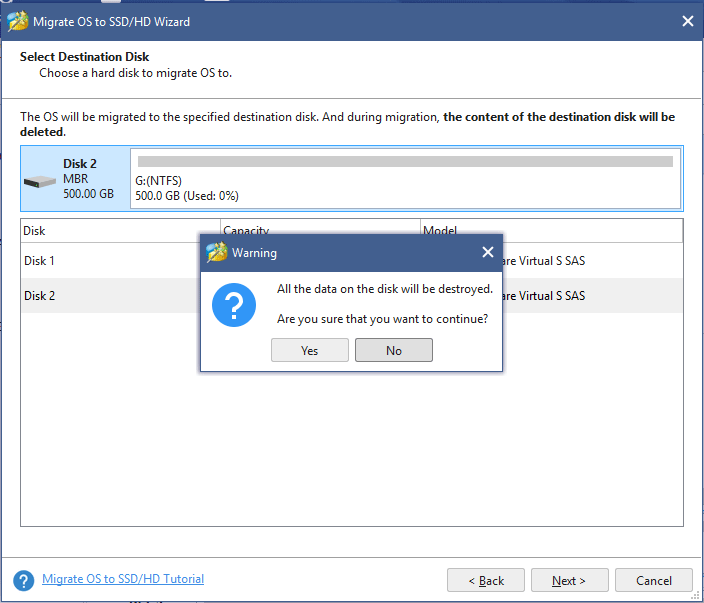
Step 3: Then you need to choose a target disk that must be larger than the used disk space of the source disk. Also, please ensure there is not any important data on the target disk.
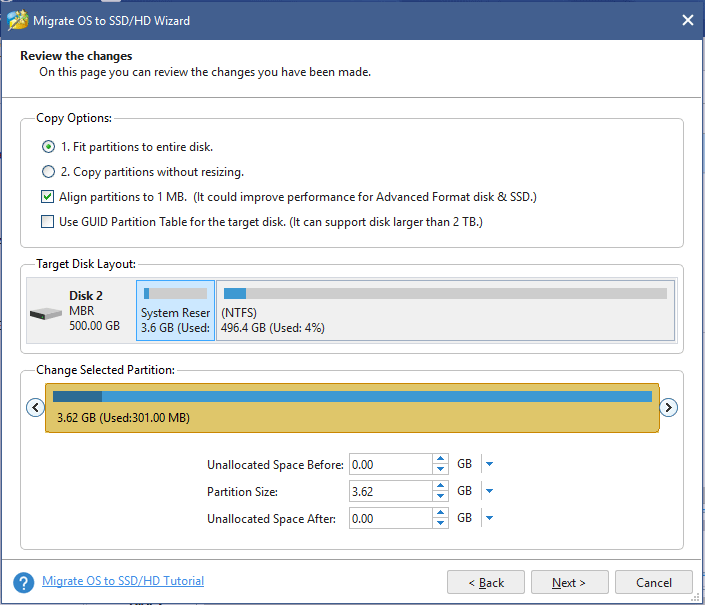
Step 4: Next select a copy method from Copy Options according to your need. Here, Fit partitions to entire disk is recommended to extend C drive in Windows 10.
Step 5: Then you will go to a window where MiniTool Partition Wizard will tell you to change the boot order in BIOS to boot from the destination disk.
Step 6: Finally click Apply to execute this OS migration operation.
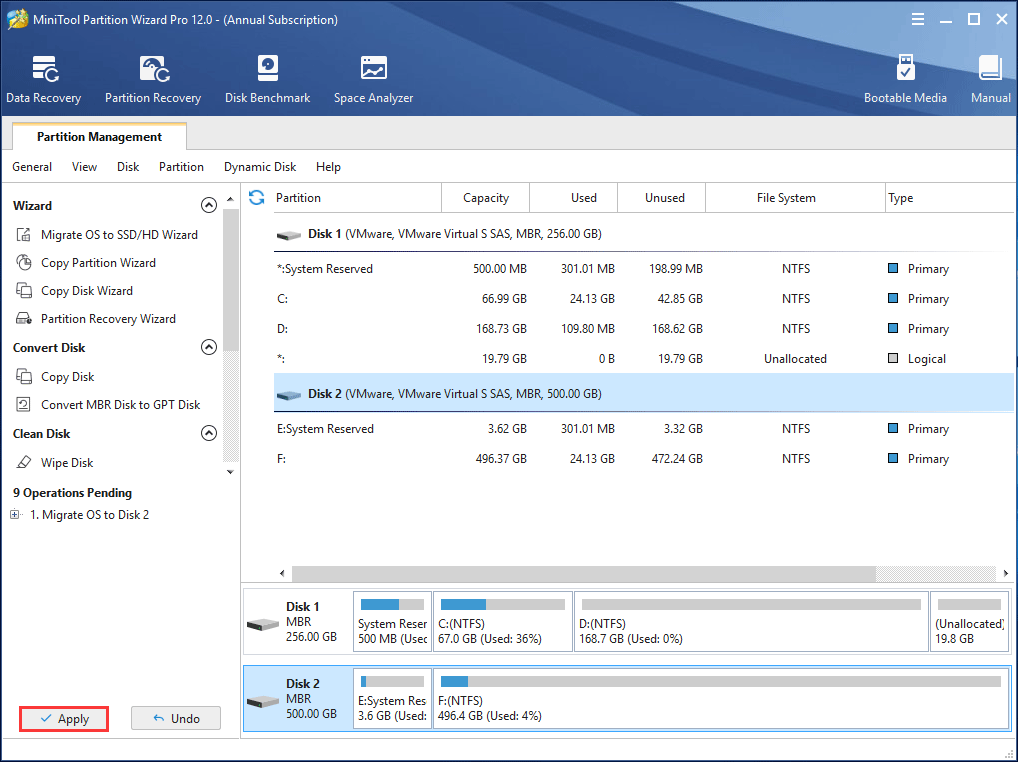
After that, set the BIOS to boot your PC from the target disk and then use the original disk as a data disk.
Want to extend partition in Windows 10 by migrating OS to another hard drive? Just use MiniTool Partition Wizard for a try. Also, you can share this tool on Twitter.
Suggestions to Reduce the Possibility of C Drive Full
Perhaps you will ask: how to extend C drive in Windows 10 without software? In this part, you can know two methods, which can increase system partition size to some extent.
Method 1: Empty Recycle Bin
As you know, in Windows, there is a built-in icon which is called Recycle Bin that usually locates on the desktop. As a temporary storage place, it is used to temporarily store some deleted files or folders.
More specifically, when you delete the file or folder you don’t need on your PC, the file is not deleted permanently and it is just put to Recycle Bin.
In this case, you can choose to free up some disk space from Recycle Bin if you have deleted some files. Right click on Recycle Bin and then select Empty Recycle Bin from the menu.
However, this way can only increase a bit of disk space because large files or folders won’t go to Recycle Bin and they will be directly deleted.
Method 2: Run Windows 10 Storage Sense
In Windows 10, there is a snap-in utility called Storage sense which enables you to automatically free up space by getting rid of files you don’t need like temporary files and content in your Recycle Bin.
To use it to extend partition Windows 10, follow the guide:
Step 1: Go to Settings > System > Storage.
Step 2: In the Storage sense section, please click the Change how we free up space link to configure which files you want to delete. And then, turn Storage sense on. Then, Windows will remove those files automatically to free up space.
These two ways are suitable for daily disk space clean. If you want to get more disk space, you need to extend C partition in Windows 10 by taking some free disk space from other big partitions with MiniTool Partition Wizard.
Bottom Line
Low disk space issue occurs on Windows 10 partition C? Now, you should choose any of the two solutions to extend Windows 10 partition without losing data. If there is any suggestion or solution, welcome to leave a comment below or contact [email protected].
Extend Partition Windows 10 FAQ
- Run MiniTool Partition Wizard. (To expand the system partition, it is recommended to use the bootable edition).
- Right-click the Windows partition and click Extend.
- Take some free space from another drive or the unallocated space.
- Click Apply.
About The Author

Position: Columnist
Vera is an editor of the MiniTool Team since 2016 who has more than 5 years’ writing experiences in the field of technical articles. Her articles mainly focus on disk & partition management, PC data recovery, video conversion, as well as PC backup & restore, helping users to solve some errors and issues when using their computers. In her spare times, she likes shopping, playing games and reading some articles.