Partition Manager
- Windows 8 partition manager
- Magic partition manager
- Partition magic for Windows 2003 Server
- Partition assistant
- RAID partition manager
- Partition manager server
- The best server partition manager
- Upgrade to larger disk
- Windows 7 partition software
- Free Hard Disk Drive Space Manager
- Partition software windows server 2008
- Free fat ntfs partition recovery
- Merge partitions
- Free partition manager
- Windows server 2008 partition manager software
- Windows web server partition software
- Windows Server 2003 partition software
- Partition manager for Windows server 2008
- Windows Vista Partition Manager
- Partition software for server
- Windows server partition manager
- Windows Server 2003 Partition Manager
- Windows server 2008 partition manager
- GPT Disk Partition Manager
- Free windows 7 partition manager
- Convert fat to ntfs xp
- Convert fat32 to ntfs in windows xp
- Windows convert fat32 to ntfs
- Free disk manage
- Divide disk free
- Repartition windows 7 drive
- Windows 7 disk manager
- Recover lost partition
- Explore partition
- Extend boot partition Windows 7
- Windows 7 partition manager
- Hard disk copy
- Copy disk partition
- Dynamic disk recovery
- Extend OS partition
- Disk partition software for 64-bit Vista.
- Disk partition windows server 2003
- Extend/enlarge gpt partition
- Extend/expand logical partition
- Free partition manager software
- Extend/expand logical partition
- Extend/enlarge gpt partition
- Delete all partitions
- Copy wizard
- Copy gpt disk
- Free repartition external hard drive
- Free partition recovery software
- Discard all changes
- Boot partition is the partition where...
- Copy partitions is a function where a...
- How to create partitions?
- How to format partitions?
- Partition wizard can perform Linux...
- Partition wizard can tell you how to fix...
- Norton Partition Magic is one good...
- What is partition?
- Partitioning is the process of writing the...
- If user needs one professional partition...
- What is partition drive?
- How to fix partition?
- Partition Magic is an excellent partition...
- Partition Magic 8.0 is an excellent...
- Choosing partition software, user can...
- Partition wizard is an alternative to...
- Partition wizard can support many OS...
- Managing partition, Partition wizard is...
- How to perform partition recovery?
- How to repair partition?
- How to resize partition?
- Partition wizard can resize partition well.
- Partition wizard is one professional...
- What is partition table?
- What is Partition table doctor?
- What is partition utility?
- How to partition windows?
- Partitions are divided into primary...
- How to restore partition?
- How to swap partition?
- What is system partition?
- How to boot windows 7?
- How to resize windows partitions?
- How to partition Vista?
- How to partition windows 7?
- Partition wizard supports many 32...
- Partition Wizard is a professional...
- Partition wizard can partition FAT32 well.
- Partition wizard can tell user how to...
- How to merge partition under windows...
- How to resize NTFS partitions?
- What is NTFS and how to resize partitions?
- Partition wizard supports 64 bit systems.
- How to resize server partition?
- What is disk partitioning software?
- What is drive partition AFS?
- How to resize hard disk partition?
- Partition Wizard is the industry leading...
- How to resize 64 bit partition?
- How to resize partitions?
- What is 64 bit system?
- How to partition 64 bit windows XP?
- How to active partition?
- How to partition disk?
- Partition wizard can partition windows...
- How to partition windows 2000 server?
- How to partition windows vista 32 bit?
- How to partition windows vista 64 bit?
- How to partition 64 bit windows 2008...
- How to partition 32 bit windows 2008...
- How to partition windows 2003?
- How to partition windows 2008?
- How to partition 32 bit windows XP?
- What is partition magic64?
- How to partition 64 bit windows XP?
- Partition Wizard is professional...
- How to perform windows 7 64 bit...
- How to partition for windows XP?
- What is Partition magic 8 for vista?
- Compared with partition wizard in light...
- What is Partition magic 8.05?
- What is partition magic Dos?
- What is Partition Magic 9.0?
- How to partition for windows vista with...
- How to partition under windows 7?
- Partition wizard is an alternative to...
- Partition wizard can perform partitioning...
- Partition wizard is an alternative to...
- Partition Wizard is alternative partition...
- What is partition magic X64?
- What is partition management?
- Partition Wizard is the best partition...
- What is partition manager 64 bit?
- How to partition for Windows 2003...
- How to partition for windows 7?
- How to partition for Windows 2003...
- How to do partition 32 bit winddows7?
- What is partition manager for vista 64 bit?
- What is partition manager for vista 64...
- What is partition manager 9.0 64X?
- What is partition manager for XP64?
- What is partition manager X64?
- How to do resize partition for vista?
- What is partition manager for windows...
- Partition wizard is one free partition...
- How to resize partitions 64 bit vista?
- What is sd partitions?
- What is partition?
- What is XP partition?
- Partition manager is a professional...
- Partition wizard home edition is one free...
- How to clone disk?
- How to convert FAT32 to NTFS?
- How to copy disk?
- What is disk manager?
- What is drive copy?
- What is partition backup copy?
- How to resize partition for windows 2003?
- What is server partition manager?
- What is system copy?
- What is volume manager?
- How to boot windows?
- What is windows MBR?
- How to fix windows MBR?
- What is windows partition?
- How to build windows 7?
- Partition wizard can partition windows 7...
- Partition wizard can partition XP and...
- Partition Wizard Home Edition for...
- What is Microsoft windows 7?
- How to resize windows 7 partition?
- How to get windows 7 key?
- How to install windows 7?
- How to use windows 7 tools?
- How to resize windows 7 partitions?
- How to remove windows 7?
- What is windows 7 2009?
- Partition wizard supports windows 7...
- What is windows 7 test?
- What is server magic partition?
- What is server partition software?
- What is partition software for server?
- How to resize server 2003 partition?
- How to resize window server 2003...
- Partition Wizard Server Edition is an...
- How to partition windows server 2003...
- What is windows server partition?
- How to do windows server 2003 partition?
- What is partition server 2000?
- What is windows server 2000 partition?
- What is server 2000 partition?
- What is partition magic for windows...
- What is server partitioning tool?
- How to partition windows server 2003?
- What is windows server 2003 partition...
- What is partition manager server edition?
- What is windows 2003 partition manager?
- What is partition manager for server?
- What is partition manager for windows...
- Partition wizard is the best server...
- Partition wizard home edition is best...
- What is partition manager 2003?
- What is partition magic 2003?
- Partition 64 bit with 64 bit partition manager
- Partition copy
- Partition for Windows 2000 professional
- Partition for Windows 2003 server 32bit
- Windows 7 Partitions
- Partition for Windows XP 32bit
- Partition backup and copy
- Create NTFS Partitions
- Partition manager of windows vista
- Windows partition manager9.0 64x
- Change Letter with Partition Manager Freeware
- Partition for 64bit Windows Server 2003
- Partition for Windows Vista 32 bit
- Partition for Windows Vista 64bit
- Partition for 32bit Windows Server 2008
- Partition for 32bit windows 7
- Partition 64bit Windows 7
- Partition for Windows 2003
- Partition for Windows XP 64bit
- Partition for 64bit Windows Server 2008
- Partition Wizard for drive partitioning.
- Partition Wizard Overview
- Partitions for Windows 2008
- Partitions for Windows XP
- Copying System
- System partitions
- Volume partition manager
- Windows backup
- Boot damaged windows
- Rebuild Windows MBR
- Damaged Windows MBR fix
- Recovery Data
- Disk Partition
- Manage partition from CD-ROM
- Manage partition when system can not be booted
- 64 bit Windows 7 partition
- Best free partition manager for Windows 7
- Change dynamic disk to basic
- Change NTFS partition size
- Change partition size Server 2003
- Change server 2008 partition size
- Changing partition label
- Check partition for error
- Copy hard drive
- Copying disk freeware
- Create bootable disks
- Deleting partitions
- Windows 7 partition
Merge partitions
- In daily operations Merge Partitions is not frequent. Therefore, many computer users will often neglect this function while utilizing partition management software to manage disks. However, sometimes can play a very big role in partition management. If you can use it well, you will be able to manage partition files more efficiently.
What is merge partitions?
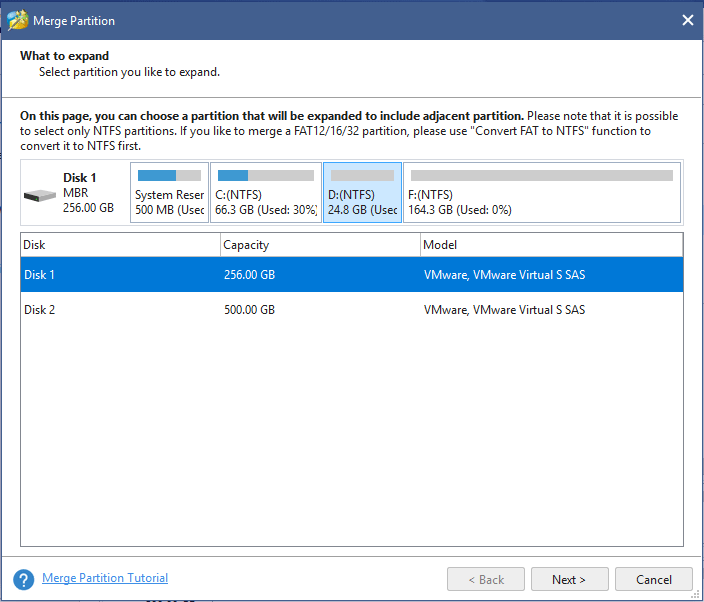
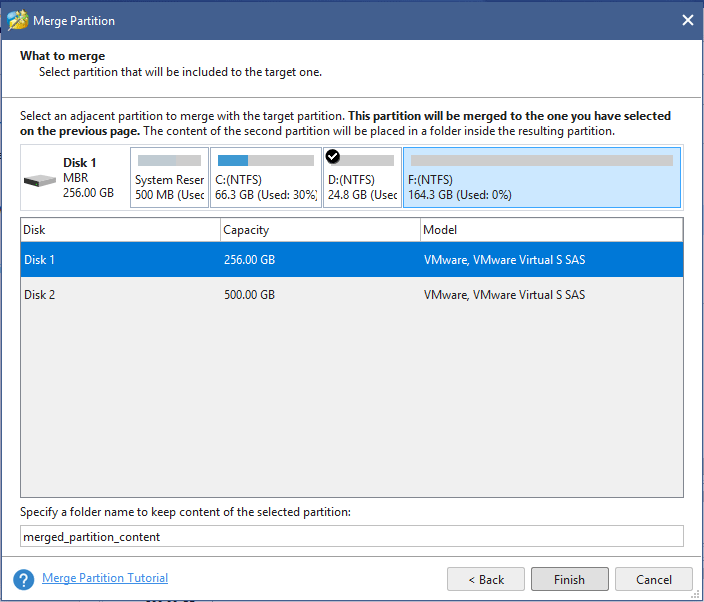
Maybe some computer users will feel unfamiliar with merge partition. In managing partitions, you deal most with creating, modifying, formatting, deleting, etc. But you may have few chances to merge partitions or even have never done it before. Then what is merge partition? It refers to combining two partitions with NTFS file system into one. From this definition, you will know, the operation involves two partitions rather than multiple partitions. Moreover, both of their file systems must be NTFS. Only on this basis can you perform this function. After two partitions are successfully merged, the files from one of the partitions will be saved as a file folder in the other partition. They will not be randomly stored in the root directory of partitions. It seems that merging partitions is actually transferring all files of one partition in a file folder to another partition, which is a little bit like partition copying. However, partition merging and partition copying is two totally distinct instructions. When you merge partitions, one of them will be deleted and the other one will become a combination of the two capacities.
Why is merge partition necessary?
Now you have learned what merge partition is. You know that when two partitions have the same file system, you can you can merge them into one. This will improve the efficiency in managing various sorts of files. Also to some extent, it will enhance the speed of operation system in retrieving and operating application programs. To enterprise users, it is quite necessary to merge their partitions that store the information of their clients. This will increase their efficiency in dealing with business, or the efficiency will go down and result in economic loss. Thus, though merge partitions is not often used in partition management, it can play significant role at key point.
How to merge partitions?
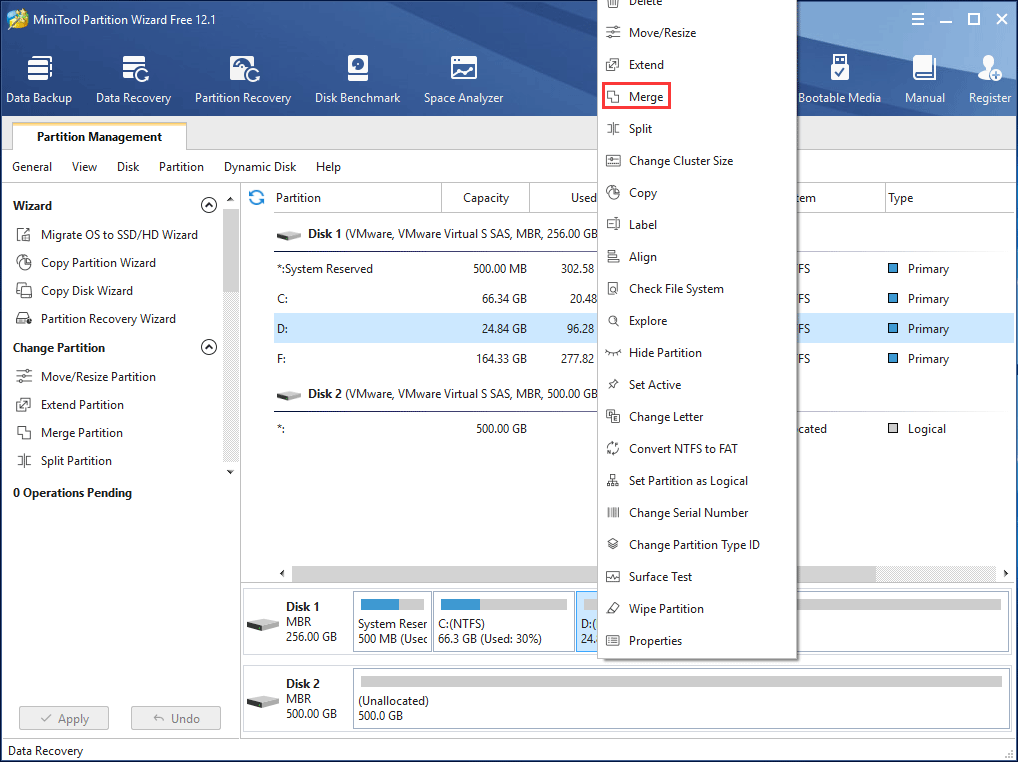
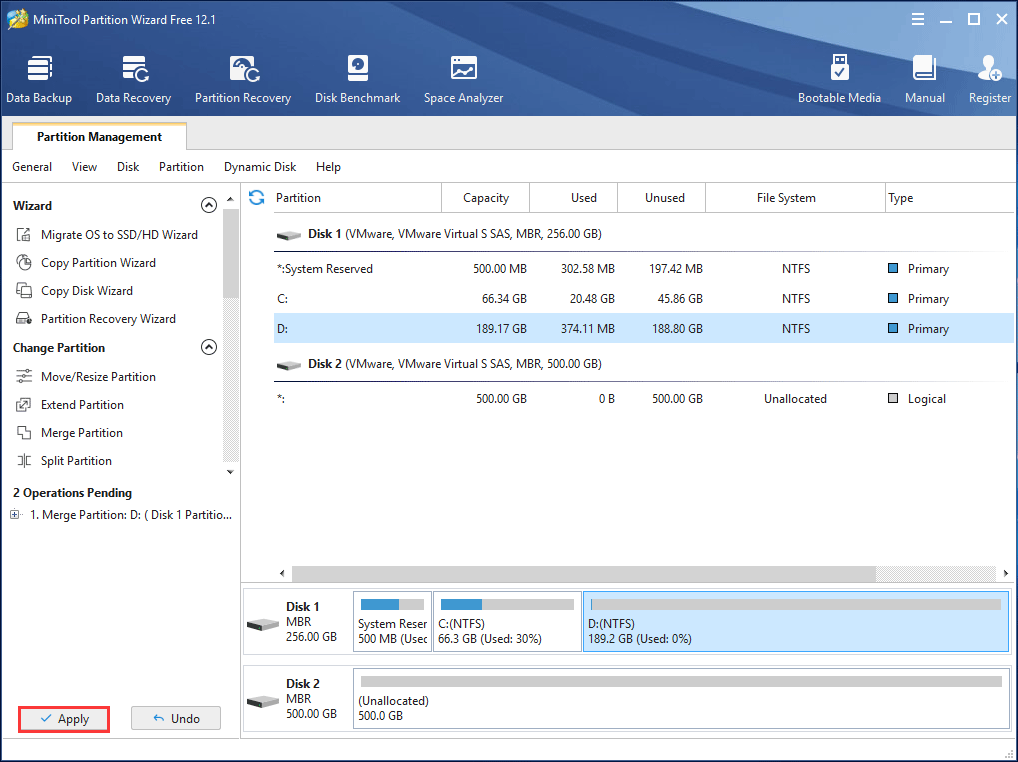
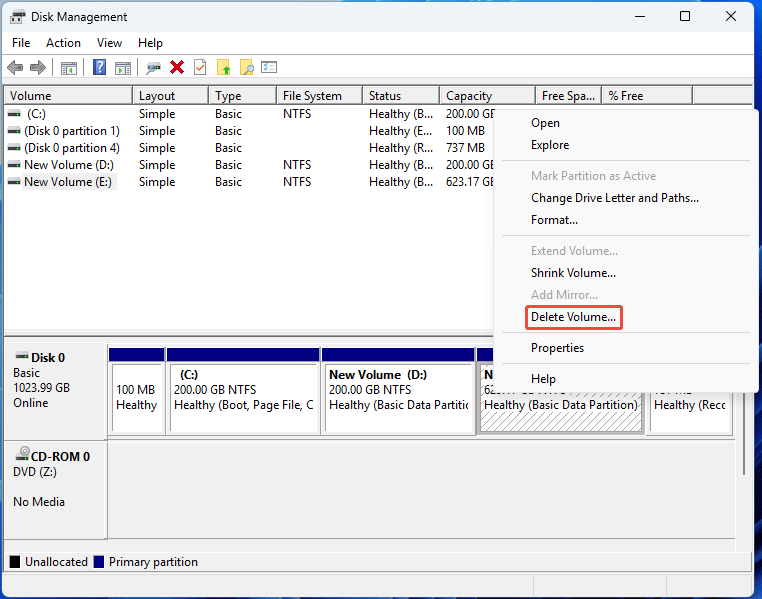
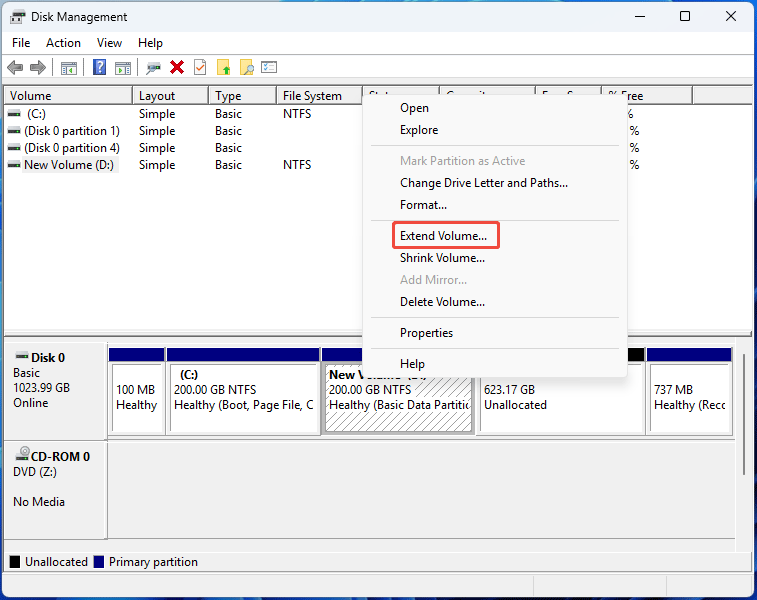
Since partition merge is of great help to you in managing partitions, to have a good command of it will be very necessary. As we have mentioned previously, partition merge is not partition copying. Copying partition is mainly for the purpose of backup. But partition merge aims at better management of the partition data. At present, operation systems do not provide partition merging function, so you have to rely on third-party partition manager. MiniTool Partition Wizard is an effective partition manager to merge partitions. Through years of development, MiniTool Partition Wizard has developed into sophisticated partition manager. In the function and security, it has been well accepted by people from all kinds of fields. Apart from merging partitions, this partition manager can provide you with a full range of functions in everyday partition management.
Problems to Pay Attention in Merge Partitions with MiniTool Partition Wizard
MiniTool Partition Wizard is easy partition managing software. As long as you know common computer operations, using it to merge partitions will be a simple thing. However, you should pay attention to several aspects in practical operations.

When you use MiniTool Partition Wizard to merge partitions, the files from the selected partition will be stored in the partition it merges to in a folder. You can modify its name in the interface. If you intend to combine two partitions of two various file systems, you may have the following questions.

When you use MiniTool Partition Wizard to merge FAT partitions, you should first convert them into NTFS partitions. The software will provide this service. For specific instructions, please refer to the article "How to Convert FAT Disks to NTFS?" Partition merging is only one of the various partition management functions in MiniTool Partition Wizard. Moreover, with this software, you can enjoy functions that can not be found in other partition managers.
Free Partition Manager Free Partition Magic Partition Manager Server Partition Magic Server
Common problems related to partition management and our solutions:
- How to merge partition under windows XP?
- How to merge partition for 32bit Windows Vista with MiniTool Partition Wizard?