
Do you know how to make changes to the partitions? This article will show you how to use three free Windows 7 partition managers - MiniTool Partition Wizard, Disk Management and Command Prompt to extend partitions and so on.
I recently upgraded a Dell XPS 8700 to Win10 and then downgraded back to Win7 because of compatibility with games. I’d like to delete the 21.18 GB recovery partition and add that space of the OS partition (Disk 2), SSD. The recovery partition is for Win8 it’s no longer needed. Could someone recommend a good partition management tool to help me do this? It doesn’t necessarily need to be free but free is OK. Thanks. –from Tenforums
Today Windows 7 is still occupying the first place of desktop operating system market share, in spite of the rapid growth rate of Windows 10 installation. Since so many users are sticking to use Windows 7, Windows 7 surrounding topics are growing vigorously. With the popularity of high capacity hard drives, the importance of finding free Windows 7 partition manager is no need to say.
There are tons of partition managers for Windows, however, free partition manager is always more popular. In this post, I am going to introduce 3 free partition managers, and they are: MiniTool Partition Wizard, CMD and Disk Management. By using them to do the same tasks, you know which is the best free partition software.
MiniTool Partition Wizard
Developed by MiniTool Solution Std., partition software Windows 7 – MiniTool Partition Wizard has five editions: Free, Professional, Server, Enterprise and Technician. Among these five editions, MiniTool Partition Wizard Free has got over 20,000,000 users download from CNET by now! This shows it is trusted by the majority. Why is it a great success?

Features of MiniTool Partition Wizard
MiniTool Partition Wizard Free Edition is designed to solve all possible issues that can occur on basic disks. Example: you can use it to create/delete/format partition, to move/resize partition, to split partition, to copy partition/disk, to migrate OS to HDD/SSD, to hide/unhide partition, to recover lost partition, to convert MBR to GPT and vice versa, and more…
This desktop program can be used for Windows non-server OS, including Windows XP/Vista/7/8/10 all editions. Thus, it is really a free Windows 7 partition manager.
Let’s see how it works on extending Windows 7 partition and converting MBR disk to GPT disk.
Use MiniTool Partition Wizard Free to Extend Partition
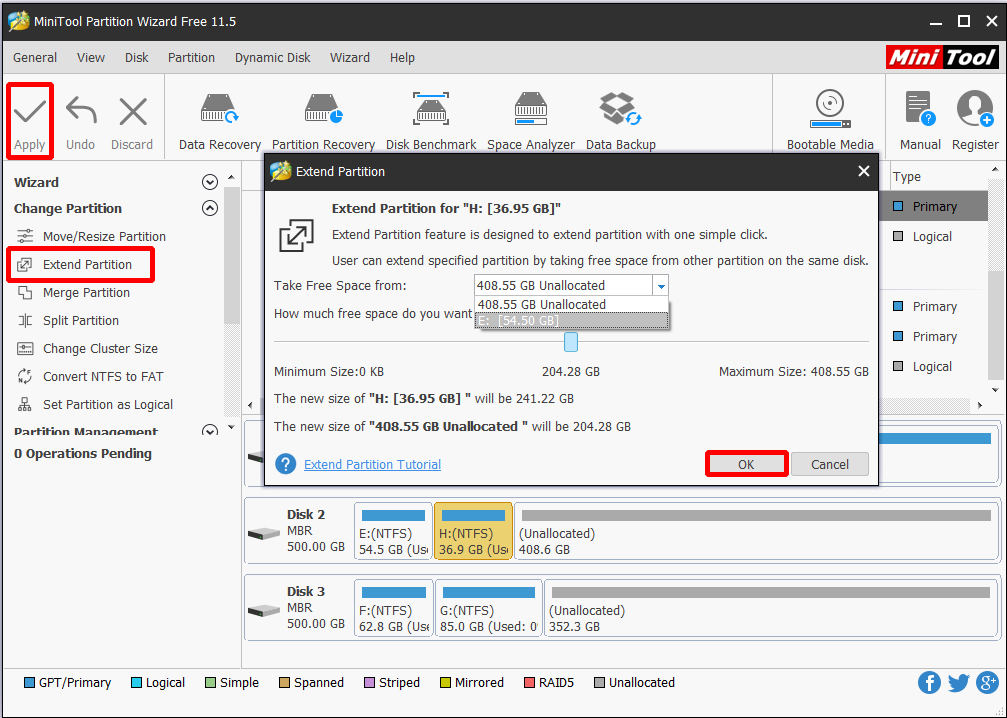
- Step 1. Launch MiniTool Partition Wizard Free, then click on the partition to be extended (here is partition H) and choose “Extend Partition” from the operations menu.
- Step 2. In the new emerging window, drop down the check box to choose a partition/unallocated space to take free space from. Besides, you can also choose how much free space you need by sliding the quadrangle. Here I choose to take some free space form the 408.55 GB unallocated space.
- Step 3. Click “Apply” to save changes.
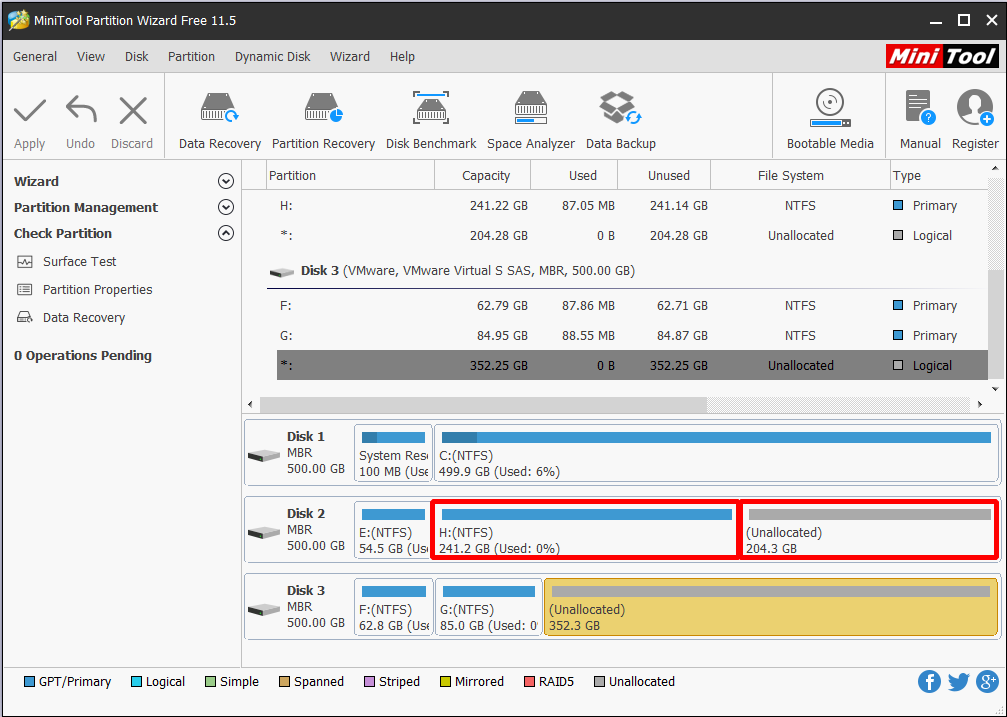
Here is what partition C looks like after the extending. See the H drive has been increased from 36.9 GB to 241.2 GB; whereas the unallocated space has been decreased from 408.6 GB to 204.3 GB.
Use MiniTool Partition Wizard Free to Convert MBR Disk to GPT
I have said at the beginning, large capacity drives are gaining popularity in this day and age, thus how to convert MBR disk to GPT disk without affecting data is a frequently asked issue on the net. Click here to get the reasons. Luckily, MiniTool Partition Wizard can do this job well.
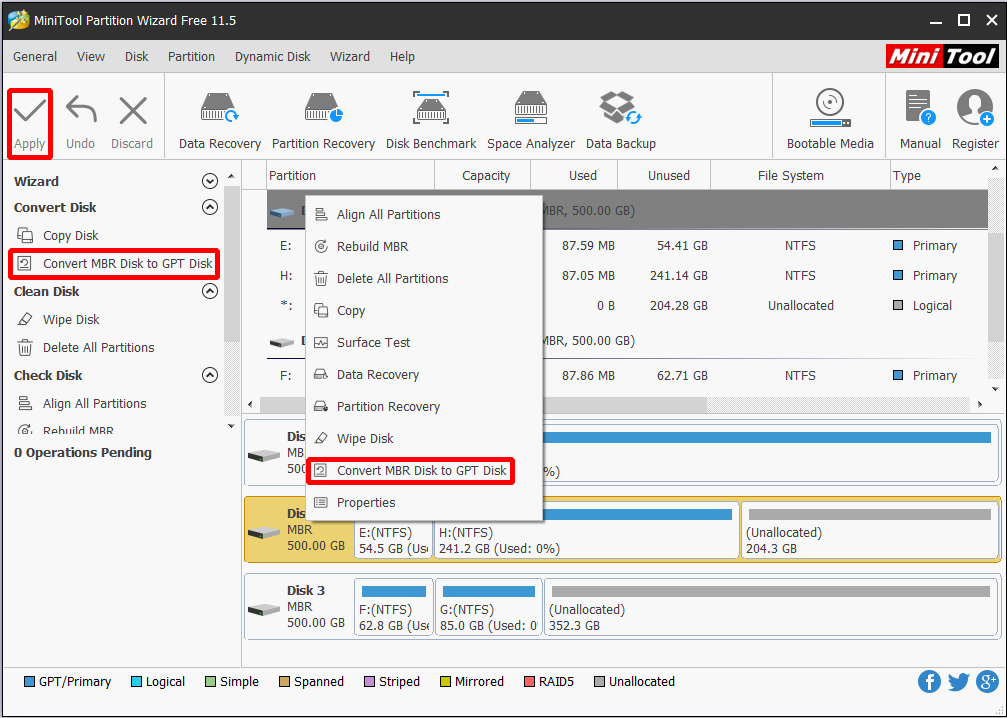
- Step 1. Click on the MBR disk you want to convert and choose “Convert MBR Disk to GPT Disk“.
- Step 2. Click “Apply” to save this change.
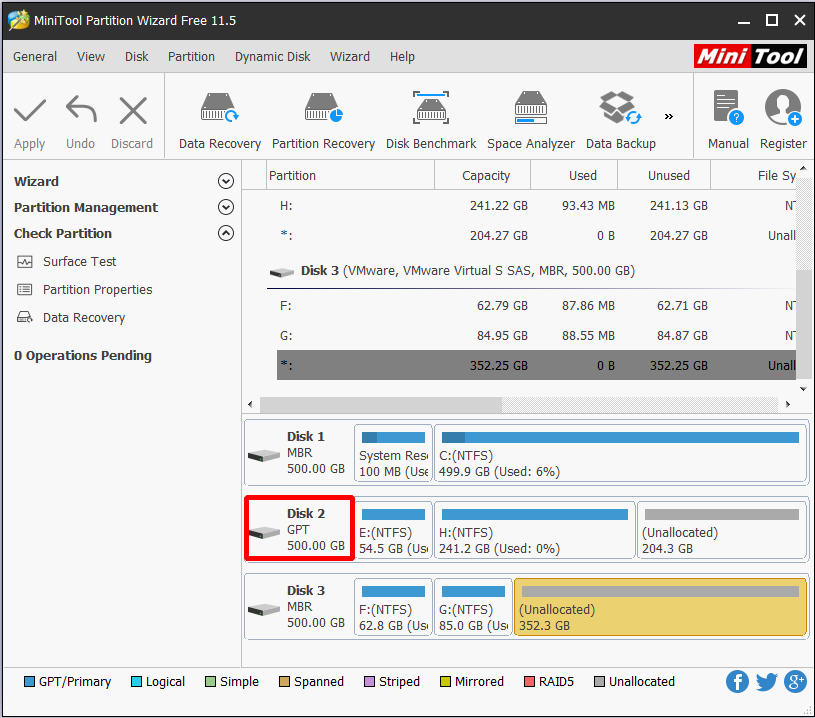
See Disk 2 is successfully changed to GPT disk, and all partitions are still there.
Pros: MiniTool Partition Wizard is flexible to deal with disk/partition management. Besides, its user-friendly clear interface is easy to be understood. What’s more, as third-party software, it is a free partition software Windows 7 in essence.
Cons: MiniTool Partition Wizard Free Edition only works on Windows XP/Vista/7/8/10, which means if you are a server user, you won’t benefit from this freeware.
MiniTool Partition Wizard FreeClick to Download100%Clean & Safe
Windows 7 Partition Manager CMD
Command Prompt, also known as cmd.exe or cmd (after its executable file name), is the command-line interpreter on Windows NT, Windows CE, OS/2 and eComStation operating systems. It is the counterpart of COMMAND.COM in DOS and Windows 9x systems (where it is also called “MS-DOS Prompt”), and analogous to the Unix shells used on Unix-like systems. The initial version of Command Prompt for Windows NT was developed by Therese Stowell.–from Wikipedia
Command Prompt is frequently used to automate tasks via scripts and batch files, perform advanced administrative functions, and solve certain kinds of Windows issues. To resolve disk management issues, you should run CMD, type a series of commands in order, and be careful to avoid mistaken operations, for any carelessness may lead to serious data loss.
Example: if you want to format partition F: – the 2nd partition on disk 1, you should go through these commands in order: list disk -> select disk 1 -> list partition -> select partition 2 – > format quick. But if you input format instead of format quick, then the removed data cannot be recovered even by professional data recovery program. Seems rather complex right?
See how you can use this free Windows 7 partition manager to extend partition and convert disk style.
Use CMD to Extend Partition
If you want to extend partition C by using Diskpart, then you should first of all check out whether there is some unallocated space following the C drive (Note only unallocated space can be used to extend primary partition. For more precautions please see The Volume You Have Selected May Not Be Extended). If YES, then do the followings:
- Step 1: Run CMD as administrator, then type “Diskpart“.
- Step 2: Type “list disk” in Diskpart prompt.
- Step 3: Type “select disk n” where n is the disk number of the target disk.
- Step 4: Type “list partition“.
- Step 5: Type “select partition n” where n is the partition number of the target partition.
- Step 6: Type “extend size=n disk=n” where n should be a specific number of the unallocated space/free space you want to use, and the unit for n is MB.
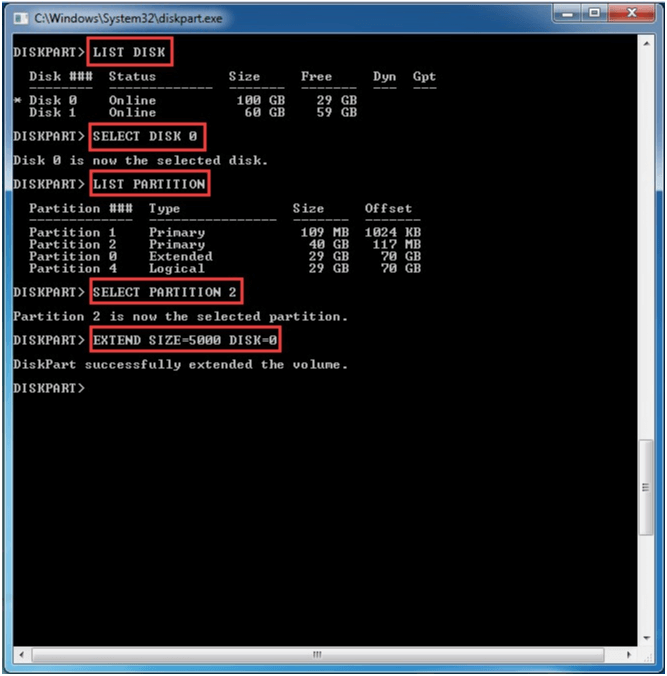
However, if no unallocated space/free space is available for extending, probably you will see the following error message when you come to the extend command:
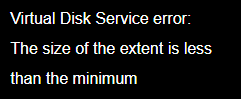
At this time, you should delete the partition to make sure that there is continuous unallocated space following the primary partition to be extended and free space for logical partition. After that, repeat the above operations. For more information, please refer to Virtual Disk Service Error.
Use Diskpart to Convert MBR Disk to GPT Disk:
When using Partition Wizard to convert MBR disk to GPT disk, you see it’s rather easy. However, by using Command Prompt, things are quite different. Please read on.
- Step 1: Back up or move the data on the MBR disk you want to convert to GPT disk.
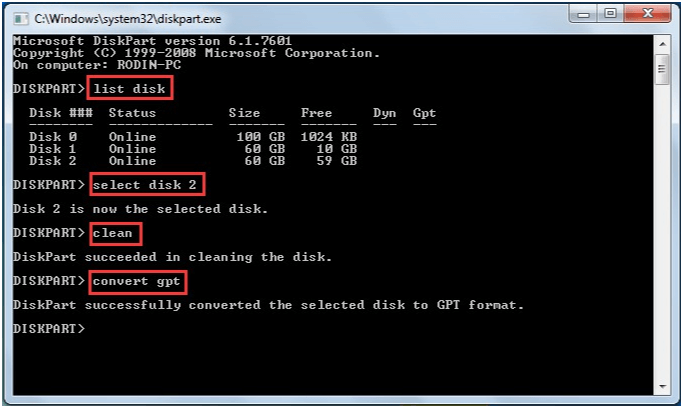
- Step 2: Run CMD as Administrator and type “diskpart“.
- Step 3: At the Diskpart prompt, type “list disk“. Make note of the disk number you want to convert.
- Step 4: Type “select disk <disk number>“.
- Step 5: Type “clean“. Note running the clean command will delete all partitions or volumes on the disk. But if the disk does not contain any partitions or volumes, skip this step.
- Step 6: Type “convert gpt“
Pros: CMD comes with Windows OS, and is able to troubleshoot and solve some problems even when Windows fails to boot. Besides, CMD supports the use of scripts to automate its usage.
Cons: CMD is not easy to use for average users. Without a clean interface, data loss happens often if a wrong partition is chosen.
Windows Disk Management
Since Windows 7, Disk Management offers two new features which are called “Extend Volume” and “Shrink Volume“. They are very helpful for increasing/reducing partition size. However, Disk Management is relatively dull and often fails a job when there is something different. Guess many of you have such an experience: when trying to extend partition, sometimes “Extend Volume” is activated, but sometimes it is disabled, not knowing why.
How do I say this?
Use Disk Management to Extend Partition
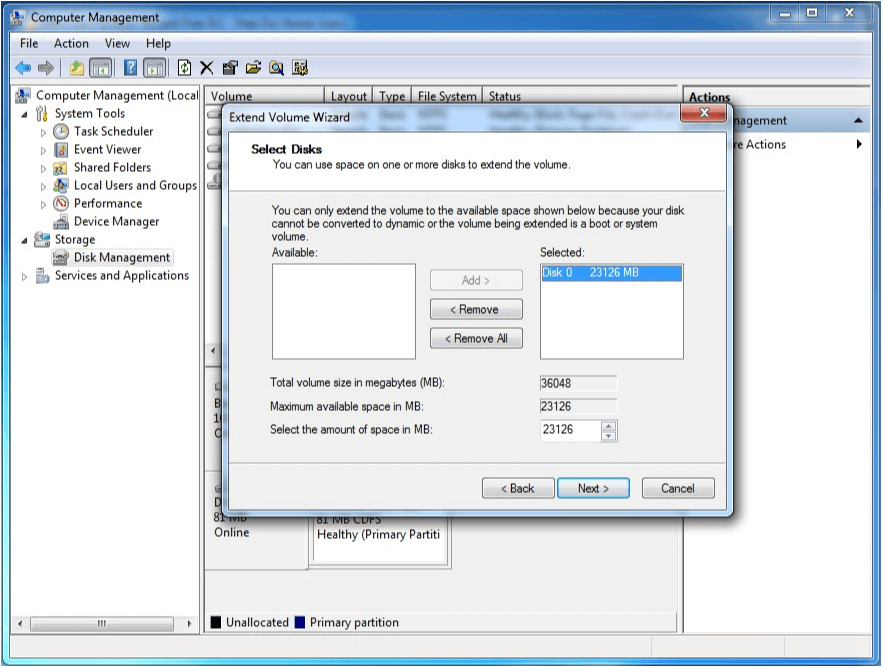
If you want to extend partition using Disk Management, you should click on the partition you intend to increase capacity and choose “Extend Volume” from the context menu, then follow the extend wizard to complete this task.
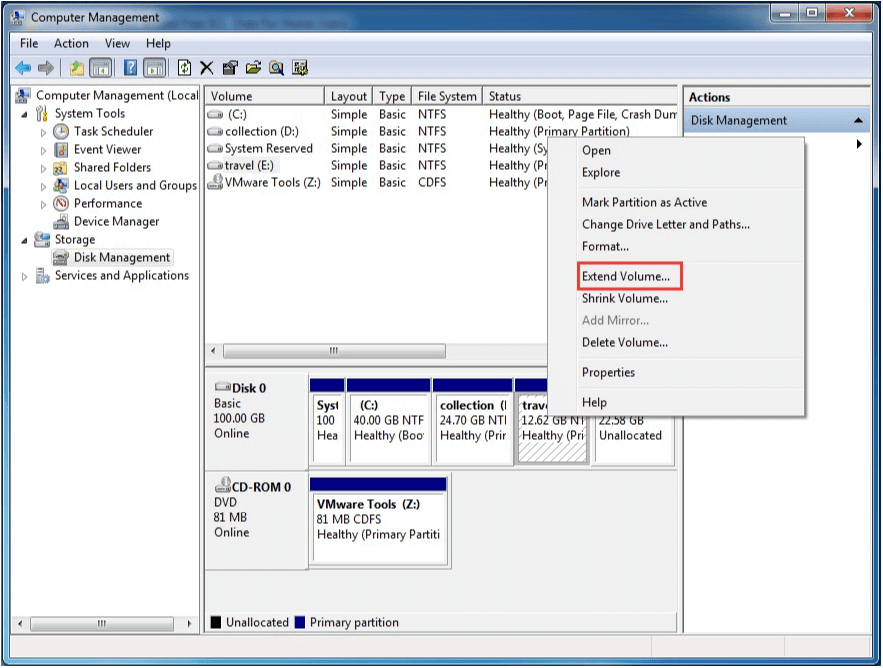
However, most of the time, you will find that Extend Volume is grayed out, just like showing below:
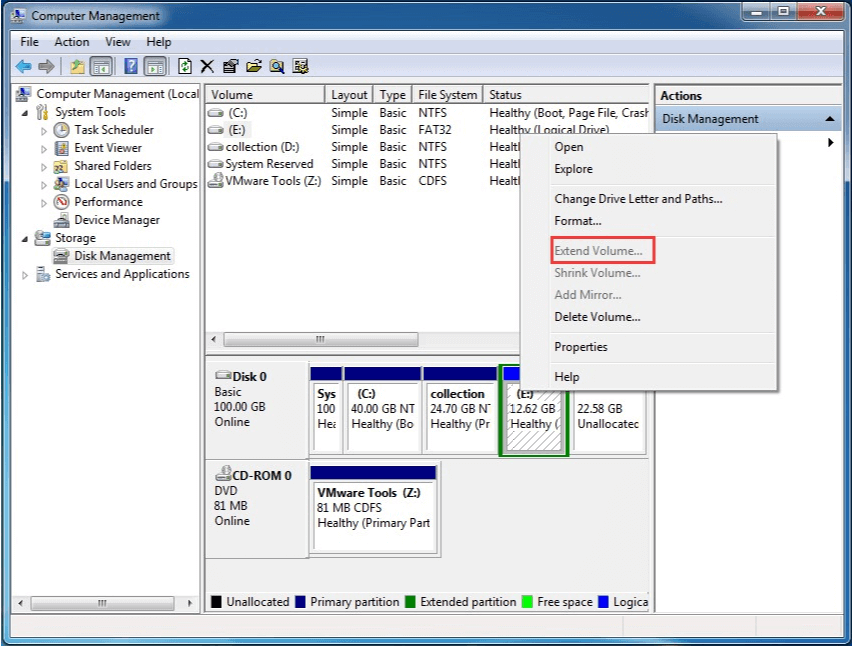
Theoretically speaking, Extend Volume will grey out if one of the following conditions is not true:
- The partition to be extended should have NTFS or RAW file system.
- Only when there is unallocated space following the target primary partition, extend volume is activated.
- Only when there is free space following the target logical partition, extend volume is activated.
Besides, sometimes “Extend Volume” will lead to a basic disk to become dynamic disk. Actually, this happens on data drive. If the unallocated space is not following the target partition, while another drive is dynamic disk, extending volume will lead to a dynamic disk. For more details, you can see 3 Situations Where Hard Drive Will Convert to Dynamic.
Use Disk Management to Convert MBR Disk to GPT Disk
Knowing the disadvantages of extending volume by using Disk Management, let’s see how Disk Management works when you use it to convert an MBR disk to GPT disk. Will the situation improve?
Take disk 1 for example. When there is a partition/partitions on the drive, you can see the option “Convert to GPT Disk” is greyed out.
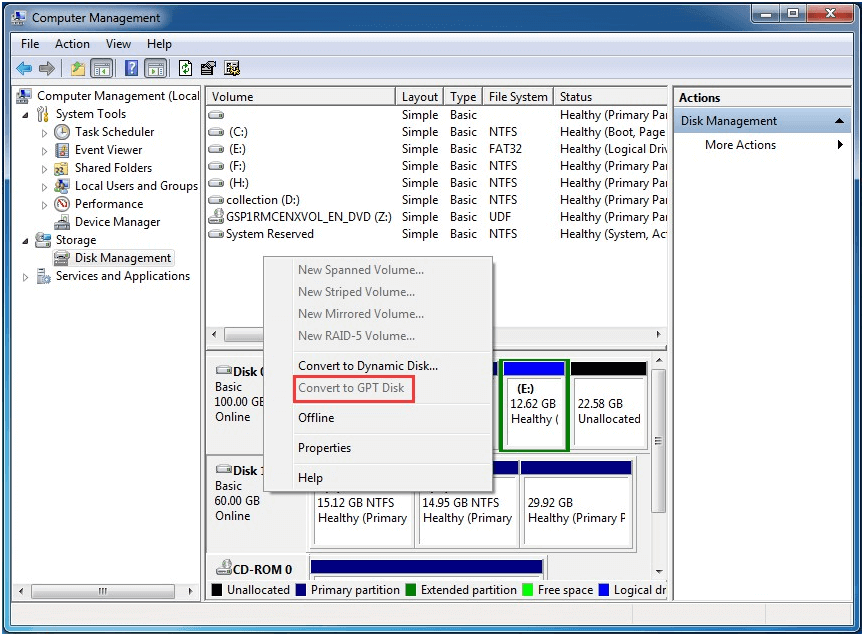
But when all partitions are deleted, see this option is activated. Why?
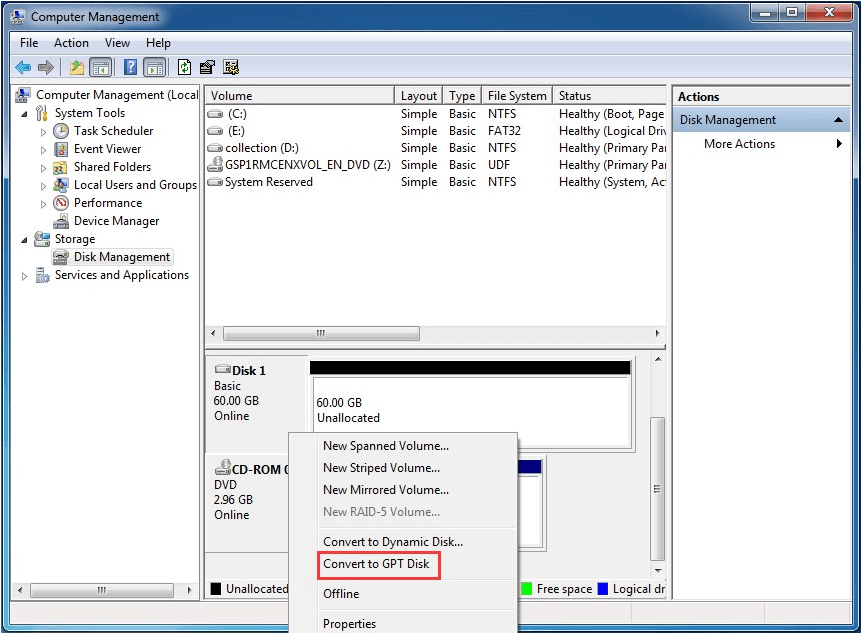
Just like using CMD, when converting MBR disk to GPT, the drive should be empty. Microsoft explains that “the disk must be empty to convert it into a GPT disk. Back up your data, and then delete all partitions or volumes before converting the disk. Besides, the required minimum disk size for conversion to GPT is 128 megabytes“. For more information, you can visit: Convert GPT.
So to convert MBR disk to GPT using Disk Management, you should first of all back up data on the target hard drive, then delete all partitions, and finally convert the drive to GPT. If there is a necessity, you may need to transfer the backup data back to this GPT drive. Considering these factors, Disk Management is not as flexible to use as using MiniTool Partition Wizard.
Pros: Almost all Windows OS offer Disk Management, which won’t cost you a penny to do disk/partition management. Besides, it can even convert a basic disk to dynamic disk without restart, which is a loss in Partition Wizard.
Cons: There are so many limitations while using most features, and will lead to data loss if no backup is made in advance.
Summary
Here comes to the end of this post. By reading here, you must already have had a general understanding of these 3 kinds of Free Windows 7 partition manager. By using them to finish the same tasks, we can draw a conclusion that MiniTool Partition Wizard is more competent in disk/partition management, for it is easier to use, and offers flexible solutions than the rest two methods.
However, it is also the truth that MiniTool Partition Wizard Free Edition cannot be applied on Windows Server, which is a fatal weakness compared with the rest. Anyhow, it is you who make the final decision. For any questions and suggestions, please leave it in the comment area or contact us via the email [email protected], we read every thread.
Free Windows 7 Partition Manager FAQ
Here are several free partition managers trusted by millions of users.
- MiniTool Partition Wizard.
- Paragon Partition manager.
- Gparted.
- Active@ Partition Manager.
- Aomei Partition Assistance.
About The Author

Position: Columnist
Rodin is an enthusiastic IT writer focusing on Windows trends, disk partition management and data recovery. She loves to write and share her idea about the useful tips and tricks on personal computers' maintenance. If you are looking for methods to improve your computer performance, manage hard drives and recover data from different devices, Rodin can provide reliable solutions for data management.