
When Need to Check Hard Drive for Errors?
During the course of the utilizing partition or the hard drive, damages may be imposed on the partitions or the hard drive. And the damages are often divided into two aspects which include the logical error and the physical error.
For example, you may often encounter the problem that there are some bad sectors on the hard drive, or you may encounter a corrupted file system issue on the partition. In general, these problems would give rise to some worse problems, such as losing data, failing to boot the computer, and so on.
Thus, what you need do is to check whether your hard drive has problems and try to solve the problems. However, do you know how to check hard drive health or partition for errors and fix those errors?
If no, don’t worry. This post will show you the solutions.
As is well known, checking hard drive health always focuses on two aspects which are checking whether there is a bad sector on hard drive and checking whether is a corrupted file system on your partition. Therefore, we will show you how to perform hard drive test Windows 10 one by one.
How to Check Bad Sectors on Hard Drive?
In the beginning, we will show you how to check bad sectors on hard drive. In order to check bad sectors on hard drive, you can take a piece of third-party software. Thus, MiniTool Partition Wizard, the professional partition magic, would be a good choice.
MiniTool Partition Wizard is designed to deal with a lot of disk and partition matters. For example, it can be used to test disk speed through the Disk Benchmark feature. It can also help you to copy hard drive to another one without losing any personal data.
Thus, to check whether there is a bad sector on the hard drive, you can purchase MiniTool Partition Wizard from the following button.
MiniTool Partition Wizard FreeClick to Download100%Clean & Safe
And we will show you how to check hard drive for errors Windows 10 step by step.
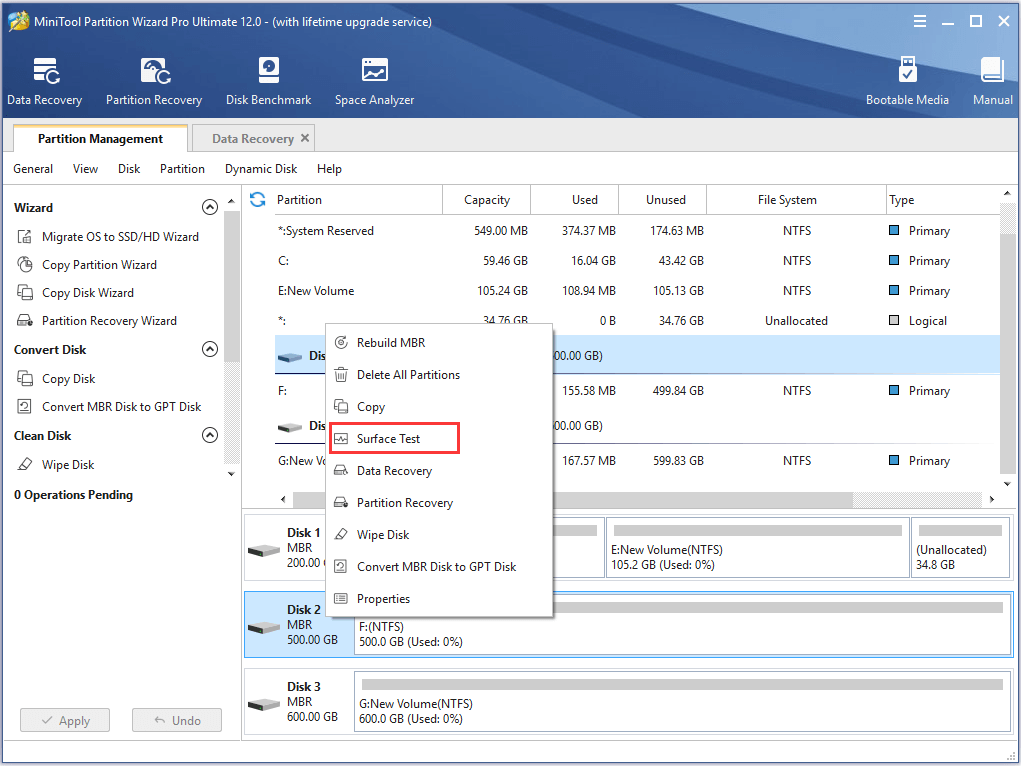
Step 1: Install the software and launch it to enter its main interface. Then select the disk which you want to check and choose Surface Test feature from the context menu to continue.
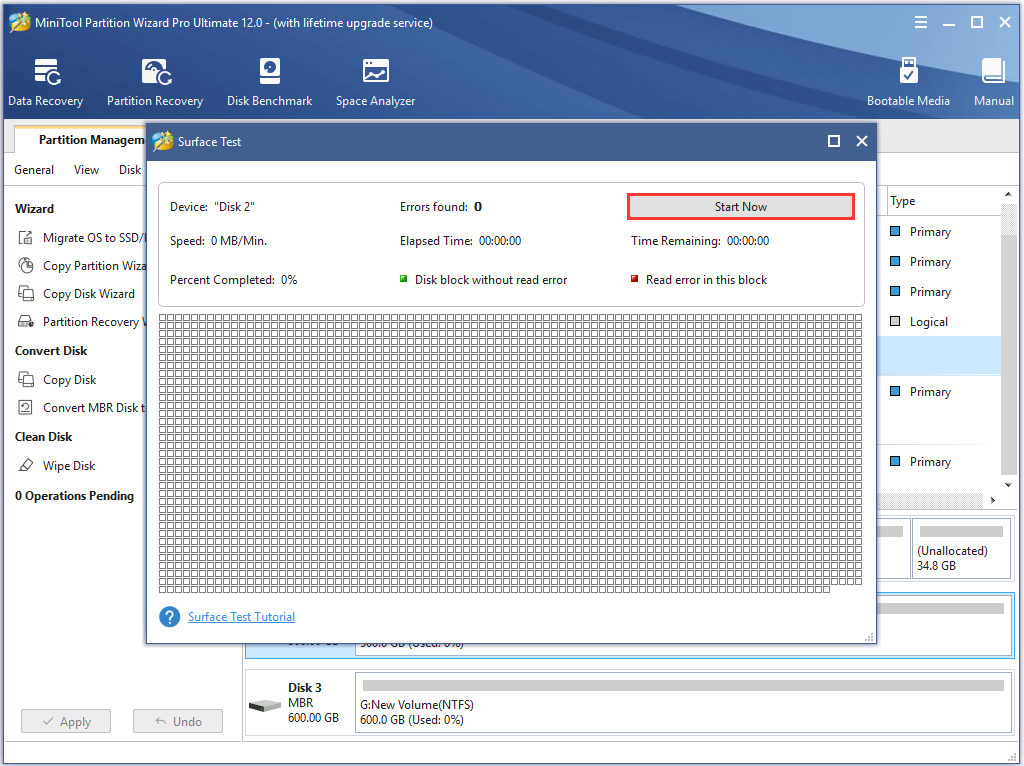
Step 2: In the popup window, click Start Now button to check hard drive for errors Windows 10 immediately.
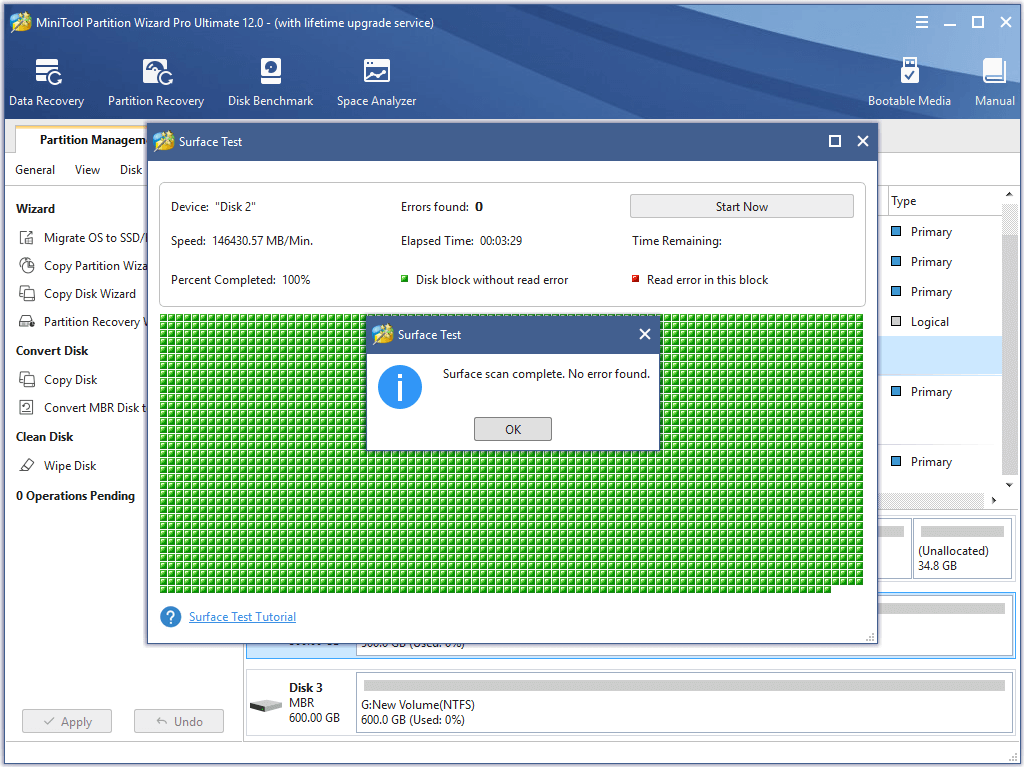
Step 3: When the process of testing hard drive for errors is finished, disk block without reading error will be marked with green color. As the following picture:
Step 4: However, if MiniTool Partition Wizard has found some hard drive errors, the block with reading error will be marked with red color, as showing in the following picture:
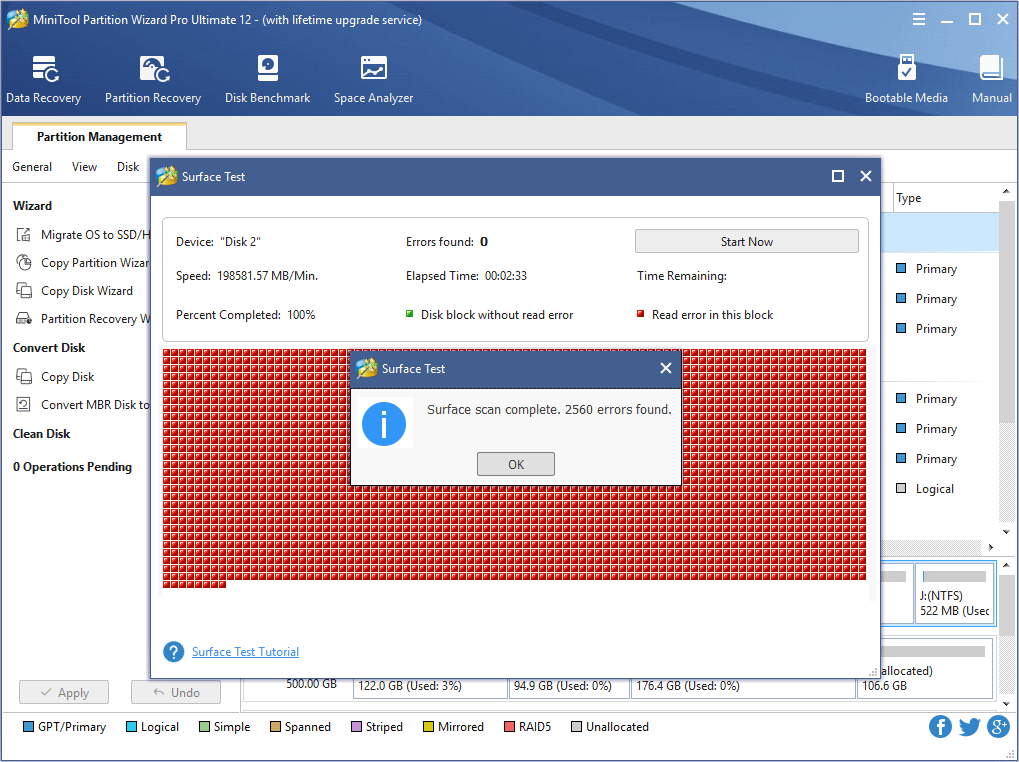
Step 5: However, if you have found bad sectors on the hard drive, you need to transfer the data first and use the special tool to mark the bad sectors as unusable. And when the operating system meets them next time, it will skip them automatically.
Step 6: In order to mark the bad sectors as unusable, you can input the chkdsk /f/r in the command window to mark the bad sectors as unavailable. Then type Y to continue. In addition, you can also use other specific software to shield the bad tracks.
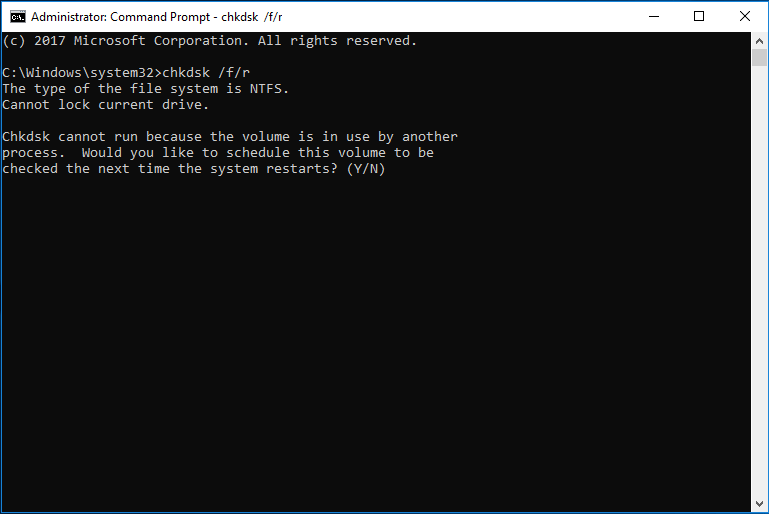
When you have finished the above steps, you can shield the bad sectors and they are marked as unusable. However, if there are too many bad sectors on the hard drive, thing would become worse. Thus, you can read the post What to Do If I Find Bad Sectors on Hard Drive in Windows 10/8/7 to find the solution.
What’s more, if you have lost data due to bad sectors on the hard drive, what can you do? Is there any way to find the lost data back? The answer is positive.
In the following part, we will show you how to recover data which is lost due to bad sectors on hard drive.
How to Recover Lost Data Because of Bad Sectors?
In order to recover lost data, MiniTool Partition Wizard is also competent. It can also help you to find the data back with the Data Recovery feature.
And now, we will show you how to operate step by step with pictures.
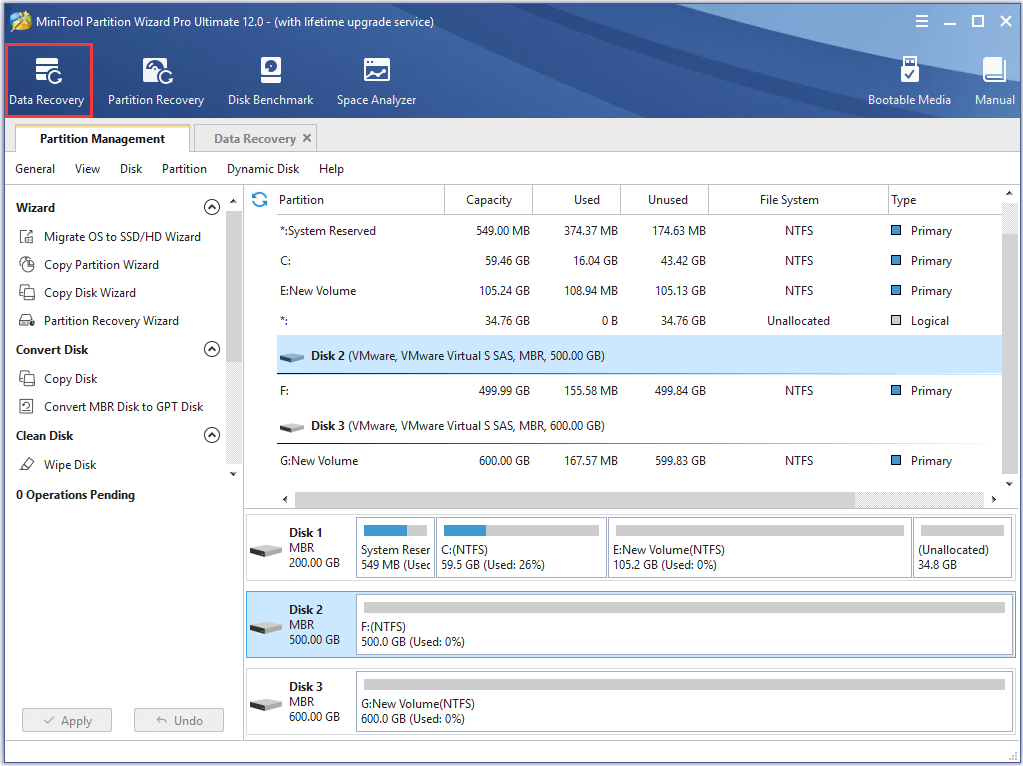
Step 1: Install the software and launch it to enter its main interface. Click the Data Recovery feature in the toolbar to continue.
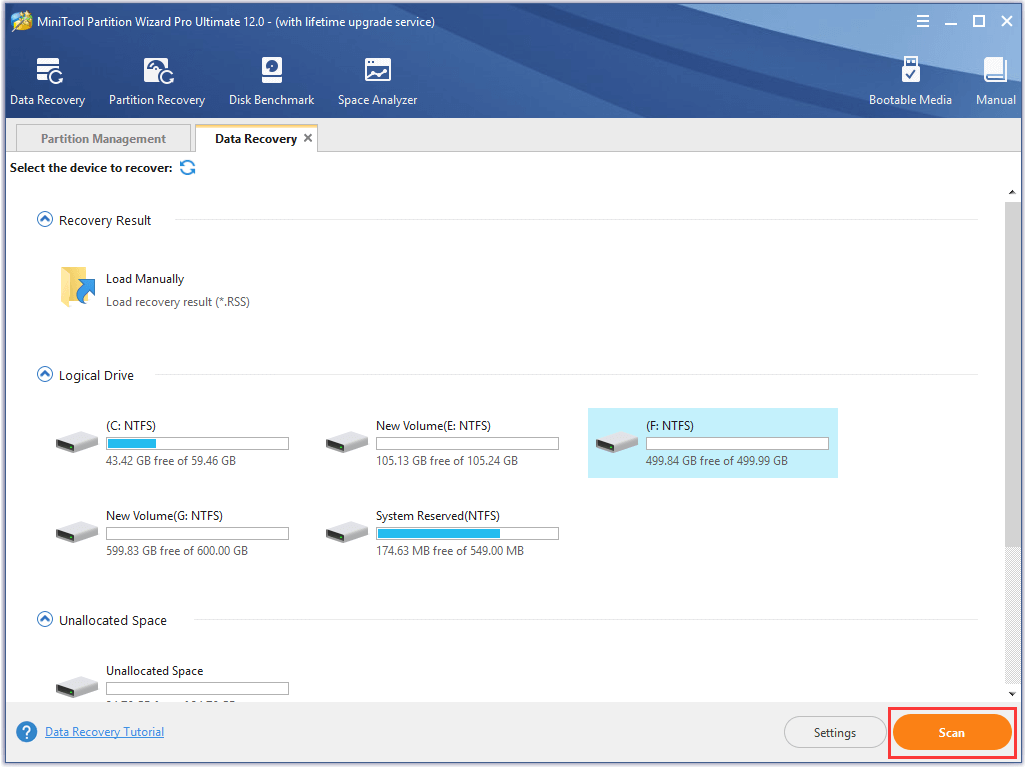
Step 2: In the popup window, select the hard drive which has lost the data and click Scan to continue.
Step 3: When the scanning process is finished, you can see that all your lost files are listed here. Then check the files you need and click Save to continue.
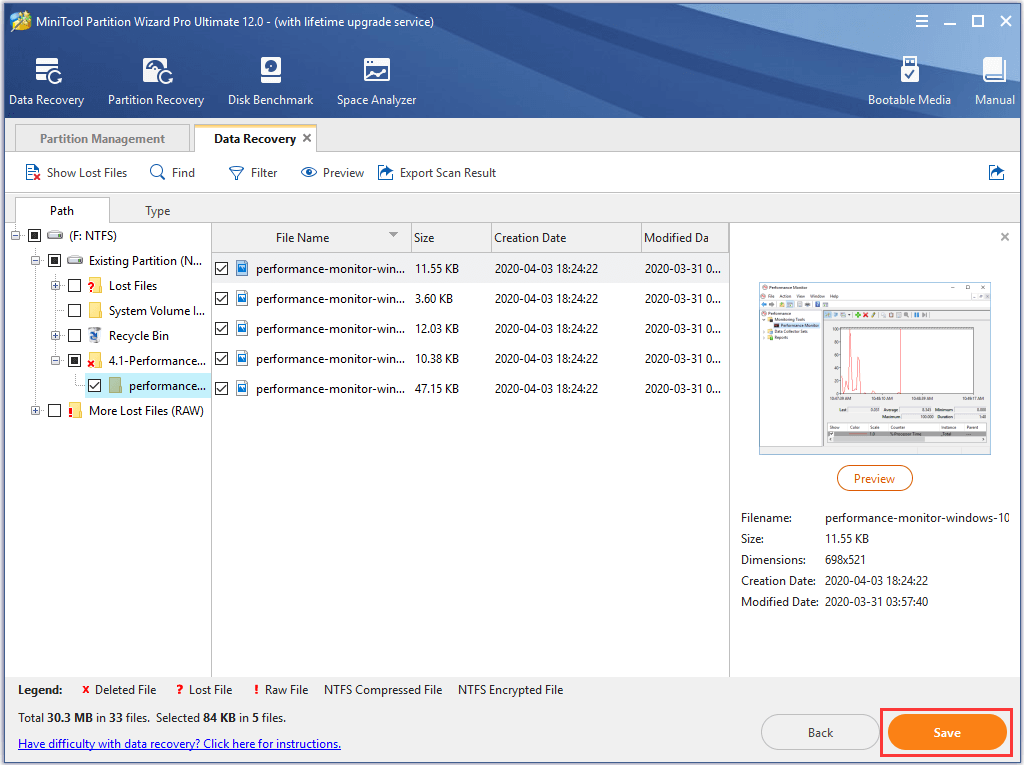
Step 4: Then you are required to select a destination to save the files and click OK to continue. It is recommended to choose an external hard drive as the destination path.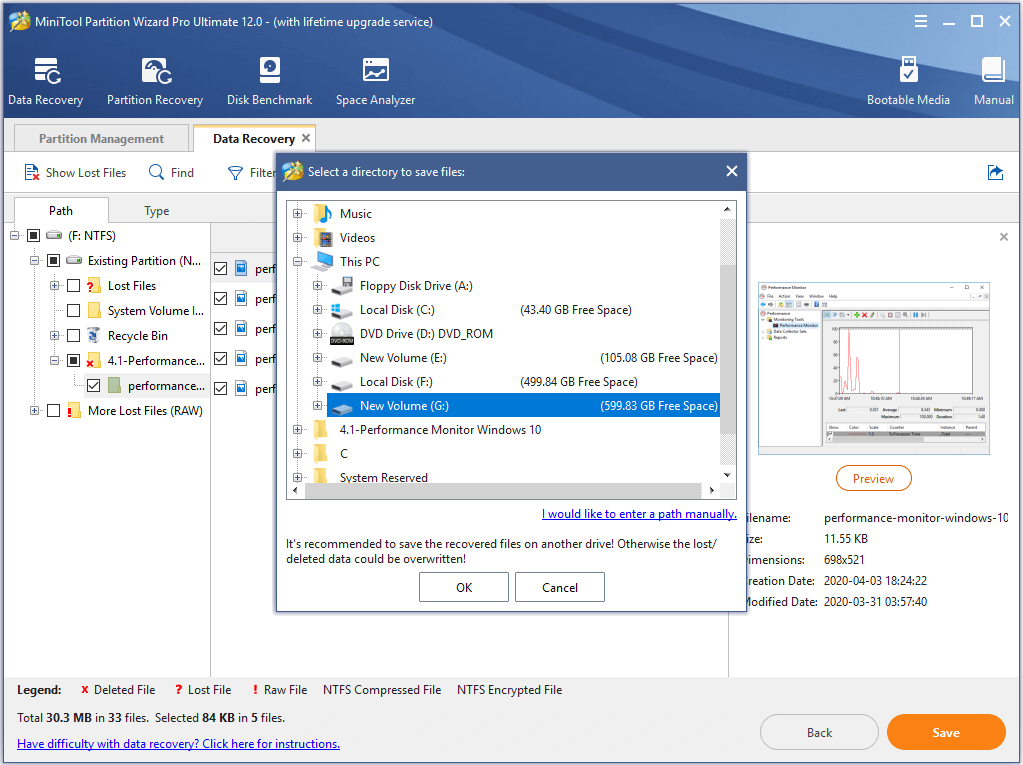
When you have finished all the steps, you can successfully recover the lost data. So if you have suffered data loss due to bad sectors on hard drive, please try to MiniTool Partition Wizard to find them back.
Related article: This Tells How to Recover Data after Hard Drive Crash on Windows
On the other hand, we have mentioned that the bad sector can be marked as unusable after inputting the specific command or taking advantage of a specific tool.
However, if there are too many bad sectors found after you test hard drive for errors and all of them are marked as unusable, the free space of this hard drive will become less and less or even the performance of the computer will become worse and worse.
Thus, what can you do if too many bad sectors are found after you check hard drive for error Windows 10? Some people may want to ask whether they can replace the hard drive with a new one. In order to solve the above problem, you can choose to upgrade your hard drive to a larger one.
Clone Hard Drive If There Are Too Many Bad Sectors
In order to clone hard drive, MiniTool Partition Wizard can achieve that and would not bring any damage to the original data.
Thus, you need to purchase one from the following button and we will show you how to operate step by step.
MiniTool Partition Wizard FreeClick to Download100%Clean & Safe
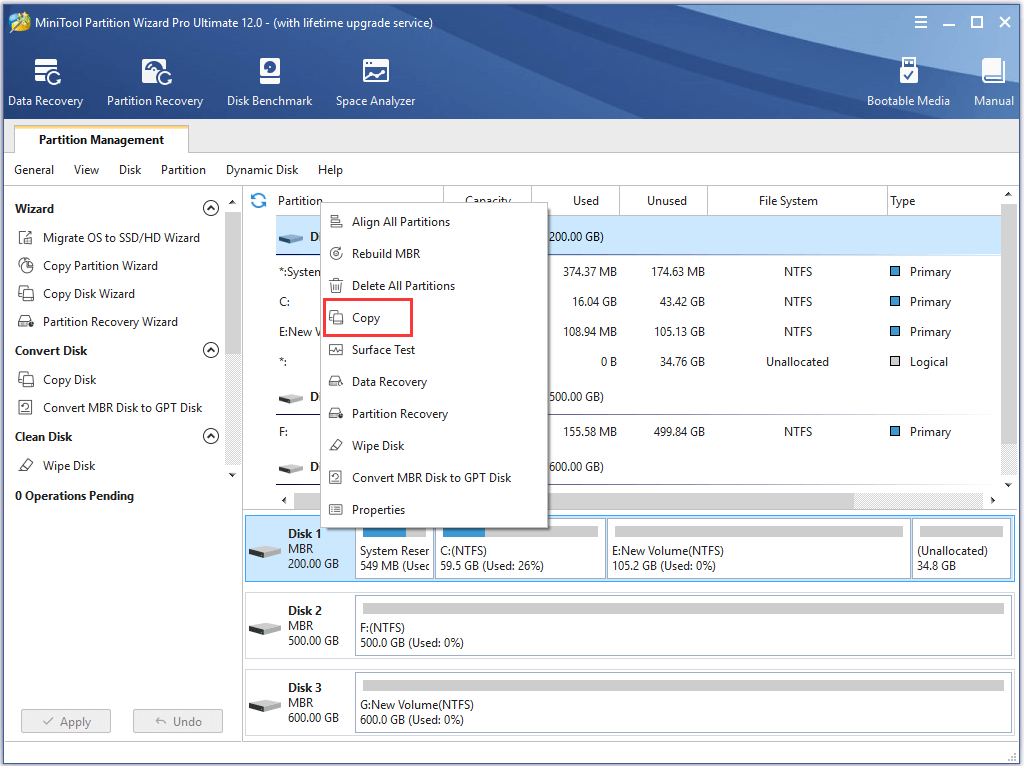
Step 1: Install the software and launch it to enter its main interface. Then select the hard drive which has problems and choose Copy from the context menu to continue.
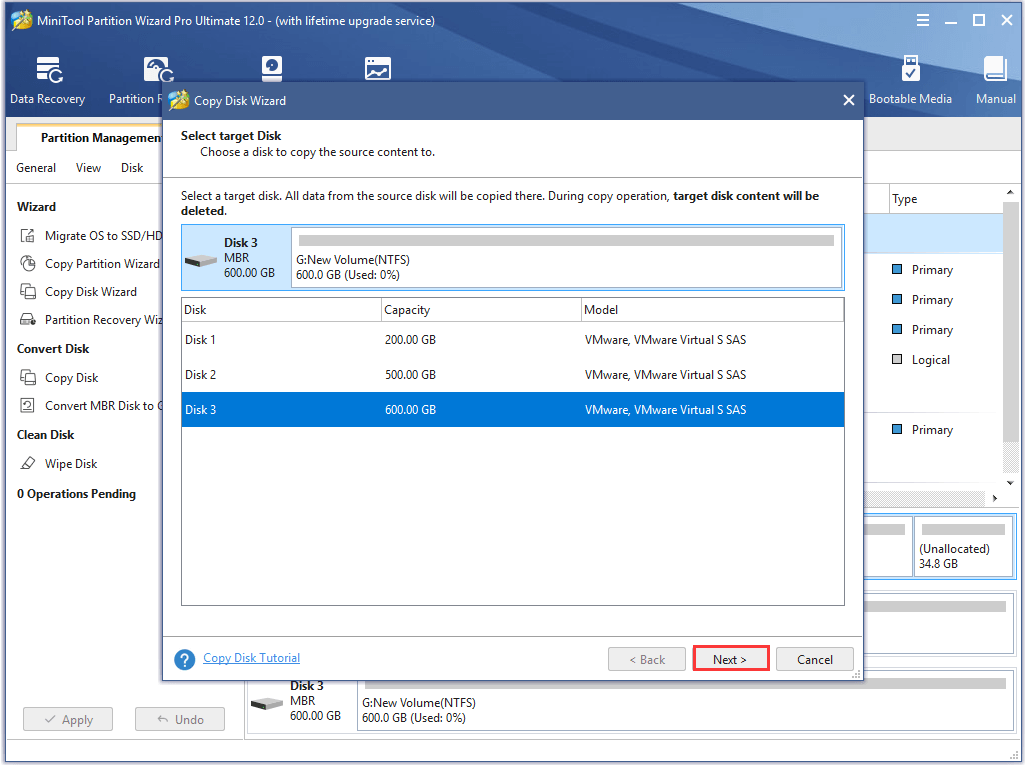
Step 2: In the popup window, you are required to choose a target disk. Please note that the target disk should be large enough to save all files on the source disk. Then click Next to continue.
Step 3: Then you see four options. You can choose any one based on your own needs and then click Next to continue. Please note if you check the option Use GUIDE Partition Table for the target disk, the target disk will be turned GPT.
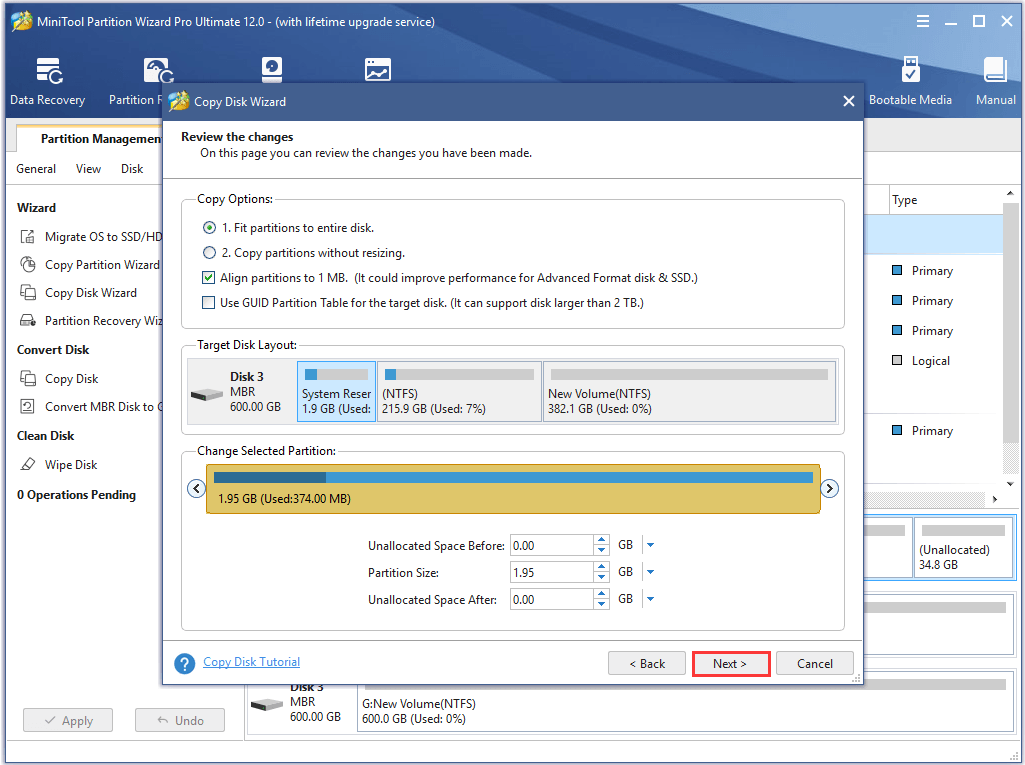
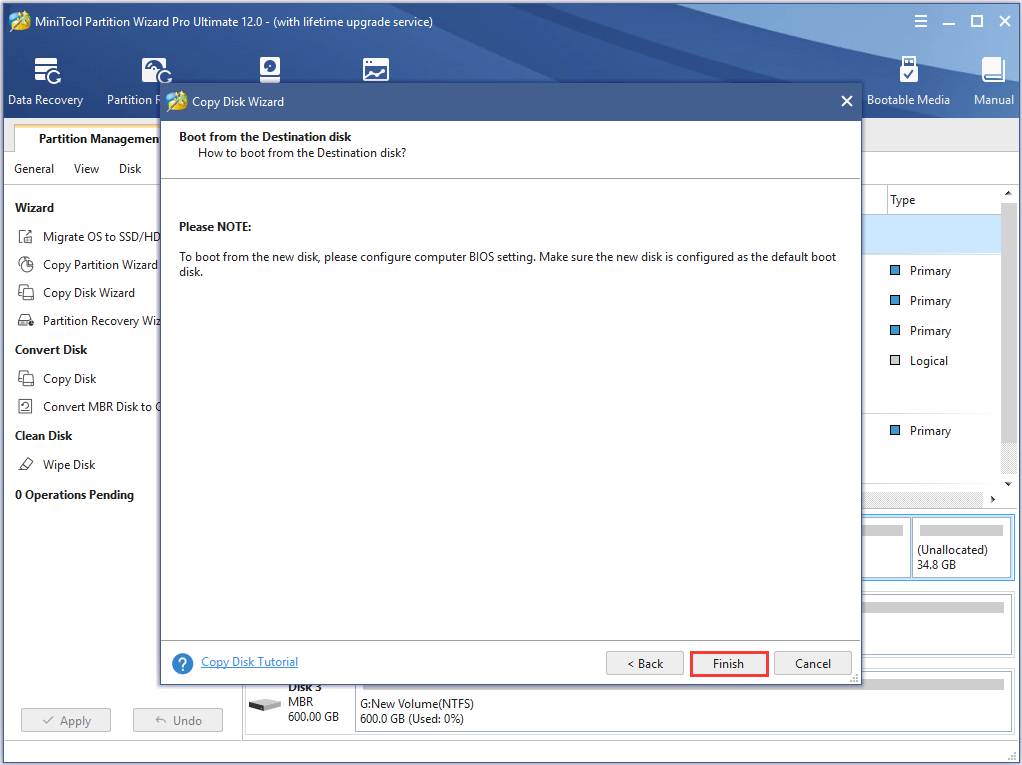
Step 4: In the popup window, please read the note carefully. You need to change the BIOS setting when you want to boot your computer from the target disk. Then click Finish to continue.
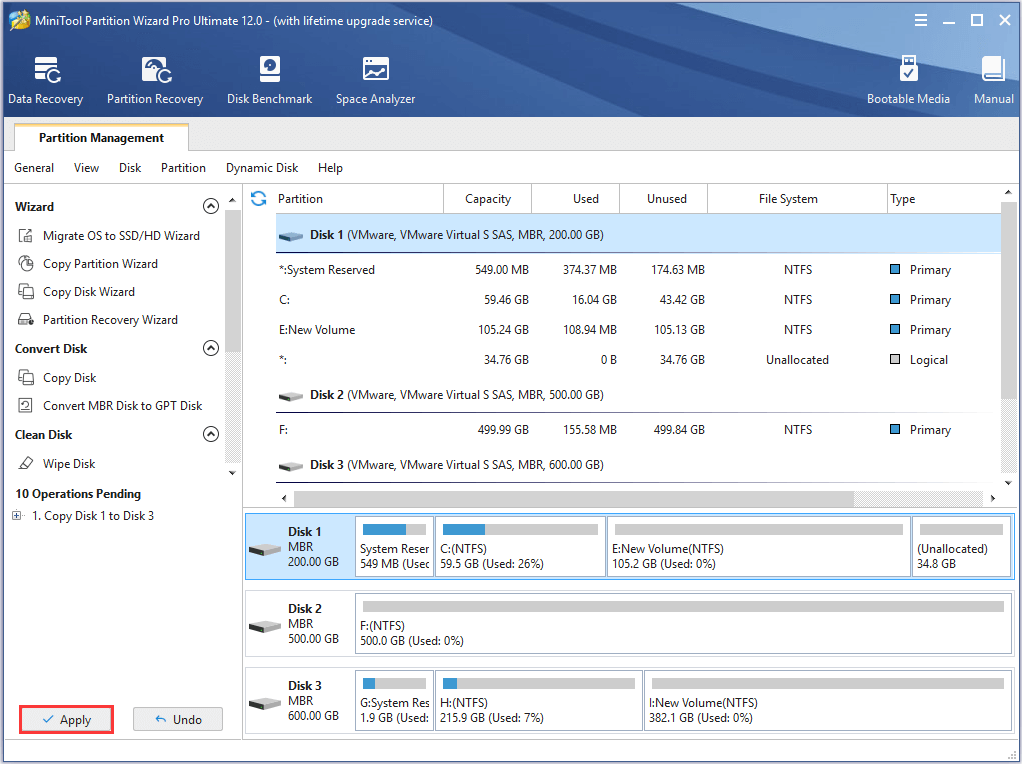
Step 5: Returning to the main interface, you can preview the changes and click Apply to confirm the changes. MiniTool Partition Wizard requires you to restart the computer during the copying process. Thus, you just click Restart Now to continue.
Therefore, if there are too many bad sectors being found after you scan hard drive for errors, you can clone the hard drive to a new one. Besides the Copy Disk feature, you can also use Migrate OS to SSD feature which can help you to transfer OS to SSD without reinstalling the operating system.
How to Check File System?
Of course, besides the bad sectors, the partition may also suffer the corrupted file system problem. Thus, do you know how to check partition and fix the problem?
In this part, we will show you how to check partition and fix the corrupted file system problem. To check hard drive for errors Windows 10 and fix the problem, MiniTool Partition Wizard is also recommended.
Not only can it help you to check partition for errors, but also it can help you to fix those problems. Thus, in order to perform hard drive test Windows 10, you can purchase MiniTool Partition Wizard from the following button.
MiniTool Partition Wizard FreeClick to Download100%Clean & Safe
And now, we will show you how to check file system and fix the problem.
Step 1: Install the software and launch it to enter its main interface.
Step 2: Select the partition you want to check and choose Check File System from the context menu to continue.
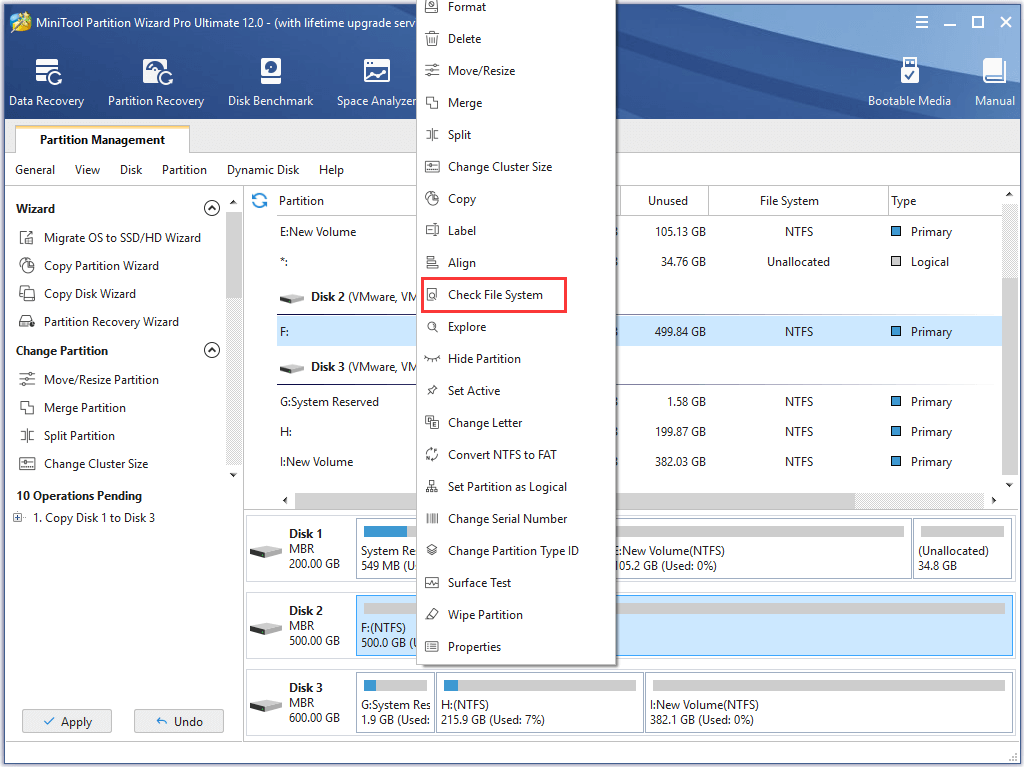
Step 3: In the popup window, you can see two options which are Check only and Check & fix detected errors. Thus, if you want to check and fix the error, you can choose the second option to continue. Then click the Start button to continue and MiniTool Partition Wizard will begin to check file system and repair the errors immediately.
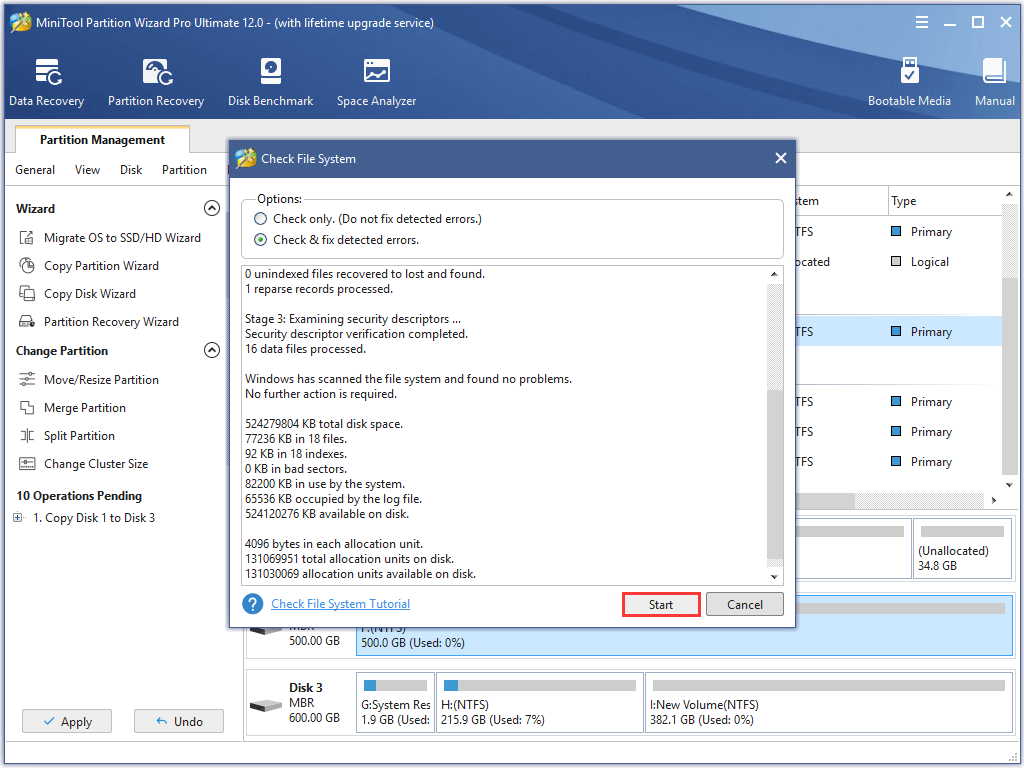
When you have finished all the steps, you have successfully performed hard disk health check and repair. Its operation methods are pretty easy. Thus, if you need to check partition for errors, please try to use MiniTool Partition Wizard.
Bottom Line
In this post, we have introduced two ways for you to check hard drive for errors Windows 10 which include check file system and check bad sectors on the hard drive.
And we also show you different ways to repair the problems if they have been found during the checking process.
In addition, if you have any better solution to hard disk check and repair, please share it on the comment zone.
And if you have any problem of MiniTool Partition Wizard, please feel free to contact us via the email [email protected].
Check Partition for Error FAQ
There are 5 signs indicate that your SSD is failing.
- There are errors involving bad blocks.
- Files cannot be read or written.
- The file system needs to be repaired.
- Your computer frequently crashes.
- Your drive becomes read-only.