
How to extend NTFS partition? With MiniTool Parition Wizard, you will find it too easy to extend NTFS partition. In addition, this partition magic also helps in exteding and shrinking a NTFS partition.
Why Change NTFS Partition Size
NTFS File System Is Popular
As you know, FAT32 and NTFS are the most commonly used file systems in Windows, with the latter one enjoying more powerful functions and popularity. The reason? Well, hard drives are going for larger capacity, and networks are getting more complex, thus, security is generating more concerns. As NTFS provides better security than FAT 32, it is undoubtedly enjoying more popularity.
Below is a rough comparison between NTFS and FAT32.
NTFS VS. FAT32
| FAT32 | NTFS | |
| Security | FAT32 provides poor security. A user who can access a FAT32 drive can also access files in it. | NTFS enables the use of NTFS Permissions. Thus, folder and file access can be controlled individually. |
| Compatibility | FAT 32 can be recognized by Windows 95/98/Me. | NTFS is not recognized by Windows 95/98/Me. |
| Space Efficiency | FAT32 does not support file compression. In Windows, the maximum partition size that can be created using FAT32 is 32GB. | NTFS supports file compression. In Windows, the maximum partition size that can be created using NTFS increases to 16TB. |
| Reliability | FAT32 drives are easily to infect disk errors. | Log files are created under NTFS which can be used for automatic file system repairs. |
Resize NTFS Partition Size Is a Common Requirement
To wrap up, due to the better performance NFTS can offer, it has become the most welcomed file system. However, in many cases you may need to change NTFS partition size to make use of the disk space better. For example, the C: drive is running on low disk space; OR the entertainment partition is occupying too much disk space…
Then you may turn to Disk Management or Diskpart for help. The result? Well, sometimes you can benefit from these built-in tools, yet in many cases you get disappointed.
Disk Management and Diskpart are useful when you shrink a NTFS partition, but is of great limitation when you want to extend NTFS partition. As to the reasons, you can refer to this post: Why Extend Volume Greyed out and how to solve it?
Since the systems build-in Disk Management tool fails to resize partition, a third-party partition manager such as MiniTool Partition Wizard should be utilized to finish this operation.
Obtain 5-star MiniTool Partition Wizard
MiniTool Partition Wizard is an all-in-one desktop program that is committed to help Windows users deal with all kinds of hard drive management issues. This software is composed of five editions, among them the free edition is a 5-star recommendation.
MiniTool Partition Wizard Free is not only powerful in changing NTFS partition size, but also offers many useful features like Migrate OS to SSD/HD, convert MBR Disk to GPT Disk, do Partition Recovery, etc. Due to its concise interface and outstanding performance, it has gained grate reputation all over the world.
Let’s see how it works on resizing NTFS Partition:
MiniTool Partition Wizard FreeClick to Download100%Clean & Safe
Situation One: Extend NTFS Partition
When the disk space becomes insufficient, hard drive response will become slower and slower, leading to a bad computer performance. In this regard, extending NTFS partition size is quite urgent so as to enhance partition performance.
To extend NTFS partition with MiniTool Partition Wizard, you can do the followings:
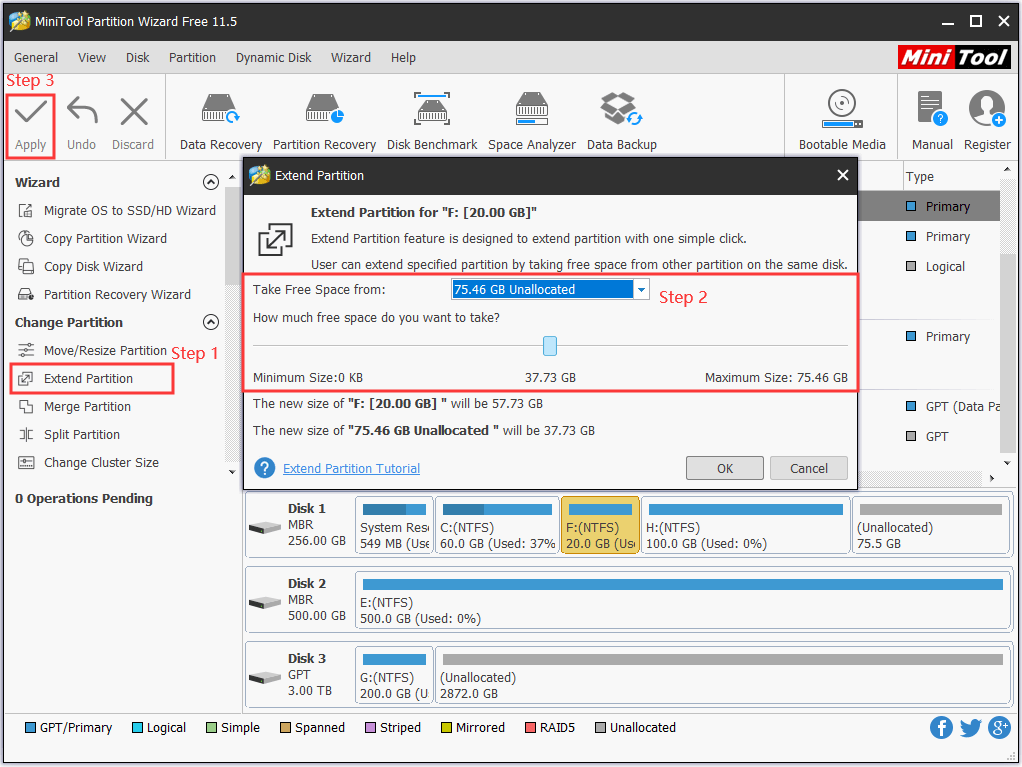
Step 1: Click on the partition you want to extend and choose “Extend Partition“. Here take extending partition C: for example.
Step 2: In the pop-up windows choose where to take some free space and how much free space you want by dragging the slider. Then click “OK” to back to the main interface.
Step 3: Lastly, click “Apply” at the top left corner.
Are you a server user? Then this “Resize Server Partition” post may help you change NTFS partition size in Windows Server.
Situation Two: Shrink NTFS Partition
Sometimes, you may need to shrink a partition to release some free space and then create another partition. In this case, you can do the followings:
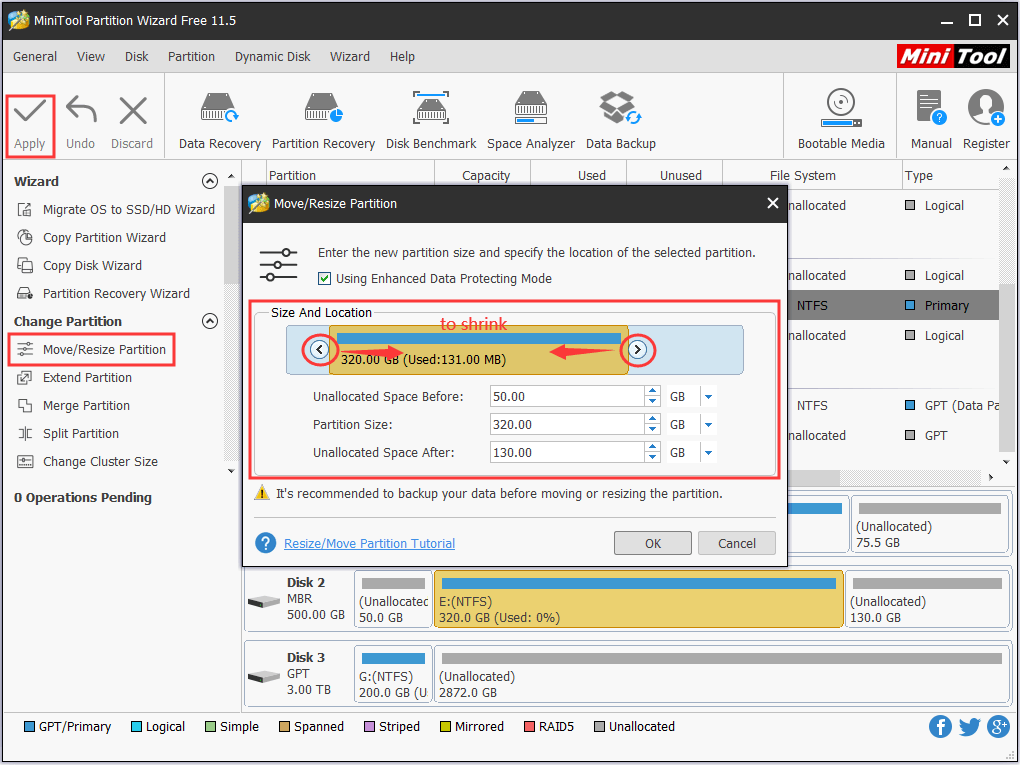
Step 1: Click on the partition you want to shrink and choose “Move/Resize Partition“. Also take shrinking partition C: for example.
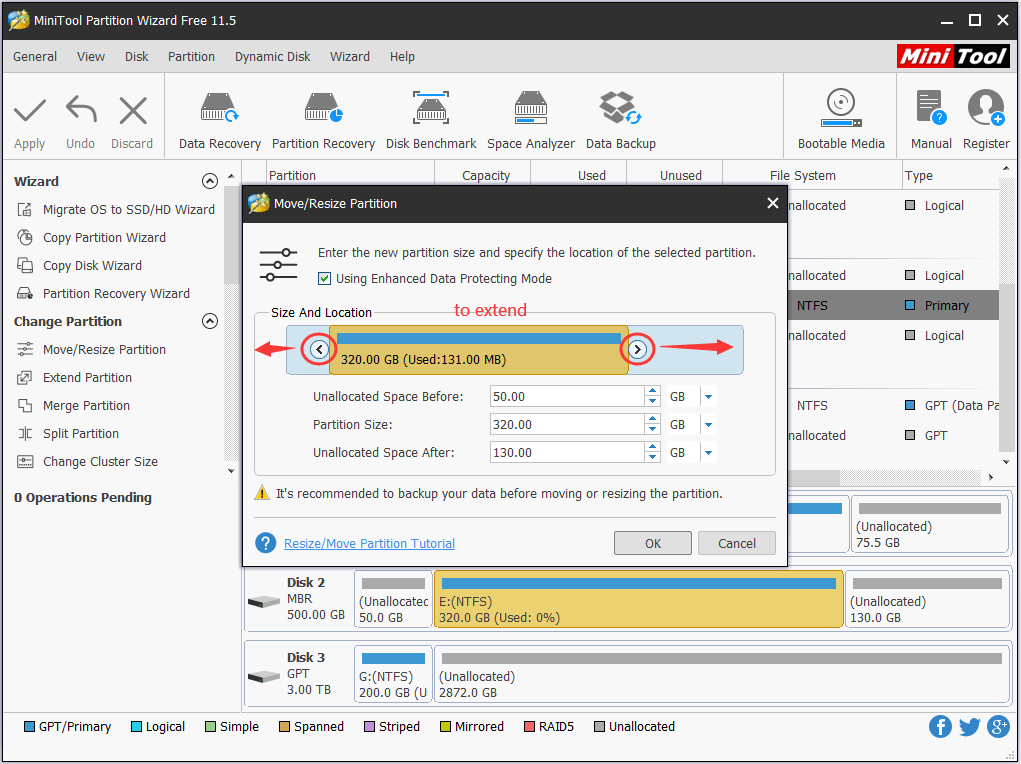
Step 2: In the pop-up window drag the triangle leftwards to reduce the current partition size. Then click “OK” to continue.
Step 3: Finally click “Apply” to end this process.
What’s Your Choice?
Here comes to the end of this article. Now you know how to change NTFS partition flexibly to meet your variable requirements. Hope you can benefit from this article. By the way, when you want to extend a NTFS partition but the whole disk is full of data, which means no partition on the same disk can offer some free space, you may consider upgrade hard drive by using MiniTool Partition Wizard, which is the most reliable way to transfer data to another hard drive without system reinstallation.
About The Author

Position: Columnist
Rodin is an enthusiastic IT writer focusing on Windows trends, disk partition management and data recovery. She loves to write and share her idea about the useful tips and tricks on personal computers' maintenance. If you are looking for methods to improve your computer performance, manage hard drives and recover data from different devices, Rodin can provide reliable solutions for data management.