
If you are looking for a reliable partition manager for Windows Server, you may have a try on this Windows Server partition manager - MiniTool Partition Wizard. It helps resize Server partition, back up Server hard drive and troubleshoots Server boot issues.
On February 27, 2008, Microsoft officially released Windows Server 2008. As the successor of Windows Server 2003, Windows Server 2008 has improved a lot. For example, it provides high-availability to services and applications through Failover Clustering, and two new functions (Extend Volume and Shrink Volume) are added to Server 2008 Disk Management utility.
A year later, Windows Server 2008 R2 was released, which has all new features Server 2008 owns and even does much better in virtualization, system management, and network access. But disappointingly, such excellent Server operating systems are still not competent in partition management although new functions have been added.
Limited Functions in Server 2008 Built-in Disk Management Tool
Since Disk Management in Server 2008 and Server 2008 R2 have the same functions, here we just take “partition Server 2008 R2 64 bit” for example. To open the built-in Disk Management, please right click the “Computer” icon on the desktop, choose “Manage”, select “Storage” and then “Disk Management”. After that, the following window will appear:
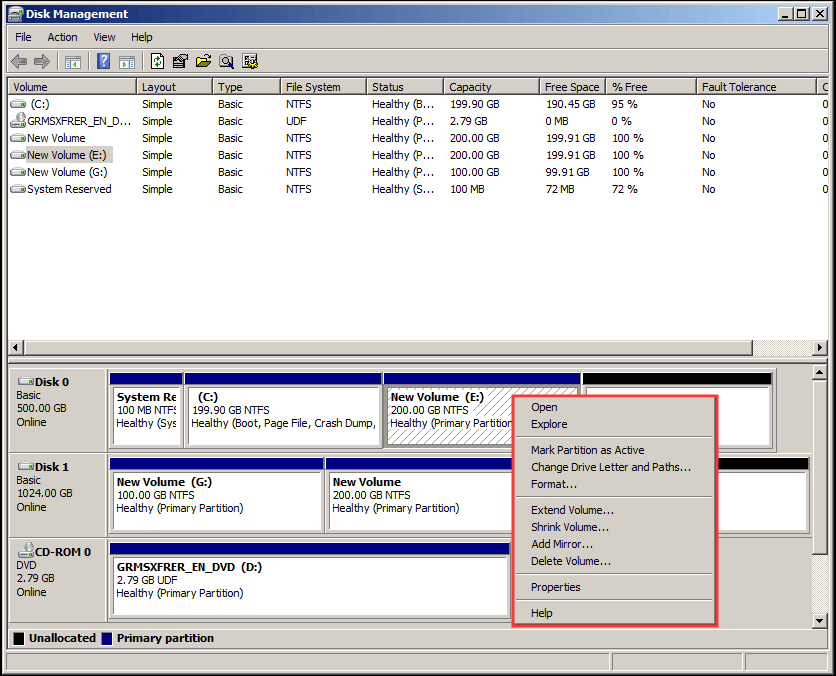
In this window, if you want to know what partitioning functions the program offers, please right click a partition. Then, all functions will emerge in the pop-up menu, including Open, Mark Partition as Active, Change Drive Letter and Paths, Extend Volume, Shrink Volume, etc., just as the picture shows above.
However, these are just basic functions that can’t help users to accomplish advanced operations like recover lost partition, convert file system, change cluster size, and set partition logical/primary without losing data. In addition, the newly added functions are also limited by some factors. For example, Extend Volume will fail to expand a partition when there is no contiguous unallocated space on the right side.
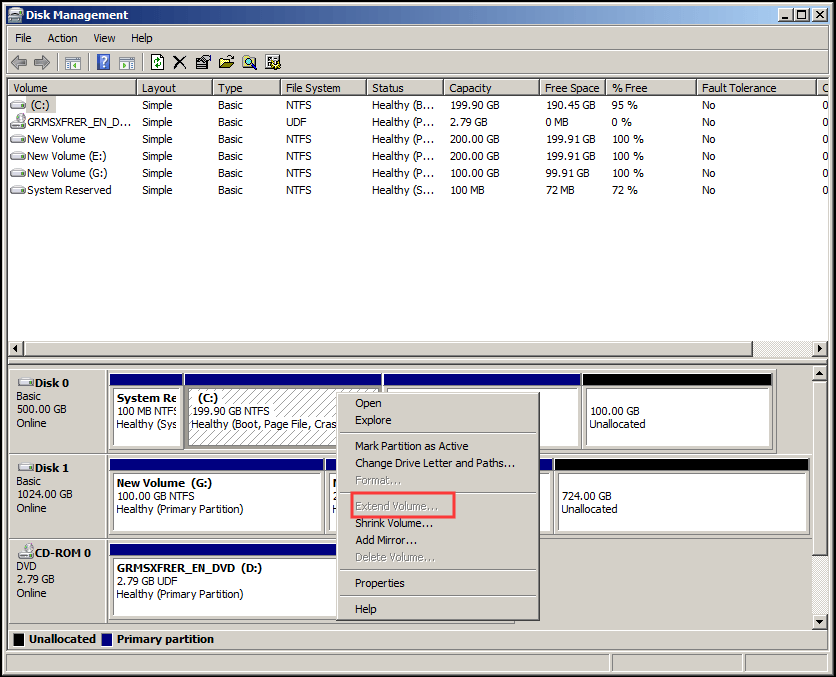
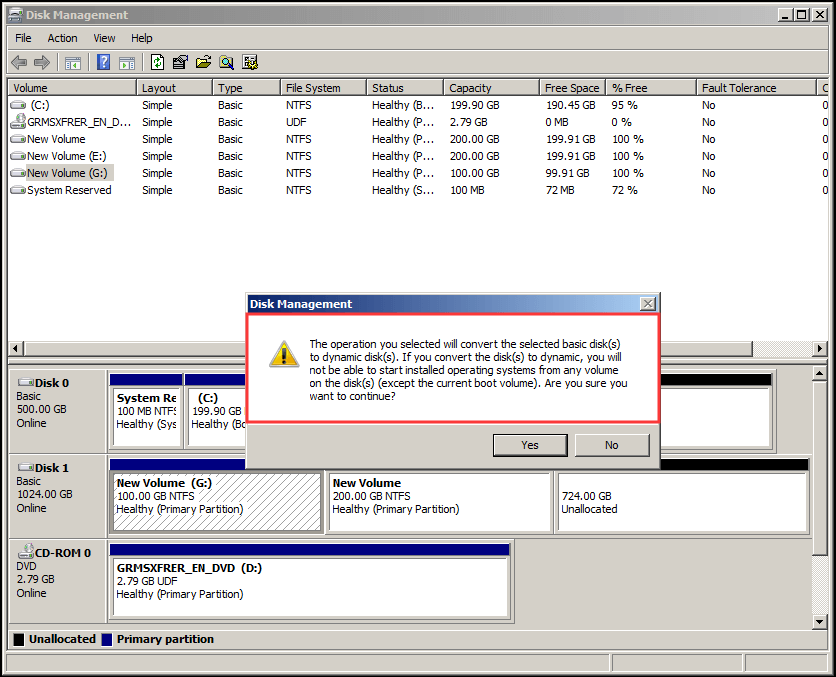
Or if there is unallocated space on another hard disk, Disk Management requires to convert the selected basic disk to Dynamic for partition extending (see picture below). But for a third-party partition magic server 2008, extending partition can be easily solved even there is no unallocated space in the same disk.
Now that Server 2008 Disk Management is not good for partitioning, some users think of Diskpart which is also a Windows built-in partitioning program. But actually, this tool has the same limits as Disk Management.
Therefore, both Server 2008 and 2008 R2 users need to download a third-party partition magic for Server 2008 if they want to do partition better. Well then, which program is available? If you do not have a good idea, just try using MiniTool Partition Wizard Server.
The Best Partition Magic for Server 2008/2008 R2 – MiniTool Partition Wizard Server
MiniTool Partition Wizard Server is an easy to use partitioning program, with which users are able to complete most partitioning operations (both basic and advanced).
This software is specially designed for Windows Servers. However, it can perfectly support both Windows Server systems as well as the Windows PC systems, including all editions of Windows Server 2000, Server 2003, Server 2008/2008 R2, Server 2012 R2, Windows XP, Windows Vista, Windows 7, Windows 8, and Windows 10, both 32 bit and 64 bit.
Thus, this is a paid software without question. But MiniTool still offers another way for Server Users to experience this software, that is the DEMO version. The only difference between the full version and demo version is that you cannot execute all changes you have made by using the demo version. However, this is a great choice for you to have a try first and then decide whether it is worth buying.
MiniTool Partition Wizard DemoClick to Download100%Clean & Safe
A Close Look at MiniTool Partition Wizard Server
Now let’s cut to the point. What functions does MiniTool Partition Wizard Server provide when dealing with partition management? We will show you a close look at this partition magic for Windows Server 2008/2008 R2.
After installing and running the software successfully, we can see its main interface where all recognized disks and partitions are shown. By default the first disk is selected when you open this tool and the available features are listed on the left panel.
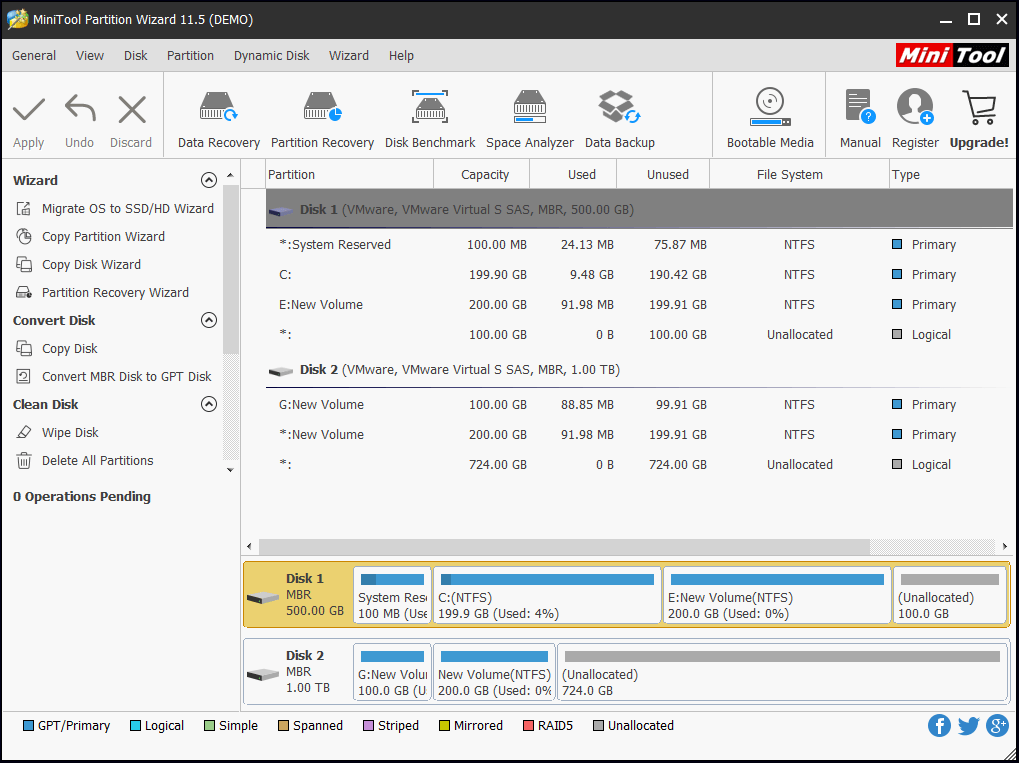
To manage a disk, users just need to select the target disk. Then, all disk management functions will appear on the left action pane, with which users are able to migrate OS to SSD or HDD, convert dynamic disk to basic without data loss (Disk Management requires deleting all volumes), copy disk, align partitions (for SSD), recover lost partition, convert non-system disk from MBR to GPT or from GPT to MBR, and so on.
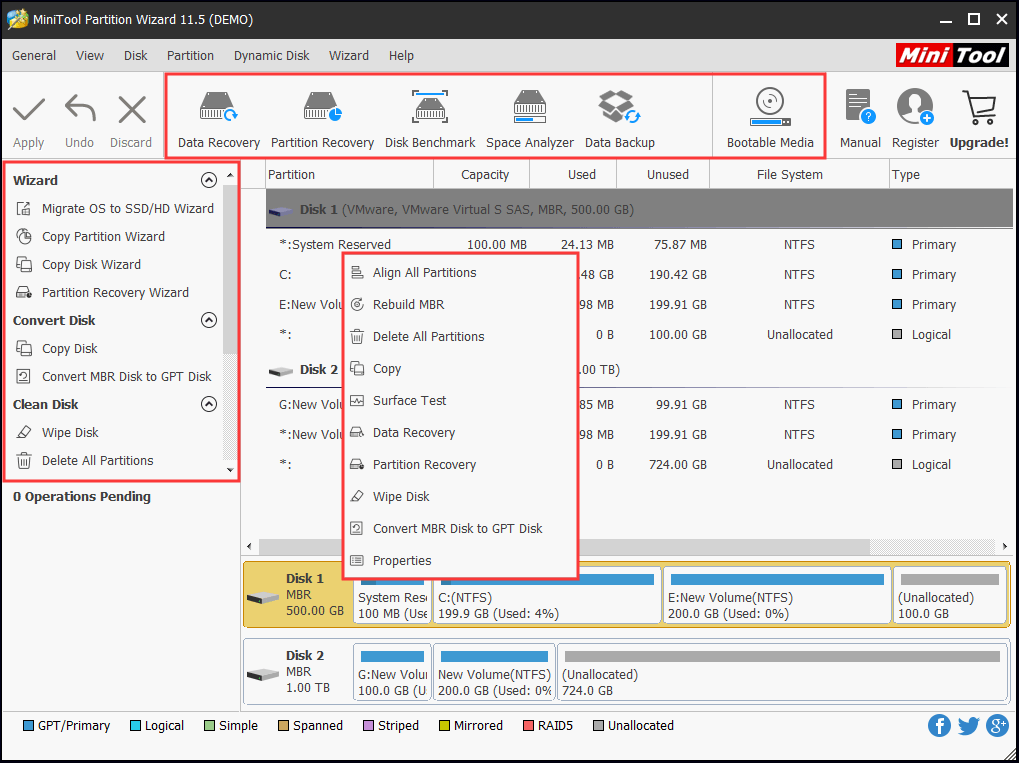
To manage a partition, users only need to select the target partition. Then, all partitioning functions will emerge on the left panel, including Format Partition, Move/Resize Partition, Extend Partition (enlarge a partition by taking free space from any other partition or unallocated space on the same disk), Merge Partition, Align Partition, Change Cluster Size, Set Partition as Logical or Primary, Convert FAT to NTFS, etc.
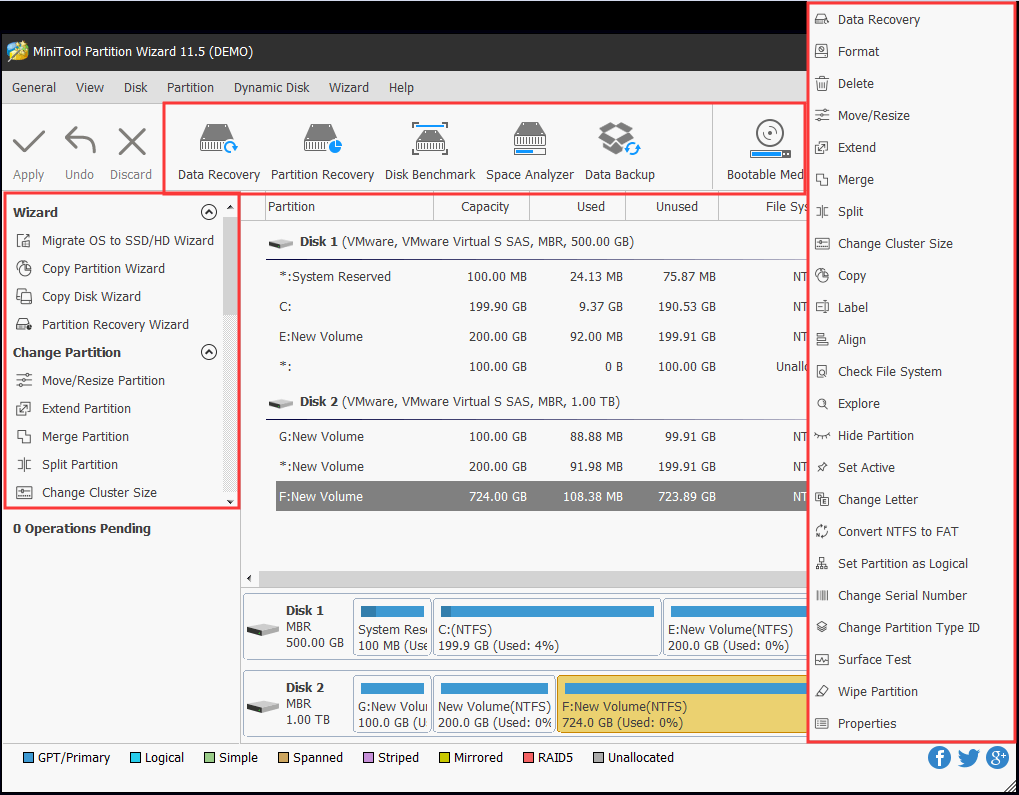
It is worth mentioning that you can accomplish most partitioning requirements by using this program without losing data, unless the operation is doomed to loss data in any case. Therefore, this Server 2008/2008 R2 partition magic is much better than Windows Server’s built-in Disk Management tool.
Now It’s Your Turn
After seeing so much, you must have had your own judgment. Do you want to do partitioning well? Now, you can purchase the full version of MiniTool Partition Wizard Server to manage your disks and partitions in Windows Server 2008/2008 R2, which brings no damage to your data and system.
About The Author

Position: Columnist
Rodin is an enthusiastic IT writer focusing on Windows trends, disk partition management and data recovery. She loves to write and share her idea about the useful tips and tricks on personal computers' maintenance. If you are looking for methods to improve your computer performance, manage hard drives and recover data from different devices, Rodin can provide reliable solutions for data management.
User Comments :