Convert Partition
- Server partition magic
- Convert dynamic
- Convert fat to ntfs without losing data
- Convert fat32 to NTFS in windows 7
- Primary or extended partition
- Convert fat32 in windows xp and vista
- Convert FAT to NTFS File System
- How to convert fat32 to ntfs without losing data
- Convert FAT32
- Convert FAT32 to NTFS in Vista
- Convert FAT32 NTFS without Losing Data
- Convert-convert fat to ntfs windows xp
- Convert dynamic disk to basic
- Convert dynamic disk to basic disk
- Convert fat32 NTFS in vista
- Vista convert fat32 NTFS
- Windows 7 convert FAT32 to NTFS
- Windows Dynamic DISK Conversion
- Convert FAT32 to NTFS Vista
- Windows convert FAT32 NTFS
- Convert FAT32 to NTFS in windows 7
- Convert FAT32 to NTFS external hard drive
- Windows dynamic disk
- XP convert fat32 NTFS
- Convert fat32 to ntfs without losing data
- Convert Disk
- Convert simple volume to primary partition
- How to convert FAT32 to NTFS
- NTFS Convert FAT32
- How can I convert FAT32 to NTFS?
- Convert fat32 to NTFS on windows
- Win xp convert fat32 to ntfs
- To convert fat32 to ntfs
- Convert fat32 ntfs xp
- Windows xp convert fat32 to ntfs
- Convert fat to ntfs vista
- Convert fat to ntfs windows 7
- Convert FAT to NTFS file system
- Convert file system
- Convert partition
- Convert to basic disk
- Convert to NTFS
- Convert partition to NTFS
- Convert partition to FAT32
- Convert partition NTFS
- Convert MBR disk to GPT disk
- Convert FAT32 to NTFS Windows XP
- Convert FAT32 to NTFS Windows 7
- Convert FAT32 to NTFS
- Convert fat32 to ntfs under xp
- Convert fat to nfts
- Convert fat to ntfs command
- Convert fat32 to ntfs in vista
- Convert fat32 to ntfs in windows
- Convert fat32 ntfs windows 7
- Convert disk to dynamic
- Vista convert fat32 to ntfs
- Convert fat32 to ntfs on xp
- Convert file system from fat32 to ntfs
Convert FAT32 to NTFS Windows XP
-
Windows XP is an operating system that was produced by Microsoft for use on personal computers, including home and business desktops, laptops, and media centers. It was first released in August 2001, and is the most popular version of Windows, based on installed user base. Windows XP was the successor to both Windows 2000 and Windows Me, and was the first consumer-oriented operating system produced by Microsoft to be built on the Windows NT kernel and architecture. However, the system build-in disk management tool stile fails to meet the increasing demand of enormous XP users'. As the daily storage medium of our data, disk and disk partition are vitally important for the safety of our data. Naturally, user should have a good management over disk partitions. Another problem that baffles user is the diverse partition formats of partition. Currently, we have two types of file systems; FAT and NTFS. As the release of Windows 98, Fat 32 has replaced FAT 16 while NTFS is the latest file system that is extensively promoted by Microsoft, not only fitting large disk but offering richer file functions. Therefore, many users want to convert previous partition file system to NTFS. To realize this operation, user should turn to a third-party partition manager, for instance, MiniTool Partition Wizard.
Functions of MiniTool Partition Wizard:Functions of MiniTool Partition Wizard:
1. Create partition of FAT, FAT32, NTFS, Ext2, Ext3 and Linux Swap, etc.
2. Delete partition.
3. Format partition.
4. Wipe partition.
5. Delete entire disk.
6. Delete all disk partitions.
7. Detect partition bad track.
8. Resize partition cluster.
9. Distribute logical drive for partition.
10. Set partition as activated or inactivated.
11. Recover lost partition.
12. Merge partitions while insuring data safety.
13. Resize partition while insuring data safety.
14. Check file system.
15. Copy partition.
16. Copy entire disk.
17. Convert partition file system while insuring data safety.
18. Set logical or main partition freely.
For more functions of MiniTool Partition Wizard, please go to the official website http://www.partitionwizard.com for more information.
Convert FAT32 to NTFS under Windows XP with MiniTool Partition Wizard
To perform this operation, user should first download MiniTool Partition Wizard at MiniTool Partition Wizard Download Center and then install it to computer.
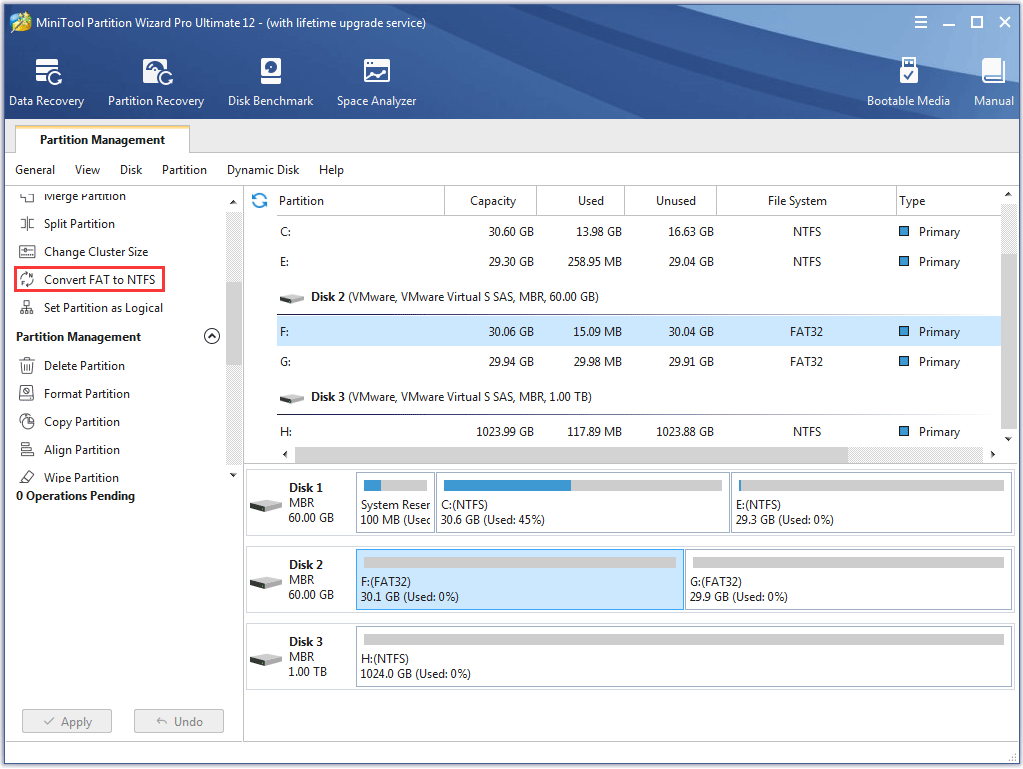
User would come to the following main interface after running MiniTool Partition Wizard.

Select the desired FAT32 partition, then click "Convert FAT to NTFS".

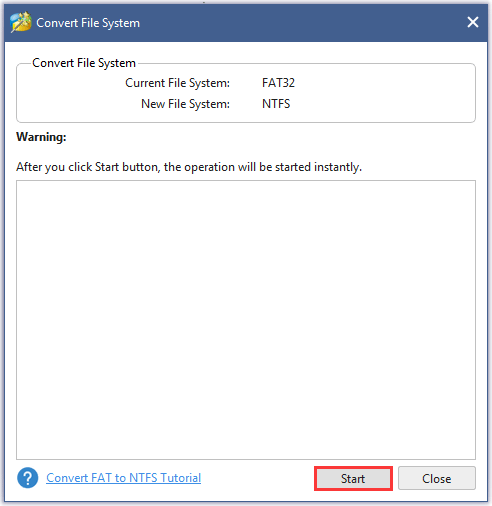
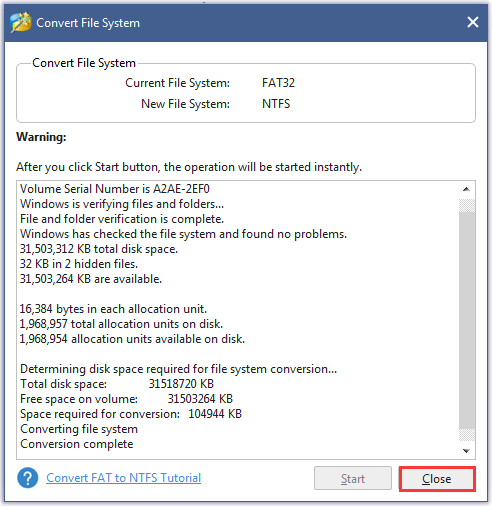
At the upper part of this window, the current file system and new file system is displayed. User should click "Start" to convert file system and click "Close" after conversion.

Now, user could notice the former FAT32 partition has been converted to NTFS.
Free Partition Manager Free Partition Magic Partition Manager Server Partition Magic Server
Common problems related to partition management and our solutions:
- Convert FAT to NTFS file system with MiniTool Partition Wizard.
- Convert file system with MiniTool Partition Wizard.
- Convert partition format with MiniTool Partition Wizard.
- Convert file system to NTFS with MiniTool Partition Wizard.
- Convert Fat32 to NTFS under Windows 7 with MiniTool Partition Wizard.