Convert Partition
- Server partition magic
- Convert dynamic
- Convert fat to ntfs without losing data
- Convert fat32 to NTFS in windows 7
- Primary or extended partition
- Convert fat32 in windows xp and vista
- Convert FAT to NTFS File System
- How to convert fat32 to ntfs without losing data
- Convert FAT32
- Convert FAT32 to NTFS in Vista
- Convert FAT32 NTFS without Losing Data
- Convert-convert fat to ntfs windows xp
- Convert dynamic disk to basic
- Convert dynamic disk to basic disk
- Convert fat32 NTFS in vista
- Vista convert fat32 NTFS
- Windows 7 convert FAT32 to NTFS
- Windows Dynamic DISK Conversion
- Convert FAT32 to NTFS Vista
- Windows convert FAT32 NTFS
- Convert FAT32 to NTFS in windows 7
- Convert FAT32 to NTFS external hard drive
- Windows dynamic disk
- XP convert fat32 NTFS
- Convert fat32 to ntfs without losing data
- Convert Disk
- Convert simple volume to primary partition
- How to convert FAT32 to NTFS
- NTFS Convert FAT32
- How can I convert FAT32 to NTFS?
- Convert fat32 to NTFS on windows
- Win xp convert fat32 to ntfs
- To convert fat32 to ntfs
- Convert fat32 ntfs xp
- Windows xp convert fat32 to ntfs
- Convert fat to ntfs vista
- Convert fat to ntfs windows 7
- Convert FAT to NTFS file system
- Convert file system
- Convert partition
- Convert to basic disk
- Convert to NTFS
- Convert partition to NTFS
- Convert partition to FAT32
- Convert partition NTFS
- Convert MBR disk to GPT disk
- Convert FAT32 to NTFS Windows XP
- Convert FAT32 to NTFS Windows 7
- Convert FAT32 to NTFS
- Convert fat32 to ntfs under xp
- Convert fat to nfts
- Convert fat to ntfs command
- Convert fat32 to ntfs in vista
- Convert fat32 to ntfs in windows
- Convert fat32 ntfs windows 7
- Convert disk to dynamic
- Vista convert fat32 to ntfs
- Convert fat32 to ntfs on xp
- Convert file system from fat32 to ntfs
Convert fat32 to NTFS on windows
- FAT32 evolved from an age -old file system or we may say the emergence of FAT32 is to meet user's demands on file management and it also belongs to one of the file systems of FAT. Similar to other FAT file systems, FAT32 also possesses a file allocation table, specifically a better one. FAT32 file system bears 32-bit file allocation table to be able to manage 32GB partition but unable to manage single file over 4GB and support long file name. In this sense, Microsoft released a brand-new file management system, named NTFS, which makes up for many defects of FAT32 and offers fantastic safety performance. As a result, many users flood to convert FAT32 to NTFS. In this regard, MiniTool Solution Ltd. thoughtfully developed a third-party partition magic software - MiniTool Partition Wizard to help user convert FAT32 to NTFS.
Introduction to our partition magic software - MiniTool Partition Wizard
MiniTool Partition Wizard was developed by professional software producer, MiniTool Solution Ltd. who has committed to the research and study of storage media such as Discs (CD / DVD / BD / HD DVD), hard disks (IDE SCSI ATA RAID), flash card, memory card and has released a series of software including MiniTool Partition Wizard, MiniTool Drive Wipe, MiniTool Drive Copy, MiniTool Partition Recovery, MiniTool Power Data Recovery and MiniTool Mac Data Recovery. All the software has aroused great responses from the market.
As for the partition magic software, MiniTool Partition Wizard possesses plenty of powerful functions such as resize partition, create partition, delete partition, format partition, wipe partition, merge partitions, copy partition, convert FAT32 to NTFS, etc. besides, it runs excellently under 32 or 64 bit Windows 2000, Windows 2003, Windows XP, Windows Vista, Windows 7, Windows Server 2008 and supports partition formats such as FAT12, FAT16, FAT32, NTFS4, NTFS5. Moreover, in order to repay the unremitting support to our products from enormous user, MiniTool Partition Wizard is presented totally free for home and personal user.
Convert FAT32 to NTFS with partition magic software
Before utilizing this partition magic software, please download it at the official website http://www.partitionwizard.com for free.
Note that user should never install the partition magic software to partition to be operated. After installation, please launch MiniTool Partition Wizard:

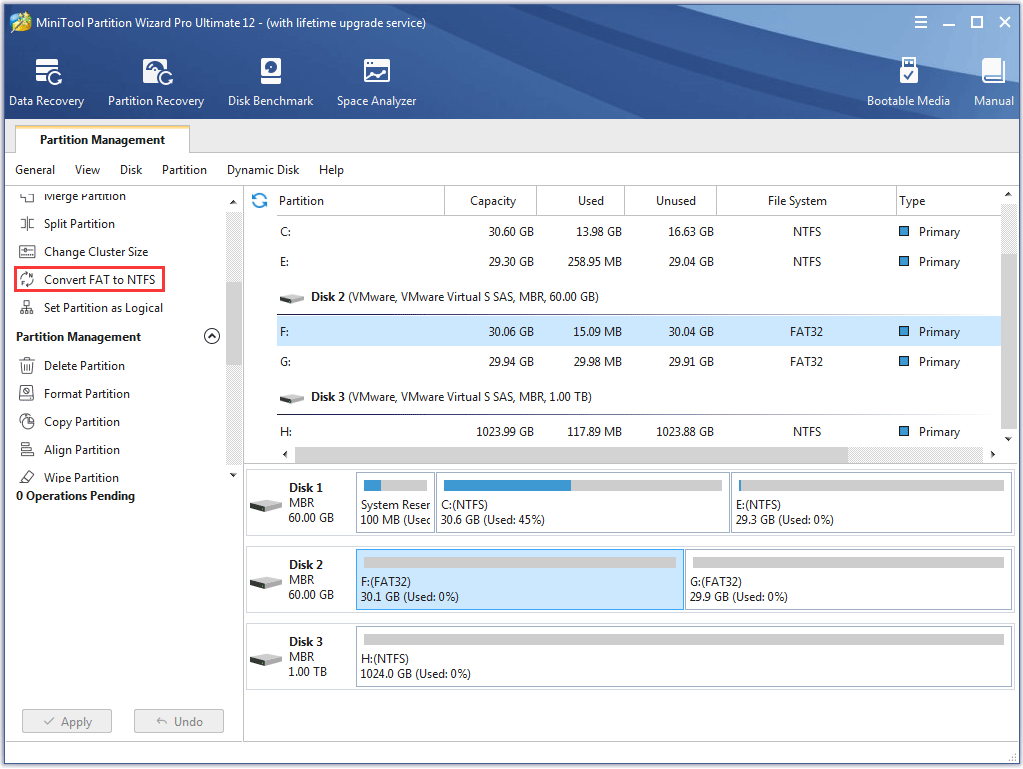
Select the desired FAT32 partition and then click "Convert FAT to NTFS" at the action panel on the left.

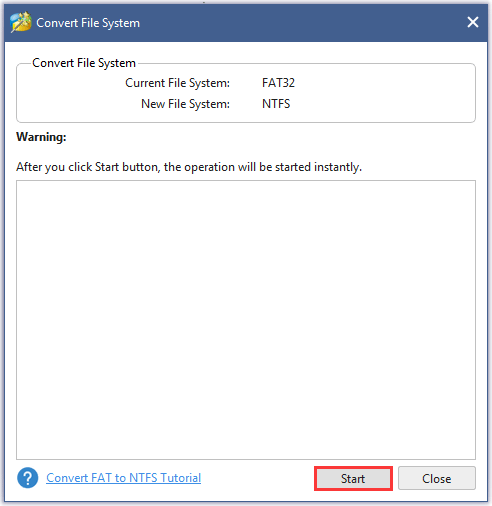
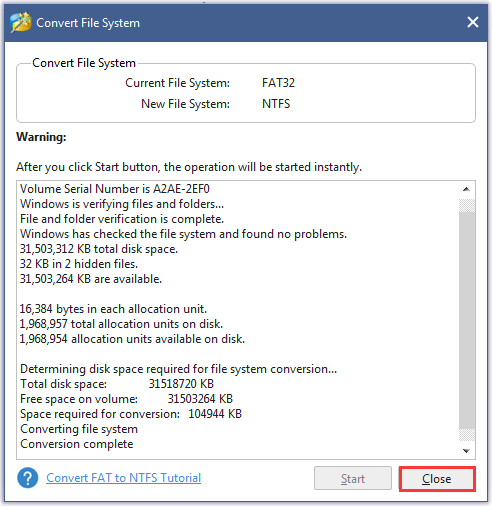
Click "Start" to convert FAT32 to NTFS. After a short period, the FAT32 would be successfully converted to NTFS by our partition magic software.
Common problems related to partition management and our solutions:
- Convert FAT32 to NTFS on Win XP with partition magic software.
- How to convert FAT32 to NTFS on XP?
- How to convert FAT32 to NTFS with partition magic software?
- Convert FAT32 to NTFS for XP.
- Convert FAT32 to NTFS under Windows.