Convert Partition
- Server partition magic
- Convert dynamic
- Convert fat to ntfs without losing data
- Convert fat32 to NTFS in windows 7
- Primary or extended partition
- Convert fat32 in windows xp and vista
- Convert FAT to NTFS File System
- How to convert fat32 to ntfs without losing data
- Convert FAT32
- Convert FAT32 to NTFS in Vista
- Convert FAT32 NTFS without Losing Data
- Convert-convert fat to ntfs windows xp
- Convert dynamic disk to basic
- Convert dynamic disk to basic disk
- Convert fat32 NTFS in vista
- Vista convert fat32 NTFS
- Windows 7 convert FAT32 to NTFS
- Windows Dynamic DISK Conversion
- Convert FAT32 to NTFS Vista
- Windows convert FAT32 NTFS
- Convert FAT32 to NTFS in windows 7
- Convert FAT32 to NTFS external hard drive
- Windows dynamic disk
- XP convert fat32 NTFS
- Convert fat32 to ntfs without losing data
- Convert Disk
- Convert simple volume to primary partition
- How to convert FAT32 to NTFS
- NTFS Convert FAT32
- How can I convert FAT32 to NTFS?
- Convert fat32 to NTFS on windows
- Win xp convert fat32 to ntfs
- To convert fat32 to ntfs
- Convert fat32 ntfs xp
- Windows xp convert fat32 to ntfs
- Convert fat to ntfs vista
- Convert fat to ntfs windows 7
- Convert FAT to NTFS file system
- Convert file system
- Convert partition
- Convert to basic disk
- Convert to NTFS
- Convert partition to NTFS
- Convert partition to FAT32
- Convert partition NTFS
- Convert MBR disk to GPT disk
- Convert FAT32 to NTFS Windows XP
- Convert FAT32 to NTFS Windows 7
- Convert FAT32 to NTFS
- Convert fat32 to ntfs under xp
- Convert fat to nfts
- Convert fat to ntfs command
- Convert fat32 to ntfs in vista
- Convert fat32 to ntfs in windows
- Convert fat32 ntfs windows 7
- Convert disk to dynamic
- Vista convert fat32 to ntfs
- Convert fat32 to ntfs on xp
- Convert file system from fat32 to ntfs
Convert FAT to NTFS File System in windows
- Many computer users are perhaps adopting FAT32 file system. Compared with the previous file systems, FAT32 has many advantages, such as higher disk use ratio, supporting the maximum partition of 2TB, and supporting the maximum individual file of 4GB. Although it has these advantages, its disadvantages can not be offset. After the partition files are deleted, FAT is unable to integrate the data into a complete segment when new data is written. After long term use, the data will be scattered and the read-write speed slows down. This is the main disadvantage of FAT32. Besides, FAT32 is not in support of single file which is larger than 4GB. Compared with FAT32, the new file system NTFS which is restorable has more advantages. Because of its restorability, we seldom run disk repair program. In addition, the file encryption greatly improves data security. And its disk compression function improves disk use ratio. It is obvious that NTFS is superior to FAT file system. However, it is difficult to convert FAT to NTFS file system because the disk management tool built in operating system can not make it. We need to back up partition data when we use the third party partition magic to convert FAT to NTFS file system because there may be data losses when we use them. Nevertheless, the partition magic MiniTool Partition Wizard published by MiniTool Solution Ltd. can help us convert FAT to NTFS file system without data loss. It is professional partition magic suitable for many users.
Convert FAT to NTFS file system with MiniTool Partition Wizard
In order to convert FAT to NTFS file system, download it on the official website http://www.partitionwizard.com/. Then install and run it.
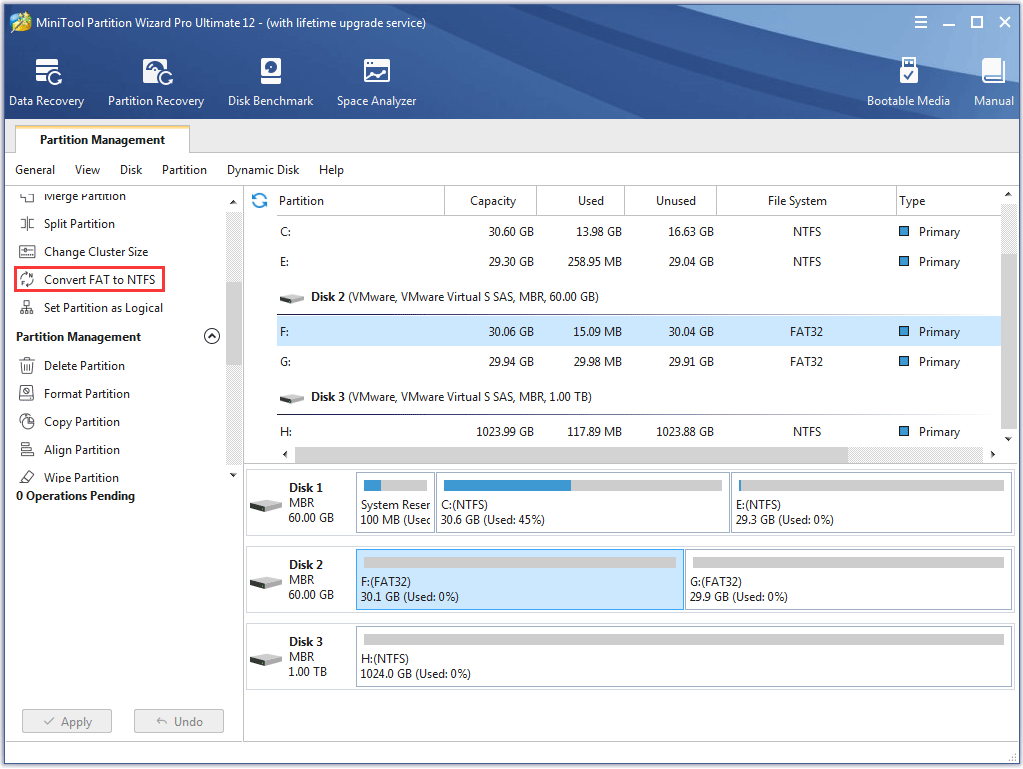
In this window, we can see the distribution information of all disks and partitions. Select FAT32 partition and click "Convert FAT to NTFS" on the left action panel.
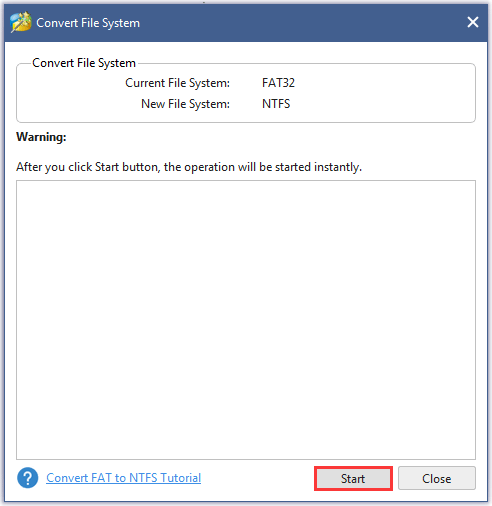
In this window, click "Start" to convert FAT to NTFS file system.
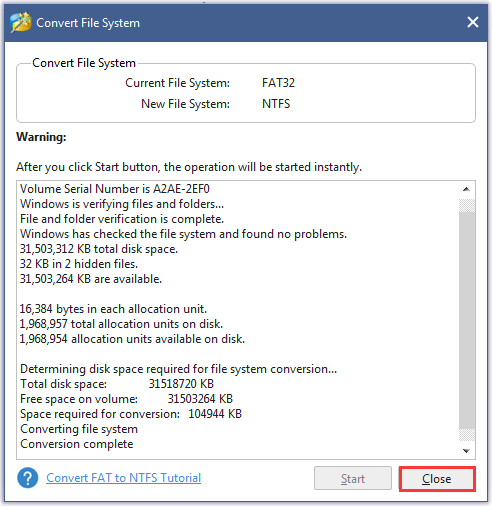
After the conversion is finished, click "Close" to return to the main window.
With MiniTool Partition Wizard, we can not only convert FAT to NTFS file system, but also perform other operations such as format partition, delete partition, resize and move partition, copying partition, etc. In addition, we could recover lost partition and hide partition. More function information can be obtained on its official website.
Common problems related to partition management and our solutions:
- Convert FAT to NTFS in Windows XP with partition magic.
- How to convert FAT to NTFS on XP?
- Convert fat to ntfs vista
- Convert fat to ntfs windows 7
- Convert FAT to NTFS file system with MiniTool Partition Wizard.